
Wagtail StreamField presets
Give your editors a head start: ready-made sets of blocks they can load into a StreamField and fill in.
Most pages on a site follow a pattern. A landing page is a hero, a few sections and a call to action. A recipe is an introduction, a photo, the ingredients and the method. Without presets, editors rebuild that pattern block by block on every new page.
With presets, an editor picks one from the list above the field and presses Load. The blocks appear, ready to fill in, so the editor's time goes on the words instead of the layout.
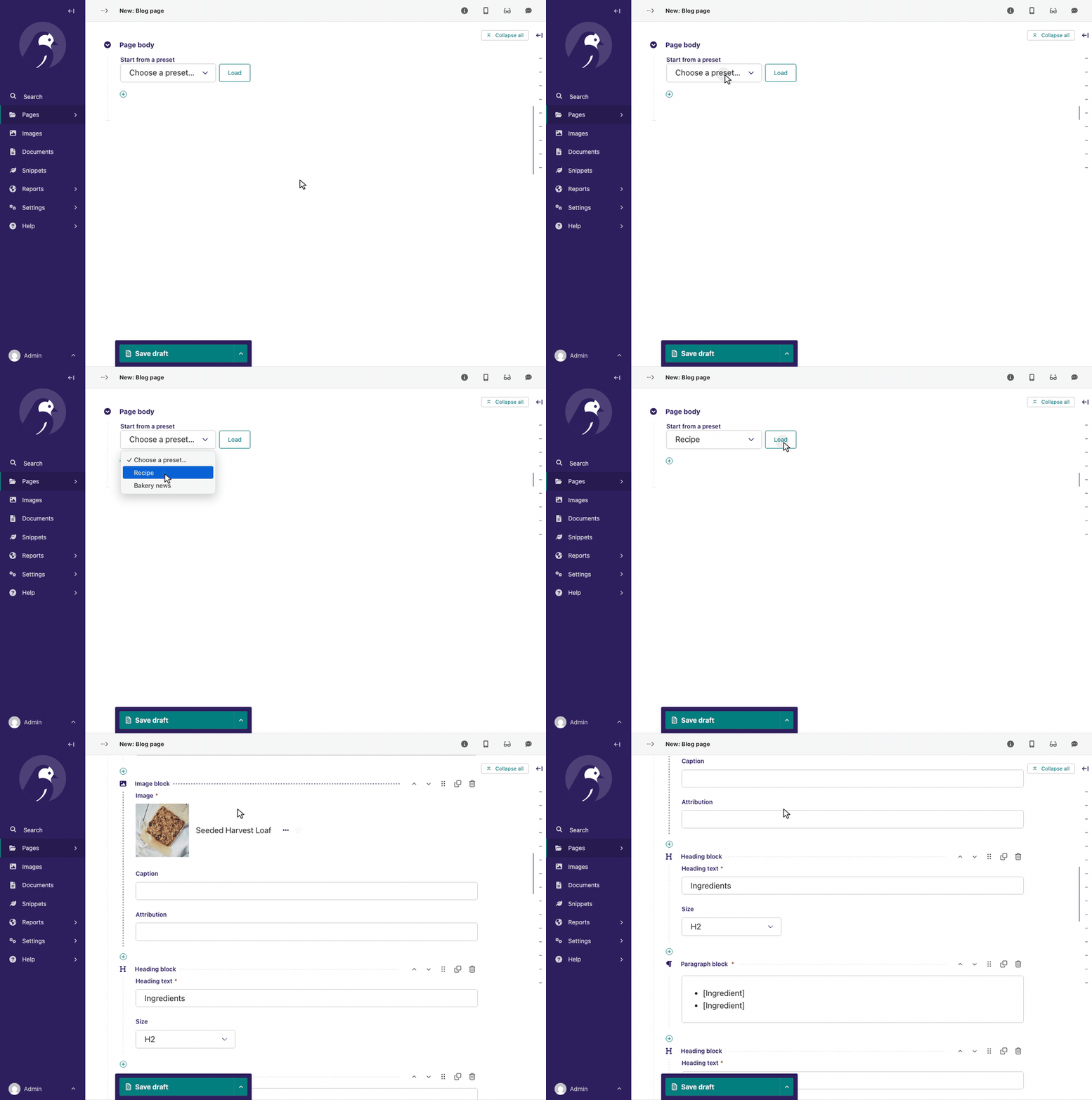
- Fills the field in the browser. Nothing reloads, so the title and every other field keep what the editor typed.
- Asks before replacing. If the field already has blocks, the editor confirms first; nothing is saved until the page is.
- Declared in code, next to the blocks. A preset is a function that returns blocks, so it can start with real content from your database, such as an image from the library.
- A plain StreamBlock everywhere but the editor. Rendering, storage, validation and migrations are unchanged, so an existing stream can adopt it without touching its data.
Links
Supported versions
Wagtail 7.4 and up, and all compatible versions of Python and Django: Python 3.11+ and Django 5.2+.
Installation
Pick the command for your preferred package installer:
uv add wagtail-streamfield-presets
poetry add wagtail-streamfield-presets
pip install wagtail-streamfield-presets
Then add the app to INSTALLED_APPS:
INSTALLED_APPS = [
    # ...
    "wagtail_streamfield_presets",
]
No template or URL wiring is needed. The picker's script and stylesheet travel with the field's own editor media.
Usage
Subclass PresetStreamBlock instead of StreamBlock, and declare presets in its Meta:
from wagtail import blocks
from wagtail.rich_text import RichText
from wagtail_streamfield_presets.blocks import Preset, PresetStreamBlock


def article_outline():
    return [
        ("heading", "[Title]"),
        ("paragraph", RichText("<p>[Opening paragraph]</p>")),
    ]


class ArticleStream(PresetStreamBlock):
    heading = blocks.CharBlock()
    paragraph = blocks.RichTextBlock()

    class Meta:
        presets = [Preset("outline", "Article outline", article_outline)]
Use it like any StreamBlock: body = StreamField(ArticleStream()). Editors now see
Start from a preset above the field. Set preset_picker_label in the same Meta to say
it in your editors' words, such as "Start with a set of sections".
Presets belong in Meta, not in the block's constructor arguments: Wagtail writes those into
migrations, and a preset holds a function. Kept in Meta, editing a preset never needs a
migration.
The documentation has a tutorial, how-to guides and the full reference.
License
1 maintainer

Metadata
1 maintainer
Release files for wagtail-streamfield-presets 0.2.0
For a detailed explanation of source distributions (sdists) and built distributions (wheels), please see the package formats documentation.
Source distribution (sdist)
| File | Size | Uploaded | Provenance | |
|---|---|---|---|---|
| wagtail_streamfield_presets-0.2.0.tar.gz | 7.2 kB | With provenance | Details |
Built distribution (wheel)
| File | Interpreter | ABI | Platform | Reset |
|---|---|---|---|---|
| wagtail_streamfield_presets-0.2.0-py3-none-any.whl | Python 3 | none | any | Details |
Total release size: 16.3 kB
Release files / wagtail_streamfield_presets-0.2.0.tar.gz
| Download URL | wagtail_streamfield_presets-0.2.0.tar.gz |
|---|---|
| Size | 7.2 kB |
| Tags | Source |
|
SHA-256 checksum How to use checksums |
955f4c014af7f833bc8f010b07094bf8c3fad1ab082f7003830b5e9a5e38b615
|
|
BLAKE2b-256 checksum How to use checksums |
6b39112820cd5d775082853593f8ef9e692b9d15bb145beeef6ff230cf3594d0
|
| Upload date | |
|
Uploaded using Trusted Publishing? What is trusted publishing? |
Yes |
| Uploaded via |
twine/7.0.0 CPython/3.13.14
|
Provenance
Provenance describes where a file came from. On PyPI, provenance is shared via attestations, which provide a verifiable record of the build or publishing details. View details, limitations and caveats.


PyPI Publish Attestation
PyPI verified that this artifact, at this checksum, originated from the publisher listed below.
Signed by GitHub Actions, verified by PyPI on Oct 13, 2026.
Transparency logRelease files / wagtail_streamfield_presets-0.2.0-py3-none-any.whl
| Download URL | wagtail_streamfield_presets-0.2.0-py3-none-any.whl |
|---|---|
| Size | 9.1 kB |
| Tags | Python 3 |
|
SHA-256 checksum How to use checksums |
5dfac1d80613e543a2ad7a890fb4d0699922521f105b39478f6948a8b5b165f2
|
|
BLAKE2b-256 checksum How to use checksums |
1a0cebfe943fe7471683cbae2d1050cada7b9eb968a32486475d2a2bc2565b77
|
| Upload date | |
|
Uploaded using Trusted Publishing? What is trusted publishing? |
Yes |
| Uploaded via |
twine/7.0.0 CPython/3.13.14
|
Provenance
Provenance describes where a file came from. On PyPI, provenance is shared via attestations, which provide a verifiable record of the build or publishing details. View details, limitations and caveats.
PyPI Publish Attestation
PyPI verified that this artifact, at this checksum, originated from the publisher listed below.
Signed by GitHub Actions, verified by PyPI on Oct 13, 2026.
Transparency logSecurity for wagtail-streamfield-presets 0.2.0
Provenance
Provenance describes where a file came from. On PyPI, provenance is shared via attestations, which provide a verifiable record of the build or publishing details. View details, limitations and caveats.
Full provenance
All 2 files in this release have been uploaded with provenance metadata.
Attestation for wagtail_streamfield_presets-0.2.0.tar.gz
PyPI Publish Attestation
PyPI verified that this artifact, at this checksum, originated from the publisher listed below.
Signed by GitHub Actions, verified by PyPI on Oct 13, 2026.
Transparency logA note on package security
PyPI is a repository for distributing packages, not a service for auditing them. While third-party security researchers and our staff do their best to detect and remove malicious packages, PyPI cannot guarantee the quality, security or suitability of any given package.
To learn more about protecting yourself from malicious actors, visit our package security documentation.














