
A Wagtail block that displays thumbnail images for choice fields
Project description
Wagtail Thumbnail Choice Block
A reusable Wagtail block that displays thumbnail images for choice fields, making it easier for content editors to visually select options.
Examples
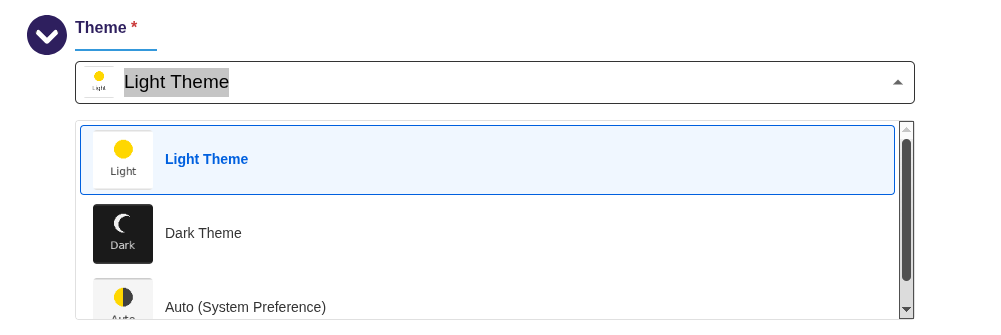
A theme field may want to display a thumbnail of each available theme:
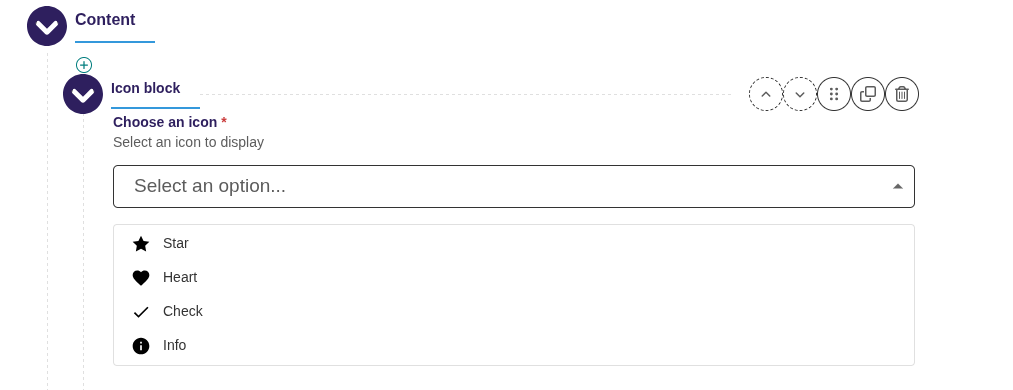
An icon field may want to display a thumbnail of each available icon:
Features
- Visual Selection: Display thumbnail images (recommended 80x80px) for each choice option
- Accessible: Built on Django's standard RadioSelect widget with full keyboard navigation
- Responsive: Works seamlessly with Wagtail's responsive admin interface
- Easy Integration: Simple API similar to Wagtail's built-in ChoiceBlock
- Portable: Self-contained package with no external dependencies beyond Django and Wagtail
Installation
pip install wagtail-thumbnail-choice-block
Add to your Django INSTALLED_APPS:
INSTALLED_APPS = [
    # ...
    'wagtail_thumbnail_choice_block',
    # ...
]
Usage
Basic Usage
from django.templatetags.static import static
from wagtail import blocks
from wagtail_thumbnail_choice_block import ThumbnailChoiceBlock

class BannerSettings(blocks.StructBlock):
    theme = ThumbnailChoiceBlock(
        choices=(
            ('light', 'Light Theme'),
            ('dark', 'Dark Theme'),
            ('auto', 'Auto'),
        ),
        thumbnails={
            'light': static('images/theme-light-thumb.png'),
            'dark': static('images/theme-dark-thumb.png'),
            'auto': static('images/theme-auto-thumb.png'),
        },
        default='light',
    )
Customizing Thumbnail Size
You can customize the size of thumbnails in the dropdown by passing the thumbnail_size parameter (in pixels). The default is 40px.
class BannerSettings(blocks.StructBlock):
    # Small thumbnails (24px)
    small_icon = ThumbnailChoiceBlock(
        choices=ICON_CHOICES,
        thumbnails=ICON_THUMBNAILS,
        thumbnail_size=24,
    )

    # Default size (40px)
    medium_icon = ThumbnailChoiceBlock(
        choices=ICON_CHOICES,
        thumbnails=ICON_THUMBNAILS,
    )

    # Large thumbnails (80px)
    large_theme = ThumbnailChoiceBlock(
        choices=THEME_CHOICES,
        thumbnails=THEME_THUMBNAILS,
        thumbnail_size=80,
    )
Note: While the thumbnails in the dropdown appear in the size configured by the user, the preview thumbnail shown in the input field is automatically sized proportionally and constrained between 20px and 32px, to ensure it fits nicely within the input.
Dynamic Choices with Callables
Both choices and thumbnails can be callables (functions) that return the data. This is useful when you need to generate choices dynamically from the database or other runtime sources.
Example: Selecting from Django Models
from wagtail import blocks
from wagtail_thumbnail_choice_block import ThumbnailChoiceBlock
from myapp.models import Category

def get_category_choices():
    """Generate choices from Category model."""
    return [
        (str(category.id), category.name)
        for category in Category.objects.filter(active=True)
    ]

def get_category_thumbnails():
    """Generate thumbnail mapping from Category model."""
    return {
        str(category.id): category.icon.url
        for category in Category.objects.filter(active=True)
        if category.icon
    }

class ContentBlock(blocks.StructBlock):
    category = ThumbnailChoiceBlock(
        choices=get_category_choices,
        thumbnails=get_category_thumbnails,
    )
Static Or Dynamic Thumbnail Templates
Sometimes, it may be preferable to use a template file for thumbnails. For example, if you are using sprites and do not have a separate file for each thumbnail, but are using a single HTML template for your thumbnails, you may define thumbnail_templates and pass relevant context for each thumbnail. You may do so statically
from wagtail_thumbnail_choice_block import ThumbnailChoiceBlock

class MySettings(blocks.StructBlock):
    icon = ThumbnailChoiceBlock(
        choices=[
            ('star', 'Star'),
            ('check', 'Check'),
        ],
        thumbnail_templates={
            'star': {
                'template': 'components/icon.html',
                'context': {'icon_name': 'star', 'extra_class': 'thumbnail-icon'}
            },
            'check': {
                'template': 'components/icon.html',
                'context': {'icon_name': 'check', 'extra_class': 'thumbnail-icon'}
            },
        }
    )
or dynamically
from wagtail_thumbnail_choice_block import ThumbnailChoiceBlock

def get_thumbnail_choices() -> list[tuple[str, str]]:
    return [
        (icon_name, icon_name.capitalize())
        for icon_name in ["star", "check"]
    ]

def get_thumbnail_templates() -> dict[str, str]:
    return {
        icon_name: {
            'template': 'components/icon.html',
            'context': {'icon_name': icon_name, 'extra_class': 'thumbnail-icon'}
        }
        for icon_name in ["star", "check"]
    }

class MySettings(blocks.StructBlock):
    icon = ThumbnailChoiceBlock(
        choices=get_thumbnail_choices,
        thumbnail_templates=get_thumbnail_templates
    )
Important Notes:
- Callables are evaluated at render time, so choices will always reflect the current database state
- Callables should be efficient as they may be called multiple times during form rendering
- Consider caching if your callable performs expensive database queries
- Callables should handle cases where data might not exist (e.g., missing images)
- If you are using
thumbnail_templates, the Wagtail interface may not be set up to load all of the CSS files that your regular pages load, so using an icon template may lead to an empty icon in Wagtail. In this case, you will need to update the CSS that is loaded in Wagtail to include the necessary CSS styles. For example, an HTML template like<span class="icon icon-android"></span>will need to use theiconandicon-androidCSS classes. Make sure that the CSS rules for those classes are being loaded in Wagtail.
API
ThumbnailChoiceBlock
Extends Wagtail's ChoiceBlock with thumbnail support.
Parameters:
choices(required): List of (value, label) tuples for the choice options, or a callable that returns such a listthumbnails: Dictionary mapping choice values to thumbnail image URLs/paths, or a callable that returns such a dictionarythumbnail_templates: Dictionary mapping choice values to template configurations (either a template path string or a dict with 'template' and 'context' keys), or a callable that returns such a dictionarythumbnail_size: Size of thumbnails in pixels (default: 40). The preview thumbnail in the input is automatically scaled proportionally (60%) and constrained between 20-32pxdefault: Default selected value**kwargs: Any additional arguments supported by Wagtail's ChoiceBlock
ThumbnailRadioSelect
The underlying Django widget. Can be used directly in Django forms.
Parameters:
attrs: HTML attributes for the widgetchoices: Available choices for the radio selectthumbnail_mapping: Dictionary mapping choice values to thumbnail URLs/pathsthumbnail_template_mapping: Dictionary mapping choice values to template configurationsthumbnail_size: Size of thumbnails in pixels (default: 40)
Thumbnail Images
For best results:
- Use square images (80x80px recommended)
- Supported formats: PNG, JPG, SVG, WebP
- Images should clearly represent each option
- Consider both light and dark mode compatibility
Styling
The widget includes default CSS that can be customized by overriding these classes:
.thumbnail-radio-select- Container div.thumbnail-radio-option- Individual option label.thumbnail-radio-option.selected- Selected option state.thumbnail-wrapper- Thumbnail image container.thumbnail-image- The thumbnail image itself.thumbnail-label- The option label text
Requirements
- Python >= 3.10
- Django >= 4.2
- Wagtail >= 5.0
Example Project
An example Wagtail project demonstrating various uses of ThumbnailChoiceBlock is included in the repository. The example shows best practices including dynamic choices, template-based thumbnails, and different thumbnail configurations.
See example/README.md for setup instructions and details.
Development
# Clone the repository
git clone https://github.com/lincolnloop/wagtail-thumbnail-choice-block.git
cd wagtail-thumbnail-choice-block

# Install in development mode
pip install -e ".[dev,accessibility]"

# Run tests except for accessibility tests
pytest -m "not accessibility"

# Run accessibility tests (requires Chrome/ChromeDriver)
pip install -e ".[accessibility]"
pytest tests/test_accessibility_axe.py -m accessibility

# Run all tests
pytest
Accessibility Testing
The package includes automated accessibility tests using axe-core via selenium-axe-python. These tests verify:
- WCAG 2.1 Level AA compliance
- Keyboard accessibility
- Screen reader compatibility
- Color contrast requirements
To run accessibility tests:
# Install accessibility testing dependencies
pip install -e ".[accessibility]"

# Run only accessibility tests
pytest tests/test_accessibility_axe.py -m accessibility

# Or run all tests including accessibility
pytest
Note: Accessibility tests require a web browser (Chrome or Firefox) and the corresponding WebDriver to be available on your system.
License
This project is licensed under the MIT License.
Credits
Developed by Lincoln Loop.
Contributing
Contributions are welcome! Please feel free to submit a Pull Request.
Releases
Releases are done with GitHub Actions whenever a new tag is created. For more information, see build.yml. If adding a new tag, make sure to first update the version in pyproject.toml.
Project details


Download files
Download the file for your platform. If you're not sure which to choose, learn more about installing packages.
Source Distribution
Built Distribution
Filter files by name, interpreter, ABI, and platform.
If you're not sure about the file name format, learn more about wheel file names.
Copy a direct link to the current filters
File details
Details for the file wagtail_thumbnail_choice_block-0.1.3.tar.gz.
File metadata
- Download URL: wagtail_thumbnail_choice_block-0.1.3.tar.gz
- Upload date:
- Size: 51.9 kB
- Tags: Source
- Uploaded using Trusted Publishing? Yes
- Uploaded via: twine/6.1.0 CPython/3.13.7
File hashes
| Algorithm | Hash digest | |
|---|---|---|
| SHA256 |
c81c3fd07329cc35b34efc714de0d5bc4ef8022465a5cf9b31146f46700daa53
|
|
| MD5 |
df2be164dce7a384f659d9302508b77a
|
|
| BLAKE2b-256 |
6c51e4d2841d311951900e03989694569367f3279a0de08ca2fbc24ea11c4a21
|
Provenance
The following attestation bundles were made for wagtail_thumbnail_choice_block-0.1.3.tar.gz:
Publisher:
build.yml on lincolnloop/wagtail-thumbnail-choice-block
-
Statement:
-
Statement type:
https://in-toto.io/Statement/v1 -
Predicate type:
https://docs.pypi.org/attestations/publish/v1 -
Subject name:
wagtail_thumbnail_choice_block-0.1.3.tar.gz -
Subject digest:
c81c3fd07329cc35b34efc714de0d5bc4ef8022465a5cf9b31146f46700daa53 - Sigstore transparency entry: 873277429
- Sigstore integration time:
-
Permalink:
lincolnloop/wagtail-thumbnail-choice-block@bbdf58c1958a9acc95f471c031358d271b4dcca7 -
Branch / Tag:
refs/tags/0.1.3 - Owner: https://github.com/lincolnloop
-
Access:
public
-
Token Issuer:
https://token.actions.githubusercontent.com -
Runner Environment:
github-hosted -
Publication workflow:
build.yml@bbdf58c1958a9acc95f471c031358d271b4dcca7 -
Trigger Event:
push
-
Statement type:
File details
Details for the file wagtail_thumbnail_choice_block-0.1.3-py3-none-any.whl.
File metadata
- Download URL: wagtail_thumbnail_choice_block-0.1.3-py3-none-any.whl
- Upload date:
- Size: 17.2 kB
- Tags: Python 3
- Uploaded using Trusted Publishing? Yes
- Uploaded via: twine/6.1.0 CPython/3.13.7
File hashes
| Algorithm | Hash digest | |
|---|---|---|
| SHA256 |
2fc1f05292cd1bc288a612da90d9542afdbfcf9f97a4bc1bd02d7966291ba307
|
|
| MD5 |
1f62ac89f96598368884c501e0ce6973
|
|
| BLAKE2b-256 |
14eb5e106a1bef7d42a6c17842a28e26a0979e5e9cbbaa732d999afb6777bf57
|
Provenance
The following attestation bundles were made for wagtail_thumbnail_choice_block-0.1.3-py3-none-any.whl:
Publisher:
build.yml on lincolnloop/wagtail-thumbnail-choice-block
-
Statement:
-
Statement type:
https://in-toto.io/Statement/v1 -
Predicate type:
https://docs.pypi.org/attestations/publish/v1 -
Subject name:
wagtail_thumbnail_choice_block-0.1.3-py3-none-any.whl -
Subject digest:
2fc1f05292cd1bc288a612da90d9542afdbfcf9f97a4bc1bd02d7966291ba307 - Sigstore transparency entry: 873277479
- Sigstore integration time:
-
Permalink:
lincolnloop/wagtail-thumbnail-choice-block@bbdf58c1958a9acc95f471c031358d271b4dcca7 -
Branch / Tag:
refs/tags/0.1.3 - Owner: https://github.com/lincolnloop
-
Access:
public
-
Token Issuer:
https://token.actions.githubusercontent.com -
Runner Environment:
github-hosted -
Publication workflow:
build.yml@bbdf58c1958a9acc95f471c031358d271b4dcca7 -
Trigger Event:
push
-
Statement type:






