


Wagtail + Lottie is a Wagtail package for playing Adobe After Effects animations exported as json with Bodymovin.
Usage
Export your animation from Adobe After Effect with Bodymovin.
Compress the folder in zip format.
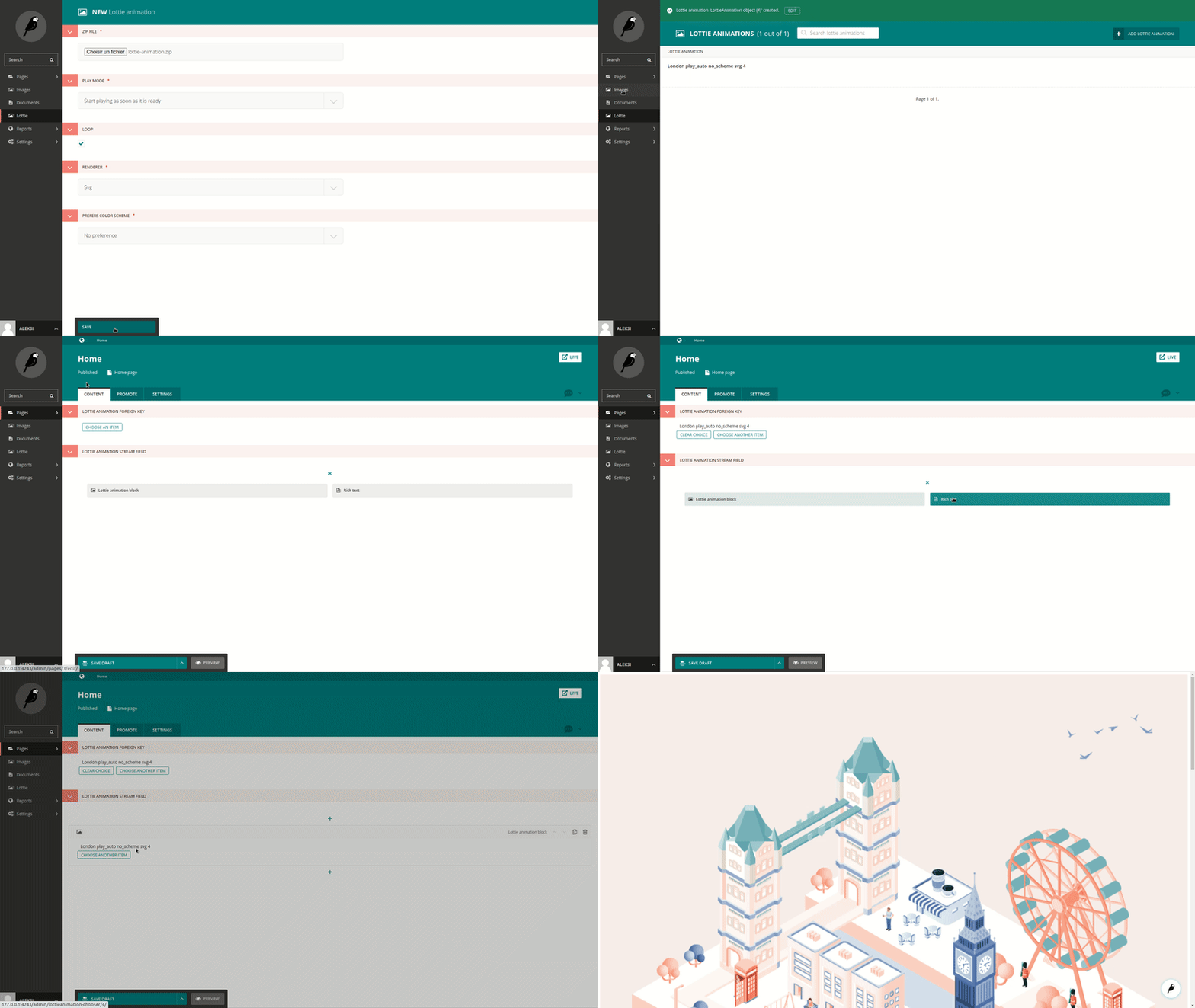
Create a Lottie animation from Wagtail and add this zip file.
Can be used like this at Wagtail page level :
from wagtail_lottie.models import LottieAnimation
from wagtail_lottie.widgets import LottieAnimationChooser
from wagtail_lottie.blocks import LottieAnimationChooserBlock


class HomePage(Page):
    lottie_animation_foreign_key = models.ForeignKey(LottieAnimation, on_delete=models.SET_NULL)
    lottie_animation_stream_field = StreamField([
        ('lottie_animation_block', LottieAnimationChooserBlock()),
        ('rich_text', blocks.RichTextBlock())
    ])

    content_panels = [
        FieldPanel('lottie_animation_foreign_key', widget=LottieAnimationChooser),
        StreamFieldPanel('lottie_animation_stream_field')
    ]
And rendered this way at html level :
<!-- For ForeignKey -->
{% include 'wagtail_lottie/lottie_animation.html' with value=page.lottie_animation_foreign_key %}

<!-- For StreamField -->
{% for block in page.lottie_animation_stream_field %}
    {% include_block block %}
{% endfor %}

<!-- These scripts are required to launch animations -->
<script src="{% static 'wagtail_lottie/lottie-player.js' %}"></script>
<script src="{% static 'wagtail_lottie/lottie-animation.js' %}"></script>
Setup
Install with pip :
pip install wagtail_lottieAdd wagtail_lottie to Django apps installed :
INSTALLED_APPS = [
    'wagtail_lottie',
    'wagtail.contrib.modeladmin',
    'generic_chooser',
    ...
]
Run some Django commands :
python manage.py collectstatic
python manage.py migrate
Set if needed Wagtail Lottie download folder in the Django settings (default value is ‘wagtail_lottie’) :
WAGTAIL_LOTTIE_UPLOAD_FOLDER = 'custom_location'1 maintainer

Metadata
1 maintainer
Release files for wagtail-lottie 0.1.19
For a detailed explanation of source distributions (sdists) and built distributions (wheels), please see the package formats documentation.
Source distribution (sdist)
| File | Size | Uploaded | Provenance | |
|---|---|---|---|---|
| wagtail_lottie-0.1.19.tar.gz | 93.0 kB | Without provenance | Details |
Built distribution (wheel)
| File | Interpreter | ABI | Platform | Reset |
|---|---|---|---|---|
| wagtail_lottie-0.1.19-py3-none-any.whl | Python 3 | none | any | Details |
Total release size: 193.0 kB
Release files / wagtail_lottie-0.1.19.tar.gz
| Download URL | wagtail_lottie-0.1.19.tar.gz |
|---|---|
| Size | 93.0 kB |
| Tags | Source |
|
SHA-256 checksum How to use checksums |
23198120fe6b5bb540d2d5ca77aa8c83ce56eec97c44e9c91df957baccd60e6b
|
|
BLAKE2b-256 checksum How to use checksums |
242a3232c65862810a3cce7358f646b023df00203b2e4859a547018ab01ade82
|
| Upload date | |
|
Uploaded using Trusted Publishing? What is trusted publishing? |
No |
| Uploaded via |
twine/3.6.0 importlib_metadata/4.8.2 pkginfo/1.8.1 requests/2.26.0 requests-toolbelt/0.9.1 tqdm/4.62.3 CPython/3.9.7
|
Release files / wagtail_lottie-0.1.19-py3-none-any.whl
| Download URL | wagtail_lottie-0.1.19-py3-none-any.whl |
|---|---|
| Size | 100.0 kB |
| Tags | Python 3 |
|
SHA-256 checksum How to use checksums |
36c46429d3d7ab86a54a068fda82a859b494eda90b7d39873f4f77bb46425c95
|
|
BLAKE2b-256 checksum How to use checksums |
c66e845074b7bdbd557dacea1708a8b738535cda0318a3acf93ccf843740602e
|
| Upload date | |
|
Uploaded using Trusted Publishing? What is trusted publishing? |
No |
| Uploaded via |
twine/3.6.0 importlib_metadata/4.8.2 pkginfo/1.8.1 requests/2.26.0 requests-toolbelt/0.9.1 tqdm/4.62.3 CPython/3.9.7
|
Security for wagtail-lottie 0.1.19
Provenance
Provenance describes where a file came from. On PyPI, provenance is shared via attestations, which provide a verifiable record of the build or publishing details. View details, limitations and caveats.
No provenance found
None of the files in this release were uploaded with provenance metadata.
A note on package security
PyPI is a repository for distributing packages, not a service for auditing them. While third-party security researchers and our staff do their best to detect and remove malicious packages, PyPI cannot guarantee the quality, security or suitability of any given package.














