
Wagtail FontAwesome

Add FontAwesome 4.7 icons to your Wagtail project.
Install
pip install wagtailfontawesomeThen add wagtailfontawesome to your installed apps.
Usage
StreamField
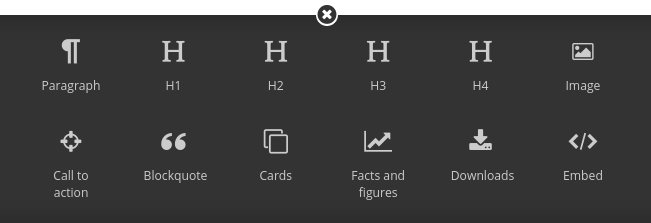
Add FontAwesome icons to StreamField the regular way, just set icon=”fa-something”. Reference the full list.
For example, using fa-exclamation-triangle on a block that’s a class:
class NoticeBlock(StructBlock):
    message = RichTextBlock()
    indicator = ChoiceBlock()

    class Meta:
        icon = 'fa-exclamation-triangle'
The same block, but inline:
notice = StructBlock([
  ('message', RichTextBlock()),
  ('indicator', ChoiceBlock())
], icon='fa-exclamation-triangle')
Using IconBlock
Wagtail FontAwesome contains a dropdown chooser you can use to select a block from the available options. For example,
from wagtailfontawesome.blocks import IconBlock

class CardBlock(StructBlock):
    icon = IconBlock()
    title = CharBlock()
You are responsible for including the FontAwesome CSS yourself somewhere on the page. See the section “On the front-end” below for a way to do that with Wagtail FontAwesome.
ModelAdmin
ModelAdmin is supported if you’re using Wagtail 1.5 or above. Similar to StreamField, just set icon=”fa-something” on your menu item.
Other parts of the admin
You can include icons anywhere in the admin with:
<i class="icon icon-fa-something"></i>In Wagtail 1.3.x and below you can only use icons on the page editor screen.
On the front-end
You can also include the CSS on the front end, and follow FontAwesome’s documentation.
{% load wagtailfontawesome %}

{% fontawesome_css %}
This will generate equivalent markup to:
<link rel="stylesheet" href="{% static 'wagtailfontawesome/css/fontawesome.css' %}">Then include icons anywhere on the front-end with:
<i class="fa fa-something"></i>Using wagtailfontawesome as an optional dependency
If you want to distribute a Wagtail plugin with FontAwesome icons, you can use this package as an optional dependency by checking if it’s installed in Django, and falling back otherwise.
from django.apps import apps
try:
    from wagtail.core.blocks import StructBlock
except ImportError:  # fallback for Wagtail <2.0
    from wagtail.wagtailcore.blocks import StructBlock


class BlockquoteBlock(StructBlock):
    quote = TextBlock()
    author = TextBlock()

    class Meta:
        if apps.is_installed('wagtailfontawesome'):
            icon = 'fa-quote-left'
(in this case, the fallback is to do nothing)
3 maintainers


Metadata
3 maintainers
Release files for wagtailfontawesome 1.2.1
For a detailed explanation of source distributions (sdists) and built distributions (wheels), please see the package formats documentation.
Source distribution (sdist)
| File | Size | Uploaded | Provenance | Actions |
|---|---|---|---|---|
| wagtailfontawesome-1.2.1.tar.gz | 659.3 kB | Without provenance | Details for wagtailfontawesome-1.2.1.tar.gz |
Built distribution (wheel)
| File | Interpreter | ABI | Platform | Actions Reset |
|---|---|---|---|---|
| wagtailfontawesome-1.2.1-py2.py3-none-any.whl | Python 2, Python 3 | none | any | Details for wagtailfontawesome-1.2.1-py2.py3-none-any.whl |
Total release size: 1.3 MB
Release files / wagtailfontawesome-1.2.1.tar.gz
| Download URL | wagtailfontawesome-1.2.1.tar.gz |
|---|---|
| Size | 659.3 kB |
| Tags | Source |
|
SHA-256 checksum How to use checksums |
6c1bd2d6061880848de6374ceb75d38a8c9b0debb1d4aef8a2fdc9d565a8f417
|
|
BLAKE2b-256 checksum How to use checksums |
8bf3903c538de932c2f1389c87ba781df1653742fe68027fcdf4575d68e88e23
|
| Upload date | |
|
Uploaded using Trusted Publishing? What is trusted publishing? |
No |
| Uploaded via |
twine/1.13.0 pkginfo/1.5.0.1 requests/2.22.0 setuptools/39.0.1 requests-toolbelt/0.9.1 tqdm/4.32.1 CPython/3.6.9
|
Release files / wagtailfontawesome-1.2.1-py2.py3-none-any.whl
| Download URL | wagtailfontawesome-1.2.1-py2.py3-none-any.whl |
|---|---|
| Size | 661.3 kB |
| Tags | Python 2 Python 3 |
|
SHA-256 checksum How to use checksums |
76b1c64c4f1042d468a83e4352f74b57bda4a4aa09cdfeeb8663dead5ed632be
|
|
BLAKE2b-256 checksum How to use checksums |
6ffe0ebcfefd30e696ddb20ea866dd6416b5d362eb11461ad9a94bc0326f5040
|
| Upload date | |
|
Uploaded using Trusted Publishing? What is trusted publishing? |
No |
| Uploaded via |
twine/1.13.0 pkginfo/1.5.0.1 requests/2.22.0 setuptools/39.0.1 requests-toolbelt/0.9.1 tqdm/4.32.1 CPython/3.6.9
|
Security for wagtailfontawesome 1.2.1
Provenance
Provenance describes where a file came from. On PyPI, provenance is shared via attestations, which provide a verifiable record of the build or publishing details. View details, limitations and caveats.
No provenance found
None of the files in this release were uploaded with provenance metadata.
A note on package security
PyPI is a repository for distributing packages, not a service for auditing them. While third-party security researchers and our staff do their best to detect and remove malicious packages, PyPI cannot guarantee the quality, security or suitability of any given package.
To learn more about protecting yourself from malicious actors, visit our package security documentation.














