
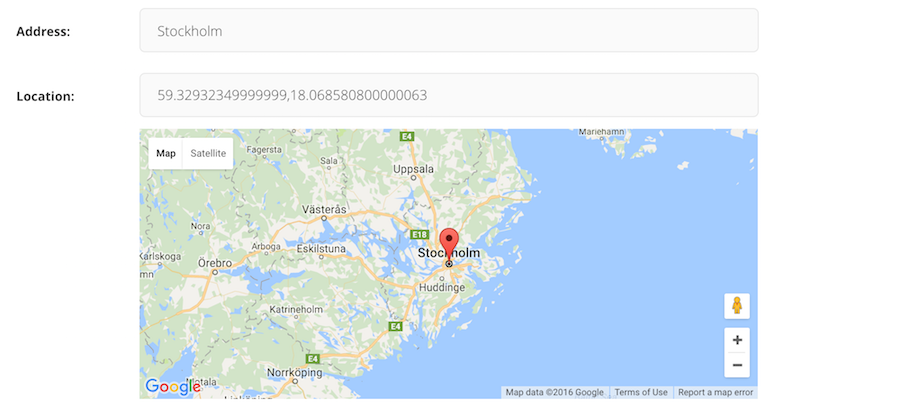
A Google Maps widget for Wagtail that supports both GeoDjango PointField, StreamField and CharField.


Project description
[](https://badge.fury.io/py/wagtailgeowidget)
# Wagtail-Geo-Widget
A Google Maps widget for Wagtail that supports both GeoDjango PointField, StreamField and the standard CharField.
## Requirements
- Python 2.7 / Python 3.5
- Wagtail 1.7+ and Django
## Installation
Install the library with pip:
```
$ pip install wagtailgeowidget
```
## Quick Setup
Make sure wagtail_geo_widget is added to your `INSTALLED_APPS`.
```python
INSTALLED_APPS = (
# ...
'wagtailgeowidget',
)
```
Obtain a Google Maps API key and add it to your django settings `GOOGLE_MAPS_V3_APIKEY`
This should be enough to get started.
## Usage
- [Standard CharField](https://github.com/Frojd/wagtail-geo-widget/blob/develop/README.md#standard-charfield)
- [StreamField](https://github.com/Frojd/wagtail-geo-widget/blob/develop/README.md#streamfield)
- [GeoDjango/PointField](https://github.com/Frojd/wagtail-geo-widget/blob/develop/README.md#geodjango-pointfield)
## Standard CharField
Define a CharField representing your location, then add a GeoPanel.
```python
from django.db import models
from wagtailgeowidget.edit_handlers import GeoPanel
class MyPage(Page):
location = models.CharField(max_length=250, blank=True, null=True)
content_panels = Page.content_panels + [
GeoPanel('location'),
]
```
The data is stored as a `GEOSGeometry` string (Example: `SRID=4326;POINT(17.35448867187506 59.929179873751934)`. To use the data, we recommend that you add helper methods to your model.
```python
from django.contrib.gis.geos import GEOSGeometry
class MyPage(Page):
# ...
@property
def point(self):
return GEOSGeometry(self.location)
@property
def lat(self):
return self.point.y
@property
def lng(self):
return self.point.x
```
NOTE: While this implementation is quick and easy to setup, the drawback is that it will prevent you from making spatial queries, if that is what you need, use the GeoDjango/Pointer field implementation instead.
### With address field
The panel accepts a `address_field` if you want to the map in coordiation with a geo-lookup (like the screenshot on top).
```python
from django.db import models
from wagtailgeowidget.edit_handlers import GeoPanel
class MyPageWithAddressField(Page):
address = models.CharField(max_length=250, blank=True, null=True)
location = models.CharField(max_length=250, blank=True, null=True)
content_panels = Page.content_panels + [
GeoPanel('location', address_field='address'),
]
```
For more examples, look at the [example](https://github.com/Frojd/wagtail-geo-widget/blob/develop/example/geopage/models.py#L82).
## StreamField
To add a map in a StreamField, import and use the GeoBlock.
```python
from wagtail.wagtailcore.models import Page
from wagtail.wagtailcore.fields import StreamField
from wagtailgeowidget.blocks import GeoBlock
class GeoStreamPage(Page):
body = StreamField([
('map', GeoBlock()),
])
content_panels = Page.content_panels + [
StreamFieldPanel('body'),
]
```
The data is stored as a json struct and you can access it by using value.lat / value.lng
```html
<article>
{% for map_block in page.stream_field %}
<hr />
{{ map_block.value }}
<p>Latitude: {{ map_block.value.lat}}</p>
<p>Longitude: {{ map_block.value.lng }}</p>
{% endfor %}
</article>
```
### With a address field
Make sure you define a field representing the address at the same level as your GeoBlock, either in the StreamField or in a StructBlock.
```python
from wagtail.wagtailadmin.edit_handlers import StreamFieldPanel
from wagtailgeowidget.blocks import GeoBlock
class GeoStreamPage(Page):
body = StreamField([
('map_struct', blocks.StructBlock([
('address', blocks.CharBlock(required=True)),
('map', GeoBlock(address_field='address')),
]))
])
content_panels = Page.content_panels + [
StreamFieldPanel('body'),
]
```
For more examples, look at the [example](https://github.com/Frojd/wagtail-geo-widget/blob/develop/example/geopage/models.py#L64).
## GeoDjango (PointField)
First make sure you have [GeoDjango](https://docs.djangoproject.com/en/1.10/ref/contrib/gis/) correctly setup and a PointField field defined in your model, then add a GeoPanel among your content_panels.
```python
from django.contrib.gis.db import models
from wagtailgeowidget.edit_handlers import GeoPanel
class MyPage(Page):
location = models.PointField(srid=4326, null=True, blank=True)
content_panels = Page.content_panels + [
GeoPanel('location'),
]
```
### With a address field
The panel accepts a `address_field` if you want to the map in coordiation with a geo-lookup (like the screenshot on top).
```python
from django.contrib.gis.db import models
from wagtailgeowidget.edit_handlers import GeoPanel
class MyPageWithAddressField(Page):
address = models.CharField(max_length=250, blank=True, null=True)
location = models.PointField(srid=4326, null=True, blank=True)
content_panels = Page.content_panels + [
GeoPanel('location', address_field='address'),
]
```
For more examples, look at the [example](https://github.com/Frojd/wagtail-geo-widget/blob/develop/example/geopage/models.py#L35).
## Settings
- `GOOGLE_MAPS_V3_APIKEY`: Api key for google maps (required).
- `GEO_WIDGET_DEFAULT_LOCATION`: Default map location when no coordinates are set, accepts a dict with lat and lng keys (required, default is `{'lat': 59.3293, 'lng': 18.0686}` that is Stockholm/Sweden).
- `GEO_WIDGET_ZOOM`: Default zoom level for map (required, 7 is default).
## Roadmap
- [x] Editable map widget for GeoDjango PointerField
- [x] Global default map location
- [x] Streamfield map widget
## Contributing
Want to contribute? Awesome. Just send a pull request.
## License
Wagtail-Geo-Widget is released under the [MIT License](http://www.opensource.org/licenses/MIT).
# Wagtail-Geo-Widget
A Google Maps widget for Wagtail that supports both GeoDjango PointField, StreamField and the standard CharField.

## Requirements
- Python 2.7 / Python 3.5
- Wagtail 1.7+ and Django
## Installation
Install the library with pip:
```
$ pip install wagtailgeowidget
```
## Quick Setup
Make sure wagtail_geo_widget is added to your `INSTALLED_APPS`.
```python
INSTALLED_APPS = (
# ...
'wagtailgeowidget',
)
```
Obtain a Google Maps API key and add it to your django settings `GOOGLE_MAPS_V3_APIKEY`
This should be enough to get started.
## Usage
- [Standard CharField](https://github.com/Frojd/wagtail-geo-widget/blob/develop/README.md#standard-charfield)
- [StreamField](https://github.com/Frojd/wagtail-geo-widget/blob/develop/README.md#streamfield)
- [GeoDjango/PointField](https://github.com/Frojd/wagtail-geo-widget/blob/develop/README.md#geodjango-pointfield)
## Standard CharField
Define a CharField representing your location, then add a GeoPanel.
```python
from django.db import models
from wagtailgeowidget.edit_handlers import GeoPanel
class MyPage(Page):
location = models.CharField(max_length=250, blank=True, null=True)
content_panels = Page.content_panels + [
GeoPanel('location'),
]
```
The data is stored as a `GEOSGeometry` string (Example: `SRID=4326;POINT(17.35448867187506 59.929179873751934)`. To use the data, we recommend that you add helper methods to your model.
```python
from django.contrib.gis.geos import GEOSGeometry
class MyPage(Page):
# ...
@property
def point(self):
return GEOSGeometry(self.location)
@property
def lat(self):
return self.point.y
@property
def lng(self):
return self.point.x
```
NOTE: While this implementation is quick and easy to setup, the drawback is that it will prevent you from making spatial queries, if that is what you need, use the GeoDjango/Pointer field implementation instead.
### With address field
The panel accepts a `address_field` if you want to the map in coordiation with a geo-lookup (like the screenshot on top).
```python
from django.db import models
from wagtailgeowidget.edit_handlers import GeoPanel
class MyPageWithAddressField(Page):
address = models.CharField(max_length=250, blank=True, null=True)
location = models.CharField(max_length=250, blank=True, null=True)
content_panels = Page.content_panels + [
GeoPanel('location', address_field='address'),
]
```
For more examples, look at the [example](https://github.com/Frojd/wagtail-geo-widget/blob/develop/example/geopage/models.py#L82).
## StreamField
To add a map in a StreamField, import and use the GeoBlock.
```python
from wagtail.wagtailcore.models import Page
from wagtail.wagtailcore.fields import StreamField
from wagtailgeowidget.blocks import GeoBlock
class GeoStreamPage(Page):
body = StreamField([
('map', GeoBlock()),
])
content_panels = Page.content_panels + [
StreamFieldPanel('body'),
]
```
The data is stored as a json struct and you can access it by using value.lat / value.lng
```html
<article>
{% for map_block in page.stream_field %}
<hr />
{{ map_block.value }}
<p>Latitude: {{ map_block.value.lat}}</p>
<p>Longitude: {{ map_block.value.lng }}</p>
{% endfor %}
</article>
```
### With a address field
Make sure you define a field representing the address at the same level as your GeoBlock, either in the StreamField or in a StructBlock.
```python
from wagtail.wagtailadmin.edit_handlers import StreamFieldPanel
from wagtailgeowidget.blocks import GeoBlock
class GeoStreamPage(Page):
body = StreamField([
('map_struct', blocks.StructBlock([
('address', blocks.CharBlock(required=True)),
('map', GeoBlock(address_field='address')),
]))
])
content_panels = Page.content_panels + [
StreamFieldPanel('body'),
]
```
For more examples, look at the [example](https://github.com/Frojd/wagtail-geo-widget/blob/develop/example/geopage/models.py#L64).
## GeoDjango (PointField)
First make sure you have [GeoDjango](https://docs.djangoproject.com/en/1.10/ref/contrib/gis/) correctly setup and a PointField field defined in your model, then add a GeoPanel among your content_panels.
```python
from django.contrib.gis.db import models
from wagtailgeowidget.edit_handlers import GeoPanel
class MyPage(Page):
location = models.PointField(srid=4326, null=True, blank=True)
content_panels = Page.content_panels + [
GeoPanel('location'),
]
```
### With a address field
The panel accepts a `address_field` if you want to the map in coordiation with a geo-lookup (like the screenshot on top).
```python
from django.contrib.gis.db import models
from wagtailgeowidget.edit_handlers import GeoPanel
class MyPageWithAddressField(Page):
address = models.CharField(max_length=250, blank=True, null=True)
location = models.PointField(srid=4326, null=True, blank=True)
content_panels = Page.content_panels + [
GeoPanel('location', address_field='address'),
]
```
For more examples, look at the [example](https://github.com/Frojd/wagtail-geo-widget/blob/develop/example/geopage/models.py#L35).
## Settings
- `GOOGLE_MAPS_V3_APIKEY`: Api key for google maps (required).
- `GEO_WIDGET_DEFAULT_LOCATION`: Default map location when no coordinates are set, accepts a dict with lat and lng keys (required, default is `{'lat': 59.3293, 'lng': 18.0686}` that is Stockholm/Sweden).
- `GEO_WIDGET_ZOOM`: Default zoom level for map (required, 7 is default).
## Roadmap
- [x] Editable map widget for GeoDjango PointerField
- [x] Global default map location
- [x] Streamfield map widget
## Contributing
Want to contribute? Awesome. Just send a pull request.
## License
Wagtail-Geo-Widget is released under the [MIT License](http://www.opensource.org/licenses/MIT).
Release history Release notifications | RSS feed


Download files
Download the file for your platform. If you're not sure which to choose, learn more about installing packages.
Source Distribution
File details
Details for the file wagtailgeowidget-3.0.0.tar.gz.
File metadata
- Download URL: wagtailgeowidget-3.0.0.tar.gz
- Upload date:
- Size: 8.3 kB
- Tags: Source
- Uploaded using Trusted Publishing? No
File hashes
| Algorithm | Hash digest | |
|---|---|---|
| SHA256 |
a5c26280f01743586768c90934467584115e646e0b76715e5b00afe870968f4d
|
|
| MD5 |
7ec410ae75d7e149cc9be26fb539175d
|
|
| BLAKE2b-256 |
dddef9a42639582a97e19d0999c78a77f5077a8592a4af0c60bac5e87b2f073e
|






