
Waldiez Runner
Run your Waldiez flows in isolated environments and stream AG2 logs/input/output via Redis.
Overview
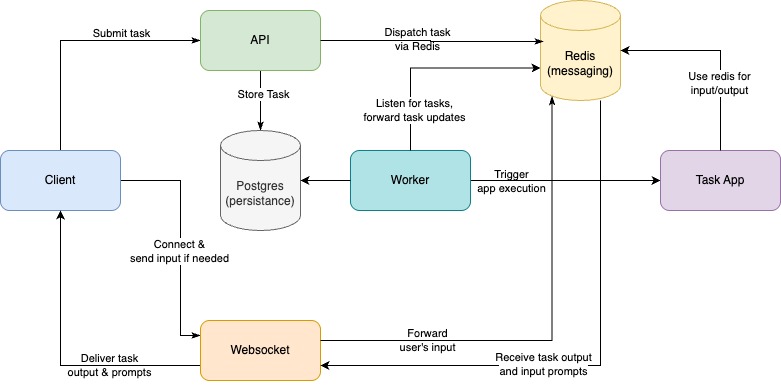
Waldiez Runner enables executing flows in isolated Python virtual environments or containers, with full I/O streaming via Redis and task management via FastAPI + Taskiq.
Backed by:
- FastAPI for the HTTP API
- Taskiq for async task queuing and scheduling
- Redis for messaging and log/input/output streaming
- PostgreSQL for task and client persistence
- Waldiez + ag2 + FastStream for defining, executing, and streaming interactive flows in isolation
Getting Started
Follow these steps to get Waldiez Runner up and running in your development environment.
🐳 Quickstart (Docker/Podman Compose)
To launch the full development stack (API + Redis + Postgres + Nginx):
!!!Note This could take some minutes on the first run, as it installs all dependencies.
docker compose -f compose.dev.yaml up --build
This setup includes:
- API server (waldiez-runner)
- Redis + PostgreSQL
- Taskiq worker + scheduler
- Nginx reverse proxy
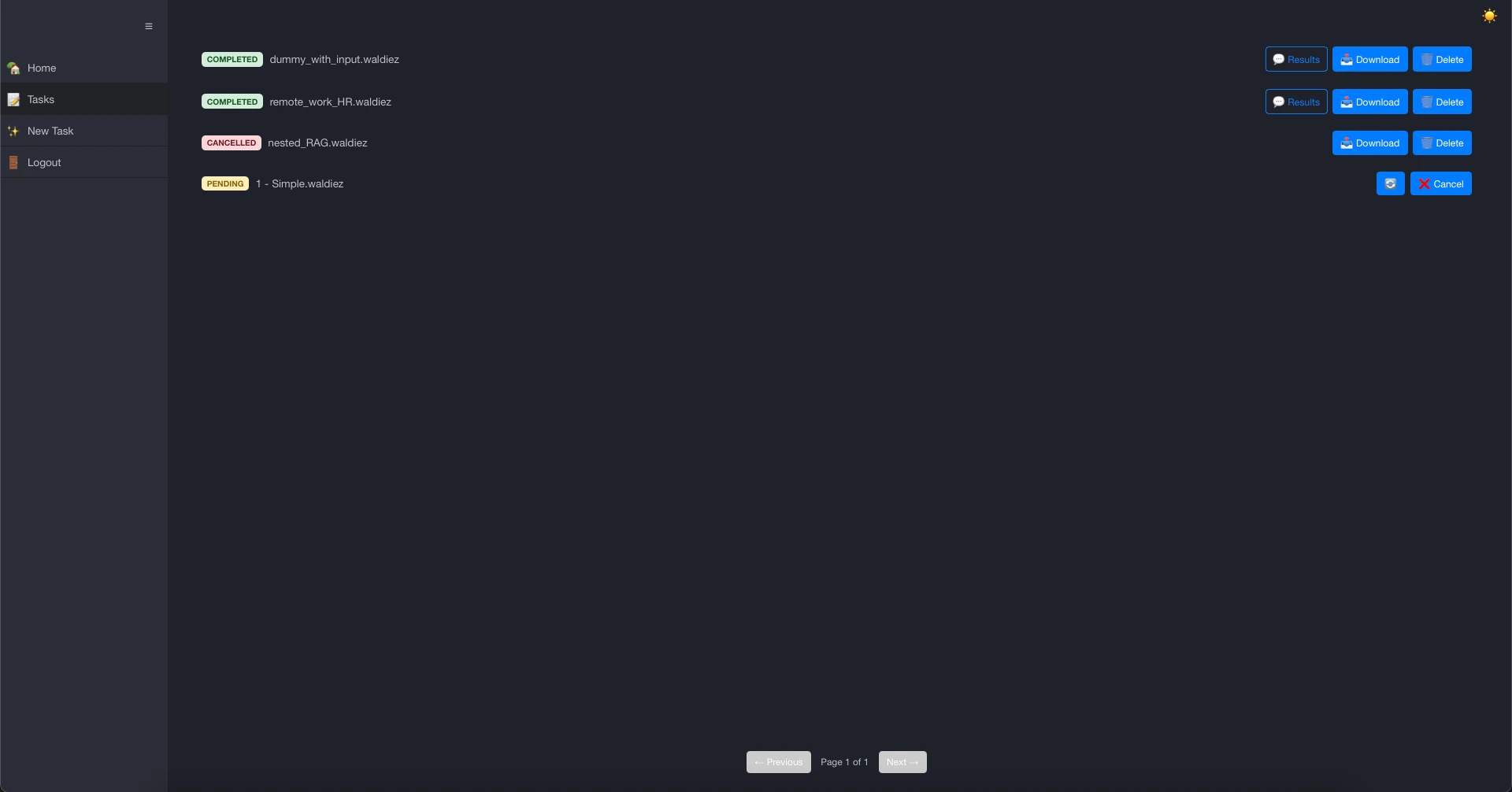
- A simple static example in
examples/html
Once started, you can access:
- Static example UI: http://localhost
- API: http://localhost/docs (Swagger UI)
!!!Note Alternatively, you can open this project in VS Code with Dev Containers enabled — it uses most of the services (not nginx) via .devcontainer/compose.yaml.
🔑 Authenticating with the API or Example UI
When the server starts, it automatically generates a clients.json file in the project root.
This file contains two API clients:
- One for the
clients-apiaudience (managing clients) - One for the
tasks-apiaudience (creating and interacting with tasks)
You'll need the tasks-api credentials to:
- Use the Swagger UI (try out endpoints under
/api/v1/tasks) - Submit tasks via curl or HTTP clients
- Use the example UI at http://localhost
!!!INFO
On the example page, you’ll be asked to paste the base URL, client ID, and secret.
Use the values from clients.json (specifically the tasks-api entry).
🔐 See Clients & Authentication for more details.
🔐 Admin Access
For administrative operations, you'll need an admin-api audience client:
- View all tasks across all users:
GET /api/v1/admin/tasks - Monitor task activity across all clients
- Access administrative endpoints for oversight and management
!!!WARNING
Admin endpoints require special authentication with the admin-api audience.
Regular tasks-api clients cannot access admin functionality.
The server automatically generates an admin client alongside the standard clients.
Check clients.json for the admin-api entry when it exists.
🧪 Local Mode (Advanced)
You can also run the server without any external dependencies (Redis/Postgres):
- SQLite for storage
- FakeRedis for message streams
make dev-no-reload
!!!Warning Do expect limitations in this mode, [Fake]Redis messages might not work as expected.
Or manually (what make dev-no-reload does):
# drop all tables and remove the .env file if it exists
python scripts/drop.py
# switch to local mode if not already
python scripts/toggle.py --mode local
# make sure the .env file is created and the database is initialized
python scripts/pre_start.py --dev
# make sure the first two Clients are created
python scripts/initial_data.py --dev
# start the server, the broker and the scheduler
python -m waldiez_runner --trusted-origins http://localhost:3000,http://localhost:8000 --trusted-hosts localhost --debug --no-force-ssl --no-redis --no-postgres --dev --all
You can now either use the Swagger UI at http://localhost:8000/docs or you can also serve the example on another port terminal:
cd examples/plain
python -m http.server 3000
Calling python -m http.server will start a simple HTTP server on port 3000, serving the files in the current directory.
You can now access the example UI at http://localhost:3000.
📤 Submitting and Managing Tasks
Once the server is running, you can create and interact with tasks:
-
Submit a task by uploading a
.waldiezfile via:- the example UI at http://localhost
- or the Swagger UI at http://localhost/docs (
POST /api/v1/tasks)
-
Monitor task progress via:
- the Swagger
GET /api/v1/tasks/{task_id} - or the WebSocket endpoint
/ws/{task_id}(see WebSocket) - Admin users:
GET /api/v1/admin/tasksto view all tasks across all users
- the Swagger
-
Send input if the task requests it:
- Use the input box in the example UI
- Or call
POST /api/v1/tasks/{task_id}/input
-
Cancel or delete tasks using:
POST /api/v1/tasks/{task_id}/cancelDELETE /api/v1/tasks/{task_id}
You can explore all available routes via the interactive API docs at /docs.
Contributors ✨
Thanks goes to these wonderful people (emoji key):
 Panagiotis Kasnesis 📆 🔬 |
 Lazaros Toumanidis 💻 |
 Stella Ioannidou 📣 🎨 |
 Amalia Contiero 💻 🐛 |
 Christos Chatzigeorgiou 💻 |
||
 Add your contributions
|
||||||
This project follows the all-contributors specification. Contributions of any kind welcome!
License
This project is licensed under the Apache License, Version 2.0 (Apache-2.0).
1 maintainer

Metadata
1 maintainer
Release files for waldiez-runner 0.7.1
For a detailed explanation of source distributions (sdists) and built distributions (wheels), please see the package formats documentation.
Source distribution (sdist)
| File | Size | Uploaded | |
|---|---|---|---|
| waldiez_runner-0.7.1.tar.gz | 118.4 kB | Details |
Built distribution (wheel)
| File | Interpreter | ABI | Platform | Reset |
|---|---|---|---|---|
| waldiez_runner-0.7.1-py3-none-any.whl | Python 3 | none | any | Details |
Total release size: 297.6 kB
Release files / waldiez_runner-0.7.1.tar.gz
| Download URL | waldiez_runner-0.7.1.tar.gz |
|---|---|
| Size | 118.4 kB |
| Tags | Source |
|
SHA-256 checksum How to use checksums |
d654426a3e39fc9ea75fdadd03ffcbf4147356a4e04ea81b8efb710b5a908abe
|
|
BLAKE2b-256 checksum How to use checksums |
091502d0434b0ddf4a03671800686994e0c2975585c407f2db336f04d3edcda9
|
| Upload date | |
|
Uploaded using Trusted Publishing? What is trusted publishing? |
Yes |
| Uploaded via |
twine/6.1.0 CPython/3.13.7
|
Provenance
Provenance describes where a file came from. On PyPI, provenance is shared via attestations, which provide a verifiable record of the build or publishing details. View details, limitations and caveats.


PyPI Publish Attestation
PyPI verified that this artifact, at this checksum, originated from the publisher listed below.
Signed by GitHub Actions, verified by PyPI on Jan 13, 2026.
Transparency logRelease files / waldiez_runner-0.7.1-py3-none-any.whl
| Download URL | waldiez_runner-0.7.1-py3-none-any.whl |
|---|---|
| Size | 179.2 kB |
| Tags | Python 3 |
|
SHA-256 checksum How to use checksums |
9b2382ac120c0928e822da0cd02b86200c583844afaeb19b8cd5b6bff84559b0
|
|
BLAKE2b-256 checksum How to use checksums |
8da6d66e77f9bba67d9c97a51f26af85dd79fb082f0aec736730dbfc0b1e24fb
|
| Upload date | |
|
Uploaded using Trusted Publishing? What is trusted publishing? |
Yes |
| Uploaded via |
twine/6.1.0 CPython/3.13.7
|
Provenance
Provenance describes where a file came from. On PyPI, provenance is shared via attestations, which provide a verifiable record of the build or publishing details. View details, limitations and caveats.
PyPI Publish Attestation
PyPI verified that this artifact, at this checksum, originated from the publisher listed below.
Signed by GitHub Actions, verified by PyPI on Jan 13, 2026.
Transparency log













