
wallfetch
A simple command-line tool for searching and downloading wallpapers from Wallhaven.cc.
wallfetch lets you search and download wallpapers directly from the terminal without having to open Wallhaven in a browser.
Demo
https://github.com/user-attachments/assets/512eb70d-b4b5-4091-8ef2-7de765692f51
Features
-
Search wallpapers directly from the terminal
-
Download multiple wallpapers at once
-
Progress bars for downloads
-
Sort wallpapers by relevance, views, favorites, etc.
-
Filter wallpapers by category and purity
-
Choose how many wallpapers you want to download
-
Save wallpapers to
~/Pictures/wallfetchby default -
Specify a custom download directory
-
Support for Wallhaven API keys
Installation
Install from PyPI:
pip install wallfetch
or from source:
Clone the repository:
git clone https://github.com/Aditya1770/wallfetch.git
cd wallfetch
Make a Python virtual environment:
python -m venv .venv
source .venv/bin/activate
Install wallfetch in the virtual environment:
python -m pip install .
python -m pip install -e . #for editable installation
You can now use:
wallfetch -h
Usage
Search for wallpapers:
wallfetch <query>
For example:
wallfetch cyberpunk
You can also use queries with spaces:
wallfetch "dark forest"
By default, wallpapers are downloaded to:
~/Pictures/wallfetch
Options
| Option | Description |
|---|---|
-n, --count N |
Number of wallpapers to download |
-f, --folder FOLDER |
Folder to download wallpapers to |
-s, --sorting SORT |
Sort the search results |
-o, --order {asc,desc} |
Sorting order |
-p, --purity PURITY |
SFW/Sketchy/NSFW filter |
-c, --categories CATS |
General/Anime/People filter |
--page PAGE |
Page of search results |
--set-api-key KEY |
Set your Wallhaven API key |
--config |
Check the current wallfetch configuration |
-h, --help |
Show the help menu |
Number of wallpapers
Use -n to specify how many wallpapers you want to download:
wallfetch cyberpunk -n 5
Custom download directory
Use -f to specify where the wallpapers should be saved:
wallfetch cyberpunk -f ~/Pictures/cyberpunk
Sorting
Wallpapers can be sorted using:
| Value | Sort by |
|---|---|
date_added |
Date added |
relevance |
Relevance |
random |
Random |
views |
Views |
favorites |
Favorites |
toplist |
Toplist |
hot |
Hot |
For example:
wallfetch cyberpunk -s favorites
You can also change the sorting order:
wallfetch cyberpunk -s views -o desc
Categories
Wallhaven uses three digits for its category filters:
General / Anime / People
1 enables a category and 0 disables it.
| Value | Categories |
|---|---|
100 |
General |
010 |
Anime |
001 |
People |
110 |
General + Anime |
101 |
General + People |
011 |
Anime + People |
111 |
All |
For example, to only search for anime wallpapers:
wallfetch cyberpunk -c 010
The default is 111.
Purity
Purity works the same way:
SFW / Sketchy / NSFW
| Value | Purity |
|---|---|
100 |
SFW |
010 |
Sketchy |
001 |
NSFW |
110 |
SFW + Sketchy |
101 |
SFW + NSFW |
011 |
Sketchy + NSFW |
111 |
All |
The default is 100.
For example:
wallfetch cyberpunk -p 110
Some filters may require a Wallhaven API key.
Pages
Use --page to get wallpapers from another page of the search results:
wallfetch cyberpunk --page 2
Additionally you can provide a range to to get wallpapers from certain range:
wallfetch cyberpunk --page 3:5 #will get wallpaper from page 3 to 5
API Key
You can get your Wallhaven API key through your Account Settings and going to Account:
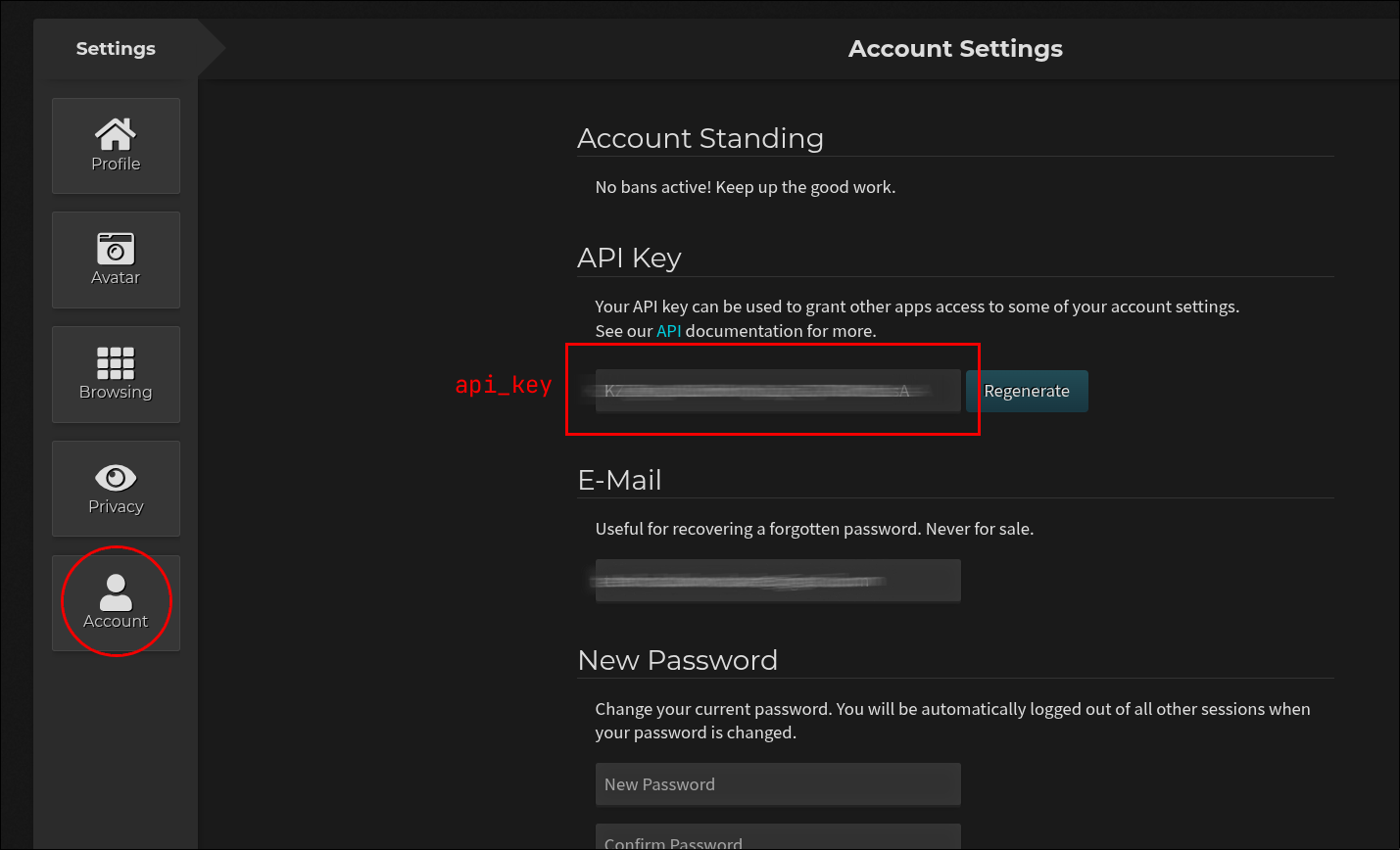
You can save your Wallhaven API key using:
wallfetch --set-api-key <key>
The key is stored in:
~/.config/wallfetch/config.toml
To check if an API key is configured:
wallfetch --config
Examples
Download 5 cyberpunk wallpapers:
wallfetch cyberpunk -n 5
Download 10 anime wallpapers sorted by favorites:
wallfetch anime -n 10 -c 010 -s favorites
Download wallpapers to a different folder:
wallfetch mountains -n 5 -f ~/Pictures/mountains
You can combine the options however you want:
wallfetch "night city" -n 10 -s favorites -o desc -c 111 -p 100 --page 2
Dependencies
wallfetch requires Python 3 and uses:
-
Requests for API requests and downloads
-
Rich for download progress bars
-
tomli_w for editing .toml files
The dependencies are installed automatically when running:
python -m pip install .
Uninstall
Since wallfetch is installed inside the virtual environment, you can uninstall it with:
python -m pip uninstall wallfetch
Or just remove the virtual environment:
rm -rf .venv
Contributing
Contributions, bug reports and suggestions are welcome.
If you want to improve wallfetch, fork the repository, make your changes and open a pull request.
License
This project is licensed under the MIT License. See LICENSE for more information.
1 maintainer

Download files
Download the file for your platform. If you're not sure which to choose, learn more about installing packages.
Source Distribution
Built Distribution
Filter files by name, interpreter, ABI, and platform.
If you're not sure about the file name format, learn more about wheel file names.
Copy a direct link to the current filters
File details
Details for the file wallfetch-0.1.0.tar.gz.
File metadata
- Download URL: wallfetch-0.1.0.tar.gz
- Upload date:
- Size: 10.2 kB
- Tags: Source
- Uploaded using Trusted Publishing? No
- Uploaded via:
twine/7.0.0 CPython/3.14.7
File hashes
| Algorithm | Hash digest | |
|---|---|---|
| SHA256 |
999d947ba0c85a1bf7ab40dedf3eebd8b7341bc1a30068470ea29c3b3e0430a6
|
|
| MD5 |
0b735714bd3caa1fd7c2fbae07a299ae
|
|
| BLAKE2b-256 |
a0261b84b7af6c4f0b5cbc87490e74e63355a6b6ee8e50d738a4348972863c8f
|
File details
Details for the file wallfetch-0.1.0-py3-none-any.whl.
File metadata
- Download URL: wallfetch-0.1.0-py3-none-any.whl
- Upload date:
- Size: 8.0 kB
- Tags: Python 3
- Uploaded using Trusted Publishing? No
- Uploaded via:
twine/7.0.0 CPython/3.14.7
File hashes
| Algorithm | Hash digest | |
|---|---|---|
| SHA256 |
f478138a9b680514199fdb3da5475dc40221e5e702c1de0c4f2aa6fef92dabee
|
|
| MD5 |
f7150517dfb3b298513911b0b33bf696
|
|
| BLAKE2b-256 |
fed28929d2339e301acbce467a121011683f1c9ccd53e4db24bd54643859d2de
|













