
wallmonitor
A local-only companion for the Tesla Wall Connector Gen 3 that grew well beyond reading data off the charger: it records everything the device reports, turns that history into a thermal model fitted to your install, forecasts derates before they happen (with the charge-current cap that avoids them), watches for connector degradation with honest statistics, and pushes actionable warnings to your browser or phone.
Everything stays on your machine and your LAN: the only network traffic is HTTP GETs to the charger's local API, storage is a local SQLite file, and the web UI serves no external assets (no CDNs, fonts, or analytics).
Try it in 30 seconds
No hardware needed — demo mode runs a built-in charger simulator:
uvx wallmonitor --demo
Then open http://127.0.0.1:8480.
Against your real Wall Connector — let the tool find it on your LAN (a
polite sweep of your own subnet; nothing leaves the network), then run with
the address it prints (add --split-phase on a North American install):
uvx wallmonitor --discover
uvx wallmonitor --host 192.168.1.50 --split-phase
On first contact the monitor pins the charger's serial number: if a different unit ever answers at that address, it alarms and pauses recording rather than blending two chargers' histories.
More than one Wall Connector? Run one instance per charger — --label names
each in the header and notifications, --peer links them so the header hops
between dashboards, and the service installer's --name does it all per
charger in one command. See More than one Wall Connector.
All history lands in a single wallmonitor.db SQLite file — back up that
one file and you have everything (wallmonitor --backup DIR writes a
verified, compressed snapshot wherever you point it, while running). For every option, and for running it as a
systemd service on an always-on box, see Running wallmonitor.
At a glance
- Zero-config setup —
--discoverfinds the charger on your LAN; the serial is pinned on first contact so a swapped or second unit can never blend into your history - Full-fidelity recording — every response stored with its complete raw JSON (optional retention trims old raw blobs so the database stays near-flat)
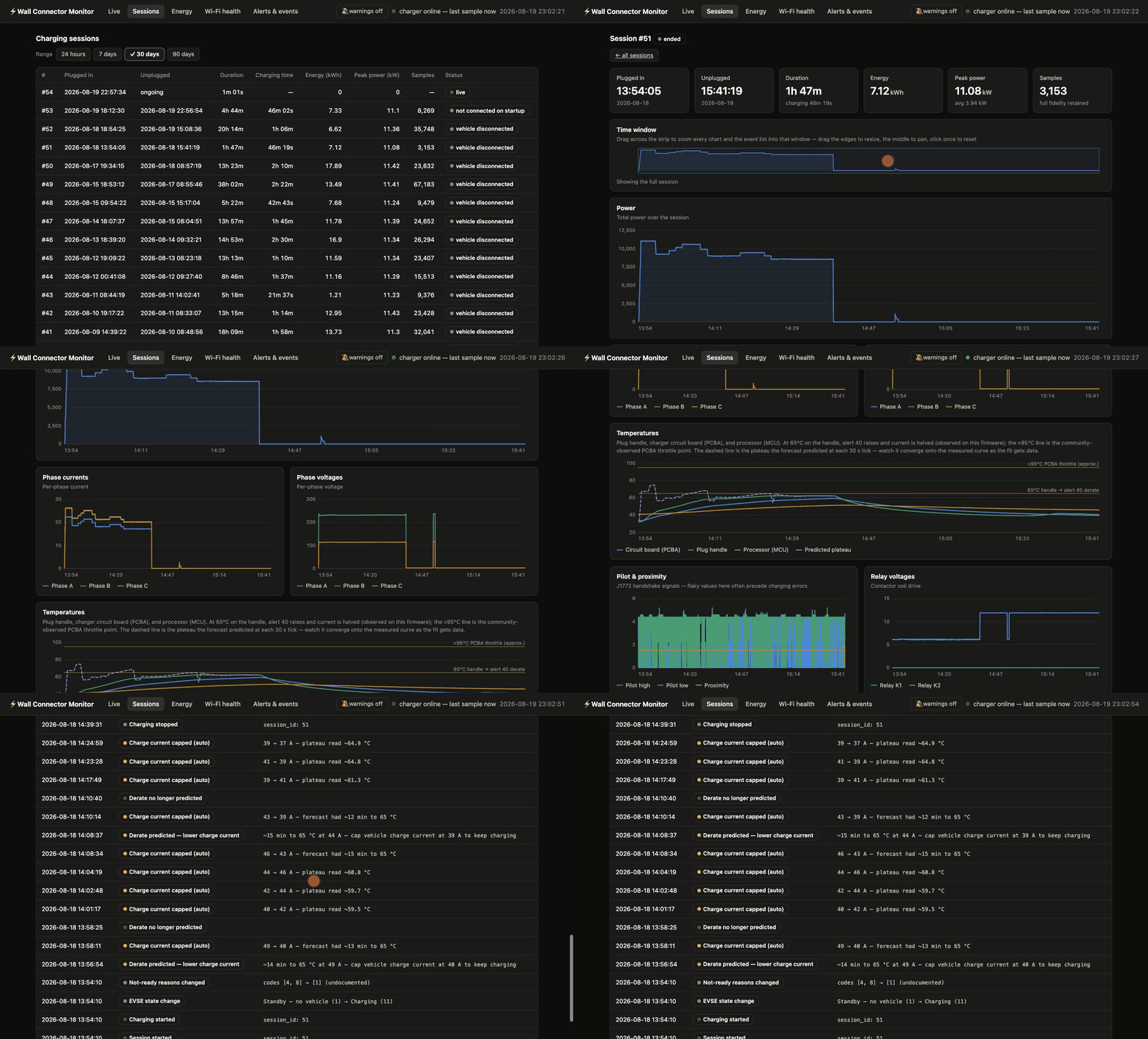
- Live dashboard (SSE) with rolling charts, an active-alert banner, and a live derate-forecast chart: measured handle temperature against the model's projected plateau and the trip threshold, projection drawn forward so the predicted trip intercept is visible on the chart
- Session review: energy, peak/average power, per-phase telemetry, drillable charts, and forecast hindsight — what the model predicted at each tick against what the handle actually did
- Event timeline with range presets, category filters, and paging
- Alert decoding and EVSE-state labels, each marked verified vs community-reported
- Wi-Fi health history and connectivity events
- Thermal derate forecast — a per-install fitted model predicts alert 40 live and suggests the highest current that avoids the 50% foldback
- Automatic derate prevention — an optional daemon caps the vehicle's charge current through a least-privilege BLE pairing when the forecast firms up, and restores it once the risk clears
- Degradation watch — heat rise regressed on time while ambient and charge current are held, over windows the charger was not regulating, with confidence intervals and a verified-baseline anchor, so "getting worse" is a statistical claim about the connector and not about the weather
- Actionable notifications, local-only — browser push and LAN webhook/self-hosted ntfy for phones, with a systemd + Docker deploy recipe
- Resilience: seamless restarts, downtime recorded as explicit gap events, sensor-glitch quarantine
- Several chargers: one labeled instance each, linked by a header switcher; per-install thermal models stay separate by construction
Works out of the box — everything else is additive
The core needs nothing but the charger. Integrations are optional, degrade
gracefully when absent, and the absence paths are covered by the test suite:
without an ambient sensor the charger doubles as its own thermometer, with
no webhook configured notifications are a tested no-op, and TeslaMate /
ntfy / ESP32-BLE each plug into a generic interface (POST /api/ambient, a
plain LAN webhook, a REST call) rather than being wired into the core.
Documentation
| Page | What's in it |
|---|---|
| Running wallmonitor | Every option, finding your charger, device identity, multiple chargers, systemd service install |
| What gets recorded | Recording fidelity, sessions, events, alert/EVSE label verification, resilience |
| Thermal model | The derate forecast and the degradation watch, in full detail |
| Amp control | Automatic derate prevention over BLE: design, guards, backtesting |
| Ambient sensing | Garage sensors (Ecowitt or any JSON poster), placement, contamination checks, the TeslaMate car bridge |
| Notifications | Browser push and self-hosted ntfy phone alerts |
| Measured charging efficiency | What three cross-referenced meters say about wall-to-battery efficiency |
Tests
uv run pytest
The suite runs the full pipeline against the simulator — polling, session detection, alert lifecycle, the web API, and the thermal model end to end.
License
MIT. Built on the
tesla-wall-connector
library (MIT, by Einar Bragi Hauksson).
wallmonitor is an independent project, not affiliated with, endorsed by, or sponsored by Tesla, Inc. "Tesla" and "Tesla Wall Connector" are trademarks of Tesla, Inc., used here only to identify the hardware this software monitors.
1 maintainer

Metadata
1 maintainer
Release files for wallmonitor 0.6.0
For a detailed explanation of source distributions (sdists) and built distributions (wheels), please see the package formats documentation.
Source distribution (sdist)
| File | Size | Uploaded | |
|---|---|---|---|
| wallmonitor-0.6.0.tar.gz | 114.6 kB | Details |
Built distribution (wheel)
| File | Interpreter | ABI | Platform | Reset |
|---|---|---|---|---|
| wallmonitor-0.6.0-py3-none-any.whl | Python 3 | none | any | Details |
Total release size: 234.8 kB
Release files / wallmonitor-0.6.0.tar.gz
| Download URL | wallmonitor-0.6.0.tar.gz |
|---|---|
| Size | 114.6 kB |
| Tags | Source |
|
SHA-256 checksum How to use checksums |
5d425dab07aad7467d922b1ec8ae6610e99b57e9e1f665ac188c5338e80839b4
|
|
BLAKE2b-256 checksum How to use checksums |
6fe70c29cb6a5e9bd62c21c6268f89d4d0f79704ea6824e4354fae294f6e1caa
|
| Upload date | |
|
Uploaded using Trusted Publishing? What is trusted publishing? |
Yes |
| Uploaded via |
twine/7.0.0 CPython/3.13.14
|
Provenance
Provenance describes where a file came from. On PyPI, provenance is shared via attestations, which provide a verifiable record of the build or publishing details. View details, limitations and caveats.


PyPI Publish Attestation
PyPI verified that this artifact, at this checksum, originated from the publisher listed below.
Signed by GitHub Actions, verified by PyPI on Oct 14, 2026.
Transparency logRelease files / wallmonitor-0.6.0-py3-none-any.whl
| Download URL | wallmonitor-0.6.0-py3-none-any.whl |
|---|---|
| Size | 120.2 kB |
| Tags | Python 3 |
|
SHA-256 checksum How to use checksums |
b92b5c01fcf3c9fa44cf638c876dea6f986689ccd7438d006b3f3859f05e1edd
|
|
BLAKE2b-256 checksum How to use checksums |
32463c41071fb862e5d81289b0a3a6ac8aa090ffa5ccd82177abac34ba35bae0
|
| Upload date | |
|
Uploaded using Trusted Publishing? What is trusted publishing? |
Yes |
| Uploaded via |
twine/7.0.0 CPython/3.13.14
|
Provenance
Provenance describes where a file came from. On PyPI, provenance is shared via attestations, which provide a verifiable record of the build or publishing details. View details, limitations and caveats.
PyPI Publish Attestation
PyPI verified that this artifact, at this checksum, originated from the publisher listed below.
Signed by GitHub Actions, verified by PyPI on Oct 14, 2026.
Transparency log













