

Nothing binds a port without asking.
One place that decides which local port a service runs on. Services register under a name, say what they are, and get a port back. The same name keeps the same port across restarts, so a backend never wakes up on the port its frontend grabbed while it was down.
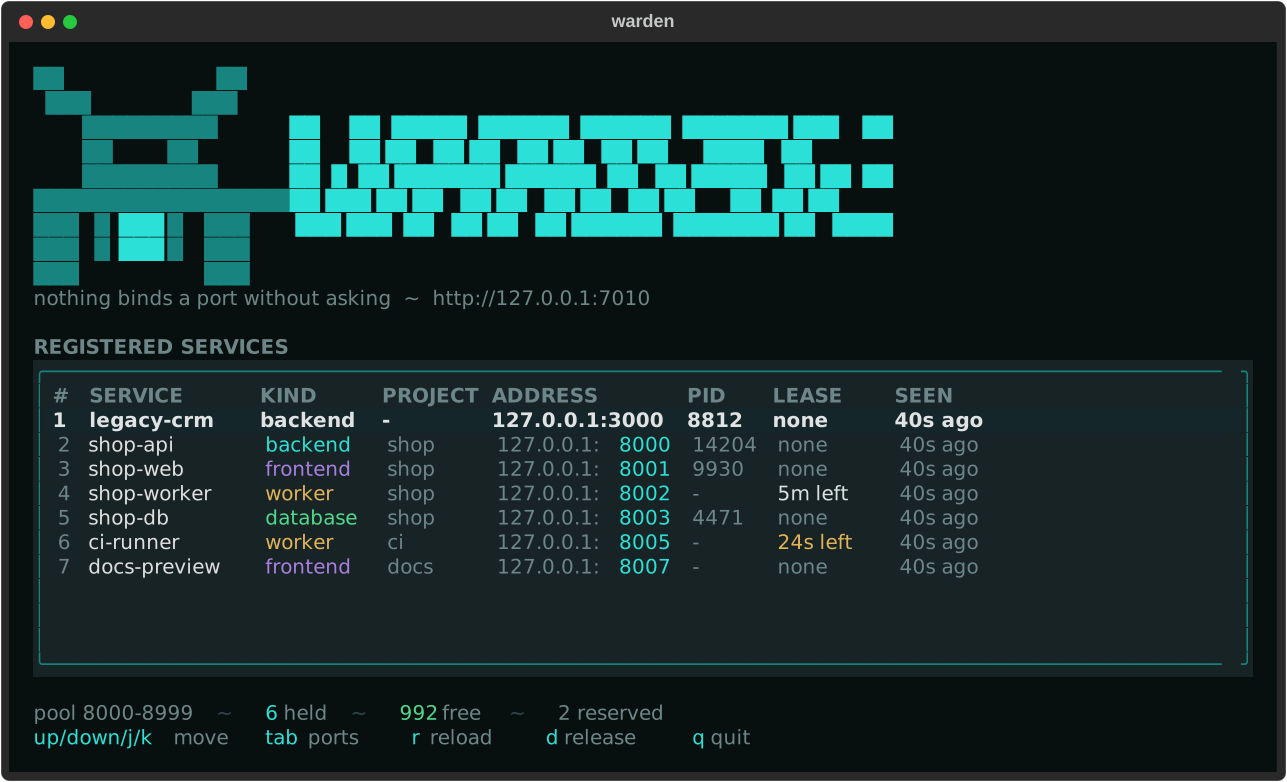
What is on port 3000?
Not every port on a machine came from a registry. warden ports shows every
socket the operating system reports, whether warden handed it out or not, and
warden kill frees one:
$ warden ports --port 3000
PORT  PROTO  PROCESS   PID    USER              ADDRESS  WARDEN
3000  tcp    node.exe  25084  dev               0.0.0.0  -

$ warden kill 3000
Stop node.exe (25084) on port 3000? [y/N]: y
stopped node.exe (25084)
Neither needs a warden running anywhere — they read the machine directly. The
WARDEN column names the service whenever the port did come from the registry.
warden ports --all asks every warden in the fleet instead, and adds a NODE
column saying which machine each socket is on.
Sockets owned by another user appear without a process name; run warden as
administrator on Windows, or with sudo on Linux and macOS, to see those too.
Why
On a machine that runs a handful of projects, ports are picked by hand and
written down in three places: a .env, a vite.config.ts, and someone's memory.
Two services eventually pick 8080 and the second one fails to start — or worse,
starts and talks to the wrong neighbour.
warden replaces that with a registry:
- every service asks for a port instead of hardcoding one
- ports come from a single pool, so two services cannot collide
- a service keeps its port across restarts
- ports already occupied by something outside the registry are skipped
warden lsanswers "what is running on 8003?"
Install
git clone https://github.com/vxnsin/warden
cd warden
uv sync
uv run warden
To get warden as a command of its own, without the uv run in front:
uv tool install .
That works in cmd, PowerShell and any POSIX shell, from any directory.
The distribution is called warden-ports because warden on PyPI belongs to
something else; the command it installs is warden either way. It is not
published yet, so installing by name does not work — see
#1.
Quick start
Start the registry — it listens on 127.0.0.1:7010 and hands out 8000-8999:
warden serve
Claim a port:
$ warden register shop-api --kind backend --project shop
8000
$ warden register shop-web --kind frontend --project shop
8001
See who holds what:
$ warden ls
SERVICE   KIND      PROJECT  ADDRESS         PID
shop-api  backend   shop     127.0.0.1:8000  -
shop-web  frontend  shop     127.0.0.1:8001  -
Give a port back:
warden release shop-web
Asking for a particular port
Two different wishes, two different fields:
# "I would like 3000, but anything free will do."
warden register shop-web --kind frontend --preferred-port 3000

# "It has to be 3000, this port is hardcoded in a config I cannot change."
warden register legacy-crm --kind backend --require-port 3000
--preferred-port falls back to the pool when the port is taken, reserved, or
already in use. --require-port fails with 409 instead. Both may name a port
outside the pool, which is how a legacy service on 3000 joins the registry.
Dashboard
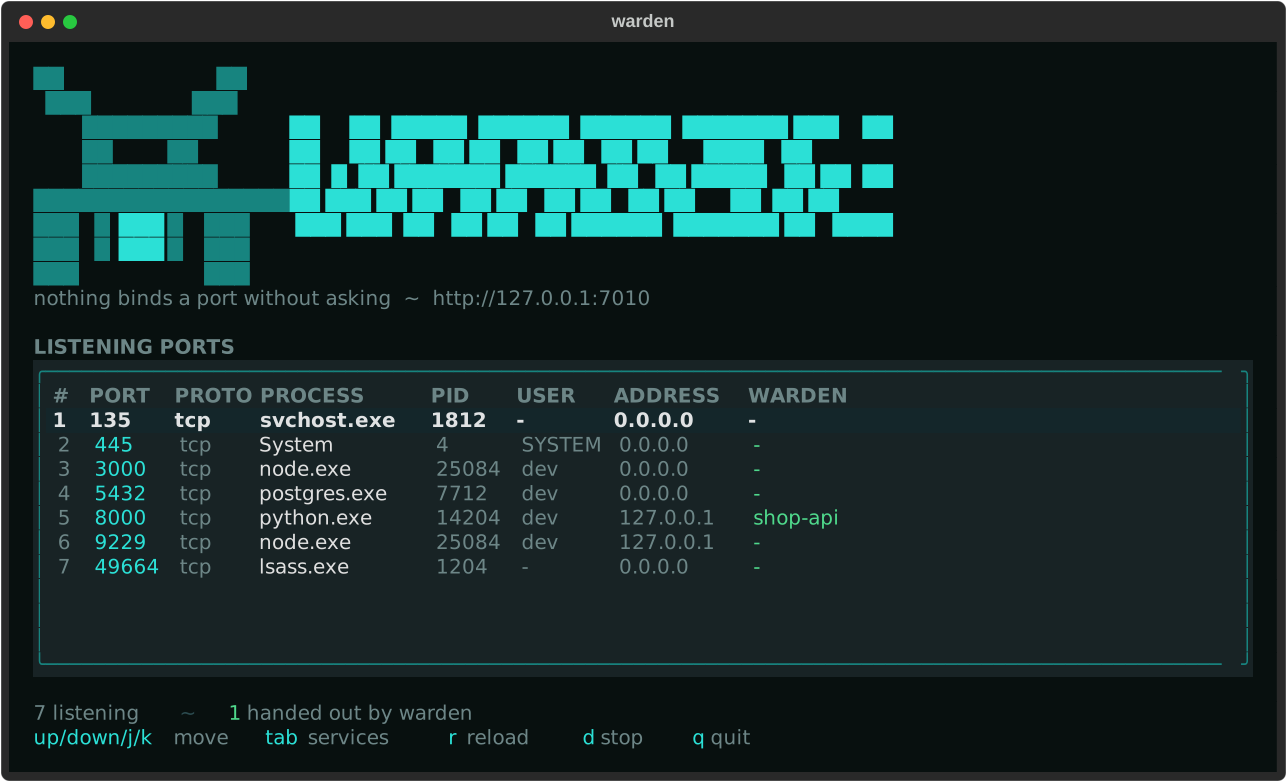
warden tui
Two live tables, refreshed every two seconds. tab swaps between what warden
handed out and what is actually listening:
| Key | Action |
|---|---|
↑ ↓ j k |
Move |
tab |
Switch between services and ports |
n |
Step the filter through one node at a time (with --all) |
r |
Reload now |
d |
Release the service, or stop the process |
q |
Quit |
The dashboard reads both tables from the warden it is pointed at, so the ports
it lists are the ones on that machine. Stopping a process from here goes
through the API and needs WARDEN_ALLOW_KILL (see below); warden kill on the
command line is local and always works.
warden tui --all points it at the whole fleet instead: both tables gain a NODE
column, n steps through one warden at a time, and a node that did not answer
is named at the bottom rather than being quietly left out. Releasing and
stopping go to the machine the row is on — a pid means nothing anywhere else.
Every refresh asks every node, so a large fleet is worth a longer --interval.
From Python
The package ships a client, so a service can ask for its own port at startup:
import uvicorn
from warden import register

port = register("shop-api", kind="backend", project="shop")
uvicorn.run(app, port=port)
Look up a neighbour instead of hardcoding its address:
from warden import WardenClient

with WardenClient() as client:
    backend = client.lookup("shop-api")
    base_url = f"http://{backend.address}"
For short-lived processes, reserve hands the port back on the way out:
from warden import reserve

with reserve("test-fixture", kind="worker") as port:
    run_server(port)
From the shell
PORT=$(warden register shop-api --kind backend)
exec ./server --port "$PORT"
HTTP API
Base URL http://127.0.0.1:7010. Interactive docs at /docs.
| Method | Path | Purpose |
|---|---|---|
GET |
/health |
Liveness and number of registrations |
GET |
/v1/pool |
Pool size, allocated, free, reserved |
GET |
/v1/services |
List registrations, filter by project and kind |
POST |
/v1/services |
Register a service, 201 when new, 200 when renewed |
GET |
/v1/services/{name} |
Look up one service |
POST |
/v1/services/{name}/heartbeat |
Extend a lease |
DELETE |
/v1/services/{name} |
Release a port |
GET |
/v1/listeners |
Every socket bound on that machine |
DELETE |
/v1/listeners/{pid} |
Stop a process, off unless WARDEN_ALLOW_KILL |
POST |
/v1/nodes |
A warden announces itself, cluster token |
GET |
/v1/nodes |
Every warden this one knows |
DELETE |
/v1/nodes/{name} |
Forget a warden |
GET |
/v1/fleet/services |
Everything the fleet holds, plus what did not answer |
GET |
/v1/fleet/services/{node}/{name} |
One service on one named node |
GET |
/v1/fleet/pool |
How much of its pool every node has left |
GET |
/v1/fleet/listeners |
Every socket bound anywhere in the fleet |
POST |
/v1/fleet/services/{node} |
Register on one named node, through this one |
POST |
/v1/fleet/services/{node}/{name}/heartbeat |
Extend a lease on one named node |
DELETE |
/v1/fleet/services/{node}/{name} |
Release a port on one named node |
DELETE |
/v1/fleet/listeners/{node}/{pid} |
Stop a process on one named node |
GET |
/v1/update |
Whether a newer warden exists |
POST |
/v1/update |
Ask this warden to update itself |
POST |
/v1/fleet/update |
Ask every warden in the fleet to update itself |
curl -s localhost:7010/v1/services \
  -H 'content-type: application/json' \
  -d '{"name": "shop-api", "kind": "backend", "project": "shop"}'
{
  "name": "shop-api",
  "kind": "backend",
  "project": "shop",
  "host": "127.0.0.1",
  "port": 8000,
  "pid": null,
  "meta": {},
  "ttl": null,
  "created_at": "2026-08-31T12:00:00Z",
  "updated_at": "2026-08-31T12:00:00Z",
  "expires_at": null
}
Failures come back as {"detail": "..."} with 404 for an unknown service,
409 when a required port is taken, and 503 when the pool is full.
How a port is chosen
- A registration that already exists keeps its port, unless another registration has taken it meanwhile.
require_portis granted if it is free and refused with409if it is not.preferred_portis granted if it is free, and otherwise quietly gives way to the pool.- Otherwise the lowest free port in the pool wins.
- Before a fresh port is handed out it is tested for an existing listener, so
anything started outside the registry is skipped. A service keeping its own
port is not probed, since it may still be bound to it.
--no-probeturns the test off entirely.
Ports are tracked per host, so 10.0.0.5:8000 and 127.0.0.1:8000 are two
different endpoints.
Leases
A registration lasts until it is released. Pass ttl to make it expire instead —
useful for test fixtures and CI, where nothing gets the chance to clean up:
warden register ci-runner --kind worker --ttl 600
warden heartbeat ci-runner, or POST /v1/services/{name}/heartbeat, pushes the
expiry out again. Sent without a ttl it renews the lease the service registered
with, so a heartbeat can never turn a lease into a permanent registration by
accident. Expired registrations are dropped on the next request that touches the
registry.
More than one machine
A warden can report to another one. The hub then knows every node, what range it hands out and whether it is still answering:
# on the hub
WARDEN_CLUSTER_TOKEN=... warden serve

# on each other machine
WARDEN_CLUSTER_TOKEN=... \
WARDEN_NODE=build-01 \
WARDEN_UPSTREAM=http://hub:7010 \
WARDEN_ADVERTISE=http://build-01:7010 \
  warden serve
$ warden nodes --url http://hub:7010
NODE      URL                    POOL       VERSION  STATUS  LAST SEEN
build-01  http://build-01:7010   9000-9099  0.1.0    online  4s ago
web-02    http://web-02:7010     9000-9099  0.1.0    stale   6m ago
Every node owns its own ports. The hub is a directory, never the owner, and that is not a detail: whether a port is free can only be answered on the machine itself, by trying to bind it. Move the decision to the hub and warden loses the one thing that makes it more than a spreadsheet — and nothing would start anywhere while the hub is down.
So a node that cannot reach its hub carries on handing out ports and says so in
its log. A node that stops reporting is shown as stale rather than dropped: a
server that is not answering is a fact worth seeing, and
warden nodes --forget build-01 removes it once it is gone for good.
WARDEN_ADVERTISE is the address the hub should use. Leave it out only when both
run on the same machine; a node pointing at a hub elsewhere while advertising
127.0.0.1 is refused at startup rather than left to fail silently later.
The hub can answer for the whole fleet at once, and a node that does not answer is named rather than left out:
$ warden ls --all --url http://hub:7010
NODE      SERVICE       KIND     PROJECT  ADDRESS         PID
build-01  build-runner  worker   ci       127.0.0.1:9000  -
hub       hub-api       backend  shop     127.0.0.1:8000  -
build-01 (http://build-01:7010) could not be reached
A name is unique per node and never across the fleet, so this view is the only
place a clash can show up at all. Two machines both holding a shop-api is
nearly always two projects that drifted apart, and it is said out loud rather
than left to be noticed:
shop-api is registered on build-01 and web-02
warden get build-01/build-runner asks one named node.
--node puts a request through the hub to one particular warden, so a machine
can be handed a port without a shell on it:
$ warden register build-runner --kind worker --node build-01 --url http://hub:7010
9000
$ warden release build-runner --node build-01 --url http://hub:7010
released build-01/build-runner
The node still decides. Only the machine itself can try to bind a port, so probing keeps working exactly as it does locally, and what comes back refused comes back in that node's own words:
$ warden register legacy-crm --kind backend --require-port 3000 --node build-01
port 3000 is held by 'grafana'
Forwarding takes WARDEN_TOKEN, never the cluster token, and the hub carries
the caller's own authorization to the node rather than its own. A hub that
could write with the cluster token would be the one door that token was never
meant to open.
warden pool --all does the same for capacity, so the machine about to run out
is the one to look at rather than the one to find:
$ warden pool --all --url http://hub:7010
NODE      POOL       HELD  FREE  RESERVED
build-01  9000-9099    97     3         0
hub       8000-8999     4   995         1

2 wardens  101 allocated  998 free  of 1099
Every node keeps its own range, and two of them may well hand out the same numbers on different machines, so the total is a sum of what is left and never one pool the fleet shares.
Wardens authenticate to each other with WARDEN_CLUSTER_TOKEN, separate from the
WARDEN_TOKEN a person uses. The cluster token opens announcing and reading; it
opens nothing that changes state.
docs/fleet.md goes through the whole thing: what the hub keeps, what survives what, and why it is built this way.
Updates
$ warden update
warden 0.2.0 is out, this is 0.1.0

$ warden update --fleet --url http://hub:7010
NODE      RESULT   DETAIL
build-01  updated  Successfully installed warden-0.2.0
db-03     refused  updating over the API is switched off
hub       updated  Successfully installed warden-0.2.0
The hub sends an intent, never a command. POST /v1/update means "update
yourself"; what that does comes from the asked machine's own
WARDEN_UPDATE_COMMAND and nowhere else. Otherwise a leaked cluster token would
be worth every machine it can reach. Both WARDEN_ALLOW_REMOTE_UPDATE and a
configured command are off by default, and a warden without them refuses and
says so.
docs/updates.md has the rest, including why the restart is your command's job.
Configuration
Every setting is an environment variable prefixed WARDEN_, or a line in a
.env file next to the process.
| Variable | Default | Meaning |
|---|---|---|
WARDEN_HOST |
127.0.0.1 |
Interface the registry listens on |
WARDEN_PORT |
7010 |
Port the registry listens on |
WARDEN_POOL_START |
8000 |
First port that may be handed out |
WARDEN_POOL_END |
8999 |
Last port that may be handed out |
WARDEN_RESERVED |
empty | Ports to keep out, e.g. 8080,8443,9000-9010 |
WARDEN_DATABASE |
platform data dir | SQLite file holding the registry |
WARDEN_PROBE |
true |
Test ports for existing listeners |
WARDEN_ALLOW_KILL |
false |
Let the API stop processes |
WARDEN_TOKEN |
empty | Require Authorization: Bearer <token> |
WARDEN_URL |
http://127.0.0.1:7010 |
Registry the client and CLI talk to |
WARDEN_UPDATE_CHECK |
true |
Ask GitHub whether a newer release exists |
WARDEN_ALLOW_REMOTE_UPDATE |
false |
Let a caller ask this warden to update itself |
WARDEN_UPDATE_COMMAND |
empty | What updating means on this machine |
WARDEN_NODE |
machine name | This warden's name in the fleet |
WARDEN_UPSTREAM |
empty | Hub to report to; empty means it is one |
WARDEN_ADVERTISE |
from host and port | Address the hub should use to reach it |
WARDEN_CLUSTER_TOKEN |
empty | Shared secret between wardens |
WARDEN_NODE_TTL |
90 |
Seconds a node's entry stays fresh |
The registry binds to loopback and has no authentication by default. Set a token before binding it to anything else.
WARDEN_ALLOW_KILL is off on purpose. A warden reachable from the network would
otherwise let anyone holding the token end processes on that machine, which is a
much bigger thing to hand out than a port number. warden kill on the command
line is unaffected: it acts locally and never asks the API.
Colours
The palette lives in warden/theme.py, so the dashboard, the CLI and this page
never drift apart.
| Role | Colour | |
|---|---|---|
| Ground | #08100f |
sculk black |
| Surface | #0e1a1c |
panels and table |
| Border | #1e3538 |
|
| Text | #d9e4e2 |
|
| Muted | #6d8687 |
labels, empty cells |
| Live | #2be0d6 |
ports, focus, the banner |
frontend |
#a87fe0 |
|
worker |
#e0b457 |
also a lease about to run out |
database |
#4fd98c |
also free capacity |
| Conflict | #e5544b |
expired leases, errors |
Development
uv sync --all-groups
uv run pytest
uv run ruff check .
License
MIT
1 maintainer

Download files
Download the file for your platform. If you're not sure which to choose, learn more about installing packages.
Source Distribution
Built Distribution
Filter files by name, interpreter, ABI, and platform.
If you're not sure about the file name format, learn more about wheel file names.
Copy a direct link to the current filters
File details
Details for the file warden_ports-0.1.0.tar.gz.
File metadata
- Download URL: warden_ports-0.1.0.tar.gz
- Upload date:
- Size: 96.7 kB
- Tags: Source
- Uploaded using Trusted Publishing? Yes
- Uploaded via:
twine/7.0.0 CPython/3.13.14
File hashes
| Algorithm | Hash digest | |
|---|---|---|
| SHA256 |
2f0fc891c36ebbbecc51a50872e9afd1eceb041e1b137a690f25d39468484a78
|
|
| MD5 |
0b4474f8fc67dfdd88efc9c4af3d7a06
|
|
| BLAKE2b-256 |
fd56829ee5a56a4dc03db6c78fa8fbf651df86f081d7d9b59cb80a9b9d94a438
|
Provenance
The following attestation bundles were made for warden_ports-0.1.0.tar.gz:
Publisher:
release.yml on vxnsin/warden
-
Statement:
-
Statement type:
https://in-toto.io/Statement/v1 -
Predicate type:
https://docs.pypi.org/attestations/publish/v1 -
Subject name:
warden_ports-0.1.0.tar.gz -
Subject digest:
2f0fc891c36ebbbecc51a50872e9afd1eceb041e1b137a690f25d39468484a78 - Sigstore transparency entry: 2683775379
- Sigstore integration time:
-
Permalink:
vxnsin/warden@4220465b4f3ae2afc09514670b983e07f9506837 -
Branch / Tag:
refs/tags/v0.1.0 - Owner: https://github.com/vxnsin
-
Access:
public
-
Token Issuer:
https://token.actions.githubusercontent.com -
Runner Environment:
github-hosted -
Publication workflow:
release.yml@4220465b4f3ae2afc09514670b983e07f9506837 -
Trigger Event:
push
-
Statement type:
File details
Details for the file warden_ports-0.1.0-py3-none-any.whl.
File metadata
- Download URL: warden_ports-0.1.0-py3-none-any.whl
- Upload date:
- Size: 49.3 kB
- Tags: Python 3
- Uploaded using Trusted Publishing? Yes
- Uploaded via:
twine/7.0.0 CPython/3.13.14
File hashes
| Algorithm | Hash digest | |
|---|---|---|
| SHA256 |
068532ad5dbbac716beffe7a70663131cbcf377daf2894c4812564a329913909
|
|
| MD5 |
51ae8ed66d1587164f9bd49750ae8442
|
|
| BLAKE2b-256 |
8fa171af830f5279986755f12f848f14868ed9752c1c1be434bdb5fc81c1470f
|
Provenance
The following attestation bundles were made for warden_ports-0.1.0-py3-none-any.whl:
Publisher:
release.yml on vxnsin/warden
-
Statement:
-
Statement type:
https://in-toto.io/Statement/v1 -
Predicate type:
https://docs.pypi.org/attestations/publish/v1 -
Subject name:
warden_ports-0.1.0-py3-none-any.whl -
Subject digest:
068532ad5dbbac716beffe7a70663131cbcf377daf2894c4812564a329913909 - Sigstore transparency entry: 2683775394
- Sigstore integration time:
-
Permalink:
vxnsin/warden@4220465b4f3ae2afc09514670b983e07f9506837 -
Branch / Tag:
refs/tags/v0.1.0 - Owner: https://github.com/vxnsin
-
Access:
public
-
Token Issuer:
https://token.actions.githubusercontent.com -
Runner Environment:
github-hosted -
Publication workflow:
release.yml@4220465b4f3ae2afc09514670b983e07f9506837 -
Trigger Event:
push
-
Statement type:














