
WarpX Geometry


Simple geometry objects for WarpX embedded boundaries.
This package provides an easy way to define simple and complex 3D geometries as analytical functions for WarpX particle-in-cell simulations. It supports both Cartesian (XYZ) and cylindrical (RZ) coordinate systems.
Gallery
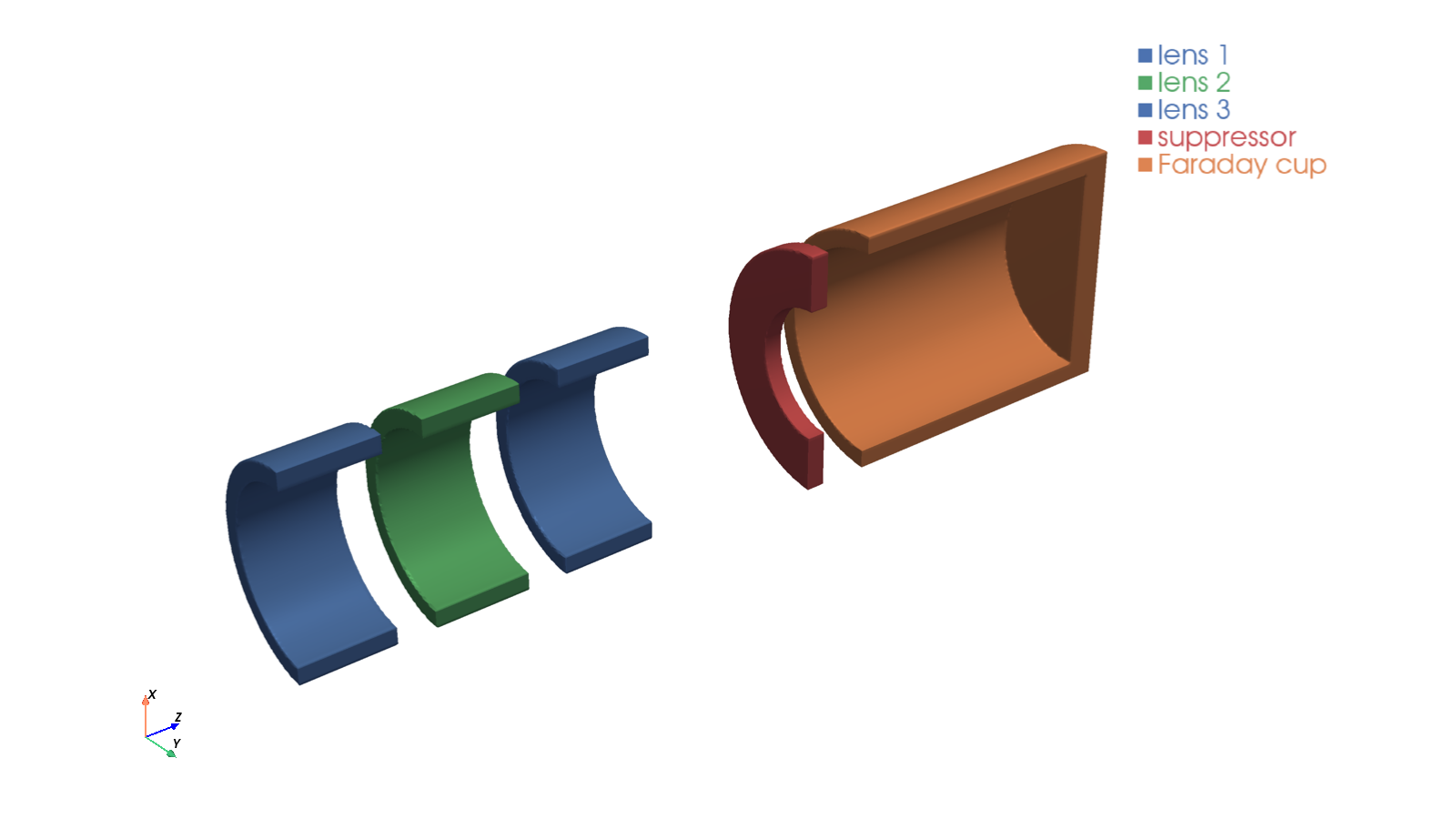
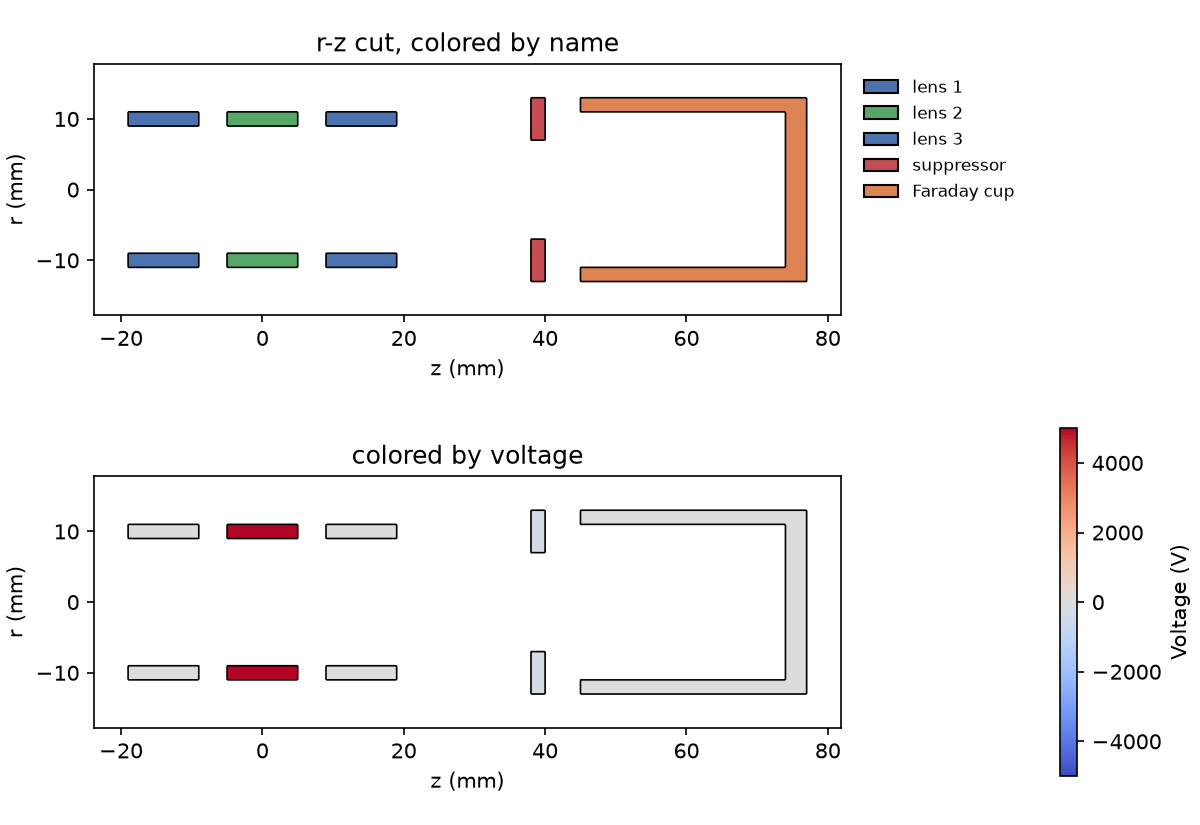
An einzel lens followed by a suppressor ring and a Faraday cup, built in RZ and
shown as a 3D cutaway and as r-z cuts colored by name and by voltage
(examples/einzel_lens_faraday_cup.py):
"warpX" built from boxes, rotated boxes and hollow cylinders, one named
conductor per letter
(examples/warpx_letters.py):

Every picture shows exactly the expression that is handed to WarpX.
Features
- Simple geometric primitives: Cylinders, boxes, cones, tori
- Boolean operations: Union, difference, intersection
- Transformations: Translation, scaling, rotation
- Named conductors: Assign voltages and colors by name
- Complex shapes: Rounded cylinders with fillets, hollow cylinders
- Pre-built components: Einzellens and other common structures
- RZ geometry support: Optimized for cylindrical simulations
- Visualization: Smooth 2D cuts (matplotlib) and 3D views (pyvista) of exactly what WarpX sees, colored by name or voltage — for quick checks and publication figures
Installation
Requires Python 3.11 or newer. The optional viz extra installs
pyvista for 3D plotting (pip install -e ".[viz]");
VTK does not provide wheels for Python 3.15 yet, so on 3.15 only the 2D plots
are available.
Using uv (recommended)
uv is a fast Python package manager that handles virtual environments and dependencies:
# Install from source
git clone https://github.com/BLAST-WarpX/warpx-geometry.git
cd warpx-geometry
uv pip install -e .
Using pip
# Install from source
git clone https://github.com/BLAST-WarpX/warpx-geometry.git
cd warpx-geometry
pip install -e .
Development installation
For development with testing and linting tools:
# Using uv
uv pip install -e ".[dev]"

# Using pip
pip install -e ".[dev]"
Quick Start
Basic Cylinder in XYZ Coordinates
from warpx_geometry import Cylinder, CylinderZ, Geometry

# Create a finite cylinder along the z-axis
# Radius: 10mm, extending from z=0 to z=100mm
cyl = CylinderZ(radius=0.010, zmin=0.0, zmax=0.1)

# Wrap it in Geometry to get WarpX-compatible output
geom = Geometry(cyl)

# Use in WarpX input: the string representation is the analytical function
print(str(geom))  # WarpX embedded boundary function
Boolean Operations
from warpx_geometry import CylinderZ, Box, Union, Diff, Geometry

# Create a hollow cylinder (difference of two cylinders)
outer = CylinderZ(radius=0.011, zmin=0.0, zmax=0.1)
inner = CylinderZ(radius=0.010, zmin=-0.01, zmax=0.11)
hollow = outer - inner  # Using - operator for difference

# Or use pre-built hollow cylinder
from warpx_geometry import CylinderZ_hollow

hollow = CylinderZ_hollow(radius_outer=0.011, radius_inner=0.010, zmin=0.0, zmax=0.1)

# Combine multiple objects
electrode1 = CylinderZ(radius=0.01, zmin=0.0, zmax=0.02)
electrode2 = CylinderZ(radius=0.01, zmin=0.05, zmax=0.07)
combined = electrode1 + electrode2  # Union using + operator

geom = Geometry(combined)
RZ (Cylindrical) Geometry
For RZ simulations, geometries are evaluated in the r-z plane (at y=0, with x representing the radial coordinate r):
from warpx_geometry import CylinderZ, Einzellens, Geometry
import numpy as np

# Create a simple electrode
electrode = CylinderZ_hollow(
    radius_outer=0.015, radius_inner=0.012, zmin=0.0, zmax=0.05
)

# Or use a pre-built Einzellens (3-electrode focusing lens)
lens = Einzellens(
    radius=0.015,  # Mean radius
    thickness=0.002,  # Wall thickness
    length=0.02,  # Length of each electrode
    gap=0.01,  # Gap between electrodes
)

geom = Geometry(lens)

# Evaluate on RZ grid for visualization
z = np.linspace(0.0, 0.15, 100)
r = np.linspace(0.0, 0.02, 50)
Z, R = np.meshgrid(z, r, indexing="ij")

# In RZ: x represents r, y=0
X = R
Y = np.zeros_like(R)

mask = geom.eval(X, Y, Z)
Advanced Shapes
from warpx_geometry import RoundedCylinderZ, Cone, Torus, Geometry

# Cylinder with rounded (filleted) edges
rounded = RoundedCylinderZ(
    radius=0.010,
    zmin=0.0,
    zmax=0.05,
    fillet_radius=0.001,
    fillet_top=True,
    fillet_bottom=True,
)

# Cone (tapered cylinder)
cone = Cone(
    z1=0.0,
    z2=0.1,  # Axial extent
    r1=0.010,
    r2=0.005,  # Radii at z1 and z2
)

# Torus (useful for fillets and rounded edges)
torus = Torus(
    major_radius=0.010,  # Distance from z-axis to tube center
    minor_radius=0.001,  # Tube radius
    z_center=0.1,  # Z-position
)

geom = Geometry(rounded + cone)
Translation
from warpx_geometry import CylinderZ, Translate, Geometry

# Create a cylinder
cyl = CylinderZ(radius=0.01, zmin=0.0, zmax=0.05)

# Translate it
cyl_translated = Translate(cyl, x=0.02, y=0.0, z=0.1)

geom = Geometry(cyl_translated)
Visualization
plot_2d (matplotlib) and plot_3d (pyvista) evaluate the WarpX expression on a
grid and contour it at zero, so outlines and surfaces are smooth. They accept a
geometry object, a Geometry (RZ geometries are revolved in 3D) or a dict
{label: object}. Named conductors are drawn as separate components; color them
with a {name: color} dict or by voltage with color_by="voltage".
import matplotlib.pyplot as plt
from warpx_geometry import CylinderZ, CylinderZ_hollow, Geometry
from warpx_geometry.viz import plot_2d, plot_3d

lens = CylinderZ_hollow(0.011, 0.009, -0.005, 0.005, name="lens", default_voltage=5000)
cup = CylinderZ_hollow(0.013, 0.011, 0.02, 0.05) + CylinderZ(0.013, 0.049, 0.052)
geo = Geometry(lens + cup.named("cup"), rz=True)

# 2D: r-z cut (default for RZ), also "xz", "yz", "xy" with position=...
ax = plot_2d(geo, mirror=True, colors={"lens": "tab:blue", "cup": "tab:orange"})
plot_2d(geo, color_by="voltage")  # colorbar from the conductor voltages
plt.savefig("geometry.pdf")  # vector output for publications

# 3D: clip="y" cuts away the +y half to look inside
plot_3d(geo, clip="y")  # interactive window
plot_3d(geo, clip="y", resolution=400, screenshot="geometry.png")  # high quality
Useful options: resolution (grid points along the longest axis; ~100 for quick
checks, 300+ for figures), bounds/extent (needed for unbounded shapes such as
Cylinder), units ("mm" by default), camera_position/view/zoom, and
plotter= to add to an existing pyvista scene. geometry_meshes returns the
surface meshes for custom rendering or export (e.g. STL).
RZ Geometry Plotting
from warpx_geometry import CylinderZ_hollow, plot_rz_geometry_components
import matplotlib.pyplot as plt

# Create geometry components
vacuum_tube = CylinderZ_hollow(0.020, 0.018, 0.0, 0.2)
electrode = CylinderZ_hollow(0.016, 0.014, 0.08, 0.12)

# Set up plot
fig, ax = plt.subplots(figsize=(10, 6))

# Plot multiple components with different colors
components = {
    "tube": (vacuum_tube, "lightgray"),
    "electrode": (electrode, "red"),
}

plot_rz_geometry_components(
    ax,
    components,
    z_range=(0.0, 0.2),  # meters
    r_range=(0.0, 0.025),  # meters
    resolution_factor=10,  # Higher = smoother edges
)

ax.set_xlabel("z (mm)")
ax.set_ylabel("r (mm)")
ax.set_title("RZ Geometry")
plt.show()
Using with WarpX
The Geometry wrapper produces WarpX-compatible embedded boundary functions:
from warpx_geometry import CylinderZ_hollow, Geometry

# Define your geometry
electrode = CylinderZ_hollow(
    radius_outer=0.015, radius_inner=0.012, zmin=0.0, zmax=0.05
)

geom = Geometry(electrode)

# In your WarpX Python input script:
# The string representation is the analytical function WarpX needs
geometry_function = str(geom)

# Use with WarpX embedded boundary
# (example for WarpX input file or Python script)
# warpx.embedded_boundary.function = geometry_function
WarpX Embedded Boundary Convention
WarpX uses the following convention for embedded boundaries:
- Function returns > 0 inside the conductor
- Function returns < 0 outside the conductor
Every shape produces a smooth function that follows this convention and is
zero exactly on its surface (where practical, the signed distance to the
surface, e.g. 0.01-sqrt(x**2 + y**2) for a cylinder of radius 10 mm).
Shapes are combined with min/max, which keeps the zero crossing on the
combined surface:
| Operation | Expression |
|---|---|
a + b (union) |
max(fa, fb) |
Intersection(a, b) |
min(fa, fb) |
a - b (difference) |
min(fa, -fb) |
The smooth function lets AMReX locate the cut cells efficiently. eval()
still returns 0/1 (outside/inside) for plotting.
Voltage Assignment (Named Conductors)
Each shape can be given a name and optional default_voltage.
A Geometry object collects all named shapes into a conductors dict and can generate
a WarpX-compatible potential expression via to_potential_expr.
from warpx_geometry import CylinderZ_hollow, Geometry, Union

# Build a multi-electrode system — give each conductor a name
ring_0 = CylinderZ_hollow(
    radius_outer=0.067,
    radius_inner=0.051,
    zmin=-0.001,
    zmax=0.001,
    name="ring_0",
    default_voltage=1600,
)
ring_1 = CylinderZ_hollow(
    radius_outer=0.067,
    radius_inner=0.051,
    zmin=0.010,
    zmax=0.012,
    name="ring_1",
    default_voltage=800,
)
tube = CylinderZ_hollow(
    radius_outer=0.100,
    radius_inner=0.080,
    zmin=-0.1,
    zmax=0.2,
    name="outer_cyl",
    default_voltage=0,  # always grounded
)

geo = Geometry(Union(Union(ring_0, ring_1), tube), rz=True)

# List the conductors the Geometry found
print(geo.conductors.keys())
# dict_keys(['ring_0', 'ring_1', 'outer_cyl'])

# Generate EB (embedded boundary) expression for WarpX
eb_expr = str(geo)

# Generate potential expression using default voltages
pot_expr = geo.to_potential_expr()

# Override voltages at call time (e.g. time-varying string expressions)
pot_expr = geo.to_potential_expr(
    {
        "ring_0": "1600 * pulse(t)",
        "ring_1": "800 * pulse(t)",
    }
)
# Zero-voltage conductors are automatically omitted.
# Non-overlapping conductors use "+"; overlapping bboxes use "max()".
to_potential_expr with a margin
Each named conductor's voltage region is derived from its bounding box.
Pass margin (in metres) to expand the region — useful when the grid spacing
means the ring boundary might not align exactly with a grid point:
# Expand each region by 2 mm so at least a few grid cells overlap
pot_expr = geo.to_potential_expr({"ring_0": 1600}, margin=0.002)
Bounding Boxes
Every shape exposes a rz_bbox property that returns an RZBBox(rmin, rmax, zmin, zmax).
from warpx_geometry import CylinderZ_hollow, RZBBox, bboxes_overlap

ring = CylinderZ_hollow(
    radius_outer=0.067,
    radius_inner=0.051,
    zmin=-0.001,
    zmax=0.001,
)

bb = ring.rz_bbox  # RZBBox(rmin=0.051, rmax=0.067, zmin=-0.001, zmax=0.001)
bb_exp = bb.expanded(0.002)  # RZBBox(rmin=0.049, rmax=0.069, zmin=-0.003, zmax=0.003)

# Check whether two bboxes overlap (touching counts as NOT overlapping)
from warpx_geometry import CylinderZ_hollow, bboxes_overlap

a = CylinderZ_hollow(0.067, 0.051, 0.000, 0.010, name="a")
b = CylinderZ_hollow(0.067, 0.051, 0.010, 0.020, name="b")  # touching at z=0.010
print(bboxes_overlap(a.rz_bbox, b.rz_bbox))  # False — touching is not overlap
print(bboxes_overlap(a.rz_bbox.expanded(0.001), b.rz_bbox.expanded(0.001)))  # True
Bounding Box Plotting
plot_rz_bboxes overlays bounding-box rectangles on an existing RZ axis.
You can call it directly or use the bbox_margin parameter of
plot_rz_geometry_components to get geometry and bboxes in one call.
from warpx_geometry import CylinderZ_hollow, plot_rz_geometry_components, plot_rz_bboxes
import matplotlib.pyplot as plt

ring = CylinderZ_hollow(0.067, 0.051, -0.001, 0.001, name="ring_0")
tube = CylinderZ_hollow(0.100, 0.080, -0.1, 0.2, name="outer_cyl")

components = {
    "ring_0": (ring, "red"),
    "outer_cyl": (tube, "gray"),
}

fig, ax = plt.subplots()

# Plot geometry + bboxes in one call
# bbox_margin=0 → exact bboxes; bbox_margin=0.002 → expanded by 2mm
plot_rz_geometry_components(
    ax,
    components,
    z_range=(-0.1, 0.2),
    r_range=(0.0, 0.11),
    bbox_margin=0,  # show unexpanded bboxes
    bbox_kwargs={"linestyle": "--", "linewidth": 1},
)

ax.set_xlabel("z (mm)")
ax.set_ylabel("r (mm)")
plt.show()
To show expanded bboxes separately (e.g. to visualise the potential regions used
by to_potential_expr):
margin = 0.002  # same margin passed to to_potential_expr

# Geometry without bboxes
plot_rz_geometry_components(ax, components, z_range=(-0.1, 0.2), r_range=(0.0, 0.11))

# Overlay expanded bboxes — dashed rectangles, same colour as each component
plot_rz_bboxes(
    ax,
    components,
    margin=margin,
    bbox_kwargs={"linestyle": ":", "linewidth": 2, "alpha": 0.5},
)
bbox_kwargs accepts any keyword argument understood by
matplotlib.patches.Rectangle (e.g. fill, facecolor, edgecolor,
linestyle, linewidth, alpha).
Available Shapes
Basic Shapes
Cylinder(radius): Infinite cylinder along z-axisCylinderZ(radius, zmin, zmax): Finite cylinderCylinderZ_hollow(radius_outer, radius_inner, zmin, zmax): Hollow cylinderBox(xmin, xmax, ymin, ymax, zmin, zmax): Rectangular boxTorus(major_radius, minor_radius, z_center): Torus around z-axisCone(z1, z2, r1, r2): Tapered cylinder
Advanced Shapes
RoundedCylinderZ(..., fillet_radius): Cylinder with rounded edgesRoundedCylinderZ_hollow(...): Hollow cylinder with fillets
Complex Geometries
Einzellens(radius, thickness, length, gap): Three-electrode electrostatic lens
Operations
Union(a, b)ora + b: Combine two objectsDiff(a, b)ora - b: Subtract b from aIntersection(a, b)ora * b: Keep only overlapping regionTranslate(obj, x, y, z): Move object in spaceScale(obj, sx, sy, sz): Scale object around the origin (see alsoscale_around,scale_to_bbox_center)Rotate(obj, angle, axis): Rotate object around the x, y or z axisobj.named(name, default_voltage=0): Name any object (including unions and transforms) so it becomes a conductor for voltages and plot colors
Project Management with uv
This project uses uv for dependency management, building, and version control:
# Run tests
uv run pytest

# Run tests with coverage
uv run pytest --cov=warpx_geometry --cov-report=html

# Format code
uv run ruff format .

# Lint code
uv run ruff check .

# Fix linting issues automatically
uv run ruff check --fix .

# Build distributions (wheel and source)
uv build
The package is built with hatchling and takes its version from the git tag via hatch-vcs.
Releasing
Move the Unreleased entries in CHANGELOG.md
to a new version section, merge that to main, then tag the merged commit.
Versions follow Semantic Versioning:
git tag -a v0.3.0 -m "Release 0.3.0"
git push origin v0.3.0
Pushing the tag publishes the package to PyPI through
publish.yml.
The version on PyPI is the tag without the leading v.
Development
Running Tests
# Using uv
uv run pytest

# Using pytest directly (if in virtual environment)
pytest

# With coverage
uv run pytest --cov=warpx_geometry
Code Quality
The project uses Ruff for linting and formatting:
# Format code
uv run ruff format .

# Check for issues
uv run ruff check .

# Auto-fix issues
uv run ruff check --fix .
Contributing
Contributions are welcome! Please:
- Fork the repository
- Create a feature branch
- Add tests for new functionality
- Ensure all tests pass:
uv run pytest - Format code:
uv run ruff format . - Submit a pull request
Copyright Notice
WarpX Copyright (c) 2018, The Regents of the University of California, through Lawrence Berkeley National Laboratory (subject to receipt of any required approvals from the U.S. Dept. of Energy). All rights reserved.
If you have questions about your rights to use or distribute this software, please contact Berkeley Lab's Innovation & Partnerships Office at IPO@lbl.gov.
Please see the full license agreement in LICENSE.txt.
Please see the notices in NOTICE.txt.
The SPDX license identifier is BSD-3-Clause-LBNL.
Citation
If you use this package in your research, please cite:
@software{warpx_geometry,
  author = {Persaud, Arun},
  title = {WarpX Geometry: Simple geometry objects for WarpX},
  url = {https://github.com/BLAST-WarpX/warpx-geometry},
  year = {2026}
}
Related Projects
Contact
For questions or issues, please open an issue on GitHub.
2 maintainers


Metadata
2 maintainers
Release files for warpx-geometry 0.3.0
For a detailed explanation of source distributions (sdists) and built distributions (wheels), please see the package formats documentation.
Source distribution (sdist)
| File | Size | Uploaded | Provenance | Actions |
|---|---|---|---|---|
| warpx_geometry-0.3.0.tar.gz | 27.2 kB | With provenance | Details for warpx_geometry-0.3.0.tar.gz |
Built distribution (wheel)
| File | Interpreter | ABI | Platform | Actions Reset |
|---|---|---|---|---|
| warpx_geometry-0.3.0-py3-none-any.whl | Python 3 | none | any | Details for warpx_geometry-0.3.0-py3-none-any.whl |
Total release size: 57.6 kB
Release files / warpx_geometry-0.3.0.tar.gz
| Download URL | warpx_geometry-0.3.0.tar.gz |
|---|---|
| Size | 27.2 kB |
| Tags | Source |
|
SHA-256 checksum How to use checksums |
d4046ed90e4be1b2ad228ad8b18ae4a574bec6043a072c2ca6b70d8c2c5e93e2
|
|
BLAKE2b-256 checksum How to use checksums |
ef1ddc7360357fa2ca52100dba058011315545b98ca8fd3192740d5934845d86
|
| Upload date | |
|
Uploaded using Trusted Publishing? What is trusted publishing? |
Yes |
| Uploaded via |
twine/7.0.0 CPython/3.13.16
|
Provenance
Provenance describes where a file came from. On PyPI, provenance is shared via attestations, which provide a verifiable record of the build or publishing details. View details, limitations and caveats.


PyPI Publish Attestation
PyPI verified that this artifact, at this checksum, originated from the publisher listed below.
Signed by GitHub Actions, verified by PyPI on Oct 31, 2026.
Transparency logRelease files / warpx_geometry-0.3.0-py3-none-any.whl
| Download URL | warpx_geometry-0.3.0-py3-none-any.whl |
|---|---|
| Size | 30.4 kB |
| Tags | Python 3 |
|
SHA-256 checksum How to use checksums |
fb3099a07bdd28507c11f5103f6f8e6c29ed1c614839b70b01491f3ec644f01c
|
|
BLAKE2b-256 checksum How to use checksums |
abbf7694f62ef7440cb4fa998443fcebd699c6751c0c3a22014cce6e3c522e2f
|
| Upload date | |
|
Uploaded using Trusted Publishing? What is trusted publishing? |
Yes |
| Uploaded via |
twine/7.0.0 CPython/3.13.16
|
Provenance
Provenance describes where a file came from. On PyPI, provenance is shared via attestations, which provide a verifiable record of the build or publishing details. View details, limitations and caveats.
PyPI Publish Attestation
PyPI verified that this artifact, at this checksum, originated from the publisher listed below.
Signed by GitHub Actions, verified by PyPI on Oct 31, 2026.
Transparency logSecurity for warpx-geometry 0.3.0
Provenance
Provenance describes where a file came from. On PyPI, provenance is shared via attestations, which provide a verifiable record of the build or publishing details. View details, limitations and caveats.
Full provenance
Both files in this release have been uploaded with provenance metadata.
Attestation for warpx_geometry-0.3.0.tar.gz
PyPI Publish Attestation
PyPI verified that this artifact, at this checksum, originated from the publisher listed below.
Signed by GitHub Actions, verified by PyPI on Oct 31, 2026.
Transparency logA note on package security
PyPI is a repository for distributing packages, not a service for auditing them. While third-party security researchers and our staff do their best to detect and remove malicious packages, PyPI cannot guarantee the quality, security or suitability of any given package.
To learn more about protecting yourself from malicious actors, visit our package security documentation.














