
Watch ArchiveTeam Warrior leaderboards on the command line

Project description
Archive Warrior Leaderboard 
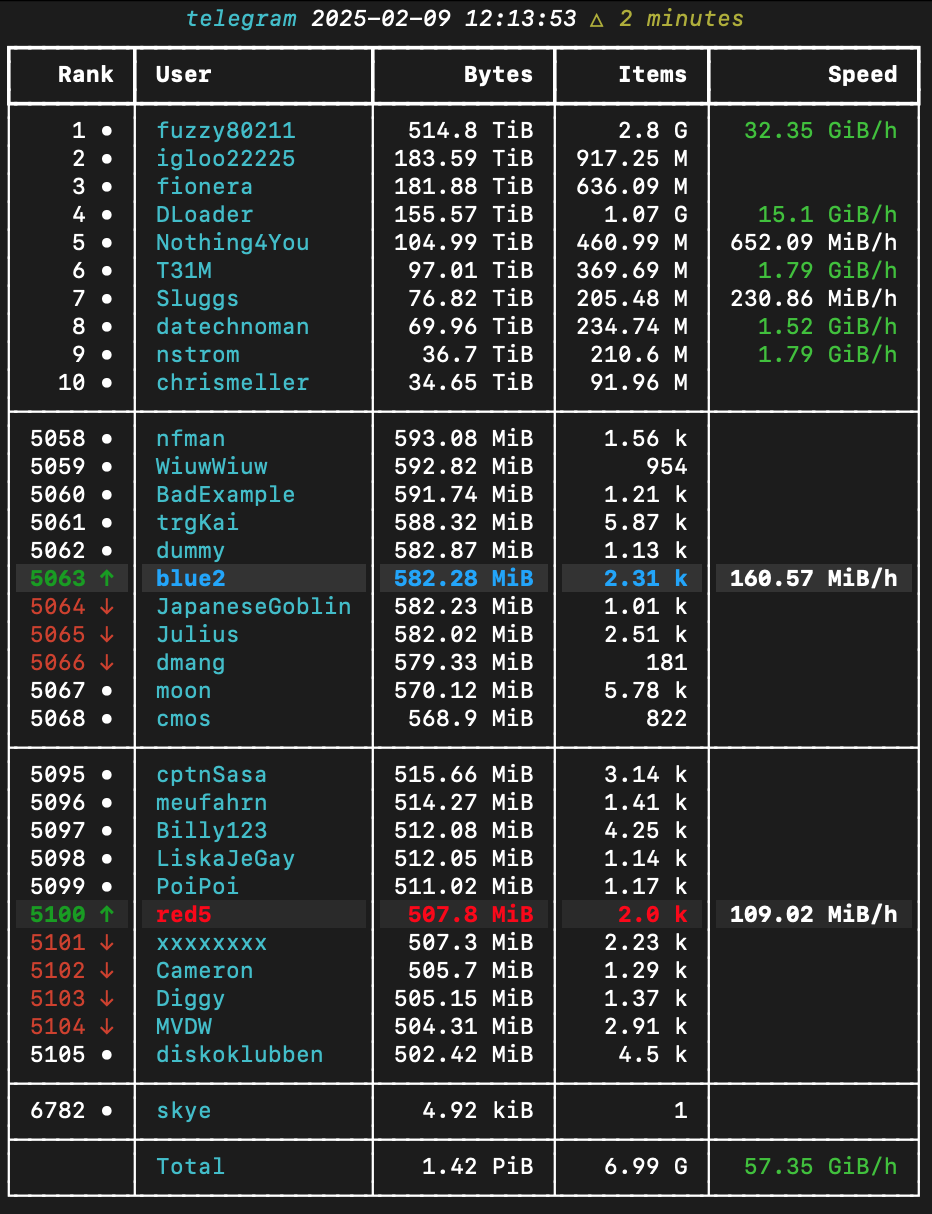
A python CLI tool to list rank of Archive Warriors
Install
Via pip
pip install warriors-leaderboard
Via brew/pipx
If you don't have pipx:
brew install pipx
pipx ensurepath
Restart terminal, then:
pipx install warriors-leaderboard
Run
warriors <project> [<user(s)>] [--top count] [--bottom count] [--surround count]
Full usage available under --help:
Usage: warriors [OPTIONS] PROJECT [USERS]...

  Shows leaderboard for given Archive Warrior project, focussing on supplied
  users or ranks

Options:
  -t, --top TEXT               Include these many from the top of the ranking
  -b, --bottom TEXT            Include these many from the bottom of the
                               ranking
  -s, --surround TEXT          Include these many either side of each supplied
                               user
  -r, --rank TEXT              Include this rank, or inclusive range of ranks
                               using a..b format, e.g. -r10..20
  --no-totals                  Hide the totals row
  --no-speed                   Hide speed column and do not show rank changes
  -l, --live                   Show and update the table in real time, ctrl+c
                               to exit
  -p, --poll-time TEXT         Live mode: Refresh rate in seconds, default 60
  -c, --average-count TEXT     Live mode: Number of refreshes to calculate
                               speed and compare ranks over, default 60
  -j, --json-record-path TEXT  Save every response under this path, latest
                               used when resuming a live view.Potentially
                               useful for a future playback mode.
  --help                       Show this message and exit.
With only a project specified you get the top 10 users:
% warriors telegram
                   telegram
┏━━━━━━┳━━━━━━━━━━━━━┳━━━━━━━━━━━━┳━━━━━━━━━━┓
┃ Rank ┃ User        ┃      Bytes ┃    Items ┃
┡━━━━━━╇━━━━━━━━━━━━━╇━━━━━━━━━━━━╇━━━━━━━━━━┩
│    1 │ fuzzy80211  │ 513.13 TiB │   2.79 G │
│    2 │ igloo22225  │ 183.59 TiB │ 917.25 M │
│    3 │ fionera     │ 181.88 TiB │ 636.09 M │
│    4 │ DLoader     │ 154.84 TiB │   1.06 G │
│    5 │ Nothing4You │ 104.87 TiB │ 460.27 M │
│    6 │ T31M        │  96.87 TiB │ 368.98 M │
│    7 │ Sluggs      │  76.79 TiB │ 205.35 M │
│    8 │ datechnoman │  69.84 TiB │ 234.03 M │
│    9 │ nstrom      │  36.51 TiB │ 209.52 M │
│   10 │ chrismeller │  34.65 TiB │  91.96 M │
└──────┴─────────────┴────────────┴──────────┘
Or you can list a number of users after the project:
% warriors usgovernment kiwi breadbrix
              usgovernment
┏━━━━━━┳━━━━━━━━━━━┳━━━━━━━━━━┳━━━━━━━━━┓
┃ Rank ┃ User      ┃    Bytes ┃   Items ┃
┡━━━━━━╇━━━━━━━━━━━╇━━━━━━━━━━╇━━━━━━━━━┩
│   14 │ breadbrix │ 4.38 TiB │ 10.88 M │
├──────┼───────────┼──────────┼─────────┤
│   17 │ kiwi      │ 3.73 TiB │  9.11 M │
└──────┴───────────┴──────────┴─────────┘
To include top or bottom ranks, use -t or -b:
% warriors usgovernment kiwi -t5 -b1
                  usgovernment
┏━━━━━━┳━━━━━━━━━━━━━━━━┳━━━━━━━━━━━┳━━━━━━━━━━┓
┃ Rank ┃ User           ┃     Bytes ┃    Items ┃
┡━━━━━━╇━━━━━━━━━━━━━━━━╇━━━━━━━━━━━╇━━━━━━━━━━┩
│    1 │ filesdotdog    │ 83.37 TiB │ 170.05 M │
│    2 │ datechnoman    │ 52.74 TiB │  83.02 M │
│    3 │ fuzzy80211     │ 26.04 TiB │  58.39 M │
│    4 │ nstrom         │ 14.85 TiB │  29.44 M │
│    5 │ paarklicks     │ 13.41 TiB │   29.4 M │
├──────┼────────────────┼───────────┼──────────┤
│   17 │ kiwi           │  3.72 TiB │   9.11 M │
├──────┼────────────────┼───────────┼──────────┤
│ 1893 │ atomicbunnies2 │ 10.26 kiB │        2 │
└──────┴────────────────┴───────────┴──────────┘
To lookaround the specified user(s), use -sN. e.g. to list the 3 above and below kiwi:
% warriors usgovernment kiwi -s3
                usgovernment
┏━━━━━━┳━━━━━━━━━━━━━━━┳━━━━━━━━━━┳━━━━━━━━━┓
┃ Rank ┃ User          ┃    Bytes ┃   Items ┃
┡━━━━━━╇━━━━━━━━━━━━━━━╇━━━━━━━━━━╇━━━━━━━━━┩
│   14 │ breadbrix     │ 4.38 TiB │ 10.87 M │
│   15 │ katia         │  4.1 TiB │ 10.58 M │
│   16 │ Sluggs        │ 3.91 TiB │  7.32 M │
│   17 │ kiwi          │ 3.72 TiB │  9.11 M │
│   18 │ xxdesmus      │ 3.61 TiB │  6.81 M │
│   19 │ DigitalDragon │ 3.37 TiB │  7.34 M │
│   20 │ meisnick      │ 3.27 TiB │  6.53 M │
└──────┴───────────────┴──────────┴─────────┘
Styling
When specifying a user, you can specify a rich style.
For a list of colors, see https://rich.readthedocs.io/en/stable/appendix/colors.html#appendix-colors
If the style contains "on" then it applies to the whole row. Speed and Rank text foreground colors will not be replaced.
Examples:
alan:red - Highlight user alan in red.
alan:"red bold" - Highlight user alan in red with bold.
alan:"red bold on yellow" - Highlight user alan in red with bold on a yellow background, and apply to whole row.
Development
- Clone repo.
- Install uv if you don't have it.
Then run:
uv run warrior_rank.py <options as decripted above>


Download files
Download the file for your platform. If you're not sure which to choose, learn more about installing packages.
Source Distribution
Built Distribution
Filter files by name, interpreter, ABI, and platform.
If you're not sure about the file name format, learn more about wheel file names.
Copy a direct link to the current filters
File details
Details for the file warriors_leaderboard-0.1.5.tar.gz.
File metadata
- Download URL: warriors_leaderboard-0.1.5.tar.gz
- Upload date:
- Size: 13.6 kB
- Tags: Source
- Uploaded using Trusted Publishing? Yes
- Uploaded via: twine/6.1.0 CPython/3.12.8
File hashes
| Algorithm | Hash digest | |
|---|---|---|
| SHA256 |
87f7c2c8a3817883016c53e1e7b9f7f541e25749b4423a74d6027fe2456ff1f7
|
|
| MD5 |
dd99869be31a3ec9524c74c1ca05f50b
|
|
| BLAKE2b-256 |
894d6b4186640172780b68ebe2bdff3cc4be35d6d716205ecfb6cc7335d9905b
|
Provenance
The following attestation bundles were made for warriors_leaderboard-0.1.5.tar.gz:
Publisher:
publish-to-pypi.yaml on westonal/archive-warrior-leaderboard-cli
-
Statement:
-
Statement type:
https://in-toto.io/Statement/v1 -
Predicate type:
https://docs.pypi.org/attestations/publish/v1 -
Subject name:
warriors_leaderboard-0.1.5.tar.gz -
Subject digest:
87f7c2c8a3817883016c53e1e7b9f7f541e25749b4423a74d6027fe2456ff1f7 - Sigstore transparency entry: 169902531
- Sigstore integration time:
-
Permalink:
westonal/archive-warrior-leaderboard-cli@bdb071783889ca16663b5794a52219f4178db762 -
Branch / Tag:
refs/tags/0.1.5 - Owner: https://github.com/westonal
-
Access:
public
-
Token Issuer:
https://token.actions.githubusercontent.com -
Runner Environment:
github-hosted -
Publication workflow:
publish-to-pypi.yaml@bdb071783889ca16663b5794a52219f4178db762 -
Trigger Event:
push
-
Statement type:
File details
Details for the file warriors_leaderboard-0.1.5-py3-none-any.whl.
File metadata
- Download URL: warriors_leaderboard-0.1.5-py3-none-any.whl
- Upload date:
- Size: 8.5 kB
- Tags: Python 3
- Uploaded using Trusted Publishing? Yes
- Uploaded via: twine/6.1.0 CPython/3.12.8
File hashes
| Algorithm | Hash digest | |
|---|---|---|
| SHA256 |
88022494f3855917449b4fd07a239b41f5cb15865f2844e6a0fd12536a8bd508
|
|
| MD5 |
45f06481a878ff7e039ccf8bf3128809
|
|
| BLAKE2b-256 |
89dd8f8edcea243d6e822dc114f5afa5d6307565f3d8481b331e78d7ec900dc6
|
Provenance
The following attestation bundles were made for warriors_leaderboard-0.1.5-py3-none-any.whl:
Publisher:
publish-to-pypi.yaml on westonal/archive-warrior-leaderboard-cli
-
Statement:
-
Statement type:
https://in-toto.io/Statement/v1 -
Predicate type:
https://docs.pypi.org/attestations/publish/v1 -
Subject name:
warriors_leaderboard-0.1.5-py3-none-any.whl -
Subject digest:
88022494f3855917449b4fd07a239b41f5cb15865f2844e6a0fd12536a8bd508 - Sigstore transparency entry: 169902533
- Sigstore integration time:
-
Permalink:
westonal/archive-warrior-leaderboard-cli@bdb071783889ca16663b5794a52219f4178db762 -
Branch / Tag:
refs/tags/0.1.5 - Owner: https://github.com/westonal
-
Access:
public
-
Token Issuer:
https://token.actions.githubusercontent.com -
Runner Environment:
github-hosted -
Publication workflow:
publish-to-pypi.yaml@bdb071783889ca16663b5794a52219f4178db762 -
Trigger Event:
push
-
Statement type:






