
Overview
Wasatch.PY is a Python application-level driver for Wasatch Photonics spectrometers. It has been tested on Windows, MacOS and Linux platforms (including Raspberry Pi Zero), and is directly used by Wasatch's own ENLIGHTEN™ spectroscopy desktop GUI.
If you'd like simpler, smaller examples of how to perform individual operations against Wasatch spectrometers from Python, please also see our Python Example Scripts repository.
History
This project started as a successor to the earlier WasatchUSB. The main difference is that while WasatchUSB was a one-time copy-pasta of legacy ENLIGHTEN classes, Wasatch.PY is an actively maintained and supported HAL (hardware abstraction layer) dependency of the current ENLIGHTEN GUI. As a result, when we add or update ENLIGHTEN features, Wasatch.PY is typically updated by necessity, making the same foundational interface available to all our users.
This shared library exemplifies two of our core values: transparency and dogfooding.
Finally, the project name reflects the fact that this is specifically a Python binding and implementation; for other USB-capable interfaces, see Wasatch.NET, Wasatch.VCPP and other software drivers.
API
A significant portion of Wasatch.PY's command interface is exposed through key-value settings, originally provided to simplify multi-process applications and summarized in docs/README_SETTINGS.md.
PyPi
Looking for Wasatch.PY from pip (PyPi)? Look no further! The
latest released version of Wasatch.PY can be loaded into your environment with a simple
pip command:
$ pip install wasatch
Package info:
For more information about PyPi package management, see README_PYPI.
Dependencies
$ pip install .
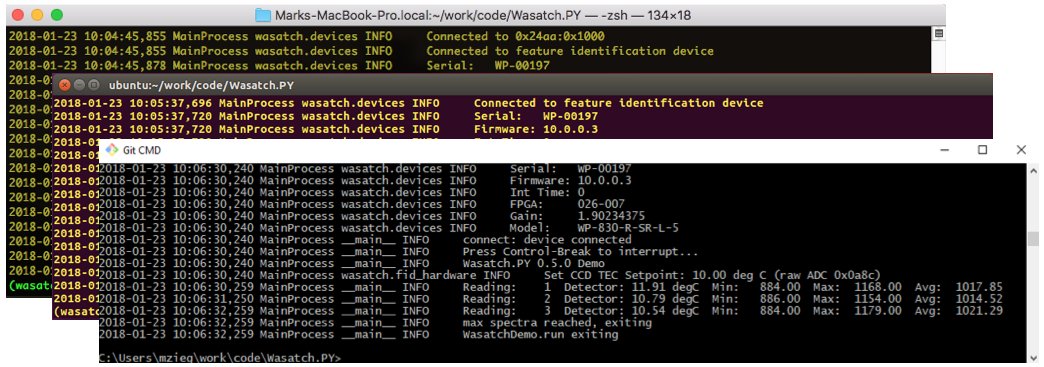
Running the Demo
Following are the general usage instructions for the included command-line demo scripts. After find specific Anaconda setup instructions for Windows, Linux, MacOS and other tested platforms.
$ python -m venv venv
$ . venv/*/activate
$ pip install .
$ python -u scripts/demo.py --help

usage: demo.py [-h] [--log-level LOG_LEVEL]
			   [--integration-time-ms INTEGRATION_TIME_MS]
			   [--scans-to-average SCANS_TO_AVERAGE]
			   [--boxcar-half-width BOXCAR_HALF_WIDTH] [--delay-ms DELAY_MS]
			   [--outfile OUTFILE] [--max MAX] [--non-blocking] [--ascii-art]

Simple demo to acquire spectra from command-line interface

optional arguments:
  -h, --help            show this help message and exit
  --log-level LOG_LEVEL
						logging level [DEBUG,INFO,WARNING,ERROR,CRITICAL]
  --integration-time-ms INTEGRATION_TIME_MS
						integration time (ms, default 10)
  --scans-to-average SCANS_TO_AVERAGE
						scans to average (default 1)
  --boxcar-half-width BOXCAR_HALF_WIDTH
						boxcar half-width (default 0)
  --delay-ms DELAY_MS   delay between integrations (ms, default 1000)
  --outfile OUTFILE     output filename (e.g. path/to/spectra.csv)
  --max MAX             max spectra to acquire (default 0, unlimited)
  --non-blocking        non-blocking USB interface (WasatchDeviceWrapper
						instead of WasatchDevice)
  --ascii-art           graph spectra in ASCII
Raspberry Pi
A standalone Raspberry Pi "Quick Start" tutorial is available here:
Linux
IMPORTANT: For Linux, you must copy the file udev/10-wasatch.rules from the Wasatch.PY distribution to /etc/udev/rules.d, then HUP udev or reboot. This will require root (sudo) privs, and is required to give userland applications access to USB devices matching Wasatch VID/PID.
Common Errors
LIBUSB error: No backend available (MacOS)
Using Homebrew:
$ brew install libusb
Version History
See Changelog


Release files for wasatch 2.5.1
For a detailed explanation of source distributions (sdists) and built distributions (wheels), please see the package formats documentation.
Source distribution (sdist)
| File | Size | Uploaded | |
|---|---|---|---|
| wasatch-2.5.1.tar.gz | 716.1 kB | Details |
Built distribution (wheel)
| File | Interpreter | ABI | Platform | Reset |
|---|---|---|---|---|
| wasatch-2.5.1-py3-none-any.whl | Python 3 | none | any | Details |
Total release size: 965.3 kB
Release files / wasatch-2.5.1.tar.gz
| Download URL | wasatch-2.5.1.tar.gz |
|---|---|
| Size | 716.1 kB |
| Tags | Source |
|
SHA-256 checksum How to use checksums |
6f008041d61a382c1f0de9e6647350e9d8a19281a391ba9e8518b2dad40e0f8d
|
|
BLAKE2b-256 checksum How to use checksums |
4d6b4f3f691f12d0f21f0d854c524b4b89b4773665a862c4369bc23a55f5a6f7
|
| Upload date | |
|
Uploaded using Trusted Publishing? What is trusted publishing? |
No |
| Uploaded via |
twine/7.0.0 CPython/3.14.8
|
Release files / wasatch-2.5.1-py3-none-any.whl
| Download URL | wasatch-2.5.1-py3-none-any.whl |
|---|---|
| Size | 249.3 kB |
| Tags | Python 3 |
|
SHA-256 checksum How to use checksums |
9b75c173b032cf3021cd4c615ff0eb9a2260ca426d3238fac378bd263a336ffd
|
|
BLAKE2b-256 checksum How to use checksums |
77bd53d91bbbd987ee3e65c04642dc7f86f2bbf010defdf818cd6201e92546bd
|
| Upload date | |
|
Uploaded using Trusted Publishing? What is trusted publishing? |
No |
| Uploaded via |
twine/7.0.0 CPython/3.14.8
|














