
🙀 WAT
Deep inspection of Python objects.
WAT is a powerful inspection tool designed to help you explore unknown objects and examine them at runtime.
"Wat" is a variant of the English word "what" that is often used to express confusion or disgust
If you ever find yourself in a Python console, feeling lost and confused,
and wondering "WAT? What is this thing?",
that's where wat inspector comes in handy.
Launch the Python Interpreter and execute wat / object on any object
to investigate its
type, formatted value, variables, methods, parent types, signature,
documentation, and its source code.
This makes it particularly useful for debugging or understanding intricate data structures in Python,
providing a straightforward way to answer "what" exactly an object represents.
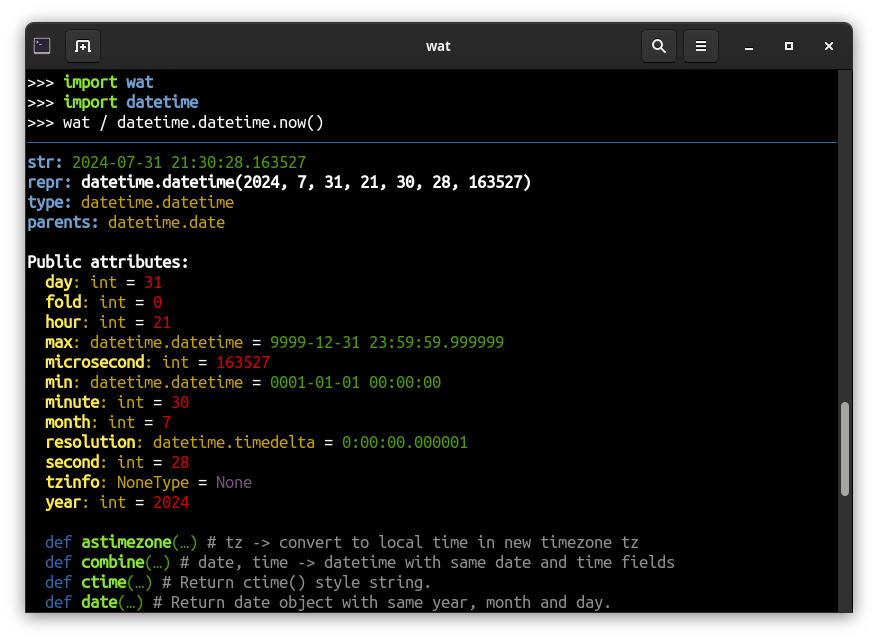
Alternatively, use wat(object) syntax for the same in-depth inspection.
Loading
Insta-Load
If you want to quickly debug something, you can use this inspector without installing anything, in the same session.
Load it on the fly by pasting this snippet to your Python interpreter:
import base64, zlib
code = b'eJzVXOtu20YW/p+nILw/SKaqNmn3Arhldp3E3Q3WjQvbbVHYBkGLI5s1RWpJKo5WENCH2Gfog/VJ9lzmTlJWmgK7G8ASOTPnmzNnzpzLzCjzpl4EedZlszJrW9EGxWJZN50peiILiqpdilmnXmtd0Qj11K7bJ3PE69bLorpVUEfVehKcLruirrJyElysl+LJXw0+fQZvGP5VXc2L28MnAfxr74D6MLip65Le81WVi8YqqOq8nrVWQVlXt9brrM6F/ZqVpUO/bIp3WaeajLF01HVNcbOCdtxptgCKtmvo7V1WruAVhkivMHB4oxGqHrObUuwahMsEjbu4rbJu1UCZktol9HfN9PXML87FXM1OOq+bRdZF9c2Pk+DphEWYfJWVrZjIrtUbC0+9oeTUM4pNP5PM1NtydVMWM/UGVfwYH0px49wlzkxGzAF9ag74K6gbhNCc8JdkBT90A2IIP0wJs8VfulSKEpA6yWpMjNWrbrnqkrJouyhdF6LMUyWvsqhEy+Ji9mMmKeaozdO2y4F4WrRZ160jOU6aaNEsCpiB9KHIu7ukbqe3okt1aVv8S0TxdFaXq0XVaipmZAqdi6aLnsH8dOtSTF8enQWfBOEv//4pDJ560FBxdnx+fBH7INlyKao8+lCERoBmVUF4VYXTH+uiihguJi16VDiHSjj8PpVLSvNG9AHZgPRWVKKB6Ui5EaDO64iZALVNaeUkUmH5jbui+b9oVkIxvFSN8RHb6CkydUGSICrVoj64NSlUFcsUpqNuIt153OM73LA4L86O3lxseW1vSHjbYKPptiHRCdD8RxCAZJx+lAp5t8mw5u/HR6+3GzOqrawPtTzR9Ghx4ktEHygQltdgX2SwHBaxRMIus0ZUXZuEk0AqS4pazsXUsLU60bMiyR6RjWqlO5cFsm/UMWk9I+gU1l/D6hGmaSmqNAWm3taViO1F2azNy2jHQG06dfUPqngs1hSJ9zOx7MimHzdN3bg9LNFd+PwihGmGDiPxh4CFNIbwl59+Ds3i1rY/IVEryFSXR0g5CfQqGNc97UXM9KoiOTywt9wNPAyuPRgUVAVZlQcRGlW56tlSx1Q+MmimBAO4qroIjU2M6/DZzul5ffrqfHtwcLABSvq2Vby/4iwEtDeXPRyQLiBNoAML7Nq3YOhWaIDS6oGxJ/evTYkzQmuIbb1qZnKe+DlFsMiZGvQjVLeHYnJDjloku1fVhkvNqrDmgQMkDZypQKVNWqgQeZQW4ApSU+7Y8klwL9ZJmS1u8oxoD+lzigrW0y2y6LA+c4nXpi3ICoKQNjLwGpqdya7OmWtYfMgERC9BXjSeCslgAerBDWdN1z4U3V0EaydkzcMKYMgqdrSPYwxfdbk4dmcD6rqiWgldqAKJXt+ya0KUUOPWh52Ws/IBMPYty8usFcf0COIMsjYQQzCGOW0UEq2Z7M4+wIgAHxMGjlFYugktMbKrZhpsI0Ek0kxIieLzoyCsRX5ATbYsMbwkEp5cGTkWZnGi12CiO/GCSRP8ye+JJQX9RAYhgT+poY+aWJ4JZ2ZTS7rSeRhKZUNMifG/crqj73BM5EomxqvEgx2AgWA7EElD8er09fEWPIYsjrVVGDJeh5Y+i3nxPgk5r1Hhi0tWNxAJQsA3X1W0sEcgsnZdzQKU3iCMQ43W01QtRHdX5wMVN6ui7ApDcpe1Q75ygBmbDds1qPrQDnm1tf3H8Q/fn55BOMXNtkq2RycnRy9Pjrcb7FAFWBszHSbmIuXpTX6r7doSTUZyeS27J6u5rNu0rso1GE6ozrpaZlV2m/sHvwn6Ym0qsXCBxhJ6mtKLABPbTmmVtJHrfql+el+AuQLPq6T9jaKafnN6/ubizenbo5P09O3JD67NGedZM6Qnf7StHymBTFTWoueCFPr3luneV2J7jvK7o7PUjHRwkH2hu73QIB/rR+oUiZJcxBj43kJ5OiyUx7h1EHs6mmqtiegptlKpR2dxjxnMmtsWk63Erdb5A0HElsqL3DZyinzbs2+o8byO06wC75uRsyxaCofUdJyrYU7FYtlZNlv1FXySBC5nwacvTBJgkKPB/lRaIA2KQh02Bz1RD5iGj1DgPTRnL8VFfKm8+4Er9OE2APeGjSh3TKY0jN3Rjs+g4cubwR0cHQ5OoN9T3OMCZi1bld3eLIh/rmClBUkQJuHYWEZAOCIKkXafEW24q62XnTps6/GoDR13hdkqaUnFkofeylEBqqkjr7uo81UpTJ6N6hPyxm5oBemCdmHKCDqa3XlxNYBT8fQWYotlFDuxNENNQ4/GGpJDe4m5uUV0/eQxCjcBB6PQrm6i8PLq6uHqanr9CYwLGadPe/CxtXhGRKOTdxKMbWaIC2cTxgIeCFQkay4Dg0ELKwYvJxO8+nnnQLwqgZRmAhUTmTxVBaan535UOoGQPRcV88VxqpegaDbnWVGCge1qFFpgp7LBhgQhYlypDvfOtoPkHQN0i1fZxNmOgHWGgu8xoTMOGeRPadcvcuRJ9HPqkBdlSkm0qGiLsLqNTHJgZbuwAJuCMi1885JYWpzk9NzlSsn0WMI0kM3T4YUek4XqcahrGASF6/TOaoed45OnTUHQM9Q66d96VlUhb8FubXSvagI9rjrxvlNZfdG0vHk8CVJcX22XYDWGrF1Bdoh2hEzo0XYY9+MKd3ZqDVAcBy+C58+e9RVPN7k8hPprtdlNu+E//ewmALptf4JlcjIwvXKSSEpmT62/AECyRpIR9G2CFyrfsZHmxO2q8SN7Z71+TZoS2Ptgv5PVuKe2x4baDthD3IxyNtigQGNfVf6OnQu+A9jNp3jx2OsGU44JGDC0RMkzMy1FC4aiy6qZbo6Lot/lgWT7/OJsG27kFrxk9UCB8VnBmGnRZvjt6dvjLTZxhmrTI7fj9Bdn3x5vsckoPYXz4wBfHZ2cH2+pkQ/Rl0dUVN0kmJd11sUDgtGD+vbrl8dn283AycIgbF7MunG3h7X9WVQTCAvzeTwOjWd049BYuw+0PGpJ8ETI2hvLqluIaG6abHYP3oeCBYwL5quypJco/DKaPo1fhBOFoDkdIB2XJxnQL/uGto8hY5XnsWN7XzhT4KOjGqvDpOEtCWsG4NEVkrV8WGgvgs8HzKqrbsdnZ6dnh+Dcawj4IGhaBxXYbJH7qoKmDa049LpD3TiU2Ww9TevEok0wEnYtwb3Hvx3vS1XwW4S8sTwJ3vHO8mxK4FHsuF3X31IL8qPmtIvK4sfGoTaKNIIzl94o6Ug1MaevUYileGirdRjwi2474UEUmJgwcyowrfCAlmyhpo0k8adqAexmFew28YEPBm6MbVuzrAVYtt1/QbPKIfPgDvPyekiveu7FY56kDcUobuzkt9eUy92Kcv0/oyeX+6vJ9aCW6NPnVM4V55K0pZ9OTWqpZMzvyvliKChL+FAfKGjjOrVpHzMvqi/O1bY7LSpTMPJ2Okqq85beAXhqdF9tXlMxJ9JN7e5e03yBLN9PgpusFYSDsyeq1YJuTERaUEjaT6qJmGJClJWF0eKhBWRO/ZS6d8SF//hUxpk1DaZPSIYuccg4H/c4ElUDfnx2n1JZ9Ce9fOjdGjq+Ioad4+nCiJ6cYzxdN51Dflk5YGYI3kGqvBaEFIeBM8d9uO2hVYjqXtX9ONlhBJPaFOUJKY1/jpgLa80Ok8ROWrrPOMT7JaRILeRN5igfEZVKjh/Ltl4uw5eiuGVymZEmZqh6VKJTnak8QzP5SqYOTnnbRdbvAtIg8trayvA4RsBtzM6oxezwDaOhgUfhN0RnnYaHEwfLnFLLjmQyZg/aGeAHda5AnN5ttLHurQNrW1gf0vlrCWH3bWN55/ODIJCg4+HqkPaonZCdqqOOU68NCefWo9PuUvAo5cmdtyr4EhRxuD10FinhAqSCJjZ90e2xo2Nn7IRB82GPwgcNRxgYaf7opgNPzYBNzcWyu3MsrzKhs1WD/oibxZqdFHlpIOlwaW17pva+3ZzX9ECf03l6A2w4nhPLHSVS4mwj/TQJpC5Zu3sfNKEVcVgF8jKLBp7eizUG84ObZV6YJ0kuEetasqLJhrfO5MUDhzLuX7Ya2En7FZto1m6XtYOmD5h4z/rq6v3zm6ury6ur/JPoC/yM/7LA4BP+iEpeWP4+kw7p4OBA3rXgg3ZKsXFvVrzPFuDjglV1X9UPlQwXWmjPVhp5Ah9fdGkataKcT4KnT9Vt0PsHPJ6zL0BBg2nqVifuq9dW3hDebEcwiipdNvUtejvrWJO5oruPzJWryajAD1k3iOIqNXcG1hiCtztR2j5Yn6JYPWKO3etQNfzy+6OLwAiZBfnCIre68SBwypJ5eNGsneAExhD8XgIpPw/IXpMphKnFvBBgmvzGML9SBGC1HDqn3dS5U/q1glMoENseXlVau3G3gS+a9XniOqv7uyK3XV9glhHZUWkTYx+efZSFQ7LTV7g0nk+Hq7lHVdXVp9nNTSPeFeBzc7YN3H9ezyDClscZPhhGVD0w6xwjqMEtBOp+y0QOhi4I4uLz4Xhr15eNwwEZOQXIHMofYfR4I3dggcGEPAT4h0QPd6KB1X0n1PQj9kPW8i353AfjWMgHw0N/GSbtkDgAOto2K1c44yWmzWxDByQLS8YikgvIYhcmaVRZe5rYNcNYfI094NMIsnkiy3HOaCKhzEe6bbK1BZUXLd1dI1s8X5UKsGB4sFxtXYq+0kBrC0WgFGY9lLYH8wpl5i/tsoYZa8fXfhQPLHUiCoxzHMG+LesbC9wC4BoLIfStqzLeMKYUkiZolEdeVko2re/OdBuaBauMLSwqqPE06DDQ4fQcDQZkUDJ4UkG8zerlOtKEUzmyiBCt+5Z4pMtt9oXacVIynv1+5qZ2NEEcN6t4iifahGF0Eml5RZ8p6UxMkGUwIQo4cTUgNBJWgmAB16CB9vnImNN073j1rrXKX9P4vzhCcJy9oaggHgBIeYAJt4fltyyzdcp1+kcpNhlIy6EcvTfgtPIh7EAENx+iENpBHGX/kGkIE4c3ND/ONdc5/uqm9OQ1KmY3wiHFUzFXbwlU4kFFT84IiMrIyQ6bGUO26O0hqVYbOf4Q1i5+oVnEb1rE4bYvEMMJh8aJ7GdZLyP36ji29KLDIeXwx9Anm66WOW6L+cqELUG6CcS9sGT7dL2WOgI1g/ADO9nSGClPM+VSYv3sxaF7WEq5fBxb6av7oJ7yBA3pqaP3nsn1oXt3JSjddBjuh9h9Zlg9drLjWJFBEKlrOzC8m5jVO2Y12YRzrAkPA/lbxLCD3uAVO90Set1OoX3R1BV3BvF6+ur05PSMEqcYnO2DaKLYEbruYDwxlozplr5gB3416OcExoyzMvkZsyUKOv8eXDQ0JqzWAjREdHbAv3bcNz3vKcigWTZ7m9RHbPtynIC8eKfdue9tbFzll7iNBZLl+ccBlO1dMe8+DqP5DTDq5iN5+FiA8iMHIK++aRAy7a4/QtNrYiZnIRnvQqkj+RffmWib7Gr2pSS5HrhqbmCl5oecI7LDygV+c+JFJRSa4RPnNfgERfvywd5tFxMf4Dk9B7QbHG9acogY/n/FnP1hyLTj146Dyd2BSMiPGImFCkP5m5f/jI4F5i8cTRx2ZApNVgCD+ldPdI9yLOzgjbxzzN0Y5OXRWRLi/t/lsy8+/8OCczM6HpLFz00xbuiY0j/LUkhUDcJnspCv/Jjy56r89O2xKf2j7u/bYwOsMOgE3xQrCLwdJks/M1zIO+b9saif3fTx1caqqflc0UBWa5BUaW/30jtznd2tqntcufOixGv5+B8ugHUcixPOZaAAHrCA8kkYezEK/0yM/3MChFYHe4oi8X7B0crbxMagQmC7xCAEf6NKo+FzvQUQUp6uxggDpHQ+IcUAU6ui3vg/o+rVyQ=='
exec(zlib.decompress(base64.b64decode(code)).decode(), globals())
Now you can use wat object.
[!Warning] Before executing Insta-Load snippet, it's recommended to verify what you're about to run. You can either:
- Verify what's inside the extracted code beforehand:
print(zlib.decompress(base64.b64decode(code)).decode())- Paste the content of inspection.py into your interpreter. It has the same effect.
- Install package with pip and review the code.
Install with pip
Alternatively, install wat package and import inspection tool from wat module:
pip install wat
import wat
This package has no external dependencies.
Fun Fact: Load from Unicode Glyph
You can load WAT from a single Unicode glyph.
import zlib
glyph = '🙀󠅸󠆜󠇕󠅜󠇫󠅮󠇛󠅆󠄖ⷾ󠆟󠆧󠄠󠆼󠄿󠅈󠆦󠆪󠄶󠅩ⷷ󠄂󠆸󠅥󠅶󠆝󠇄󠇝󠄍󠇖󠆍󠄋󠇛󠅭󠅑󠇘󠄆󠅁󠆋󠄣󠆛󠄵󠅅󠅪󠅉󠄪󠆎󠅖󠄐󠇐󠆇󠇘󠅧󠇨󠆃ⷵ󠅉ⷶ󠅜󠇦󠅎󠅒󠅖󠆚󠄂󠆻󠄛󠇀󠄒󠄹󠄳󠇧󠆛󠄳󠅧󠇎󠆜󠇋󠇌󠄨ⷳ󠆦󠅞󠄄󠅹󠇖󠅥󠆳󠄲󠅫󠅛󠇑󠄆󠇅󠅢󠅙󠄷󠆝󠄩󠅺󠄢󠄋󠆊󠆪󠅝󠆊󠅙󠆧󠅞󠅫󠅝󠇑󠄈ⷵ󠇔󠆮󠇛󠄧󠅳󠇄󠇫󠇖󠇋󠆢󠆺󠅕󠅐󠅇󠇕󠅺󠄒󠆜󠄮󠆻󠆢󠆮󠆲󠅲󠄒󠅜󠆬󠆗󠇢󠇉󠅟󠄍󠄾󠅽󠄆󠅯󠄘ⷾ󠅕󠅝󠇍󠆋󠇛󠇃󠄧󠄁ⷼ󠅫󠇯󠆀ⷺ󠄰󠆸󠆩󠇫󠆒󠇞ⷳ󠅕󠆕󠆋󠇆󠄪󠆨󠇪󠆼󠆞󠆵󠅖󠅁󠅙󠅗󠆷󠇖󠇫󠆬󠇎󠆅ⷽ󠆚󠆕󠆥󠅃󠆿󠅬󠆊󠅷󠅙󠆧󠆚󠆌󠆱󠅴󠇔󠅵󠅍󠅱󠆳󠆂󠅶󠇜󠅩󠆶󠄀󠆊󠆶󠅫󠇨󠇭󠅝󠅖󠆮󠇠󠄕󠆆󠅈󠆯󠄰󠅰󠅸󠆣󠄑󠆪󠄞󠆳󠆛󠅒󠇬󠄚󠆄󠇋󠄄󠆍󠆻󠆸󠆭󠆲󠅮󠇕󠅀󠆙󠆒󠇚󠄥ⷴ󠅷󠇍ⷴⷵ󠇌󠄯󠇎󠇅󠅜󠇍󠅎󠄺󠆯󠆛󠅅󠇖󠅅ⷵ󠇍󠆏󠆓󠇠󠇩󠆄󠅅󠆘󠅼󠆕󠆕󠆭󠆘󠇈󠆮󠇕󠄛󠄋󠅏󠆽󠆡󠇤󠇔󠄳󠆊󠅍󠄿󠆓󠇌󠇔󠇛󠅲󠅵󠅓󠄖󠄳ⷵ󠄆󠅕ⷼ󠄘󠄟󠅊󠅱󠇣󠇜󠄥󠇎󠅌󠅆󠇌󠄁󠅽󠅪󠄎ⷸ󠄫󠆨󠄛󠆄󠇐󠆜ⷰ󠆗󠅤󠄅󠄿󠅴󠄃󠅢󠄈󠄿󠅌󠄉󠆳󠇅󠅟󠆺󠅔󠆊󠄒󠆐󠄺󠇉󠅪󠅌󠆌󠇕󠆫󠅮󠆹󠇪󠆒󠆲󠅨󠆻󠄨󠅝󠄗󠆢󠇌󠅓󠄥󠆯󠆲󠆨󠅄󠇋󠇢󠅢ⷶ󠅣󠄦󠄩󠇦󠆨󠇍󠇓󠆶󠇋󠆁󠅸󠅚󠆴󠅙󠇗󠆭󠄣󠄹󠅎󠆚󠅨󠇑󠄬󠄊󠆘󠆁ⷴ󠆡󠇈󠆻󠆻󠆤󠅮󠆧󠆷󠆢󠅋󠅵󠅩󠅛ⷼ󠅋󠅄ⷱ󠅴󠅖󠆗󠆫󠅅󠇕󠅪󠄪󠅦󠅤󠄊󠆝󠆋󠆦󠆋󠆞󠇁ⷼ󠅴󠇫󠅒󠅌󠅟󠄞󠆝󠄅󠆟󠄄󠇡󠄯ⷾ󠄩󠄌󠆞󠅺󠇐󠅐󠅱󠅶󠅼󠅾󠅼󠄑ⷻ󠄠󠇙󠅲󠄩󠆪󠄼ⷺ󠅐󠆄󠅆󠆀󠅦󠅕󠅁󠅸󠅕󠆅󠇓󠄟󠇫󠆢󠆊󠄘󠄮󠄦󠄭󠅺󠅔󠄸󠆇󠅊󠄸ⷼ󠄾󠆕󠅋󠅊ⷳ󠅆ⷴ󠄁󠇙󠆀ⷴ󠅖󠅔󠆢󠆁󠇩󠅈󠆹󠄑󠆠󠇎󠇫󠆈󠆙󠄀󠆵󠅍󠅩󠇥󠄤󠅒󠅡ⷹ󠆍󠆻󠆢ⷹ󠆿󠅨󠅖󠅂󠄱󠆼󠅔󠆍ⷱ󠄑󠇛󠇨󠄩󠄲󠅵󠅁󠆒󠄠󠄪󠇕󠆢󠄾󠆸󠄵󠄩󠅔󠄕󠇋󠄔󠆦󠆣󠅮󠄢󠇝󠅹󠇜󠇣󠄻󠇜󠆰󠄸󠄯󠇎󠆎󠇞󠅜󠅬󠅹󠅭󠅯󠅈󠅸󠇛󠅠󠆣󠇩󠆶󠄡󠇑󠄉󠇐ⷼ󠅇󠄐󠆀󠅤󠆜󠅾󠆔󠄊󠅹󠆷󠇉󠆰󠇦󠇯󠇇󠅇󠆯󠆷󠄛󠄳󠆪󠆭󠆬󠄏󠆵󠄼󠇑ⷴ󠅨󠅱󠇢󠅋󠅄󠄟󠄨󠄐󠆖󠇗󠅠󠅟󠅤󠆰󠄜󠄖󠆱󠅄󠇂󠄮󠆳󠅆󠅔󠅝󠆛󠆄󠆓󠅀󠄪󠅋󠆊󠅚󠇎󠇅󠇔󠆰󠆵󠄺󠇑󠆳󠄢󠇉󠄞󠆑󠆍󠅪󠆥󠄻󠆗󠄅󠆲󠅯󠇔󠄱󠅩󠄽󠄣󠇨󠄔󠇖󠅟󠇃󠇪󠄑󠆦󠅩󠄩󠆪󠄴󠄅󠆦󠇞󠇖󠆕󠆈󠇭󠅅󠇙󠆬󠇍󠇋󠅨󠇇󠅀󠅭󠄺󠅵ⷵ󠄏󠆪󠅸󠄬󠇖󠄔󠆉ⷷ󠄳󠆱󠇬󠇈󠆦󠄟󠄷󠅍󠇝󠆸󠄽󠄬󠇑󠅝ⷸⷼ󠄢󠆄󠅩󠆆󠄎󠄣ⷱ󠆇󠆀󠆅󠄴󠆆ⷰ󠆗󠆟󠅾󠄎󠇍󠇢󠇖󠆶󠄿󠄡󠅑󠄫󠇈󠅔󠆗󠅇󠅈󠄹󠄉ⷴ󠄪󠄘󠇗󠄽󠇭󠅅󠇌ⷴ󠆪󠄢󠄹󠄼󠆰󠆷󠇜󠄍󠄼󠄌󠆮󠄽󠄘󠄔󠅔󠄅󠅙󠆕󠄇󠄑󠄚󠅕󠆹󠇪󠇙󠅒󠇇󠅔󠄾󠄲󠅨󠆦󠄄󠄃󠆸󠆪󠆺󠄈󠆍󠅍󠆌󠇫ⷰ󠇙󠇎󠇩󠅹󠅽ⷺ󠇪󠅼󠅻󠅰󠅰󠆰󠄁󠅊ⷺ󠆶󠅕󠆼󠆿󠇢󠄬󠄄󠆴󠄷󠆗󠄽󠄜󠆐󠄮󠄠󠅍󠆠󠄃󠄋󠇬󠇚󠆷󠅠󠇨󠅖󠅨󠆀󠇒󠇪󠆁󠆱󠄧ⷷ󠆯󠅍󠆉󠄳󠅂󠅫󠆈󠅭󠆽󠅪󠅦󠅲󠆞ⷸ󠄹󠅅󠆰󠇈󠆙󠄚ⷴ󠄣󠅔󠆷󠆇󠅢󠅲󠅃󠆎󠅚󠄤󠆻󠅗󠇕󠆆󠅋󠇍󠆪󠆰󠇦󠆁󠄃󠄤󠄍󠆜󠆩󠅀󠆥󠅍󠅚󠆨󠄐󠅹󠆔󠄖󠇠󠄊󠅒󠅓󠇮󠇘ⷲ󠅉󠅰󠄯󠇖󠅉󠆙󠄭󠅮ⷲ󠆌󠅨󠄏󠇩󠅳󠆊󠄊󠇖󠇓󠄭󠆲󠇨󠆰󠄾󠅳󠆉󠇗󠆦󠄭󠇈󠄊󠆂󠆐󠄶󠄲ⷰ󠄚󠆚󠆝󠇉󠆮󠇎󠆙󠅫󠅘󠅼󠇈󠄄󠅄󠄯󠅁󠅞󠄴󠆞󠄊󠇉󠅠󠄁󠇪󠇁󠄍󠅧󠅍󠇗󠄾󠄔󠇝󠅝󠄄󠅫󠄧󠅤󠇍󠇃󠄊󠅠󠇈󠄪󠅶󠆴󠆏󠅣󠄌󠅟󠅵󠆹󠄸󠅶󠅧󠄃󠇪󠆺󠆢󠅚󠄉󠅝󠆨󠄂󠆉󠅞󠇟󠆲󠅫󠅂󠆔󠅐󠇣󠇖󠆇󠆝󠆖󠆳ⷲ󠄁󠄰ⷶ󠄭󠇋󠇋󠆬󠄕󠇇ⷴ󠄈󠇢󠄌󠆲󠄶󠄐󠅃󠄰󠆆󠄹󠅭󠄔󠄒󠆭󠆙󠇬󠇎󠄾󠇀󠆈󠄀󠄟󠄓󠄆󠆎󠅑󠅘󠆺󠄉󠄭󠄱󠆲󠆫󠅦󠄚󠅬󠄣󠅁󠄤󠇒󠅌󠅈󠆉󠇢ⷳ󠆣󠄠󠆬󠅅󠅾󠅀󠅍󠆶󠄬󠄱󠆼󠄤󠄒󠆞󠅜󠄙󠄹󠄖󠅦󠅱󠆢󠇗󠅠󠆢󠄻ⷱ󠆂󠅉󠄓ⷼ󠇉󠇯󠆉󠄥󠄅ⷽ󠅄󠄆󠄡󠆁󠄿󠆩󠆡󠆏󠆚󠅘󠆞󠄉󠅧󠅦󠅓󠅋󠆺󠇒󠅹󠄘󠅊󠅥󠅃󠅌󠆉ⷱ󠆿󠅲󠆺󠆣󠇯󠅰󠅌󠇤󠅊󠄦󠇆󠆫󠇄󠆃󠄝󠆀󠆁󠅠󠄻󠄐󠅉󠅃ⷱ󠇪ⷴⷵⷱ󠄖󠄼󠆆󠄬󠆎󠆵󠅕󠄘󠄲󠅞󠆇󠆖󠄾󠆋󠅹ⷱ󠄾󠄉󠄹󠆯󠅑󠇡󠆋󠅋󠅖󠄷󠄐󠄉󠅂󠇀󠄷󠅟󠅕󠆴󠆰󠅇󠄠󠆲󠅶󠅝󠇍󠄂󠆔󠇞󠄠󠆌󠅃󠆍󠇖󠇓󠅔󠄭󠅄󠅷󠅗󠇧󠄃󠄕󠄷󠆫󠆢󠇬󠄊󠅃󠅲󠆗󠆵󠅃󠆾󠅲󠆀󠄙󠆛󠄍󠇛󠄵󠆨ⷺ󠇐󠄎󠅹󠆵󠆵ⷽ󠇇ⷱ󠄏󠇟󠆟󠆞󠅁󠄸󠇅󠇍󠆶󠅊󠆶󠅇󠄧󠄧󠅇󠄯󠅏󠆎󠆷󠄛󠇬󠅐󠄅󠅘󠄛󠄳󠄝󠄦󠇦󠄢󠇥󠇩󠅍󠅾󠆫󠇭󠇚󠄒󠅍󠅆󠅲󠅹󠄭󠆻󠄧󠆫󠆹󠆬󠇛󠆴󠆮󠇊󠄵󠄘󠅎󠆨󠇎󠆺󠅚󠅦󠅕󠅶󠆛ⷻ󠄇󠆿󠄉ⷺ󠅢󠅭󠄪󠆱󠅰󠆁󠇆󠄒󠅺󠆚󠇒󠆋󠄀󠄓󠇛󠅎󠅩󠆕󠆴󠆑󠇫󠅾󠆩󠅾󠅺󠅟󠆀󠆹󠄂󠇏󠆫󠆤ⷽ󠆍󠆢󠆚󠅾󠅳󠅺ⷾ󠇦󠇢󠇍󠇩󠇛󠆣󠆓ⷴⷴ󠇭󠇉󠄏󠆮󠇍󠄙󠇧󠅙󠄳󠆤󠄧󠅿󠆴󠆭󠄟󠄩󠆁󠅌󠅔󠇖󠆢󠇧󠆂󠄔ⷺⷷ󠆖󠇩󠇞󠅗󠅢󠅻󠆎ⷲ󠆻󠆣󠆳󠇔󠆌󠅴󠅰󠆐󠅽󠆡󠆻󠆽󠇐󠄠󠄟󠇫󠅇󠇪󠄔󠆉󠆒󠅜󠇄󠄘ⷸ󠇞󠅂󠅹󠄺󠄬󠆔󠇇󠆸󠅵󠄐󠅻󠄺󠆚󠅪󠆭󠆉󠇨󠄩󠆶󠅒󠆩󠅇󠅧󠅱󠆏󠄙󠇌󠆚󠇛󠄖󠆓󠆭󠇄󠆭󠇖ⷹ󠄃󠅁󠇄󠆖󠇊󠆋󠇜󠄶󠅲󠆊󠅼󠇛󠆳󠅯󠆨ⷱ󠆼󠆎󠇓󠆬󠄂󠇯󠆛󠆑󠆳󠄬󠅚󠄊󠆇󠇔󠅴󠆜󠆫󠅡󠅎󠇅󠅢󠇙󠅙󠄶󠅛ⷵ󠄕󠅼󠆒󠄄󠄮󠅧󠇁󠆧󠄯󠅌󠄒󠅠󠆐󠆣󠇁ⷾ󠅔󠅚󠄠󠄍󠆊󠅂󠄝󠄶󠄇󠄽󠅑󠄏󠆘󠆆󠆏󠅐󠇠󠄽󠄴󠅧󠄯󠇅󠅅󠅼󠆩󠆼ⷻ󠆁󠄫ⷴ󠇡󠄶󠄀ⷷ󠆆󠆍󠄨󠅷󠅌󠆦󠄴󠆌󠇝󠇑󠆎󠇏󠆠󠇡󠇋󠆛󠇁󠄝󠄜󠄝󠄎󠅎󠆠󠇟󠅓󠇜󠇣󠄂󠅦󠄭󠅛󠆕󠇝󠇞󠄬󠆈󠅿󠆮󠅠󠆥󠄅󠅉󠄐󠄦󠇡󠇘󠅘󠅆󠅀󠄸󠄢󠄊󠆑󠅶󠆟󠄑󠅭󠆸󠆫󠆭󠆗󠆝󠄺󠅬󠇫ⷱ󠆨󠄍󠄝󠅷󠆅󠇙󠄪󠅩󠅉󠇅󠆒󠆇󠇞󠇊󠅑󠄁󠆪󠆩󠄣󠆯󠆻󠆨ⷳ󠅕󠄩󠅌󠆞󠆍󠇪󠄓ⷲ󠇆󠅮󠅨󠄅󠇩󠆂󠅶󠅡󠇊󠄈󠄺󠆚󠇝󠅹󠅱󠄵󠆀󠅓ⷱⷴ󠄖󠅢󠆋󠅥󠄔󠄻󠆱󠄴󠅃󠅍󠅃󠆏󠇆󠄚󠆒󠅃󠅻󠆉󠆹󠆹󠅅󠅴ⷽ󠇤󠄱󠄊󠄷󠄁󠄇󠆣󠇐󠆮󠅮󠆢ⷰⷲ󠇪󠇪󠇡󠇪󠅪󠅺ⷽ󠄉󠆌󠄋󠄙󠆧󠅏󠅻ⷰ󠆱󠆵󠅸󠅆󠅄󠆣󠆓󠅷󠄒󠆌󠅭󠅦󠆈󠄋󠅧󠄓󠇆󠄂󠄞󠄈󠅔󠄤󠅫󠄮󠄃󠆃󠅁󠄋󠄫󠄆󠄯󠄧󠄓󠆼ⷺ󠅹󠇧󠅀󠆼󠄪󠆁󠆔󠅦󠄂󠄕󠄓󠆙󠄼󠅕󠄅󠆦󠆧󠇧󠅾󠅔󠄺󠆁󠆐󠄽󠄗󠄕ⷳ󠇅󠅱󠆪󠆗󠆠󠅨󠄶󠇧󠅙󠅑󠆂󠆁󠇭󠅪󠄔󠅚󠅠󠆧󠆲󠇁󠆆󠄄󠄡󠅢󠅜󠆩󠄎ⷷ󠇎󠆶󠆃󠇤󠄝󠄃󠅴󠆋󠅗󠇙󠇄󠇙󠆎󠆀󠅵󠆆󠆂󠇯󠄱󠆡󠄳󠄎󠄙󠇤󠅏󠅩󠇗󠄯󠅲󠇤󠅉ⷴ󠅳󠇪󠆐󠄗󠅥󠅊󠅉󠆴󠆨󠅨󠆋󠆰󠆺󠆍󠅌󠅲󠅠󠅥󠆻󠆰󠄀󠆛󠆂󠄲󠄭󠅼ⷳ󠆒󠅘󠅚󠆜󠇤ⷴ󠇜󠇥󠅊󠇉ⷴ󠅘󠇂󠄴󠆐󠇍󠇓󠇡󠆅󠄞󠆓󠆅󠇪󠅱󠆨󠅫󠄘󠄄󠆅󠇫ⷴ󠇎󠅪󠆇󠆝󠇣󠆓󠆧󠅍󠅁󠇐󠄳󠇔󠄺󠇩󠇟󠅺󠅖󠅕󠄡󠅯󠇁󠅮󠅭󠅴󠆯󠅪󠄂󠄽󠆮󠄺ⷱ󠆾󠅓󠅙󠅽󠇑󠆴󠆼󠅹󠄼󠄉󠅒󠅜󠅟󠅭󠆗󠅠󠄵󠆆󠆬󠅝󠅁󠅶󠆈󠅶󠆄󠅌󠇨󠇑󠅶󠄘ⷷ󠇣󠄊󠅷󠅶󠅪󠄍󠅐󠄜󠄇󠄯󠆂󠇧󠇏󠆞ⷵ󠄕󠅏󠄷󠆹󠄼󠆄ⷺ󠅫󠆵󠇙󠅍󠆻󠇡󠄿ⷽ󠇬󠄦󠄀󠆺󠅭󠅿󠆂󠅥󠅲󠄲󠄰󠆽󠅲󠆒󠅈󠅊󠅦󠅏󠆭󠆿󠄀󠅀󠆲󠅆󠆒󠄑ⷴ󠅭󠆂󠄗󠄪󠇟󠆱󠆑󠇦󠇄󠇭󠆪ⷱ󠄣󠅻󠅧󠆽󠅾󠅍󠆚󠄒󠇘ⷻ󠅠󠆿󠆓󠇕󠆸󠆧󠆶󠇇󠆆󠇚󠄎󠇘󠅃󠇜󠆌󠅲󠄶󠇘󠆠󠅀󠅣󠅟󠅕ⷾ󠆎󠆝󠄋󠆾󠄃󠇘󠇍󠆧󠅸ⷱ󠇘󠇫󠄆󠅓󠆎󠄉󠄘󠄰󠆴󠅄󠇉󠄳󠄳󠄭󠅅󠄋󠆆󠆢󠇋󠆪󠆙󠅮󠆎󠆋󠆢󠇟󠇥󠆁󠅤ⷻⷼ󠇢󠅬󠄛󠅮󠇤󠄖󠆼󠅤ⷵ󠅀󠆁ⷱ󠅙󠇁󠆘󠅩󠇑󠅦ⷸ󠇭󠇩󠇛󠇣󠄭󠄶󠅱󠆆󠅪󠇓󠄣󠆷󠇣ⷴ󠄗󠅧󠇟󠄞󠅯󠆱󠇉󠄨󠄽󠆅ⷳ󠇣󠄀󠅟󠄝󠆝󠆜󠄟󠅯󠆩󠆑󠄏󠇑󠆗󠅇󠅔󠅔󠇝󠄤󠆘󠆗󠅵󠇖󠇅󠄃󠆂󠇑󠆃ⷺⷶ󠇫󠆗󠇇󠅧󠇛󠇍󠇀󠇉󠇂󠄠󠅬󠅞󠇌󠆺󠅱󠆷󠆇󠆵ⷽ󠅙󠅔󠄓󠄈󠄋ⷳ󠅹󠄼󠄎󠆍󠅧󠅴󠇣󠇐󠅘󠆻󠄏󠆴󠄼󠅪󠅉ⷰ󠅄󠇈󠇚󠄛󠇋󠆪󠅛󠆈󠅨󠅮󠆚󠅬󠅶󠄏󠇞󠆇󠆂󠄅󠆌󠄋󠇦󠆫󠆲󠆤󠆗󠄨ⷼ󠄲󠆚󠄾󠆍󠅟󠆄󠄓󠆅󠆠󠄹󠄝󠄠󠄝󠆗󠄧󠄙󠇐󠄯ⷻ󠆆󠆶󠆏󠄡󠅣󠆕󠇧󠆱󠅣󠅻󠅟󠄸󠅓󠇠󠆣󠆣󠄚󠆫󠇃󠆤󠇡󠄭󠄉󠅫󠄆󠇠󠇑󠄕󠆒󠆵󠅼󠅘󠅨󠄯󠆂󠇏󠄇󠇌󠆪󠆫󠅮󠇇󠅧󠅧󠆧󠅧󠆇󠇠󠇜󠅫󠄈ⷸ󠄠󠅨󠅚󠄇󠄕󠇘󠅬󠆑ⷻ󠆪󠆂󠆦󠄍󠆭󠄸ⷴ󠆺󠅃󠇝󠄸󠆔󠇙󠅬󠄽󠅍󠇫󠇄󠆢󠅍󠄰󠄒󠅶󠄭󠇁󠆽󠇇󠆿󠄝󠇯󠅋󠅕ⷰ󠅛󠆄󠆼󠆱󠄼󠄉󠇞ⷱ󠇎ⷲ󠅬󠅊󠇠󠅑󠇬󠆸󠅝󠇗󠇟󠅒󠄋ⷲ󠆣󠇦󠆴󠆋󠇊󠇢󠇇󠇆󠆡󠄶󠆊󠄴󠆂󠄳󠆗󠇞󠄨󠇩󠅈󠄵󠄱󠆧󠆯󠅑󠆈󠆥󠅸󠅨󠆫󠅵󠄘ⷰ󠆋󠅮󠄻󠇡󠅁󠄔󠆘󠆘󠄰󠅳󠄪󠄰󠆭ⷰ󠆀󠆖󠅬󠆡󠆦󠆍󠄤ⷱ󠆧󠅪󠄁󠇬󠅦󠄕󠇬󠄶ⷱ󠆁󠄏󠄆󠅮󠆌󠅭󠅛󠆳󠆬󠄅󠅘󠆶󠇝󠅿󠅁󠆳󠇊󠄡ⷳ󠇠󠄎ⷳⷲ󠅺󠅈󠆯󠅺󠇮󠇅󠅣󠆞󠆤󠄍󠇅󠄨󠅮󠇬󠇤󠆷󠇗󠆔󠇋󠇝󠆊󠅲ⷽ󠄿󠆣󠄧󠆗ⷻ󠆫󠇉ⷵ󠆠󠆖󠇨󠇓󠇧󠅔󠇎󠄕󠇧󠆒󠆴󠆥󠆟󠅎󠅍󠅪󠆩󠅤󠇌󠇯󠇊ⷹ󠅢󠄨󠄨󠅋ⷸ󠅐󠄟󠄨󠅨󠇣󠄺󠆵󠅩󠄟󠄳󠄯󠆪󠄯󠇎󠇕󠆶󠄻󠄭󠄪󠅓󠄰ⷲ󠅶󠄺󠅊󠆪ⷳ󠆖󠇞󠄁󠅸󠅪󠅴󠅟󠅭󠅞󠅓󠄱󠄧󠇒󠅍󠇭󠇮󠅞󠇓󠅼󠆁󠄬󠇟󠅏󠆂󠆛󠆬󠄕󠆄󠆃󠆳󠄧󠆪󠇕󠆂󠅮󠅌󠅄󠅚󠅐󠅈󠇚󠅏󠆪󠆉󠆘󠅢󠅂󠆔󠆕󠆅󠇑󠇢󠆡󠄅󠅤󠅎ⷽ󠆔󠆺󠅷󠇄󠆅ⷸ󠅔󠇆󠆙󠄵󠄍󠆦󠅏󠅈󠆆󠄮󠅱󠇈󠄸󠄟ⷷ󠄸󠄒󠅕󠄃󠅾󠅼󠅶󠆟󠅒󠅙ⷴ󠄧󠆽󠅼󠇨󠇝󠄚󠄺󠆾󠄢󠆆󠆝󠇣󠇩󠇂󠆈󠆞󠆜󠅣󠄼󠅝󠄷󠆝󠅃󠅾󠅙󠄹󠅠󠅦󠄈󠇞󠅁󠆪󠆼󠄖󠆄󠄔󠆇󠆁󠄳󠇇󠅽󠆸󠇭󠆡󠅕󠆈󠇪󠅞󠇕ⷽ󠄸󠇙󠅡󠄄󠆓󠇚󠄔󠇥󠄉󠄩󠆍󠅿󠆎󠆘󠄋󠅫󠇍󠄎󠆓󠇄󠅎󠅚󠆺󠇏󠄸󠇄ⷻ󠄥󠆤󠅈󠄭󠇤󠅍󠇦󠄨󠄟󠄑󠆕󠅊󠆎󠄟󠇋󠆶󠅞󠄮󠇃󠆗󠆢󠆸󠅥󠅲󠆙󠆑󠄦󠅦󠆨󠅺󠅔󠆢󠅓󠆝󠆩󠄼󠅃󠄳ⷹ󠅊󠆦󠄎󠅎󠅹󠇛󠅅󠇖󠇯󠄂󠇒󠄠ⷲ󠇚󠇚󠇊ⷰ󠄸󠅆󠇀󠅭󠇌󠇎󠆨󠇅󠇬ⷰ󠄍󠆣󠆡󠆁󠅇󠇡󠄷󠅄󠅧󠆝󠆆󠆇󠄓󠄇󠇋󠆜󠅒󠇋󠆎󠅤󠄲󠅦󠄏󠇚󠄙󠇠󠄇󠅵󠆮󠅀󠆜󠇞󠅭󠆴󠆱󠇮󠆭󠄃󠅫󠅛󠅘󠄟󠇒ⷹ󠅫󠄉󠅡ⷷ󠅭󠅣󠅹󠇧ⷳ󠆃󠄠󠆐󠆠󠇣󠇡󠇪󠆐ⷶ󠆨󠆝󠆐󠆝󠆪󠆣󠆎󠅓󠆯󠄍󠄉󠇧󠇖󠆣󠇓󠇮󠅒ⷰ󠄨󠇥󠇉󠆝󠆷󠄪ⷸ󠄒󠄔󠅱󠆸󠄽󠅴󠄖󠄩󠇡󠄂󠆤󠆂󠄦󠄶󠅽󠇑󠇭󠆱󠆣󠅣󠅧󠇬󠆄󠅁ⷳ󠅡󠆏󠇂󠄇󠄍󠅇󠄘󠄘󠅩ⷾ󠇨󠆦󠄃󠅏󠇍󠆀󠅍󠇍󠇅󠆲󠆻󠅳󠄬󠆯󠄲󠆡󠆳󠅕󠆃ⷾ󠆈󠆛󠇅󠆚󠆝󠄔󠅹󠅩󠄠󠇩󠅰󠅩󠅭󠅻󠆦ⷶ󠆾󠇝󠆜󠇗ⷴ󠅀󠆟󠇓󠅹󠅺󠄃󠅬󠄸󠆞󠄓󠇋󠄝󠄥󠅒󠇢󠅬󠄣ⷽ󠄴󠄉󠆤󠄮󠅙󠆻󠅻󠄟󠄴󠆡󠄕󠅱󠅘󠄅ⷲ󠄲󠆋󠄆󠆞󠇞󠆋󠄵󠄆ⷳ󠆃󠆛󠅥󠅞󠆘󠄧󠅉󠄮󠄑󠇫󠅚󠆲󠆢󠇉󠆆󠆷󠇎󠇤󠇅󠄃󠆇󠄲󠇮󠅟󠆶󠄚󠇘󠅉ⷻ󠄕󠆛󠅨󠇖󠅮󠆗󠆵󠆃󠆦󠄏󠆘󠅸󠇏ⷺ󠇪󠇪ⷽⷳ󠆛󠆫󠆫󠇋󠆫󠆫ⷼ󠆓󠇨󠄋ⷼ󠆌󠆲󠇀󠇠󠄓ⷾ󠆈󠅊󠅞󠅘ⷾ󠄾󠆓󠄎󠇩󠇠󠇠󠅀󠇞󠆵󠇠󠆃󠅶󠅊󠆱󠅱󠅯󠅖󠆼󠇏󠄖󠇠󠇣󠆂󠅕󠅵󠅟󠇕󠄏󠆕󠄌󠄗󠅚󠅨󠇏󠅖󠄚󠅹󠄂󠄟󠅟󠅴󠅩󠄚󠆵󠆢󠆜󠅏󠆂󠆧󠅏󠇕󠅭󠇐ⷻ󠄇󠄼󠆞󠆳󠄯󠅀󠅁󠆃󠅩󠇪󠅖󠄧󠇮󠆫󠇗󠅖󠇞󠄐󠇞󠅬󠅇󠄰󠆊󠄪󠅝󠄶ⷵ󠄭󠅺󠄻󠇫󠅘󠆓󠆹󠆢󠆻󠆏󠇌󠆕󠆫󠇉󠆨󠇀󠄏󠅙󠄷󠆈󠇢󠄪󠄵󠅷󠄆󠇖󠄘󠆂󠆷󠄻󠅑󠇚󠄾󠅘󠆟󠆢󠅘󠄽󠅢󠆎󠇝󠇫󠅐󠄵ⷼⷲⷻ󠆣󠆋󠇀󠄈󠆙󠄅ⷹ󠇂󠄢󠆷󠆺ⷱ󠄠󠅰󠇊󠆒󠅹󠅸󠇑󠆬󠆝󠇠󠄄󠇆󠄐ⷼ󠅞󠄂󠄩󠄿󠄏󠇈󠅞󠆓󠄩󠆄󠆩󠇅󠆼󠄐󠅠󠆚ⷼ󠇆󠄰󠆿󠅒󠄄󠅠󠆵󠄜󠄺󠆧󠇝󠇔󠆹󠅓ⷺ󠆵󠆂󠅓󠄨󠄐󠇛󠄞󠅞󠅕󠅚󠆻󠅱󠆷󠆁󠄯󠆚ⷵ󠅹󠇢󠄺󠆫ⷻ󠆻󠄢󠆷󠅝󠅟󠅠󠆖󠄑󠇙󠅑󠅩󠄓󠅣󠄟󠆞󠅽󠆔󠆅󠅃󠆲󠇓󠅗󠆸󠄴󠆞󠅏󠆇󠆫󠆹󠅇󠅕󠇕󠇕󠆧󠇙󠇍󠅍󠄣󠇞󠄕󠇠󠅳󠅳󠆶󠄍󠇜󠅿󠅞󠇏󠄠󠇂󠆖󠇇󠄙󠄾󠄘󠅆󠅔󠄽󠄰󠇫󠄜󠄣󠆨󠇁󠄭󠄄󠇪󠅾󠇋󠅄󠄎󠆆󠄮󠄈󠇢󠇢ⷳ󠇡󠅸󠅫󠇗󠆗󠆍󠇃󠄁󠄙󠄹󠄅󠇈󠄜󠇊󠄟󠅡ⷴ󠅸󠄣󠅷󠅠󠆁󠇁󠆄󠄼󠄄ⷸ󠆇󠅄󠄏󠅷󠆢󠆁󠇕󠅽󠄧󠇔ⷴ󠄣ⷶ󠅃󠇖ⷲ󠄭ⷹ󠇜󠄇󠇣󠅘󠇈󠄇󠇃󠅃󠅿󠄙󠄦󠇭󠆐󠄸󠄀󠄺󠇚󠄶󠄫󠅗󠄸󠇣󠄥󠆦󠇍󠅬󠅃󠄇󠄤󠄋󠅋󠇆󠄢󠆒󠄋󠇈󠅢󠄗󠄦󠅩󠅔󠅙󠅻󠆚󠇘󠄵󠇃󠅘󠅼󠆍󠄽󠇠󠇓󠄈󠆲󠅹󠄢󠇋󠅱󠇎󠅨󠄢󠆡󠇌󠅇󠆺󠅭󠆲󠆵󠄅󠆕󠄗󠄭󠇝󠅝󠄣󠅛󠄼󠅟󠆕󠄊󠆰󠅠󠅸󠆰󠅜󠅭󠅝󠆊󠆾󠇒󠅀󠅫󠄋󠅅󠆠󠄔󠅦󠄽󠆔󠆶󠄇ⷳ󠄊󠅥󠇦󠄯󠇭󠆲󠆆󠄙󠅫󠇇󠇗󠅾󠄔󠄏󠄬󠅵󠄢󠄊󠆌󠅳󠄜󠇁󠆾󠄭󠇫󠄛󠄋󠇜󠄂󠇠󠄚󠄋󠄡ⷴ󠆭󠆫󠄲󠇞󠄰󠆦󠄔󠆒󠄦󠅨󠆔󠅇󠅞󠅖󠅊󠄶󠆭󠇯󠇎󠅴󠄛󠆚󠄅󠆫󠆌󠄭󠄬󠄪󠆨ⷱ󠄴󠇨󠄰󠇐󠇡ⷴ󠄜󠄍󠄆󠅤󠅐󠄲󠅸󠅒󠅁󠆼󠇍󠇪󠇥󠄺󠇒󠆄󠅓󠄹󠆲󠆈󠄐󠆭ⷻ󠆖󠅸󠆤󠇋󠅭ⷶ󠆅󠇚󠅱󠅒󠄲󠆞ⷽ󠅾󠇦󠆦󠅶󠄴󠅁󠄜󠄷󠆫󠅸󠆊󠄧󠇚󠆄󠅡󠅴󠄒󠅩󠅹󠅅󠆟󠄩󠇩󠅌󠅌󠆐󠅥󠄰󠄡󠄊󠄸󠅱󠄵󠄠󠄴󠄒󠅖󠆂󠅠󠄁󠇗󠆠󠆁ⷶⷹ󠇈󠆘󠇓󠅴󠇯󠅸ⷵ󠆮󠆵󠇊󠅟󠇓ⷸ󠆿󠄸󠅂󠅰󠆜󠆽󠆡󠆨󠄠󠄞󠄀󠅈󠅹󠆀󠄉󠆷󠆇󠇥󠆷󠄬󠆳󠅵󠇊󠅵ⷺ󠅇󠄩󠄶󠄙󠅈󠇋󠆡󠄜󠆽󠄷󠇠󠆴ⷲ󠄡󠇬󠅀󠄄󠄷󠄟󠆢󠄐󠇚󠅁󠄜󠅥󠆐󠅩󠄈󠄓󠆇󠄷󠄴󠄿󠇎󠄵󠇗󠄹ⷾ󠇪󠆦ⷴ󠇤󠄵󠄪󠅦󠄷󠇂󠄡󠇅󠅓󠄱󠅗󠅯󠄉󠅔󠇢󠅁󠅅󠅏󠇎󠄈󠆈󠇊󠇈󠇉󠄎󠆛󠄙󠅃󠆶󠇨󠇭󠄡󠆩󠅖󠄛󠄹ⷾ󠄐󠇖󠄮󠅾󠆡󠅙󠇄󠅯󠅚󠇄󠇡󠆶󠄯󠄐󠇃󠄉󠆇󠇆󠆉󠇬󠅧󠅙󠄯󠄣ⷷ󠇪󠄸󠆶ⷴ󠆢󠇃󠄡󠇥ⷰ󠇇󠇐󠄧󠆛󠆮󠆖󠄹󠅮󠆋ⷹ󠇊󠆄󠄭󠅁󠆺󠄉󠇄󠆽󠆰󠅤ⷻ󠅴󠆽󠆖󠄺󠄂󠄵󠆃ⷰ󠄃󠄻󠇙󠇒󠄘󠄩󠅏󠄳󠇥󠅒󠅢ⷽ󠇬󠇅󠆡󠅻󠅘󠅊󠆹󠅼󠄜󠅛󠇩󠆫ⷻ󠆠󠆞ⷲ󠄄󠄍󠇩󠆩󠆣ⷷ󠆞󠇉ⷵ󠆡󠅻󠅷󠄥󠄨󠇝󠅴󠄘󠇮󠆇󠇘󠅽󠅦󠅘󠄽󠅶󠆲󠇣󠅘󠆑󠅁󠄐󠆩󠅫󠄻󠄰󠆼󠆛󠆘󠇕󠄻󠅦󠄵󠇙󠆄󠅳󠆬󠄉󠄏󠄃ⷹ󠅛󠇄󠆰󠆃󠇞󠇠󠄕󠄻󠇝󠄒󠅺󠇝󠅎󠆡󠅽󠇑󠇔󠄕󠅷󠄆ⷱ󠅺ⷺ󠇪ⷴ󠇤ⷴ󠆌󠄒󠆧󠄘󠆜󠇭󠆃󠅨󠆢󠇘󠄑󠆺󠇮󠅠󠄼󠄱󠆖󠆌󠇩󠆖󠆾󠅠󠄇󠅾󠄵󠇨󠇧󠄄󠇆󠆌󠆳󠄲ⷹ󠄙󠆳󠄥󠄊󠄺󠄞󠅜󠄴󠄴󠄦󠆬󠇖󠄂󠄴󠅄󠅴󠅶󠇀󠆿󠅶󠇜󠄷󠄽󠇯󠄩󠇈󠆠󠅙󠄶󠅻󠆛󠇔󠅇󠅬ⷻ󠅲󠆜󠆀󠆼󠅸󠆧󠇝󠆹󠇯󠅭󠅬󠅜󠇥󠆗󠆸󠆍󠄅󠆒󠇥ⷹ󠇇󠄁󠆔󠇭󠅝󠄱󠇯󠄾󠄎󠆣ⷹ󠄍󠄰󠇪󠇦󠄣󠅹ⷸ󠅘󠆀ⷲ󠄣󠄇󠄠󠆯󠆾󠅩󠄐󠄲󠇭󠆮󠄿󠅂󠇓󠅫󠅢󠄦󠅧󠄡󠄙󠇯󠅂󠆩󠄣ⷹ󠄗󠇟󠆙󠅨󠆛󠇬󠅪ⷶ󠆥󠄤󠆹󠄞󠆸󠅪󠅮󠅠󠆥󠇦󠆇󠆜󠄣󠆲󠇃󠇊󠄅󠅾󠅳󠇢󠅅󠄥󠄔󠆚󠇡󠄓󠇧󠄵ⷸ󠄄󠅅ⷻⷲ󠇁󠇞󠅭󠄗󠄓󠄟󠇠󠄹󠄽󠄇󠆴󠄛󠄜󠅯󠅚󠅲󠆈󠄘ⷾ󠅿󠇅󠆜ⷽ󠅡󠇈󠆴󠇣󠇗󠆎󠆃󠇉󠇝󠆁󠅈󠇈󠆏󠄘󠆉󠆅󠄊󠅃ⷹ󠆛󠆗󠆌󠆎󠄅󠇦󠄯󠄜󠅍󠄜󠅶󠅤󠄊󠅍󠅖󠄀󠆃ⷺ󠅗󠅏󠅴󠆏󠅲󠄬󠇬󠇠󠆍󠆼󠅳󠇌󠇝󠄘󠇤󠇥󠇑󠅙󠄒󠇢ⷾ󠇟󠇥󠆳󠄯󠄾󠇃󠆂󠅳󠄳󠄺󠄞󠆒󠇅󠇏󠅍󠄱󠅮󠇨󠆘󠇒󠄿󠇋󠅒󠅈󠅔󠄍󠇂󠅧󠆲󠆐󠆯ⷼ󠆘ⷲ󠇧󠆪ⷼⷴ󠇭󠆱󠄩ⷽ󠆣󠇮󠇯󠇛󠅣󠄃󠆬󠄰󠇨󠄄󠇟󠄔󠄫󠄈󠆼󠄝󠄦󠅋󠄿󠄳󠅜󠇈󠄻󠇦ⷽ󠆱󠆨󠆟󠇝ⷴⷱ󠇕󠇆󠆪󠆩ⷹ󠅜󠇑󠅀󠅖󠅫󠆐󠅔󠅩󠅯ⷷ󠇒󠄻󠅳󠆝󠇝󠆭󠆪󠅻󠅜󠆹ⷳ󠆢󠇄󠅫ⷹⷸ󠄟󠄮󠆀󠅵󠄜󠆋󠄓󠇎󠅥󠆠󠄀󠄞󠆰󠆀ⷲ󠅉󠄘󠅻󠄱󠄊󠅌󠆌󠅳󠄂󠆄󠅖󠄇󠅻󠆊󠄢ⷱ󠅾󠇁󠇑󠇊󠇛󠇄󠇆󠆠󠅂󠅠󠆻󠇄󠄠󠄄󠅿󠆣󠅊󠆣󠇡󠅳󠆽󠄅󠄐󠅒󠆞󠆮󠇆󠄈󠄃󠆤󠅴󠄾󠄡󠇅󠄀󠅓󠆫󠆢󠇞ⷸ󠄿󠆣󠇪󠇕󠇉'
exec(zlib.decompress(bytes(ord(c)&255 for c in glyph[1:])).decode(), globals())
wat / 'WAT is going on?'
Usage & modifiers
wat can quickly inspect things
by using the division operator (for faster typing without parentheses).
A short syntax wat / foo is equivalent to wat(foo).
You can call wat.modifier / foo with the following modifiers:
.shortor.sto hide the attributes (variables and methods inside the object) and print only value, type, parent types, signature and documentation.dunderto display dunder attributes (starting with double underscore).longto show non-abbreviated values and docstrings.codeto reveal the source code of a function, method, or class.nodocsto hide documentation for functions and classes.callerto show how and where the inspection was called (works in files, not REPL).publicto show only public attributes (hiding private attributes).allto include all available information.retto return the object back after the inspection.strto return the output string instead of printing it.grayto disable colorful output in the console.colorto enforce colorful outputs in the console
You can chain modifiers, e.g. wat.short.str.gray / 'foo'.
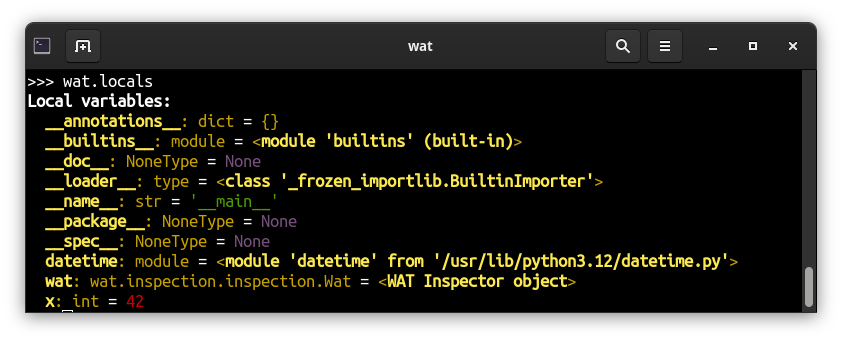
Call wat.locals to inspect local variables.
Call wat.globals to inspect global variables.
You can explore any object. In Python, an "object" refers to not only to data structures, but also to functions, classes, modules, built-in types, and more.
Type wat in the interpreter to learn more about this object itself.
There are several alternative syntaxes that are equivalent. Choose the one that works best for you:
wat.short / 'foo'  # fast typing
wat.short('foo')
wat('foo', short=True)  # natural Python syntax
'foo' | wat.short  # Unix piping
Use Case Examples
Determine type
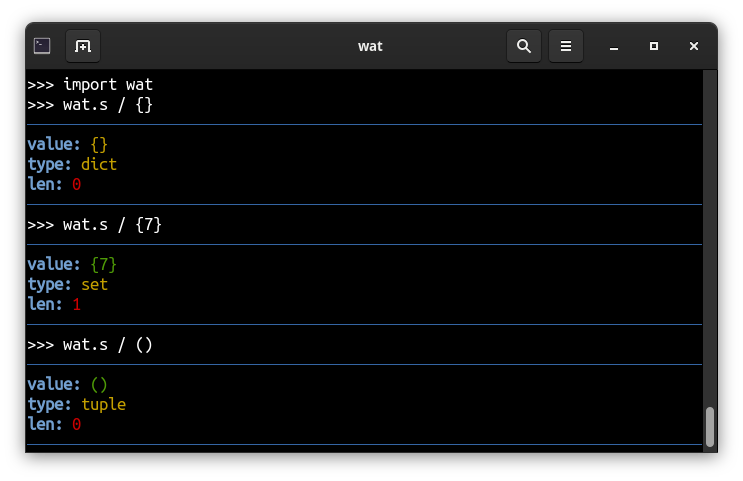
In a dynamic typing language like Python, it's often hard to determine the type of an object. WAT Inspector can help you with that by showing the name of the type with the module it comes from.
>>> wat.short / (1,)
value: (1,)
type: tuple
len: 1
>>> wat.short / {None}
value: {None}
type: set
len: 1
>>> wat.short / user
str: admin
repr: <User: admin>
type: django.contrib.auth.models.User
parents: django.contrib.auth.models.AbstractUser, django.contrib.auth.base_user.AbstractBaseUser, django.contrib.auth.models.PermissionsMixin, django.db.models.base.Model, django.db.models.utils.AltersData
Now that you've identified the actual type, you can put the type annotations in your code to reduce further confusion.
Look up methods
By listing out methods with their signatures and docstrings, you can easily grasp how to use the unknown object.
wat / ['foo']
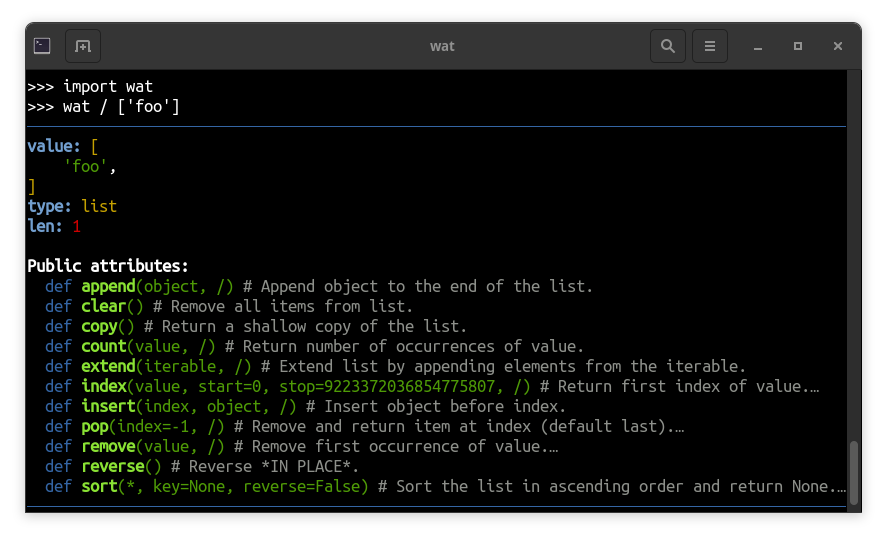
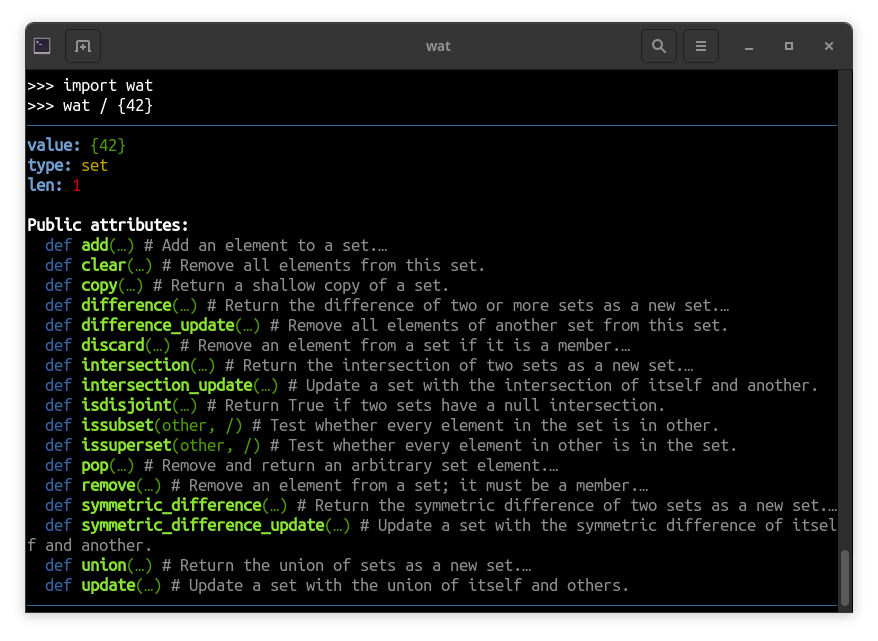
Use wat.long if you want to see full doscstrings.
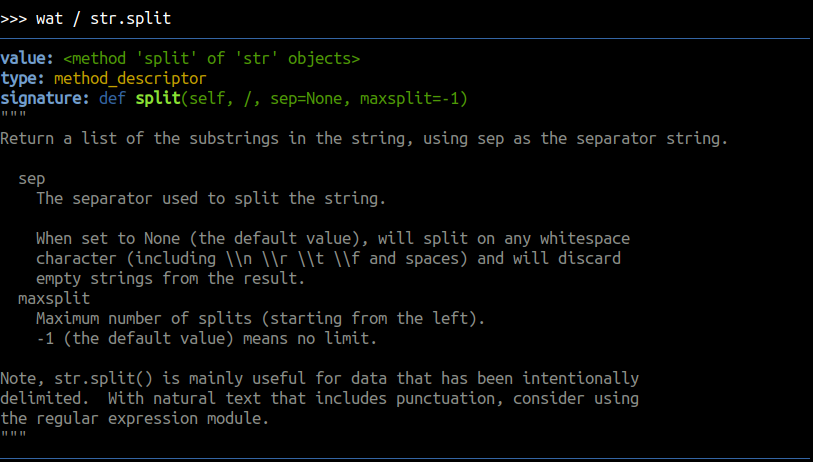
Discover function's signature
See the docstrings and the signature of a function to learn how to use it.
wat / str.split
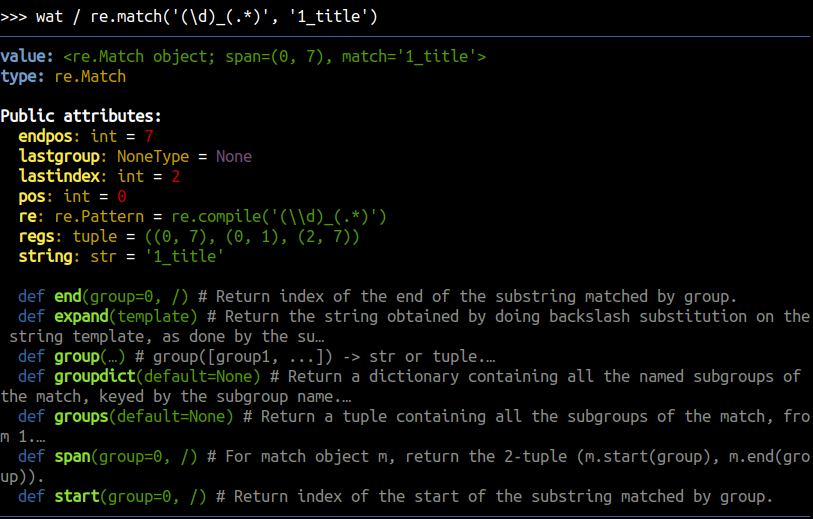
Look up attributes
List the attribues and their types to see what's really inside the inspected object.
wat / re.match('(\d)_(.*)', '1_title')
Explore modules
Another use case is to explore modules. You can list the functions, classes and sub-modules of a selected module.
import pathlib
wat / pathlib
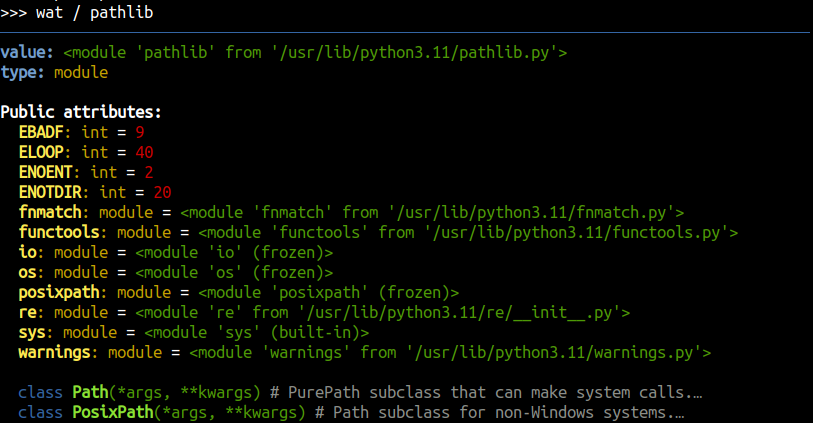
Then, you can navigate further, e.g. wat / pathlib.fnmatch.
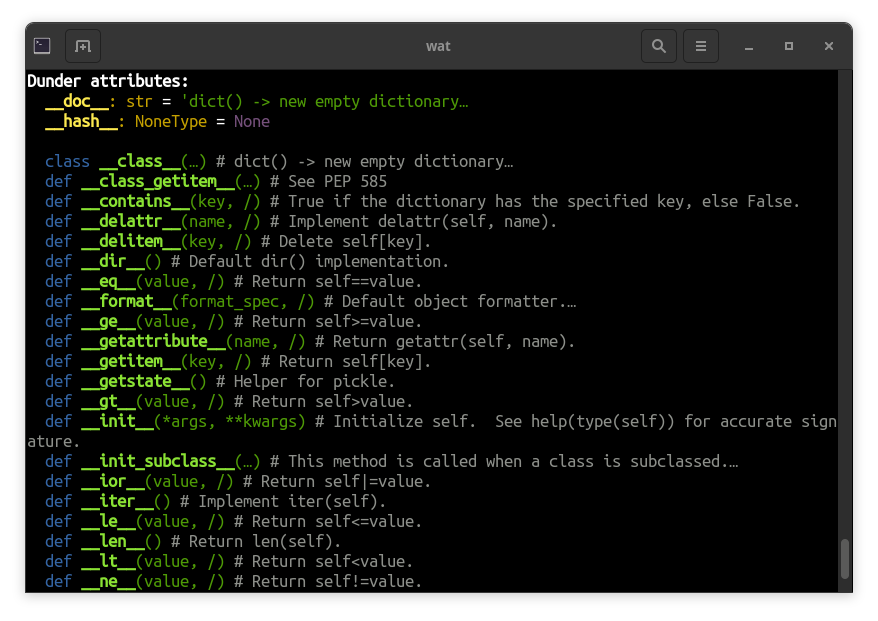
Explore dunder attributes
By default, WAT Inspector hides attributes starting with __. Use wat.dunder to see them.
wat.dunder / {}
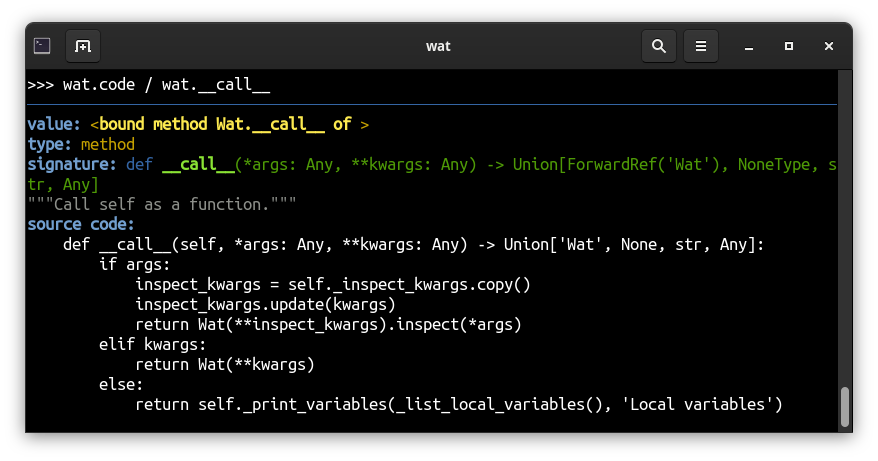
Review the code
Look up the source code of a function to see how it really works.
import colorsys
wat.code / colorsys.hsv_to_rgb
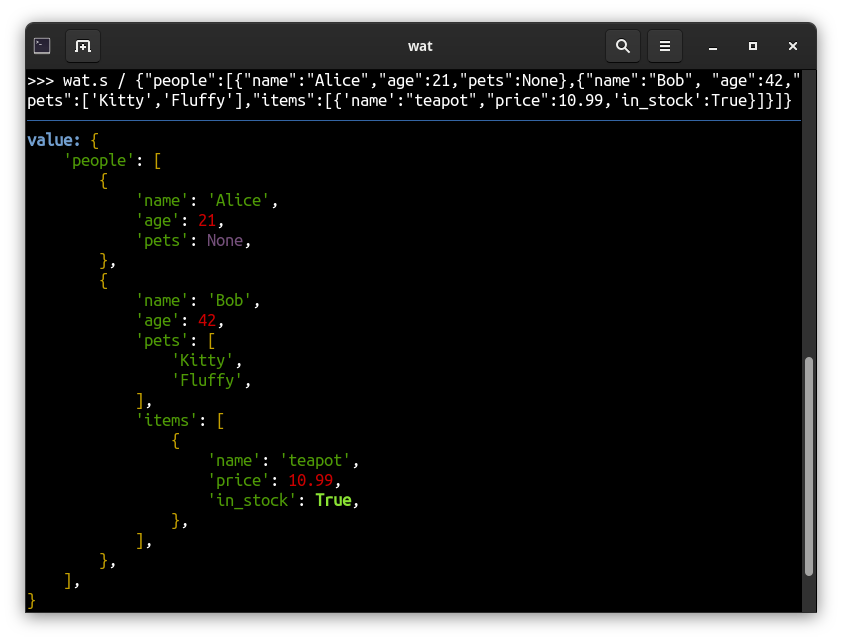
Prettify unreadable collections
Nested dictionaries and lists get nicely formatted, indented output:
Debug with breakpoint
You can use Python's breakpoint() keyword to launch an interactive debugger in your program.
Attach to the interpreter and inspect things on the spot.
(Pdb) import wat  # or paste Insta-Load snippet
(Pdb) wat / foo  # inspect local variables
...
(Pdb) c  # continue execution
Look up local variables
Use wat.locals or wat.globals to look up the local and global variables respectively.
Learn Python
With these snippets you can better understand Python internals.
reversed([]) == reversed([])
# False
wat.s / reversed([])
# value: <list_reverseiterator object at 0x76749d1cb400>
# type: list_reverseiterator
wat / type('ObjectCreator', (), {})
# value: <class '__main__.ObjectCreator'>
# type: type
# signature: class ObjectCreator()

wat / type
# value: <class 'type'>
# type: type
# signature: class type(…)
# """
# type(object) -> the object's type
# type(name, bases, dict, **kwds) -> a new type
# """
#
# Public attributes:
#   def mro(self, /) # Return a type's method resolution order.
from typing import List
wat.s / List[str]
# value: typing.List[str]
# type: typing._GenericAlias
# parents: typing._BaseGenericAlias, typing._Final
# signature: def List(*args, **kwargs)

wat(str | None)
# value: str | None
# type: types.UnionType
Explore Python built-ins:
wat / __builtins__
wat / ...
Inspect WAT itself
wat.dunder / wat
wat.code / wat.__truediv__
Environment variables
WAT_COLOR="false"to disable colorful output in the console.WAT_COLOR="true"to enforce colorful outputs even in non-tty environment.
Color theme
You can customize the color theme by setting the environment variable WAT_COLORS.
Here's the default theme which you can modify with your own ANSI color codes:
export WAT_COLORS="BAR=0;34,TRAIT=1;34,HEAD=1;37,STR=0;32,NUMBER=0;31,NONE=0;35,TRUE=1;32,FALSE=1;31,DOCS=2;37,KEYWORD=0;34,CALLABLE=1;32,VARIABLE=1;33,CODE=0;33"
References
- Inspired by Rich Inspect
1 maintainer

Metadata
1 maintainer
Release files for wat 0.7.0
For a detailed explanation of source distributions (sdists) and built distributions (wheels), please see the package formats documentation.
Source distribution (sdist)
| File | Size | Uploaded | |
|---|---|---|---|
| wat-0.7.0.tar.gz | 57.2 kB | Details |
Built distribution (wheel)
| File | Interpreter | ABI | Platform | Reset |
|---|---|---|---|---|
| wat-0.7.0-py3-none-any.whl | Python 3 | none | any | Details |
Total release size: 81.6 kB
Release files / wat-0.7.0.tar.gz
| Download URL | wat-0.7.0.tar.gz |
|---|---|
| Size | 57.2 kB |
| Tags | Source |
|
SHA-256 checksum How to use checksums |
6d78d17f955dca432de85751dee9f95806c41282df4877b17f652816f68334b0
|
|
BLAKE2b-256 checksum How to use checksums |
f5022d5797d74333156f7e4c0b6f3540b8d65f47be20da9c9b78497f309c948f
|
| Upload date | |
|
Uploaded using Trusted Publishing? What is trusted publishing? |
No |
| Uploaded via |
twine/6.1.0 CPython/3.12.7
|
Release files / wat-0.7.0-py3-none-any.whl
| Download URL | wat-0.7.0-py3-none-any.whl |
|---|---|
| Size | 24.5 kB |
| Tags | Python 3 |
|
SHA-256 checksum How to use checksums |
4d7d1a3030111899d04c230372a631d61d7a290f255e21d3c27d1dc0e32a6cef
|
|
BLAKE2b-256 checksum How to use checksums |
b1025dbdecc50207c884a70e6f2f561d4c53fb353d755b12c049ad15cc905bc0
|
| Upload date | |
|
Uploaded using Trusted Publishing? What is trusted publishing? |
No |
| Uploaded via |
twine/6.1.0 CPython/3.12.7
|














