
Watch Skill
Give every AI agent eyes for video — and a way to check its own work.




Install · Documentation · Examples · Comparison · Roadmap
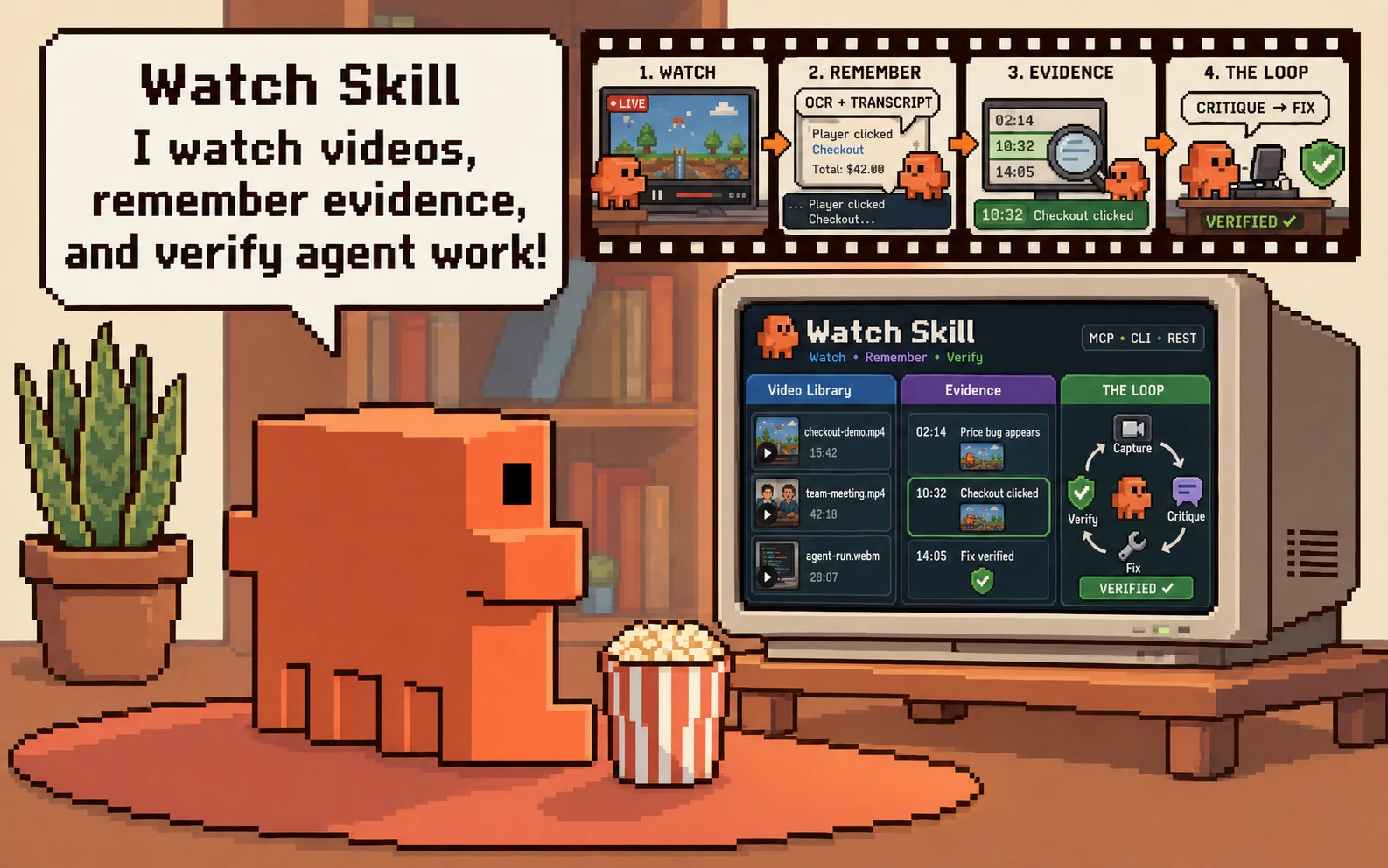
Watch Skill turns videos, live streams, meetings, and screen recordings into a searchable, timestamped index. An agent can ask what happened, get an answer that cites the exact moment behind it, and ask again tomorrow without processing the video a second time.
When the video is the agent's own browser or desktop session, THE LOOP closes the circle: record the work, judge it against plain-language criteria, and prove the fix.
uvx --from "watch-skill[standard]" watch-skill setup

THE LOOP catching a $NaN total that an end-state screenshot misses, then proving the fix.
What it does
| Watch | Scene-aware frames, on-screen text, and local-first transcription from 1,800+ sites, live HLS/DASH streams, local media, meetings, browsers, windows, and desktops. |
| Remember | A persistent, searchable index with timestamp citations, hybrid retrieval, cross-video synthesis, and reusable lessons. |
| Verify | A capture → critique → fix → proof loop for browser flows, interfaces, generated video, gameplay, and monitored streams. |
Available as Claude Code skills, 23 MCP tools, a CLI, a REST API, and native adapters for LangChain/LangGraph, CrewAI, the OpenAI Agents SDK, LlamaIndex, and AutoGen.
Install
One command, any platform, no clone:
uvx --from "watch-skill[standard]" watch-skill setup
That registers the MCP server in every AI agent it finds on the machine, backing up each config first. To wire an agent up by hand:
{ "mcpServers": { "watch-skill": {
    "command": "uvx",
    "args": ["--from", "watch-skill[standard]", "watch-skill", "serve"] } } }
Other ways in
Claude Code plugin
/plugin marketplace add oxbshw/watch-skill
/plugin install watch-skill@watch-skill
Then run /watch-skill:setup-watch-skill once.
pip or pipx
pipx install "watch-skill[standard]"
Docker — nothing installed on the host; the volume keeps the index:
docker run --rm -i -v watch-skill-data:/data ghcr.io/oxbshw/watch-skill serve
From source (installs uv and Python if missing):
curl -fsSL https://raw.githubusercontent.com/oxbshw/watch-skill/main/scripts/install.sh | sh
powershell -ExecutionPolicy Bypass -c "irm https://raw.githubusercontent.com/oxbshw/watch-skill/main/scripts/install.ps1 | iex"
Both scripts run end to end on Linux, macOS, and Windows runners on every push.
standard is frames, retrieval, and MCP — about 200 MB. watch-skill[all] adds OCR,
local Whisper, REST, and the browser THE LOOP drives. watch-skill doctor names anything
missing and prints the command that adds it, so starting small is safe.
Coming from claude-video? Your /watch
commands and flags work unchanged — see the migration guide.
Then watch a video and ask a follow-up:
watch-skill watch "https://youtu.be/..." "Summarize the important moments."
watch-skill ask <video_id> "When does the demo first fail?"
watch-skill search "pricing decision"       # search every indexed video
watch-skill serve                           # MCP over stdio
Transcription, OCR, and search run locally and need no API key. Visual question
answering uses whichever provider you already pay for — Anthropic, OpenAI, Gemini,
OpenRouter, Groq, Together, Fireworks, DeepSeek, xAI, Mistral, MiniMax, Moonshot,
Z.ai, or Qwen — or nothing at all with a local Ollama model. Anything else that
speaks the OpenAI format (vLLM, LM Studio, llama.cpp, LiteLLM, Azure OpenAI, a
company gateway) works through the custom provider:
watch-skill setup-vision --provider groq            # or any of the above
watch-skill setup-vision --provider custom \
  --base-url http://127.0.0.1:8000/v1               # your own server
See Getting started for manual installation and Configuration for provider and privacy settings.
Why use it
- Evidence instead of frame dumps. Scene detection and perceptual deduplication spend the frame budget on distinct moments. Answers include timestamps, confidence, and the evidence used to support them.
- Persistent video memory. Analyze once, ask again without downloading or transcribing the same video. Hybrid full-text and vector retrieval works within one video or across the entire library.
- Local-first processing. Original-language captions are preferred, local Whisper is the default fallback, and cloud speech-to-text is opt-in. An Ollama configuration keeps the complete pipeline on the machine.
- Flow verification. THE LOOP records an agent's browser, screen, or window; checks the result against plain-language criteria; and produces before/after proof after a fix.
- Corrections that persist.
report_mistakestores a local lesson, applies it to related questions, and turns it into a replayable evaluation. - Measured cost controls. Text-first answers, semantic caching, configurable token
budgets, and explicit
cheapest,quality_first, andoffline_onlypolicies keep the trade-offs visible. - Multilingual retrieval. Script-aware OCR routing, Arabic normalization, CJK substring matching, and multilingual embeddings support questions across languages.
The repository includes reproducible cost and perception benchmarks. Product claims in this README link to the relevant implementation notes or testable example rather than relying on unqualified marketing numbers.
Works with your agent
The setup command detects supported clients and updates their configuration with a backup. Manual guides are available for every entry below.
 Claude Code |
 Claude Desktop |
 Cursor |
 Codex CLI |
 Cline |
 Windsurf |
 Gemini CLI |
 VS Code |
 GitHub Copilot CLI |
 Kimi Code |
 Qwen Code |
 OpenCode |
 Goose |
 OpenHands |
 Kilo Code |
 Qodo |
 Agent Zero |
 OpenClaw |
 Pi |
 Hermes |

Native tools are also available for LangChain/LangGraph, CrewAI, OpenAI Agents SDK, LlamaIndex, and AutoGen; any other framework can use REST or MCP.
Skills, in any agent
The ten skills are the agent-facing layer: they decide when to reach for video,
so an agent uses Watch Skill without being told to. They live in a top-level
skills/ directory, which is what the open skills ecosystem reads — so they
install into any of its 27+ supported agents with one command, not just Claude Code:
npx skills add oxbshw/watch-skill -g
| Connection | How it reaches the agent |
|---|---|
| Skills | Every agent the skills CLI supports — Claude Code, Codex CLI, Cursor, GitHub Copilot, Gemini CLI, VS Code, and the rest — plus OpenClaw, Pi, and Hermes-style agents |
| MCP | Claude Desktop, Cursor, Codex CLI, Cline, Windsurf, Gemini CLI, VS Code, GitHub Copilot CLI, Zed, Roo Code, Continue, Kimi Code, Qwen Code, OpenCode, Goose, OpenHands, Kilo Code, Qodo, Agent Zero |
| Native Python tools | LangChain/LangGraph, CrewAI, OpenAI Agents SDK, LlamaIndex, and AutoGen |
| HTTP | Vercel AI SDK, n8n, and any client that can call REST/OpenAPI |
Skills and MCP complement each other: skills carry the judgement about when video
is worth watching, MCP carries the 23 tools. Installing both is the full setup, and
watch-skill setup does it.
The full compatibility matrix separates machine-tested, machine-configured, and documentation-verified integrations. If your agent is missing, the adapter template provides a short contribution path.
Common workflows
Build a searchable video library
watch-skill batch ./recordings --limit 50
watch-skill library overview
watch-skill library ask "What did the team decide about authentication?"
library ask synthesizes evidence across videos and retains per-video timestamp
provenance. The library example demonstrates a question
whose answer is distributed across four clips.
Verify an agent's browser work
watch-skill loop start \
  --source "browser:http://127.0.0.1:3000" \
  --criteria "Checkout completes and the total is always a valid currency amount"
The loop captures the full interaction, critiques failures, and records proof after the
agent applies a fix — the run shown at the top of this page.
Example 14 walks through that transient $NaN bug.
Export an offline report
watch-skill viewer <video_id> --out video-report.html
The generated page contains its frames, transcript, OCR, cached answers, and cited evidence. It has no external runtime dependencies and can be opened without a server.
Examples
The examples progress from a first watch to agent integration, cross-video memory, and self-verification.
| Track | Examples |
|---|---|
| Learn the core | 01 Watch and ask, 02 Focused moment, 03 Cross-video search |
| Build with agents | 06 MCP and REST, 09 Framework adapters, 15 Private offline workflow |
| Understand and organize | 05 Multilingual Arabic, 10 Structured extraction, 11 Batch mode, 12 Library memory |
| Verify and improve | 04 UI loop, 07 Lessons and stats, 08 Loop types, 13 Self-improvement, 14 Browser verification |
| Share results | 16 Export a self-contained viewer |
See the example catalog for prerequisites, expected output, and a recommended path through all 16 examples.
Architecture
All interfaces call the same Python core. Skills and agent adapters decide when to use
Watch Skill; acquisition, perception, transcription, indexing, answering, and verification
remain in src/watch_skill.
flowchart LR
    A["Agents and frameworks"] --> S["Skills · MCP · CLI · REST"]
    S --> AC["Acquire"]
    AC --> P["Scenes · OCR · transcript"]
    P --> I[("Persistent index")]
    I --> Q["Answers · extraction · library"]
    I --> L["Lessons and evaluations"]
    V["Browser · screen · stream capture"] --> C["Loop critic"]
    C --> I
Read Architecture for the data model, provider boundaries, and extension points.
Documentation
| Guide | Use it for |
|---|---|
| Documentation index | Choose a guide by task or audience |
| Getting started | Installation, first watch, and first agent connection |
| Tool reference | All 23 MCP tools and their REST/CLI counterparts |
| Configuration | Storage, privacy, models, limits, and environment variables |
| Agent matrix | Per-client setup and verification status |
| Use-case packs | Recipes for research, meetings, QA, content, and operations |
| THE LOOP | Capture, critique, iteration, and proof artifacts |
| Cost policy | Routing, budgets, caching, and benchmark method |
| Troubleshooting | Dependency repair and common runtime errors |
| Comparison | Honest trade-offs against the alternatives |
| Engineering decisions | The reasoning behind non-obvious design choices |
| Roadmap | Planned work and contribution opportunities |
Development
git clone https://github.com/oxbshw/watch-skill
cd watch-skill
uv sync --extra all
uv run pytest
uv run ruff check .
See CONTRIBUTING.md for test tiers, documentation standards, and the agent-adapter checklist. Security and privacy reports are covered by SECURITY.md.
Listed on
Independent directories that index Watch Skill. They are maintained by their operators, so the details there can lag a release.
Released under the MIT License · Built by oxbshw
1 maintainer

Download files
Download the file for your platform. If you're not sure which to choose, learn more about installing packages.
Source Distribution
Built Distribution
Filter files by name, interpreter, ABI, and platform.
If you're not sure about the file name format, learn more about wheel file names.
Copy a direct link to the current filters
File details
Details for the file watch_skill-1.2.0.tar.gz.
File metadata
- Download URL: watch_skill-1.2.0.tar.gz
- Upload date:
- Size: 4.0 MB
- Tags: Source
- Uploaded using Trusted Publishing? Yes
- Uploaded via:
twine/7.0.0 CPython/3.13.14
File hashes
| Algorithm | Hash digest | |
|---|---|---|
| SHA256 |
20bd2f5ef0dffaccaeca1b900dc083a20ae9d461a1d454fcff1d5fae3bea400c
|
|
| MD5 |
12c0d5abc7bb87ab229c8c71b0e9e813
|
|
| BLAKE2b-256 |
3d5c7b98eaa578d63e29aed982d7b5c001c60c614bac7dc90f875915999229dc
|
Provenance
The following attestation bundles were made for watch_skill-1.2.0.tar.gz:
Publisher:
release.yml on oxbshw/watch-skill
-
Statement:
-
Statement type:
https://in-toto.io/Statement/v1 -
Predicate type:
https://docs.pypi.org/attestations/publish/v1 -
Subject name:
watch_skill-1.2.0.tar.gz -
Subject digest:
20bd2f5ef0dffaccaeca1b900dc083a20ae9d461a1d454fcff1d5fae3bea400c - Sigstore transparency entry: 2386403820
- Sigstore integration time:
-
Permalink:
oxbshw/watch-skill@c41ceaf0599b61588137fcccdd8dcdedee16a1f7 -
Branch / Tag:
refs/tags/v1.2.0 - Owner: https://github.com/oxbshw
-
Access:
public
-
Token Issuer:
https://token.actions.githubusercontent.com -
Runner Environment:
github-hosted -
Publication workflow:
release.yml@c41ceaf0599b61588137fcccdd8dcdedee16a1f7 -
Trigger Event:
push
-
Statement type:
File details
Details for the file watch_skill-1.2.0-py3-none-any.whl.
File metadata
- Download URL: watch_skill-1.2.0-py3-none-any.whl
- Upload date:
- Size: 225.6 kB
- Tags: Python 3
- Uploaded using Trusted Publishing? Yes
- Uploaded via:
twine/7.0.0 CPython/3.13.14
File hashes
| Algorithm | Hash digest | |
|---|---|---|
| SHA256 |
0d75ab3360bc7b661e6a44f521e05cbf7d467f4022d8f93041e1a151c8148d64
|
|
| MD5 |
15e21737c2e4762bedc28fb4fdb7e0fb
|
|
| BLAKE2b-256 |
3fa8d0dfc0316a228d40d6ca3b232242950d83654822cce009f19513e3ced619
|
Provenance
The following attestation bundles were made for watch_skill-1.2.0-py3-none-any.whl:
Publisher:
release.yml on oxbshw/watch-skill
-
Statement:
-
Statement type:
https://in-toto.io/Statement/v1 -
Predicate type:
https://docs.pypi.org/attestations/publish/v1 -
Subject name:
watch_skill-1.2.0-py3-none-any.whl -
Subject digest:
0d75ab3360bc7b661e6a44f521e05cbf7d467f4022d8f93041e1a151c8148d64 - Sigstore transparency entry: 2386403833
- Sigstore integration time:
-
Permalink:
oxbshw/watch-skill@c41ceaf0599b61588137fcccdd8dcdedee16a1f7 -
Branch / Tag:
refs/tags/v1.2.0 - Owner: https://github.com/oxbshw
-
Access:
public
-
Token Issuer:
https://token.actions.githubusercontent.com -
Runner Environment:
github-hosted -
Publication workflow:
release.yml@c41ceaf0599b61588137fcccdd8dcdedee16a1f7 -
Trigger Event:
push
-
Statement type:







