
Watt The Hack 24-hour energy grid simulation hackathon engine

Project description
Watt The Hack Engine
The simulation engine for the Watt The Hack energy grid hackathon (DeepNeuron).
This is the public engine package, published on PyPI as watt-the-hack — controllers, scenario authoring, and the judging server live in private repos. Participants use this package to develop and test their controllers locally before submitting to the hackathon evaluation server.
How it works
You write a controller. The engine runs a grid as a simulation in 15-minute steps (duck_curve runs three days — 288 steps). At each step it hands your controller a snapshot of the grid and asks for an action:
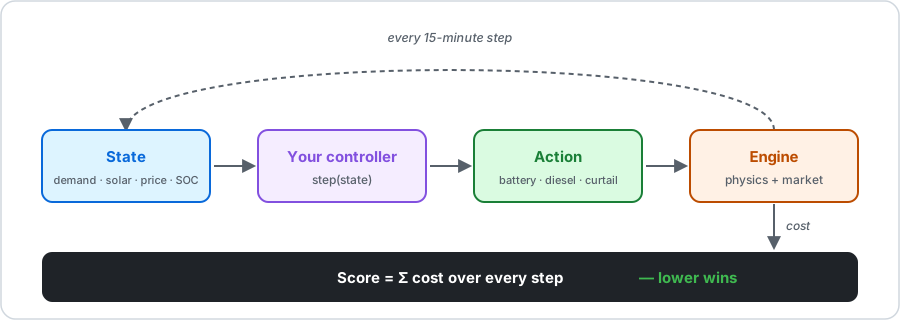
You see only the current step (plus a forecast in later scenarios) and return how much to charge/discharge the battery, run diesel, or curtail solar. The engine simulates that 15 minutes — clipping to physical limits, then applying the market — and charges you a cost. Your score is the total over every step.
One worked step — the duck curve at noon. Solar is 80 MW, demand 30 MW: a 50 MW surplus. Do nothing and that surplus floods the grid past its 50 MW export cap → an overvoltage penalty. Instead, charge the battery (battery_flow_mw = -20): you bank cheap midday energy and release it into the 6 pm peak, when grid power is dear. Store the midday glut, spend it at the evening peak — that trade-off is the duck curve, and it's exactly what the starter below does. Every run also prints how your cost compares to a do-nothing and a naive baseline (the optimum is deliberately not shown), so you always know whether a change helped.
Quick start
Three steps: install, write strategy.py, run python strategy.py.
⚠️ Make a virtual environment first. Installing into your system Python (or conda base) can clash with other tools; a venv isolates it and you can delete it with
rm -rf .venvif anything goes wrong. Colab users: skip the venv — run thepip installline in a cell, or just open the starter notebook.
1. Create a venv and install the engine. The [playtest] extra adds plots and the agentic-track OpenAI client.
macOS / Linux:
python3 -m venv .venv
source .venv/bin/activate
python3 -m pip install "watt-the-hack[playtest]"
Windows (PowerShell):
python -m venv .venv
.venv\Scripts\Activate.ps1
python -m pip install "watt-the-hack[playtest]"
Your prompt should now start with (.venv). (python -m pip — not bare pip — guarantees you install into the active venv on every OS.)
2. Create strategy.py. Your controller and its local test live in one file:
# strategy.py — edit the controller, then run:  python strategy.py
def controller(state):
    # Duck curve 101: bank the midday solar surplus, spend it at the evening peak.
    demand, solar, soc = state["demand"], state["solar"], state["soc"]
    surplus = solar - demand                      # +ve = excess solar right now
    flow = 0.0
    if surplus > 5 and soc < 0.9:                 # midday: store the excess
        flow = -min(20.0, surplus)                # negative = charge
    elif surplus < 0 and soc > 0.2:               # evening: cover the shortfall
        flow = min(20.0, -surplus)                # positive = discharge
    net = demand - solar - flow                   # what's left for the grid
    curtail = max(0.0, -net - 50.0)               # dump unstorable export
    return {"battery_flow_mw": flow, "curtail_solar": curtail}


# --- Local playtest. Runs on `python strategy.py`; the judge ignores this block. ---
if __name__ == "__main__":
    from watt_the_hack.playtest import run_playtest
    result = run_playtest(__file__, "duck_curve", plots=True, open_report=True)
    print(f"\nRaw cost (lower wins): ${result['metrics']['final_score']:,.2f}")
3. Run it:
python strategy.py
It prints your cost breakdown and opens an HTML report (plots, worst timesteps, diagnostics). In an IDE (VS Code, PyCharm) this is just the ▶ Run button — no command line at all. Edit the controller, re-run, repeat.
result["metrics"]["final_score"] is your raw cost in dollars — lower wins. The 0–150 leaderboard points are computed server-side on the hidden judging variants; locally you minimise the raw cost.
Scenarios you can run offline
The wheel bundles two: duck_curve (rule-based track) and agentic_demo (LLM / plan-replan track). List them any time:
python -m watt_the_hack.playtest --list-scenarios
duck_curve    synthetic  The Duck Curve
agentic_demo  synthetic  Agentic Demo — Your First LLM Controller
Switch scenario by changing the id in run_playtest(__file__, "duck_curve", ...). The scored judging variants stay on the server — a green local run translates directly to a submission.
Updating as new scenarios drop
Scenarios are released incrementally. Update inside the same venv:
python -m pip install --upgrade "watt-the-hack[playtest]"
Power user: the CLI
run_playtest is the easy path. The CLI runs the same harness without editing the file, and adds a sweep — compare several controllers on one scenario, ranked side by side:
python -m watt_the_hack.playtest strategy.py --scenario duck_curve --open-report
python -m watt_the_hack.playtest a.py b.py c.py --scenario duck_curve
What's in here
watt_the_hack/engine/— physics + market stepwatt_the_hack/metrics/— scoring metricswatt_the_hack/simulation/— runner gluewatt_the_hack/controllers/— reference controllers (rule-based, parametric)watt_the_hack/data_loaders/— scenario loading utilities
License
MIT
Release history Release notifications | RSS feed


Download files
Download the file for your platform. If you're not sure which to choose, learn more about installing packages.
Source Distribution
Built Distribution
Filter files by name, interpreter, ABI, and platform.
If you're not sure about the file name format, learn more about wheel file names.
Copy a direct link to the current filters
File details
Details for the file watt_the_hack-0.2.13.tar.gz.
File metadata
- Download URL: watt_the_hack-0.2.13.tar.gz
- Upload date:
- Size: 100.9 kB
- Tags: Source
- Uploaded using Trusted Publishing? Yes
- Uploaded via: twine/6.1.0 CPython/3.13.12
File hashes
| Algorithm | Hash digest | |
|---|---|---|
| SHA256 |
6a185bdd0f40abe608f2153839d87e108d0f80963dc8542036149cc06bde70e0
|
|
| MD5 |
21ee94e8c77a7f8b68e586bee1163f4e
|
|
| BLAKE2b-256 |
6ba482bb9ce3d35956cad1a04449ef24b3cca5ef77b560cd68605d811f19b912
|
Provenance
The following attestation bundles were made for watt_the_hack-0.2.13.tar.gz:
Publisher:
publish.yml on AaronEliasZachariah/City-of-Melbourne-Watt-the-Hack-Advanced-Track
-
Statement:
-
Statement type:
https://in-toto.io/Statement/v1 -
Predicate type:
https://docs.pypi.org/attestations/publish/v1 -
Subject name:
watt_the_hack-0.2.13.tar.gz -
Subject digest:
6a185bdd0f40abe608f2153839d87e108d0f80963dc8542036149cc06bde70e0 - Sigstore transparency entry: 1738526781
- Sigstore integration time:
-
Permalink:
AaronEliasZachariah/City-of-Melbourne-Watt-the-Hack-Advanced-Track@7123fb31537ccabce47eeaad54f01f3fad99764d -
Branch / Tag:
refs/heads/main - Owner: https://github.com/AaronEliasZachariah
-
Access:
public
-
Token Issuer:
https://token.actions.githubusercontent.com -
Runner Environment:
github-hosted -
Publication workflow:
publish.yml@7123fb31537ccabce47eeaad54f01f3fad99764d -
Trigger Event:
push
-
Statement type:
File details
Details for the file watt_the_hack-0.2.13-py3-none-any.whl.
File metadata
- Download URL: watt_the_hack-0.2.13-py3-none-any.whl
- Upload date:
- Size: 92.2 kB
- Tags: Python 3
- Uploaded using Trusted Publishing? Yes
- Uploaded via: twine/6.1.0 CPython/3.13.12
File hashes
| Algorithm | Hash digest | |
|---|---|---|
| SHA256 |
49b5a065f1f3f3a0b4b3a8e7fd10d05a4b52dc8a1450b8ad4124478e9ce56e41
|
|
| MD5 |
7e87f2d164c52f1d7ebbf6469ec801b1
|
|
| BLAKE2b-256 |
7db50d883c1433c3718516b35c8d3503996df648ebbb2471cc7414b6f6857a4e
|
Provenance
The following attestation bundles were made for watt_the_hack-0.2.13-py3-none-any.whl:
Publisher:
publish.yml on AaronEliasZachariah/City-of-Melbourne-Watt-the-Hack-Advanced-Track
-
Statement:
-
Statement type:
https://in-toto.io/Statement/v1 -
Predicate type:
https://docs.pypi.org/attestations/publish/v1 -
Subject name:
watt_the_hack-0.2.13-py3-none-any.whl -
Subject digest:
49b5a065f1f3f3a0b4b3a8e7fd10d05a4b52dc8a1450b8ad4124478e9ce56e41 - Sigstore transparency entry: 1738526788
- Sigstore integration time:
-
Permalink:
AaronEliasZachariah/City-of-Melbourne-Watt-the-Hack-Advanced-Track@7123fb31537ccabce47eeaad54f01f3fad99764d -
Branch / Tag:
refs/heads/main - Owner: https://github.com/AaronEliasZachariah
-
Access:
public
-
Token Issuer:
https://token.actions.githubusercontent.com -
Runner Environment:
github-hosted -
Publication workflow:
publish.yml@7123fb31537ccabce47eeaad54f01f3fad99764d -
Trigger Event:
push
-
Statement type:






