
Extensible plugin-based client for unified wattnet time-series metric storage across multiple backends.
Verified details
These details have been verified by PyPIProject links
GitHub Statistics
Maintainers

Project description

Storage Backend and Python Client Interface












wattnet-storage provides two things:
- Storage backend — a Docker Compose stack with ClickHouse for time-series metric storage and Grafana for visualization.
- Python client library — a plugin-based interface to read and write energy metrics (generation, load, carbon footprint, etc.) against the storage backend.
Purpose
Multiple Wattnet containers compute and expose energy data through their own APIs, each with its own domain model and internal representation. wattnet-storage acts as the shared persistence layer between them: it provides a single, uniform interface so that any Wattnet module can persist and retrieve metrics without coupling to a specific storage technology or to the internal data structures of other modules.
To achieve this, metrics are always stored in a common format regardless of how they are represented in the originating domain model:
| Field | Type | Description |
|---|---|---|
name |
str |
Metric identifier (MetricType value, e.g. zone_generation) |
value |
float |
Numeric measurement |
timestamp |
datetime |
Point in time the measurement was taken |
metadata |
dict |
Arbitrary key-value labels (e.g. zone, source, unit) |
Any Wattnet module that needs to persist data translates its domain objects into this format before writing, and reconstructs its own representation after reading. The storage backend in use (ClickHouse, or any future backend) is fully transparent to the caller.
Architecture
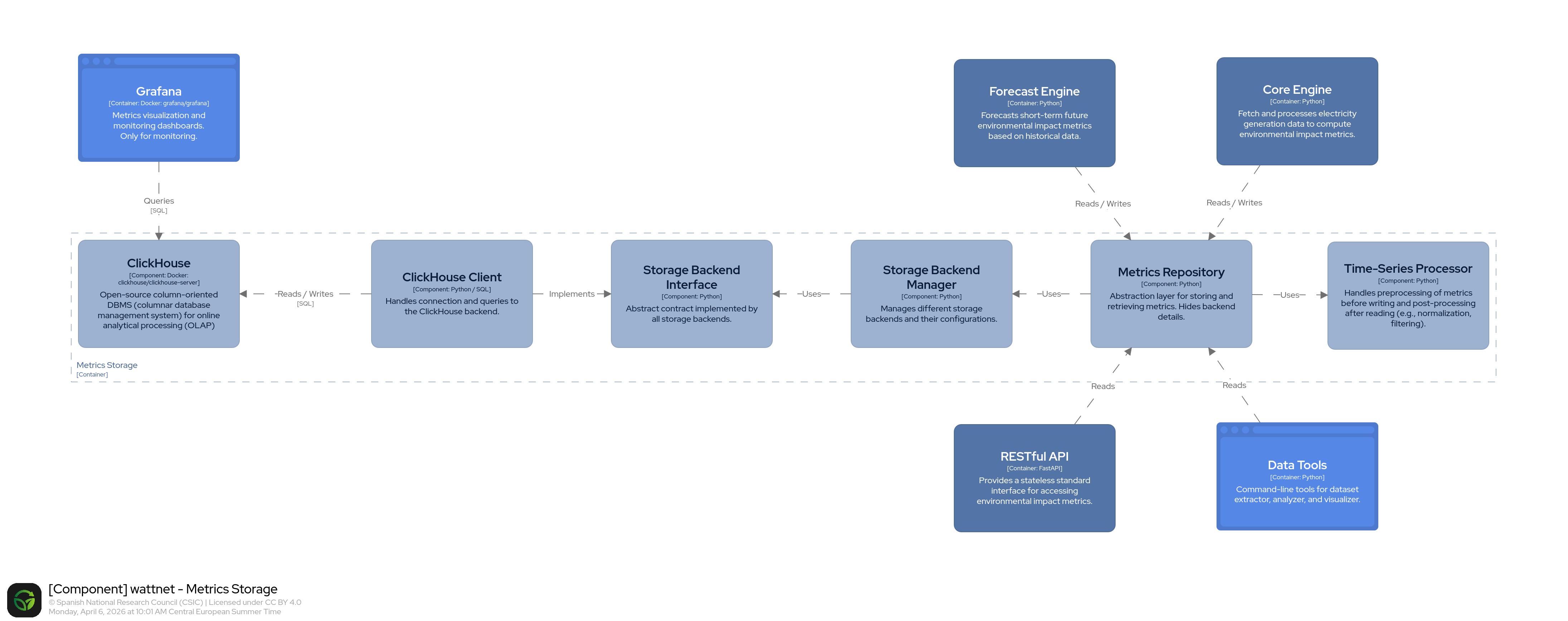
For the full system architecture see the wattnet-architecture repository.
The client layer is plugin-based (via stevedore). Additional storage backends can be added by implementing BaseStorageClient and registering a wattnet.storage.clients entry point.
Requirements
- Python ≥ 3.10
- Docker and Docker Compose (for the storage backend)
Backend Setup
Start the ClickHouse and Grafana services:
docker compose up -d
| Service | Default address |
|---|---|
| ClickHouse | http://localhost:8123 |
| Grafana | http://localhost:3000 |
Grafana's default credentials are admin / admin. The ClickHouse datasource and dashboards are provisioned automatically.
Python Client
Installation
pip install wattnet-storage
Or with Poetry:
poetry add wattnet-storage
Configuration
wattnet-storage is configured by the calling application through a StorageConfig object.
Create the config in your service and pass it to MetricsRepository.
from wattnet.storage import StorageConfig

config = StorageConfig(
    timeseries_step_minutes=15,
    storage_clients=["clickhouse"],
    plugin_configs={
        "clickhouse": {
            "host": "localhost",
            "port": 8123,
            "user": "default",
            "password": "",
            "database": "wattnet",
            "connect_retries": 5,
            "connect_retry_delay": 3,
        }
    },
)
StorageConfig is immutable: all fields are frozen at construction time. Attempting to reassign a field raises FrozenInstanceError. Validation runs automatically on construction:
timeseries_step_minutesmust be a positive integer —ValueErroris raised otherwise.storage_clientsmust not contain duplicate entries —ValueErroris raised otherwise.
wattnet-storage does not load or manage a project-specific .env file.
If your application uses a .env, it should load it before creating the repository.
Configuration precedence for ClickHouse is:
- Process environment variables (
CLICKHOUSE_*) — highest priority .envfile values (CLICKHOUSE_*) — loaded by the consuming application- Code defaults in
ClickHouseConfig— lowest priority
ClickHouseConfig does not read .env files directly. Consuming applications (wattnet-api, wattnet-core or wattnet-forecast) instantiate ClickHouseConfig(_env_file=".env") in their plugin_settings mechanism and pass the resolved values to StorageConfig.plugin_configs, achieving the priority order above automatically. This means a process-level environment variable (e.g. set in Docker Compose or Kubernetes) always wins over a .env file entry.
StorageConfig.plugin_configs["clickhouse"] is the highest-priority override but is intended for programmatic use only (e.g. tests or one-off scripts); in normal deployments the values come from the environment.
For ClickHouse, these process environment variables are supported:
| Variable | Default | Description |
|---|---|---|
CLICKHOUSE_HOST |
localhost |
ClickHouse hostname |
CLICKHOUSE_PORT |
8123 |
ClickHouse HTTP port |
CLICKHOUSE_USER |
default |
ClickHouse username |
CLICKHOUSE_PASSWORD |
(empty) | ClickHouse password |
CLICKHOUSE_DATABASE |
wattnet |
Target database name |
CLICKHOUSE_CONNECT_RETRIES |
5 |
Number of bootstrap attempts before giving up |
CLICKHOUSE_CONNECT_RETRY_DELAY |
3 |
Seconds to wait between bootstrap attempts |
If ClickHouse is unreachable after all attempts, startup fails with a single RuntimeError message indicating the host, port, and number of attempts — no deep traceback from the HTTP layer. This also handles the typical docker-compose race condition where ClickHouse is not yet ready when the API container starts.
Usage
from datetime import datetime
from wattnet.storage import MetricsRepository, StorageConfig
from wattnet.storage.models import Metric, MetricType

config = StorageConfig(
    timeseries_step_minutes=15,
    storage_clients=["clickhouse"],
    plugin_configs={
        "clickhouse": {
            "host": "localhost",
            "port": 8123,
            "user": "default",
            "password": "",
            "database": "wattnet",
            "connect_retries": 5,
            "connect_retry_delay": 3,
        }
    },
)

repo = MetricsRepository(config)

# Write metrics
metrics = [
    Metric(
        metric_type=MetricType.ZONE_GENERATION,
        value=1500.0,
        timestamp=datetime.now(),
        metadata={"zone": "ES", "source": "solar"},
    )
]
repo.write_metrics(metrics)

# Query metrics
results = repo.query_metrics(
    metric_name=MetricType.ZONE_GENERATION.value,
    start=datetime(2025, 1, 1),
    end=datetime(2025, 1, 2),
    labels={"zone": "ES"},
)
Supported metric types
MetricType |
Value | Description |
|---|---|---|
ZONE_GENERATION |
zone_generation |
Electricity generation in a zone |
ZONE_IMPORT |
zone_import |
Electricity imports |
ZONE_EXPORT |
zone_export |
Electricity exports |
ZONE_LOAD |
zone_load |
Electricity consumption / load |
ZONE_MIX_GENERATION |
zone_mix_generation |
Generation mix per source |
FACTOR |
factor |
Emission factor |
LOCAL_FOOTPRINT |
local_footprint |
Location-based carbon footprint |
GLOBAL_FOOTPRINT |
global_footprint |
Market-based carbon footprint |
LOCAL_IMPACT |
local_impact |
Location-based carbon impact |
GLOBAL_IMPACT |
global_impact |
Market-based carbon impact |
LOCAL_SCORE |
local_score |
Location-based carbon score |
GLOBAL_SCORE |
global_score |
Market-based carbon score |
FLOW_SHARE |
flow_share |
Share of electricity flow between zones |
MIX_SHARE |
mix_share |
Share of generation mix |
FOOTPRINT_SHARE |
footprint_share |
Share attributed to carbon footprint |
IMPACT_SHARE |
impact_share |
Share attributed to carbon impact |
Logging
wattnet-storage follows the standard library logging recommendation for libraries: it adds a NullHandler to the wattnet.storage logger and never configures handlers itself. This means no log output appears by default, and the calling application remains fully in control.
To see storage logs, configure the wattnet.storage logger (or the parent wattnet logger) in your application:
import logging

# Minimal setup — output all wattnet.* logs to the console
logging.getLogger("wattnet").setLevel(logging.DEBUG)
logging.getLogger("wattnet").addHandler(logging.StreamHandler())
If you use wattnet-api, wattnet-core or wattnet-forecast, their setup_logging() call already covers wattnet.storage.* logs automatically — no additional configuration is needed.
Related Projects
The following Wattnet components use wattnet-storage as their persistence layer:
- wattnet-api: RESTful API exposing real-time, historical, and forecasted electricity footprint data.
- wattnet-core: Core service that computes carbon and water footprints from electricity generation data.
- wattnet-forecast: Forecasting service for electricity carbon footprint across European zones.
Contributing
Contributions are welcome. See CONTRIBUTING.md for environment setup, code style, how to run the tests, and how to add a new storage backend.
License
This repository is licensed under the Apache License 2.0.
See the LICENSE file for more details.
Funding and Acknowledgments
This work is funded by the European Union's Horizon Europe research and innovation programme through the GreenDIGIT project, under grant agreement 101131207.


© 2026 Spanish National Research Council (CSIC). All rights reserved.
Project details
Verified details
These details have been verified by PyPIProject links
GitHub Statistics
Maintainers
Release history Release notifications | RSS feed


Download files
Download the file for your platform. If you're not sure which to choose, learn more about installing packages.
Source Distribution
Built Distribution
Filter files by name, interpreter, ABI, and platform.
If you're not sure about the file name format, learn more about wheel file names.
Copy a direct link to the current filters
File details
Details for the file wattnet_storage-1.1.0.tar.gz.
File metadata
- Download URL: wattnet_storage-1.1.0.tar.gz
- Upload date:
- Size: 24.8 kB
- Tags: Source
- Uploaded using Trusted Publishing? Yes
- Uploaded via: twine/6.1.0 CPython/3.13.12
File hashes
| Algorithm | Hash digest | |
|---|---|---|
| SHA256 |
5ce6c2bef1c9b6a59a3c387a15b8068e7a5742f4a8f5ca7dc2d7f8f5712305ba
|
|
| MD5 |
9043e625b35ab208d7fac7da60d5dede
|
|
| BLAKE2b-256 |
c6a81d368b9e205336ac0477264afeb68877d6f475a3e3bf4e70a6a65e110d1a
|
Provenance
The following attestation bundles were made for wattnet_storage-1.1.0.tar.gz:
Publisher:
publish.yml on wattnet/wattnet-storage
-
Statement:
-
Statement type:
https://in-toto.io/Statement/v1 -
Predicate type:
https://docs.pypi.org/attestations/publish/v1 -
Subject name:
wattnet_storage-1.1.0.tar.gz -
Subject digest:
5ce6c2bef1c9b6a59a3c387a15b8068e7a5742f4a8f5ca7dc2d7f8f5712305ba - Sigstore transparency entry: 1789663795
- Sigstore integration time:
-
Permalink:
wattnet/wattnet-storage@82cb05496b7b00daa886d98907f57d3f278a8b52 -
Branch / Tag:
refs/heads/main - Owner: https://github.com/wattnet
-
Access:
public
-
Token Issuer:
https://token.actions.githubusercontent.com -
Runner Environment:
github-hosted -
Publication workflow:
publish.yml@82cb05496b7b00daa886d98907f57d3f278a8b52 -
Trigger Event:
workflow_dispatch
-
Statement type:
File details
Details for the file wattnet_storage-1.1.0-py3-none-any.whl.
File metadata
- Download URL: wattnet_storage-1.1.0-py3-none-any.whl
- Upload date:
- Size: 25.5 kB
- Tags: Python 3
- Uploaded using Trusted Publishing? Yes
- Uploaded via: twine/6.1.0 CPython/3.13.12
File hashes
| Algorithm | Hash digest | |
|---|---|---|
| SHA256 |
57d5ba43583db1a3459485ca3a86e17e17b756a9565dd48a4bcb2934cbaae74b
|
|
| MD5 |
cb6dac7a5f0dfd17a0139435e5117d57
|
|
| BLAKE2b-256 |
77afea9e0ef3bf69ff3791bee24a201af8575e1cf48315c085f55d908429601e
|
Provenance
The following attestation bundles were made for wattnet_storage-1.1.0-py3-none-any.whl:
Publisher:
publish.yml on wattnet/wattnet-storage
-
Statement:
-
Statement type:
https://in-toto.io/Statement/v1 -
Predicate type:
https://docs.pypi.org/attestations/publish/v1 -
Subject name:
wattnet_storage-1.1.0-py3-none-any.whl -
Subject digest:
57d5ba43583db1a3459485ca3a86e17e17b756a9565dd48a4bcb2934cbaae74b - Sigstore transparency entry: 1789663810
- Sigstore integration time:
-
Permalink:
wattnet/wattnet-storage@82cb05496b7b00daa886d98907f57d3f278a8b52 -
Branch / Tag:
refs/heads/main - Owner: https://github.com/wattnet
-
Access:
public
-
Token Issuer:
https://token.actions.githubusercontent.com -
Runner Environment:
github-hosted -
Publication workflow:
publish.yml@82cb05496b7b00daa886d98907f57d3f278a8b52 -
Trigger Event:
workflow_dispatch
-
Statement type:






