
This release is a pre-release and may not be stable for production use.
WaveWash



Check, repair and clean audio datasets before you train on them.
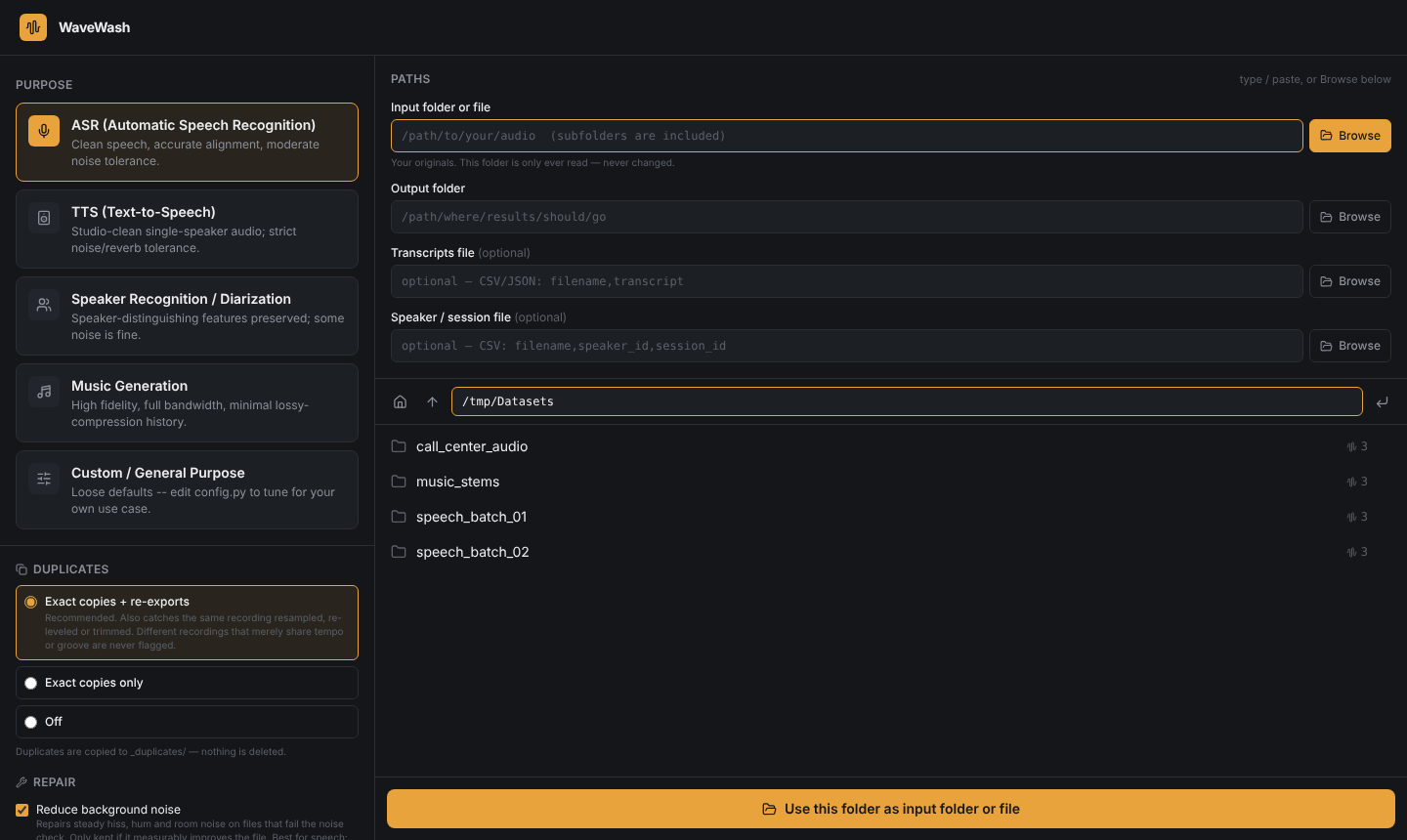
Point WaveWash at a folder of audio and tell it what you are training (speech recognition, voice synthesis, speaker ID, music generation). It checks every file, repairs what it can verify is fixed, moves the rest to an error folder with a labeled reason, sets duplicates aside, and writes a full audit log. Your original files are never modified.
Status: alpha (0.1.0a1). It works on the cases in its test suite, but it has not yet been validated on large real-world speech corpora. Treat its verdicts as a first pass and listen to a sample of what it keeps and rejects. See Limitations.
Why
Models inherit the flaws of their audio: clipped or distorted takes, DC offset, background noise, low-quality copies of better recordings, duplicates that quietly inflate test scores, empty or broken files. These are usually found by hand (listening to thousands of files) or not at all. WaveWash puts the common checks in one tool and tells you why each file was kept, repaired or rejected.
Install
python3 -m venv ~/wavewash-env
source ~/wavewash-env/bin/activate      # Windows: wavewash-env\Scripts\activate
pip install wavewash
wavewash doctor                         # confirms the install works
Python 3.10 or newer. No Node.js needed: the web app ships inside the package.
Optional extras: pip install "wavewash[lang]" (transcript language check), [plots] (spectrograms in review samples), [vad] (Silero VAD, pulls in PyTorch), [whisper] (WER check).
Use it
Web app (runs only on your machine, at http://127.0.0.1:8420):
wavewash app
Pick a purpose, choose an input folder (subfolders are included) and an output folder, click run.
Command line:
wavewash run --input ./raw_audio --output ./out/clean --purpose asr
wavewash run --help
Purposes: asr, tts, speaker_id, music_gen, custom.
What you get
out/
  clean/          audio that passed, or was repaired and re-checked
  _error/         rejected files, in folders named by reason (low_snr/, clipping/, corrupt_or_unreadable/ ...)
  _duplicates/    duplicates, copied here (nothing is deleted)
  _logs/          audit_log_*.csv and .json (one row per file: what was found, what was fixed, why rejected), summary_*.md
What it checks and repairs
| Checks | Repairs (only kept if a re-check shows they helped) |
|---|---|
| Unreadable, empty or truncated files | DC offset removal |
| Too short / too long for the purpose | De-clipping of short clipped runs (up to 8 ms, spline interpolation) |
| Signal-to-noise ratio (estimate) | Noise reduction (spectral subtraction, kept only if the SNR estimate improves) |
| Clipping, DC offset, loudness | Loudness normalisation, resampling, channel conversion to the purpose's targets |
| Silence: mostly-silent files, long gaps | Trimming silence at the edges |
| Lossy or low-pass sources (sharp spectral cliff) | |
| Exact duplicates, same-samples duplicates, near-duplicates (same take, different level or format) | |
| Multiple speakers (heuristic) | |
| Optional: transcript language, WER against Whisper, speaker/session train-validation split |
Repair is classical signal processing, not machine learning.
Limitations
Please read these before trusting a result.
- Alpha, tested on synthetic data. The test suite plants known defects (DC offset, clipping, duplicates, broken, empty and stereo files, other sample rates) and checks the routing, that originals are never modified, the local server's safety rules and the command line. It has not been validated on large real speech corpora; thresholds are reasoned defaults.
- "Repaired" means "passed the re-check", not "restored". De-clipping interpolates over saturated samples. On heavily clipped audio the re-check can pass even though the result is far from the original recording. Listen to repaired files.
- Reverb (RT60) is a warning only. Measured against synthetic rooms of known reverb time, the blind estimate could not tell dry from reverberant audio, so it never rejects a file.
- Heuristics, not trained models: the SNR estimate, the multi-speaker check and the near-duplicate threshold. Check their verdicts on your own data.
- Music: mid-track silence is not flagged, and moderate noise can go unnoticed.
- Not yet measured: whether cleaned data improves a trained model; speed and memory on very large datasets; real Whisper and Silero runs.
- The web app has no login and binds to
127.0.0.1only. Do not expose it to a network.
Development
git clone https://github.com/BoobalanArjunan/wavewash.git
cd wavewash
python3 -m venv .venv && source .venv/bin/activate
pip install -e ".[dev]"
python -m pytest -q
The front-end source is in frontend/ (React + Vite). The built app is committed in src/wavewash/static/; to rebuild it: cd frontend && npm ci && npm run build, then copy dist/ over src/wavewash/static/.
Documentation: step-by-step guide · user manual
Contributing
Bug reports with a small example file are the most useful contribution. If WaveWash rejects a good file or passes a bad one, please open an issue with the log row for that file (from _logs/audit_log_*.csv).
License
MIT
1 maintainer

Metadata
1 maintainer
Release files for wavewash 0.1.0a1
For a detailed explanation of source distributions (sdists) and built distributions (wheels), please see the package formats documentation.
Source distribution (sdist)
| File | Size | Uploaded | |
|---|---|---|---|
| wavewash-0.1.0a1.tar.gz | 438.4 kB | Details |
Built distribution (wheel)
| File | Interpreter | ABI | Platform | Reset |
|---|---|---|---|---|
| wavewash-0.1.0a1-py3-none-any.whl | Python 3 | none | any | Details |
Total release size: 693.4 kB
Release files / wavewash-0.1.0a1.tar.gz
| Download URL | wavewash-0.1.0a1.tar.gz |
|---|---|
| Size | 438.4 kB |
| Tags | Source |
|
SHA-256 checksum How to use checksums |
72dcf8cfc6b9dd97759f0c314aa3446afa2f5d0bd992764c3d1a064d035c0776
|
|
BLAKE2b-256 checksum How to use checksums |
3050efe1750a2c26390940949f5f06232a36eb853199a62d19ae38e7ae3944e3
|
| Upload date | |
|
Uploaded using Trusted Publishing? What is trusted publishing? |
No |
| Uploaded via |
twine/7.0.0 CPython/3.13.2
|
Release files / wavewash-0.1.0a1-py3-none-any.whl
| Download URL | wavewash-0.1.0a1-py3-none-any.whl |
|---|---|
| Size | 254.9 kB |
| Tags | Python 3 |
|
SHA-256 checksum How to use checksums |
21073086942272e7de24d806242bbc59b41c2ed1429156f5aa73988afcc8ca50
|
|
BLAKE2b-256 checksum How to use checksums |
e44d324f2fd799160f0ac073891bc3c667c8d5f6b9f6135b8535c3f230fade0f
|
| Upload date | |
|
Uploaded using Trusted Publishing? What is trusted publishing? |
No |
| Uploaded via |
twine/7.0.0 CPython/3.13.2
|













