
This project has been archived by its maintainers, and is no longer receiving any updates.
wbsv


wbsv(stands for "WayBack machine SavepageNow") is…
CLI tool for saving webpage on Wayback Machine forever. Enables you to save all URIs in a webpage forever on Wayback Machine.
Install
pip install wbsv
DEMO
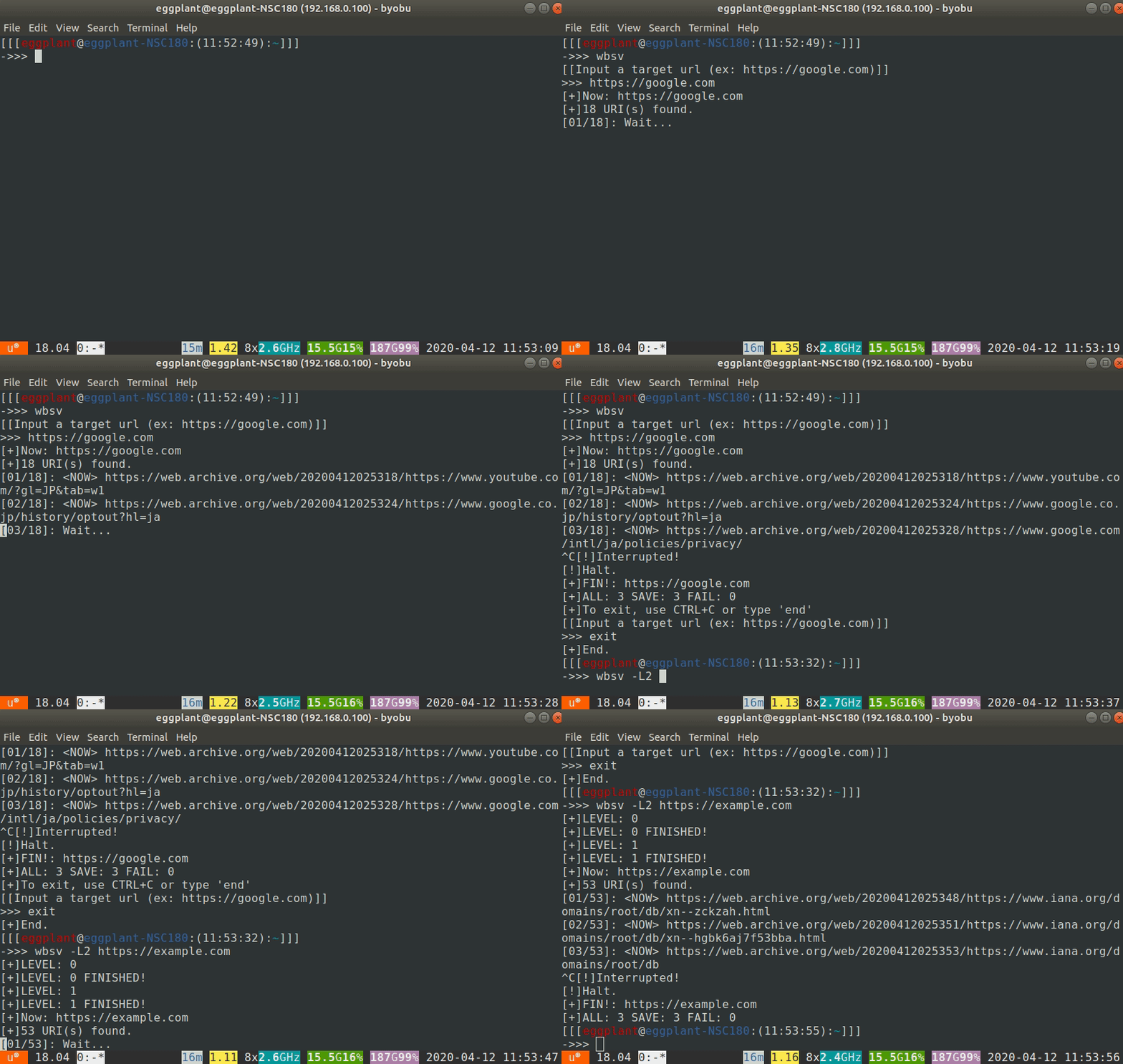
Run & Examples
Help
$ wbsv -h
usage: wbsv [-h] [-r times] [-t] [-l level] [-O] [-V] [url ...]

CLI tool for save webpage on Wayback Machine forever.
Save webpage and one 's all URI(s) on Wayback Machine.

positional arguments:
  url                   Saving pages in order.

optional arguments:
  -h, --help            show this help message and exit
  -r times, --retry times
                        Set a retry limit on failed save.(>=0
  -t, --only_target     Save just target webpage(s).
  -l level, --level level
                        Set maximum recursion depth. (>0)
  -O, --own             Only URLs with the same domain as target
  -V, --version         show program's version number and exit

If you don't give the URL,
interactive mode will be launched.
(To quit interactive mode,
type "end", "exit", "exit()",
"break", "bye", ":q" or "finish".)
Interactive mode
$ wbsv
[[Input a target url (ex: https://google.com)]]
>>> https://www.u.tsukuba.ac.jp
[+]Target: ['https://www.u.tsukuba.ac.jp']
[+]61 URI(s) found.
[01/60]: <NOW> https://web.archive.org/web/20200412020015/https://www.u.tsukuba.ac.jp/password/
[02/60]: <FAIL> https://www.u.tsukuba.ac.jp/info_lit/tebiki.html
[03/60]: <NOW> https://web.archive.org/web/20200412020026/https://www.u.tsukuba.ac.jp/account/
...
[58/60]: <NOW> https://web.archive.org/web/20200412022608/https://www.u.tsukuba.ac.jp/phishing/
[59/60]: <FAIL> https://www.u.tsukuba.ac.jp/wordpress/wp-content/uploads/note_usingcomputerrooms.png
[60/60]: <NOW> https://web.archive.org/web/20200412022640/https://www.u.tsukuba.ac.jp/
[+]FIN!: ['https://www.u.tsukuba.ac.jp']
[+]ALL: 60, SAVE: 57, PAST: 0, FAIL: 3
>>>
From stdin
$ wbsv https://tsumanne.net
[+]Target: ['https://tsumanne.net']
[+]4 URI(s) found.
[1/4]: <NOW> https://web.archive.org/web/20200412022931/https://tsumanne.net/si/
[2/4]: <NOW> https://web.archive.org/web/20200412022935/https://tsumanne.net/
[3/4]: <NOW> https://web.archive.org/web/20200412022938/https://tsumanne.net/my/
[4/4]: <NOW> https://web.archive.org/web/20200412022949/https://tsumanne.net/ct/
[+]FIN!: ['https://tsumanne.net']
[+]ALL: 4, SAVE: 4, PAST: 0, FAIL: 0
$
Search links recurcively
wbsv https://programming-place.net/ppp/contents/c/index.html -l 2
Increase limit of retry
wbsv https://tsumanne.net -r 10
LISENCE
MIT
Author
eggplants (haruna)
1 maintainer

Metadata
1 maintainer
Release files for wbsv 0.5.1
For a detailed explanation of source distributions (sdists) and built distributions (wheels), please see the package formats documentation.
Source distribution (sdist)
| File | Size | Uploaded | Provenance | |
|---|---|---|---|---|
| wbsv-0.5.1.tar.gz | 8.2 kB | Without provenance | Details |
Built distribution (wheel)
| File | Interpreter | ABI | Platform | Reset |
|---|---|---|---|---|
| wbsv-0.5.1-py3-none-any.whl | Python 3 | none | any | Details |
Total release size: 16.2 kB
Release files / wbsv-0.5.1.tar.gz
| Download URL | wbsv-0.5.1.tar.gz |
|---|---|
| Size | 8.2 kB |
| Tags | Source |
|
SHA-256 checksum How to use checksums |
dbc5598708834ebf8f6db4f03fb13091678092ea1896ef6a4225e93f1eddd51c
|
|
BLAKE2b-256 checksum How to use checksums |
bc6a81fc4b2c5534c5693f8d2be0e271888efc8ee45aea515304985607ec4bca
|
| Upload date | |
|
Uploaded using Trusted Publishing? What is trusted publishing? |
No |
| Uploaded via |
twine/3.8.0 pkginfo/1.8.2 readme-renderer/32.0 requests/2.27.1 requests-toolbelt/0.9.1 urllib3/1.26.8 tqdm/4.62.3 importlib-metadata/4.10.1 keyring/23.5.0 rfc3986/2.0.0 colorama/0.4.4 CPython/3.10.2
|
Release files / wbsv-0.5.1-py3-none-any.whl
| Download URL | wbsv-0.5.1-py3-none-any.whl |
|---|---|
| Size | 8.0 kB |
| Tags | Python 3 |
|
SHA-256 checksum How to use checksums |
f1efca4fc7d60a64695e71e578c6033f07aabf099a0d5f53c7feaea5d34d859b
|
|
BLAKE2b-256 checksum How to use checksums |
4f9db01aa56b086be2176082ad6d3a4a345970d4184e7d39bf00dff4e107f87d
|
| Upload date | |
|
Uploaded using Trusted Publishing? What is trusted publishing? |
No |
| Uploaded via |
twine/3.8.0 pkginfo/1.8.2 readme-renderer/32.0 requests/2.27.1 requests-toolbelt/0.9.1 urllib3/1.26.8 tqdm/4.62.3 importlib-metadata/4.10.1 keyring/23.5.0 rfc3986/2.0.0 colorama/0.4.4 CPython/3.10.2
|
Security for wbsv 0.5.1
Provenance
Provenance describes where a file came from. On PyPI, provenance is shared via attestations, which provide a verifiable record of the build or publishing details. View details, limitations and caveats.
No provenance found
None of the files in this release were uploaded with provenance metadata.
A note on package security
PyPI is a repository for distributing packages, not a service for auditing them. While third-party security researchers and our staff do their best to detect and remove malicious packages, PyPI cannot guarantee the quality, security or suitability of any given package.
To learn more about protecting yourself from malicious actors, visit our package security documentation.














