
WCAG 2.2 Site and PDF Scanner
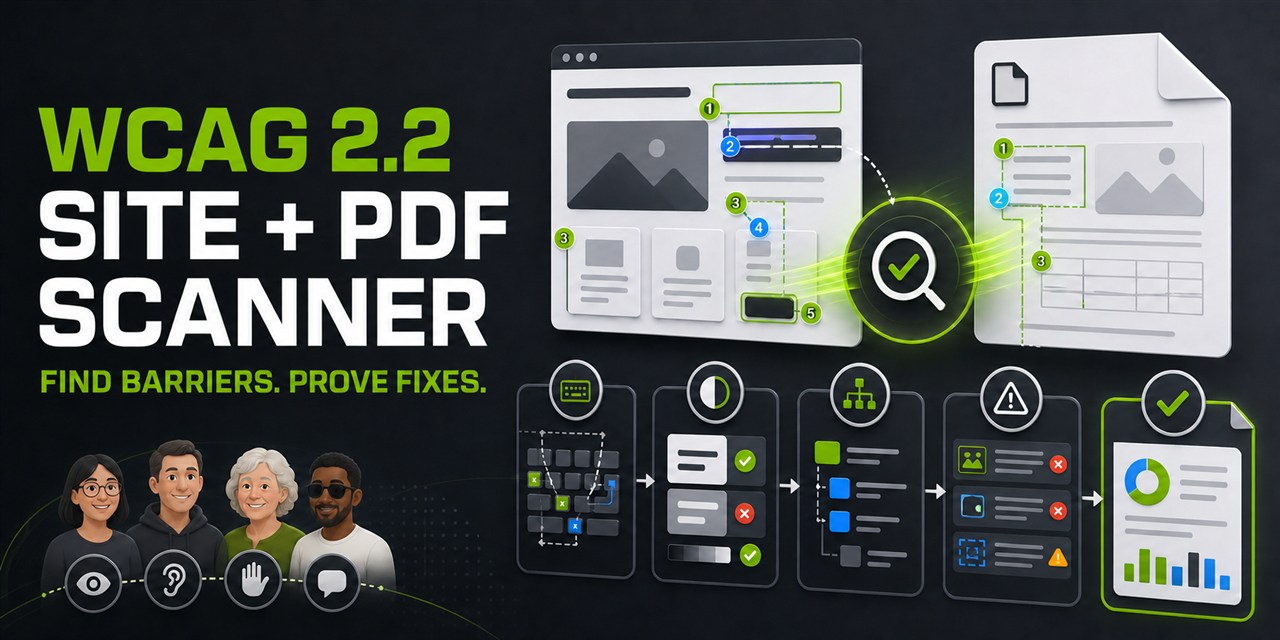




One Python runtime file. Two accessibility surfaces. Evidence you can inspect and defend.
WCAG 2.2 Site and PDF Scanner examines websites, local HTML, and PDF documents through one interactive application. It combines fast source analysis, optional real-browser testing with axe-core, bounded site crawling, conservative PDF structure inspection, PDF discovery, and accessible reports.
The scanner deliberately avoids claiming that automation proves conformance. Every result describes what was tested, what evidence was observed, and where human review is still required.
See the result before installing: open the interactive sample report generated by the production reporter, or inspect the structured JSON.
Install the published package and run its offline diagnostics:
python -m pip install wcag-site-pdf-scanner
wcag-site-pdf-scanner diagnostics
Version 5.0.4 is the current release version of this source tree. For an exact install, run python -m pip install wcag-site-pdf-scanner==5.0.4 once that version is listed in the PyPI release history. The included sample and walkthrough use synthetic evaluation assets and describe the limits of automated checks.
Read the project's accessibility statement for current support, known limitations, and feedback options.
For the reasoning behind the reporting model, read Accessibility scans need to say what they did not prove.
Automated testing finds only some accessibility barriers. It does not establish WCAG, Section 508, or PDF/UA conformance. Complete evaluation requires manual review, assistive-technology testing, and judgment about the content and its purpose.
The package's diagnostics command runs 14 offline self-tests. The six GitHub release assets include the standalone runtime, wheel, normalized source distribution, SPDX SBOM, checksums, and commit-bound release evidence. For published downloads, see GitHub releases. The public v5.0.1 tag remains fixed, but its draft release was not published after qualification found a source-package self-test gap.
See the output first
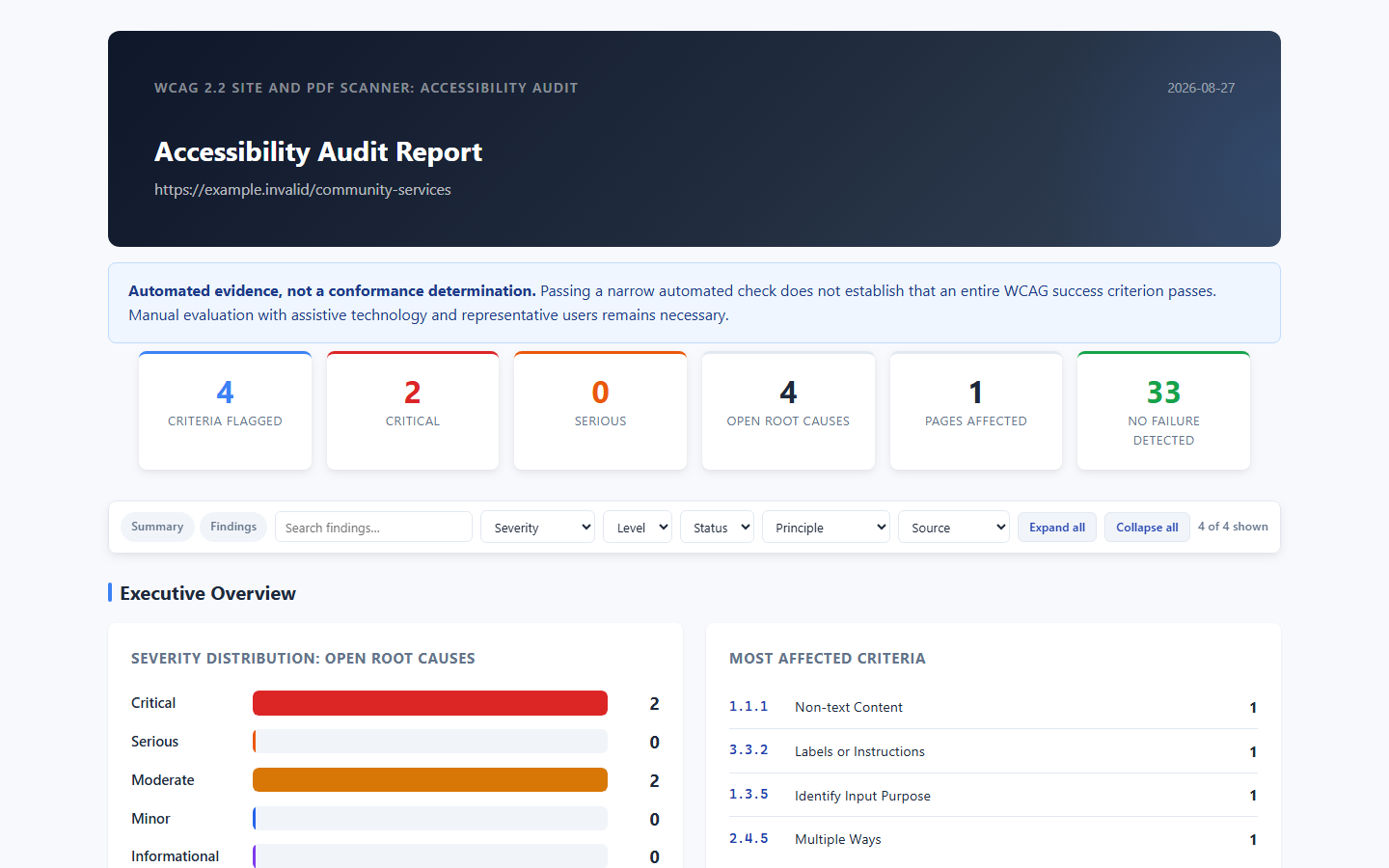
The preview comes from the production report generator using a deliberately flawed, synthetic page. Open the rendered interactive report, download the committed HTML report, inspect its structured JSON, and review the paired input page and synthetic PDF. The reserved .invalid target is never fetched, and no customer or live-scan data is stored in the repository.
Five-minute local walkthrough
This first run analyzes only the included synthetic HTML file. It does not contact a target website and does not require a Chromium download.
git clone https://github.com/fusiontechstrategies/WCAG-2.2-Site-PDF-Scanner.git
cd WCAG-2.2-Site-PDF-Scanner
python -m venv .venv
.venv\Scripts\Activate.ps1
python -m pip install --upgrade pip
python -m pip install -r requirements.txt
python WCAG_Site_PDF_Scanner.py web examples\sample-site\index.html `
  --output-dir a11y_reports `
  --report-formats html,json `
  --no-spell-check
On macOS or Linux, use the shell form:
git clone https://github.com/fusiontechstrategies/WCAG-2.2-Site-PDF-Scanner.git
cd WCAG-2.2-Site-PDF-Scanner
python3 -m venv .venv
source .venv/bin/activate
python -m pip install --upgrade pip
python -m pip install -r requirements.txt
python WCAG_Site_PDF_Scanner.py web examples/sample-site/index.html \
  --output-dir a11y_reports \
  --report-formats html,json \
  --no-spell-check
For this sample, expect four reported issues and both a11y_reports/report.html and a11y_reports/report.json. The CLI also explains that browser-based analysis is skipped for this local file; that is expected, and the reported checks do not establish conformance. Open a11y_reports/report.html locally to inspect the evidence.
Choose a workflow
| Goal | Start here | Important boundary |
|---|---|---|
| Review one public page | web URL --scope page --bulk-mode static |
This example explicitly selects bounded static analysis. |
| Inventory a public site | web URL --scope site --max-urls 500 --bulk-mode static |
Set a safety cap and use a considerate crawl delay. |
| Inspect local source | web PATH |
Local files receive static analysis; serve them locally for browser behavior. |
| Inspect PDF evidence | pdf PATH_OR_URL |
Results are conservative evidence, not PDF/UA certification. |
| Gate a build | Add --ci-mode |
The command fails on open critical or serious automated findings. |
Highlights
- One runtime file:
WCAG_Site_PDF_Scanner.py - Interactive menu when launched without arguments
- Automation-friendly
web,pdf,discover-pdfs, anddiagnosticscommands - No licensed or hard-coded website page-count ceiling, with an optional operator safety cap
- WCAG 2.2 A, AA, and AAA targeting for web checks
- Static HTML, CSS, accessible-name, spelling, content, and consistency analysis
- Optional Playwright and integrity-verified axe-core browser analysis
- Site, folder, individual page, local file, and local directory scanning
- Local PDF, PDF directory, remote PDF, and URL-list scanning
- Conservative PDF results with explicit manual-review and analysis-error states
- PDF structure, language, title, figures, headings, tables, links, forms, bookmarks, active content, attachments, and PDF/UA metadata evidence
- Bounded sitemap and same-site PDF discovery without scraping search-engine result pages
- HTML, JSON, and spreadsheet-safe CSV output
- Review-first local HTML and CSS remediation with source diffs, backups, rescanning, and rollback
- Built-in offline diagnostics and self-tests
Security defaults
- Private, loopback, link-local, multicast, reserved, and cloud metadata addresses are blocked by default.
- Redirect destinations are validated.
- Browser subrequests are checked before navigation.
- Browser permissions, service workers, and downloads are disabled for scans.
- HTML, sitemap, URL-list, PDF, and worker-output sizes are bounded.
- Remote PDFs use atomic downloads and must have a valid PDF signature.
- PDF parsing occurs in a child process with a configurable timeout.
- Generated CSV values are neutralized against spreadsheet formula injection.
- The report does not load remote fonts or other presentation assets.
- Remediation refuses templates, links, reparse points, oversized files, out-of-scope paths, and files changed after analysis.
Read SECURITY.md before scanning untrusted or internal content.
Requirements
- Python 3.12 through 3.14
- Windows, macOS, or Linux
- Chromium installed through Playwright for dynamic web analysis
For remote hostnames, use --bulk-mode static. Browser analysis is fail-closed
unless the target is an IP literal or --allow-private-hosts is explicitly set,
because Chromium cannot bind its independent DNS connection to the address
validated by the scanner. This prevents DNS rebinding from bypassing the
private-address policy.
Use browser analysis for a remote hostname only on an explicitly authorized network where private-destination access is acceptable. The opt-in broadens the network boundary for that scan:
python WCAG_Site_PDF_Scanner.py web https://example.com --scope page --allow-private-hosts
Installation
Supported source installation
Create and activate a virtual environment from a cloned repository, then install the pinned runtime dependencies:
python -m venv .venv
.venv\Scripts\Activate.ps1
python -m pip install --upgrade pip
python -m pip install -r requirements.txt
python -m playwright install chromium
On macOS or Linux, activate with source .venv/bin/activate.
Local package and pipx validation
See the GitHub release list and the PyPI release history above for published wheels and source distributions. Verify the exact project name and file hashes before installation.
Install the current checkout into an active virtual environment:
python -m pip install .
wcag-site-pdf-scanner diagnostics
Or install a trusted local checkout into a pipx-managed environment:
pipx install .
wcag-site-pdf-scanner diagnostics
Pipx separates Python package environments; it is not a security sandbox. Review and trust the checkout before installing it because installation and scanner commands run with your user account's privileges.
Both installed forms preserve the original WCAG_Site_PDF_Scanner.py module and add the wcag-site-pdf-scanner command. The source-file commands in this README remain valid.
The 5.0.3 release path built exactly six files twice and required identical bytes: an exact standalone runtime, normalized pure-Python wheel, normalized source distribution, SPDX 2.3 dependency SBOM, SHA-256 checksum file, and commit-bound release evidence. Generated package metadata, archive fields, order, timestamps, ownership, permissions, and line endings were canonicalized for cross-platform reproducibility. The verified draft was reviewed before public release. PyPI publication used a separate protected trusted-publishing workflow.
Interactive use
python WCAG_Site_PDF_Scanner.py
The menu offers website and local HTML scanning, PDF scanning, PDF discovery, and environment diagnostics.
Command-line examples
Scan one web page:
python WCAG_Site_PDF_Scanner.py web https://example.com --scope page --bulk-mode static
Scan an entire site with bounded discovery:
python WCAG_Site_PDF_Scanner.py web https://example.com --scope site --max-urls 500 --bulk-mode static
Omit --max-urls when you do not want an artificial page-count ceiling. Real capacity still depends on time, memory, storage, the target site's behavior, and crawl exclusions. For unattended or production use, an explicit safety cap is strongly recommended.
Scan a local HTML project:
python WCAG_Site_PDF_Scanner.py web C:\path\to\site --report-formats html,json,csv
Scan one or more local PDFs:
python WCAG_Site_PDF_Scanner.py pdf C:\documents\one.pdf C:\documents\two.pdf
Scan every PDF under a directory:
python WCAG_Site_PDF_Scanner.py pdf C:\documents --workers 4
Scan remote PDFs or a text file containing one URL per line:
python WCAG_Site_PDF_Scanner.py pdf https://example.com/document.pdf
python WCAG_Site_PDF_Scanner.py pdf --url-file pdf-urls.txt
Discover PDFs from sitemaps and same-site pages:
python WCAG_Site_PDF_Scanner.py discover-pdfs https://example.com --output pdf-urls.txt
Discover and immediately scan them:
python WCAG_Site_PDF_Scanner.py discover-pdfs https://example.com --scan --report-dir accessibility_reports
Run offline diagnostics and self-tests:
python WCAG_Site_PDF_Scanner.py diagnostics
Interactive remediation
Guided remediation is available for local HTML and linked CSS source:
python WCAG_Site_PDF_Scanner.py web C:\path\to\site --fix
The remediation workflow can currently guide or propose changes for image alternatives, document language, skip links, page titles, form autocomplete, form labels, iframe titles, and suppressed CSS focus outlines. Each source edit is handled as follows:
- The exact local target is validated against the scanned directory.
- Template files, symbolic links, hard links, Windows reparse points, non-UTF-8 content, and oversized files are refused.
- HTML attribute edits preserve the surrounding source instead of reformatting the full document.
- A bounded unified diff is displayed before any write.
- The user approves the transaction explicitly.
- A unique rollback backup is created and the replacement is atomic.
- Changed files are rescanned with the applicable narrow automated engine.
- The user keeps the transaction or restores every backup.
- Retained changes and SHA-256 digests are recorded in the JSON audit trail.
Remote websites are never edited. PDF results provide evidence and remediation guidance, but the tool does not attempt general-purpose automatic PDF retagging. Human review remains required even when a follow-up automated check no longer reports the original finding.
The legacy convenience form remains available. The application determines whether the target is web/HTML or PDF:
python WCAG_Site_PDF_Scanner.py https://example.com --bulk-mode static
python WCAG_Site_PDF_Scanner.py C:\documents\example.pdf
Result language
PDF evidence uses these outcomes:
| Status | Meaning |
|---|---|
Fail |
The narrow automated rule found evidence of a failure. |
Pass (narrow automated test) |
The rule ran and found no corresponding failure. This is not full success-criterion conformance. |
Needs manual review |
Automation found relevant evidence but cannot determine the outcome. |
Not applicable |
The tested feature was not detected. |
Not tested |
Required structure or capability was unavailable. |
Analysis error |
The check could not complete. Never interpret this as a pass or as not applicable. |
Web reports likewise treat successful checks as narrow evidence. If a finding contradicts a pass record for the same criterion and location, the pass record is suppressed.
Reports
Web scans support:
- Interactive HTML
- JSON
- CSV
- Markdown
- PDF summary
- JUnit XML
PDF scans support:
- Self-contained HTML
- JSON with structured evidence
- Spreadsheet-safe CSV with one row per rule result
Reports may contain page text, element markup, URLs, file paths, and screenshots. Treat them according to the sensitivity of the scanned content.
Standards and guidance
The implementation is informed by:
- Web Content Accessibility Guidelines 2.2
- W3C guidance for applying WCAG to non-web documents
- W3C guidance on Accessibility Conformance Testing rules
- US Section 508 PDF guidance
- PDF Association Matterhorn Protocol
The scanner is not a certified PDF/UA validator and does not replace a complete accessibility audit.
Responsible use
Scan only systems and documents you own or are authorized to test. Use conservative concurrency and crawl delays on shared systems. Private-network scanning requires the explicit --allow-private-hosts option.
Related Fusion projects
- M365 Incident Response Console and Windows Admin Toolkit provide separate evidence-first Microsoft operations workflows.
- Explore the complete Fusion Technology Strategies public portfolio.
Development
The production runtime remains in one Python module. Focused regression tests, examples, and release checks are kept in separate support files.
See CONTRIBUTING.md, RELEASING.md, SECURITY.md, TESTING.md, and THIRD_PARTY_NOTICES.md.
License
MIT License. See LICENSE.
This project is independent and is not affiliated with or endorsed by W3C, the US General Services Administration, PDF Association, Deque Systems, Microsoft, or the publishers of referenced accessibility tools.
1 maintainer

Metadata
1 maintainer
Release files for wcag-site-pdf-scanner 5.0.4
For a detailed explanation of source distributions (sdists) and built distributions (wheels), please see the package formats documentation.
Source distribution (sdist)
| File | Size | Uploaded | Provenance | Actions |
|---|---|---|---|---|
| wcag_site_pdf_scanner-5.0.4.tar.gz | 1.0 MB | With provenance | Details for wcag_site_pdf_scanner-5.0.4.tar.gz |
Built distribution (wheel)
| File | Interpreter | ABI | Platform | Actions Reset |
|---|---|---|---|---|
| wcag_site_pdf_scanner-5.0.4-py3-none-any.whl | Python 3 | none | any | Details for wcag_site_pdf_scanner-5.0.4-py3-none-any.whl |
Total release size: 1.5 MB
Release files / wcag_site_pdf_scanner-5.0.4.tar.gz
| Download URL | wcag_site_pdf_scanner-5.0.4.tar.gz |
|---|---|
| Size | 1.0 MB |
| Tags | Source |
|
SHA-256 checksum How to use checksums |
3aad0a8cf7e166440990afce040fdd87bc6398a55df245a4171db4b6faa0e8b2
|
|
BLAKE2b-256 checksum How to use checksums |
046150c530b64d2e7addebed4a3ac3e35b7fb6409e3f9fd5044fc9b368dc7e6f
|
| Upload date | |
|
Uploaded using Trusted Publishing? What is trusted publishing? |
Yes |
| Uploaded via |
twine/7.0.0 CPython/3.13.16
|
Provenance
Provenance describes where a file came from. On PyPI, provenance is shared via attestations, which provide a verifiable record of the build or publishing details. View details, limitations and caveats.


PyPI Publish Attestation
PyPI verified that this artifact, at this checksum, originated from the publisher listed below.
Signed by GitHub Actions, verified by PyPI on Nov 18, 2026.
Transparency logRelease files / wcag_site_pdf_scanner-5.0.4-py3-none-any.whl
| Download URL | wcag_site_pdf_scanner-5.0.4-py3-none-any.whl |
|---|---|
| Size | 488.7 kB |
| Tags | Python 3 |
|
SHA-256 checksum How to use checksums |
99f456812ceea09dc073fff55c8f5130574adb00b87ea050f275a7c0470b70ec
|
|
BLAKE2b-256 checksum How to use checksums |
e7cfc9ec28b1ead2c2504272200dc26d88af0a6798877028458e638dd8461ebe
|
| Upload date | |
|
Uploaded using Trusted Publishing? What is trusted publishing? |
Yes |
| Uploaded via |
twine/7.0.0 CPython/3.13.16
|
Provenance
Provenance describes where a file came from. On PyPI, provenance is shared via attestations, which provide a verifiable record of the build or publishing details. View details, limitations and caveats.
PyPI Publish Attestation
PyPI verified that this artifact, at this checksum, originated from the publisher listed below.
Signed by GitHub Actions, verified by PyPI on Nov 18, 2026.
Transparency logSecurity for wcag-site-pdf-scanner 5.0.4
Provenance
Provenance describes where a file came from. On PyPI, provenance is shared via attestations, which provide a verifiable record of the build or publishing details. View details, limitations and caveats.
Full provenance
Both files in this release have been uploaded with provenance metadata.
Attestation for wcag_site_pdf_scanner-5.0.4.tar.gz
PyPI Publish Attestation
PyPI verified that this artifact, at this checksum, originated from the publisher listed below.
Signed by GitHub Actions, verified by PyPI on Nov 18, 2026.
Transparency logA note on package security
PyPI is a repository for distributing packages, not a service for auditing them. While third-party security researchers and our staff do their best to detect and remove malicious packages, PyPI cannot guarantee the quality, security or suitability of any given package.
To learn more about protecting yourself from malicious actors, visit our package security documentation.














