
WDOM





WDOM is a python GUI library for browser-based desktop applications. WDOM controls HTML elements (DOM) on browser from python, as if it is a GUI element. APIs are same as DOM or browser JavaScript, but of course, you can write logic codes in python.
This library includes web-server (tornado), but is not intended to be used as a web framework, please use for Desktop GUI Applications.
Document: WDOM Documentation
Disclaimer
WDOM is in the early development stage, and may contain many bugs. All APIs are not stable, and may be changed in future release.
Features
Pure python implementation
APIs based on DOM specification
Not need to learn new special classes/methods for GUI
Implemented DOM features are listed in Wiki page
Theming with CSS frameworks (see ScreenShots on Wiki)
JavaScript codes are executable on browser
Testable with browsers and Selenium WebDriver
Licensed under MIT licence
Requirements
Python 3.5.3+ and any modern-browsers are required. Also supports Electron and PyQt’s webkit browsers.
Installation
Install by pip:
pip install wdom
Or, install latest version from github:
pip install git+http://github.com/miyakogi/wdom
Example
Simple example:
from wdom.document import get_document
from wdom.server import start

if __name__ == '__main__':
    document = get_document()
    h1 = document.createElement('h1')
    h1.textContent = 'Hello, WDOM'
    document.body.appendChild(h1)
    start()
Execute this code and access http://localhost:8888 by browser. "Hello, WDOM" will shown on the browser. To stop process, press CTRL+C.
As you can see, methods of WDOM (document.createElement and document.body.appendChild) are very similar to browser JavaScript.
WDOM provides some new DOM APIs (e.g. append for appending child) and some tag classes to easily generate elements:
from wdom.tag import H1
from wdom.document import set_app
from wdom.server import start

if __name__ == '__main__':
    h1 = H1()
    h1.textContent = 'Hello, WDOM'
    set_app(h1) # equivalent to `wdom.document.get_document().body.appendChild(h1)`
    start()
Of course, WDOM can handle events:
from wdom.tag import H1
from wdom.document import set_app
from wdom.server import start

def rev_text(event):
    elm = event.currentTarget
    elm.textContent = elm.textContent[::-1]

if __name__ == '__main__':
    h1 = H1('Hello, WDOM')
    h1.addEventListener('click', rev_text)
    set_app(h1)
    start()
When string "Hello, WDOM" is clicked, it will be flipped.
Making components with python class:
from wdom.tag import Div, H1, Input
from wdom.document import set_app
from wdom.server import start

class MyApp(Div):
    def __init__(self, *args, **kwargs):
        super().__init__(*args, **kwargs)
        self.text = H1('Hello', parent=self)
        self.textbox = Input(parent=self, placeholder='input here...')
        self.textbox.addEventListener('input', self.update)

    def update(self, event):
        self.text.textContent = event.currentTarget.value
        # Or, you can write as below
        # self.text.textContent = self.textbox.value

if __name__ == '__main__':
    set_app(MyApp())
    start()
WDOM package includes some tiny examples. From command line, try:
python -m wdom.exapmles.rev_text
python -m wdom.exapmles.data_binding
python -m wdom.exapmles.timer
Source codes of these examples will be found in wdom/examples.
Theming with CSS Frameworks
WDOM is CSS friendly, and provides easy way to theme your app with CSS frameworks. For example, use bootstrap3:
from wdom.themes import bootstrap3
from wdom.themes.bootstrap3 import Button, PrimaryButton, DangerButton
from wdom.document import get_document
from wdom.server import start

if __name__ == '__main__':
    document = get_document()
    document.register_theme(bootstrap3)
    document.body.append(
        Button('Button'), PrimaryButton('Primary'), DangerButton('Danger')
    )
    start()
Differences are:
import tag classes from wdom.themes.[theme_name] instead of wdom.tag
register theme-module by document.register_theme(theme_module)
If you want to more easily change themes (or, css frameworks), try command-line option --theme. wdom.themes.default module would be switched to --theme option.
For example, in the above code, change from wdom.themes import bootstrap3 to from wdom.themes import default. And execute the code with --theme theme_name option (see below).
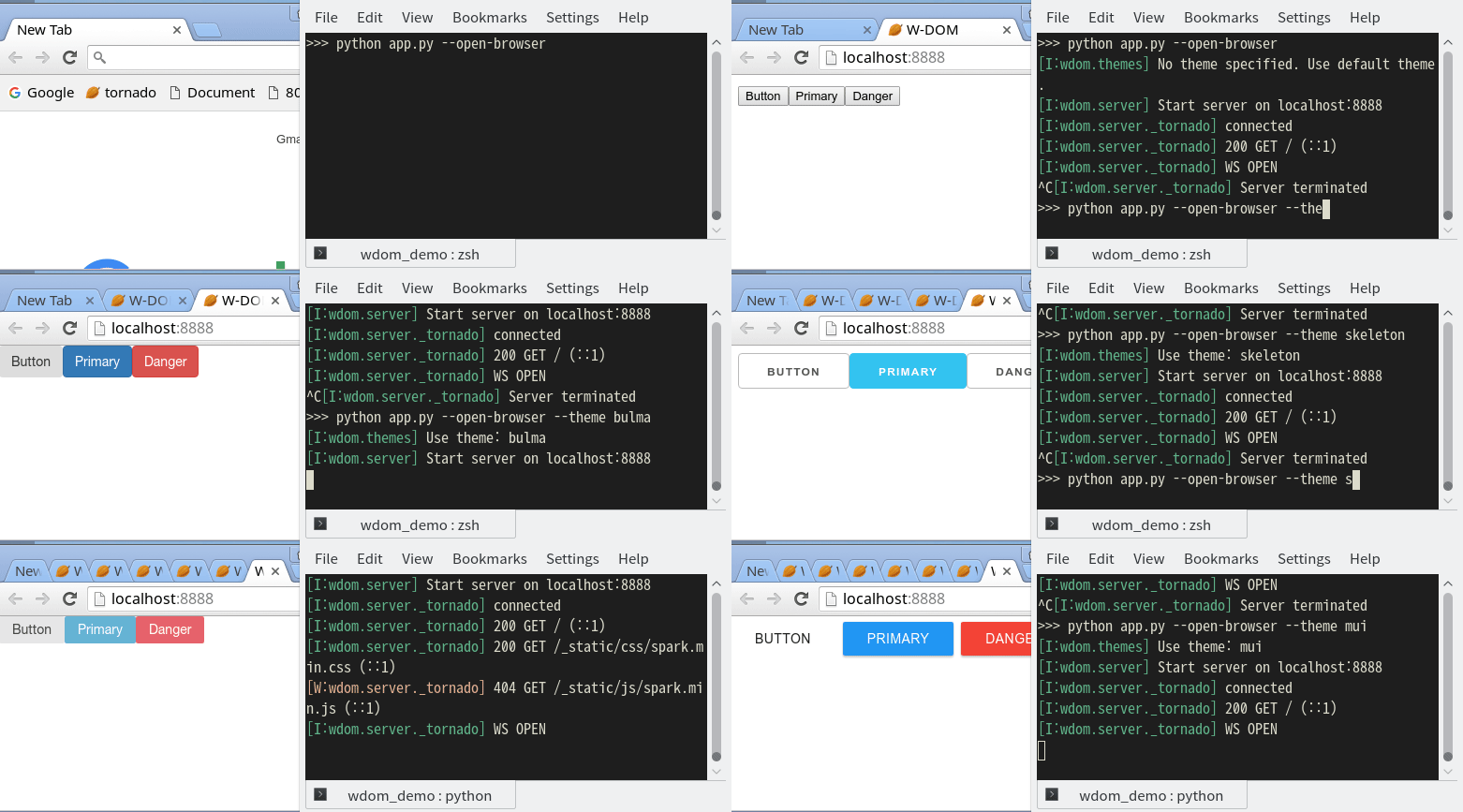
Currently, WDOM bundles 20+ CSS frameworks by default, and they are listed in Wiki with screenshots. In each theme module, only primitive HTML elements (typographies, buttons, form components, tables, and grids) are defined, but complex elements like navigations or tabs are not defined.
If your favourite CSS framework is not included, please let me know on Issues, or write its wrapper module and send PR.
Of course you can use your original css. See Loading Static Contents -> Local Resource section in the User Guide.
Contributing
Contributions are welcome!!
If you find any bug, or have any comments, please don’t hesitate to report to Issues on GitHub. All your comments are welcome!
More Documents
Please see User Guide.
1 maintainer

Metadata
1 maintainer
Release files for wdom 0.3.1
For a detailed explanation of source distributions (sdists) and built distributions (wheels), please see the package formats documentation.
Source distribution (sdist)
| File | Size | Uploaded | Provenance | |
|---|---|---|---|---|
| wdom-0.3.1.tar.gz | 372.6 kB | Without provenance | Details |
Release files / wdom-0.3.1.tar.gz
| Download URL | wdom-0.3.1.tar.gz |
|---|---|
| Size | 372.6 kB |
| Tags | Source |
|
SHA-256 checksum How to use checksums |
4fe4e38caae30278ba594b6a09c96cc145f7306f77ae078a205685a05c665a2f
|
|
BLAKE2b-256 checksum How to use checksums |
d86038042bd6c0b8696f8c9e6b1de4252a7459b7cb215f624d3a7eb03cda5c0b
|
| Upload date | |
|
Uploaded using Trusted Publishing? What is trusted publishing? |
No |
Security for wdom 0.3.1
Provenance
Provenance describes where a file came from. On PyPI, provenance is shared via attestations, which provide a verifiable record of the build or publishing details. View details, limitations and caveats.
No provenance found
None of the files in this release were uploaded with provenance metadata.
A note on package security
PyPI is a repository for distributing packages, not a service for auditing them. While third-party security researchers and our staff do their best to detect and remove malicious packages, PyPI cannot guarantee the quality, security or suitability of any given package.














