
Wyatt's Data Storage Format (WDSF)
What Is It?
WDSF is a data storage format that uses text:key pairs. This is similar to JSON, but unlike JSON it is partially programmatic. WDSF Files are internally converted to Dictionary objects so they can be easily used in a program. Currently, it can be modified by using the official python library.
How to write a WDSF file
A WDSF file is simple enough that it can be written by hand. Heres how to write one: All files must be started with a header:
#WDSF1.0
This is the most simple data structure:
key|value
That is it. But, there is also a list type:
!LIST|LIST_NAME:
1
2
3
4
5
6
7
8
9
10
!LIST_END
There is also a programmatic way to use WDSF, similar to Flask's Template Rendering System:
COOL_DATA|!#FUNC:x*y
These arguments will be passed and evaluated at time of reading:
wdsf_file.read(args=[["x", 10], ["y", 20]])
For compatibility reasons, all data types (excluding lists) are treated as strings.
Library Documentation
Reading a WDSF file and convert it to a Dictionary object:
import wdsflib
wdsf_file = wdsflib.WDSFFile(file_name)
wdsf_data = wdsf_file.read() #Returns a dictionary that can be used in wdsf_data.get('key')
Transmutation of a file is a process that converts a WDSF file into a JSON file it can be used like this:
import wdsflib
wdsf_file = wdsflib.WDSFFile(file_name)
wdsf_file.transmute("output.json")
And there is a function that can do the opposite:
import wdsflib
dict_object = {
    "key": "value"
}
#Convert the dictionary to a WDSF file
wdsflib.convert_to_wdsf(dict_object, f"{file_name}.wdsf")
Installation
This project requires no dependencies and can work with defualt python. Python 3.13 (Or Newer) is recommended.
pip install wdsf
Demo
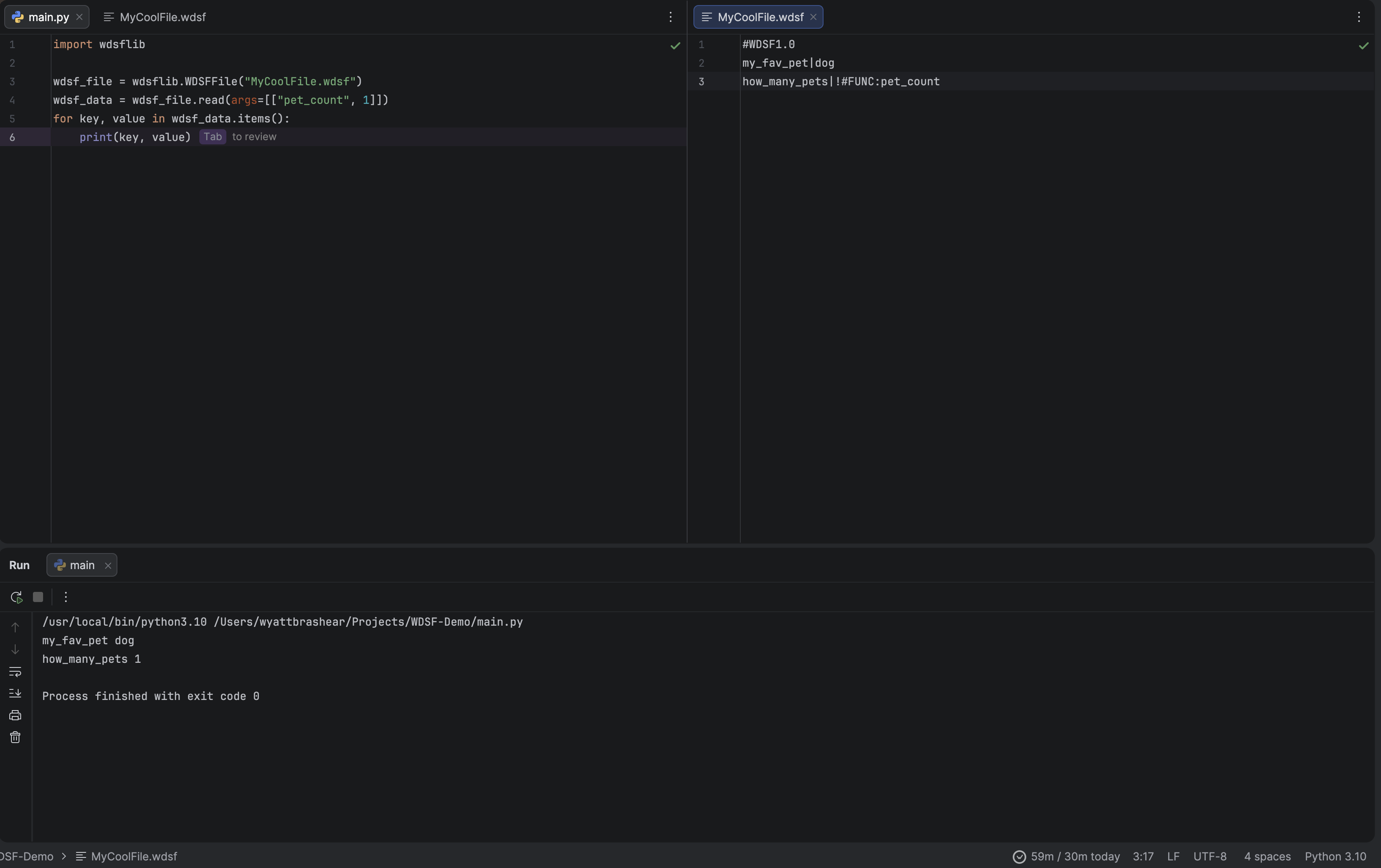
Seeing as this is a python library, it may be difficult to properly demo, however i can provide a demo image of the lib
working alongside a WDSF file.
Pypi: https://pypi.org/project/wdsf/
1 maintainer

Metadata
1 maintainer
Release files for wdsf 1.0.3
For a detailed explanation of source distributions (sdists) and built distributions (wheels), please see the package formats documentation.
Source distribution (sdist)
| File | Size | Uploaded | |
|---|---|---|---|
| wdsf-1.0.3.tar.gz | 246.2 kB | Details |
Built distribution (wheel)
| File | Interpreter | ABI | Platform | Reset |
|---|---|---|---|---|
| wdsf-1.0.3-py3-none-any.whl | Python 3 | none | any | Details |
Total release size: 249.7 kB
Release files / wdsf-1.0.3.tar.gz
| Download URL | wdsf-1.0.3.tar.gz |
|---|---|
| Size | 246.2 kB |
| Tags | Source |
|
SHA-256 checksum How to use checksums |
6012c2dca4b3a4dabec7f16d24b8b8f8b49ada9f30cbc6e1ad8a3f3df74280c9
|
|
BLAKE2b-256 checksum How to use checksums |
716c82c4afa0c02e3870c243bc6a6be67ee5fe575eb99c26e4f335081347216b
|
| Upload date | |
|
Uploaded using Trusted Publishing? What is trusted publishing? |
No |
| Uploaded via |
twine/6.2.0 CPython/3.13.7
|
Release files / wdsf-1.0.3-py3-none-any.whl
| Download URL | wdsf-1.0.3-py3-none-any.whl |
|---|---|
| Size | 3.5 kB |
| Tags | Python 3 |
|
SHA-256 checksum How to use checksums |
3357ab08bc5a72da784db643d77682a4892765052bb3f90e3c57a650395e2851
|
|
BLAKE2b-256 checksum How to use checksums |
b285fb30b816fa42a5d1015eefc920e25fe5456fabb6561f677ae1189e648e8a
|
| Upload date | |
|
Uploaded using Trusted Publishing? What is trusted publishing? |
No |
| Uploaded via |
twine/6.2.0 CPython/3.13.7
|














