
Tiny CLI to print today's weather for your terminal (Open-Meteo, zero API key).

Project description
🌦️ weather-tty
Tiny CLI to print today's weather for your terminal — zero API keys, just vibes.
















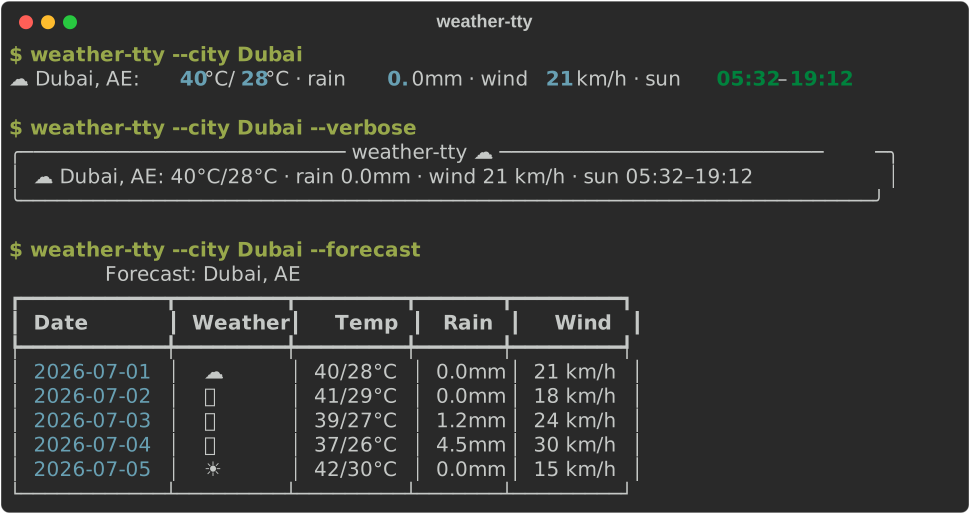
Preview
Features
- Zero-config: just type
weather-ttyand it will guess your city by IP. - Single-line summary:
🌤️ Pamplona, ES: 25°C/12°C · rain 0.0mm · wind 18 km/h · sun 08:10–19:14 - Multi-day forecast:
weather-tty --forecastfor a 5-day table. --citygeocoding (Open-Meteo) or--lat/--lon.- Units:
metric(default) orimperial. --timezoneto override the auto-detected IANA timezone.--no-emojifor boring terminals.--verbosepretty panel for humans.--versionto print the installed version.
Install
Requires Python 3.10+
Recommended (pipx)
The easiest way to install weather-tty as a CLI tool:
brew install pipx  # if you don't have pipx
pipx install weather-tty
This installs weather-tty in an isolated environment and makes it available globally.
Alternative (pip)
pip install weather-tty
⚠️ On macOS with Homebrew Python, you may get an
externally-managed-environmenterror. Usepipxinstead, or create a virtual environment.
Usage
# auto-detect city by IP
weather-tty

# by city
weather-tty --city "Pamplona"

# 5-day forecast table
weather-tty --city "Pamplona" --forecast

# coordinates (overrides city)
weather-tty --lat 40.4168 --lon -3.7038

# imperial units
weather-tty --city "New York" --units imperial

# pretty panel
weather-tty --city "Pamplona" --verbose

# override the timezone
weather-tty --city "Pamplona" --timezone Europe/Madrid

# print version
weather-tty --version
Pro Tip: Terminal Greeting
Add weather-tty to the end of your .zshrc, .bashrc, or .bash_profile to get a fresh weather report every time you open a new terminal session:
# Add this to ~/.zshrc or ~/.bashrc
weather-tty
Notes
- Data source: Open-Meteo
- No API keys required.
- Default view is today's summary; pass
--forecastfor a 5-day table. - Location is resolved via IP by default; override with
--cityor--lat/--lon.
Development
uv sync --group dev
uv run ruff check .            # lint
uv run ruff check . --fix      # autofix
uv run ty check                # type check (Astral ty)
uv run pytest --cov=weather_tty --cov-report=term-missing  # tests + coverage
uv run weather-tty --city "Pamplona"


Download files
Download the file for your platform. If you're not sure which to choose, learn more about installing packages.
Source Distribution
Built Distribution
Filter files by name, interpreter, ABI, and platform.
If you're not sure about the file name format, learn more about wheel file names.
Copy a direct link to the current filters
File details
Details for the file weather_tty-0.3.0.tar.gz.
File metadata
- Download URL: weather_tty-0.3.0.tar.gz
- Upload date:
- Size: 10.4 kB
- Tags: Source
- Uploaded using Trusted Publishing? Yes
- Uploaded via: uv/0.11.26 {"installer":{"name":"uv","version":"0.11.26","subcommand":["publish"]},"python":null,"implementation":{"name":null,"version":null},"distro":{"name":"Ubuntu","version":"24.04","id":"noble","libc":null},"system":{"name":null,"release":null},"cpu":null,"openssl_version":null,"setuptools_version":null,"rustc_version":null,"ci":true}
File hashes
| Algorithm | Hash digest | |
|---|---|---|
| SHA256 |
bb6dce06cf5b47aa4dc89263175bf63ea42242d0ed9de1523b4f1fc4dc6153a5
|
|
| MD5 |
fa9eff6623eebc2fa723b0565c5d4665
|
|
| BLAKE2b-256 |
579ffe6fe1a6ad113a3237a63af5323f1428d816fccbeffa1ffa454bae9b237d
|
File details
Details for the file weather_tty-0.3.0-py3-none-any.whl.
File metadata
- Download URL: weather_tty-0.3.0-py3-none-any.whl
- Upload date:
- Size: 9.9 kB
- Tags: Python 3
- Uploaded using Trusted Publishing? Yes
- Uploaded via: uv/0.11.26 {"installer":{"name":"uv","version":"0.11.26","subcommand":["publish"]},"python":null,"implementation":{"name":null,"version":null},"distro":{"name":"Ubuntu","version":"24.04","id":"noble","libc":null},"system":{"name":null,"release":null},"cpu":null,"openssl_version":null,"setuptools_version":null,"rustc_version":null,"ci":true}
File hashes
| Algorithm | Hash digest | |
|---|---|---|
| SHA256 |
7be2576450b575452887683bf2328f354787ac2d9879c5aa57e2ff41b0e7f46c
|
|
| MD5 |
2b7148d65c639f5a3e92a69b91160443
|
|
| BLAKE2b-256 |
4026902784afd4983b51fdde0abea16407f7ada4d34622a46b4cc86d8257a372
|






