
weavtui
A terminal UI for exploring Weaviate databases. See your schema as a diagram, browse and search objects, inspect vectors and edit data, all from the terminal. Built with Textual.
Features
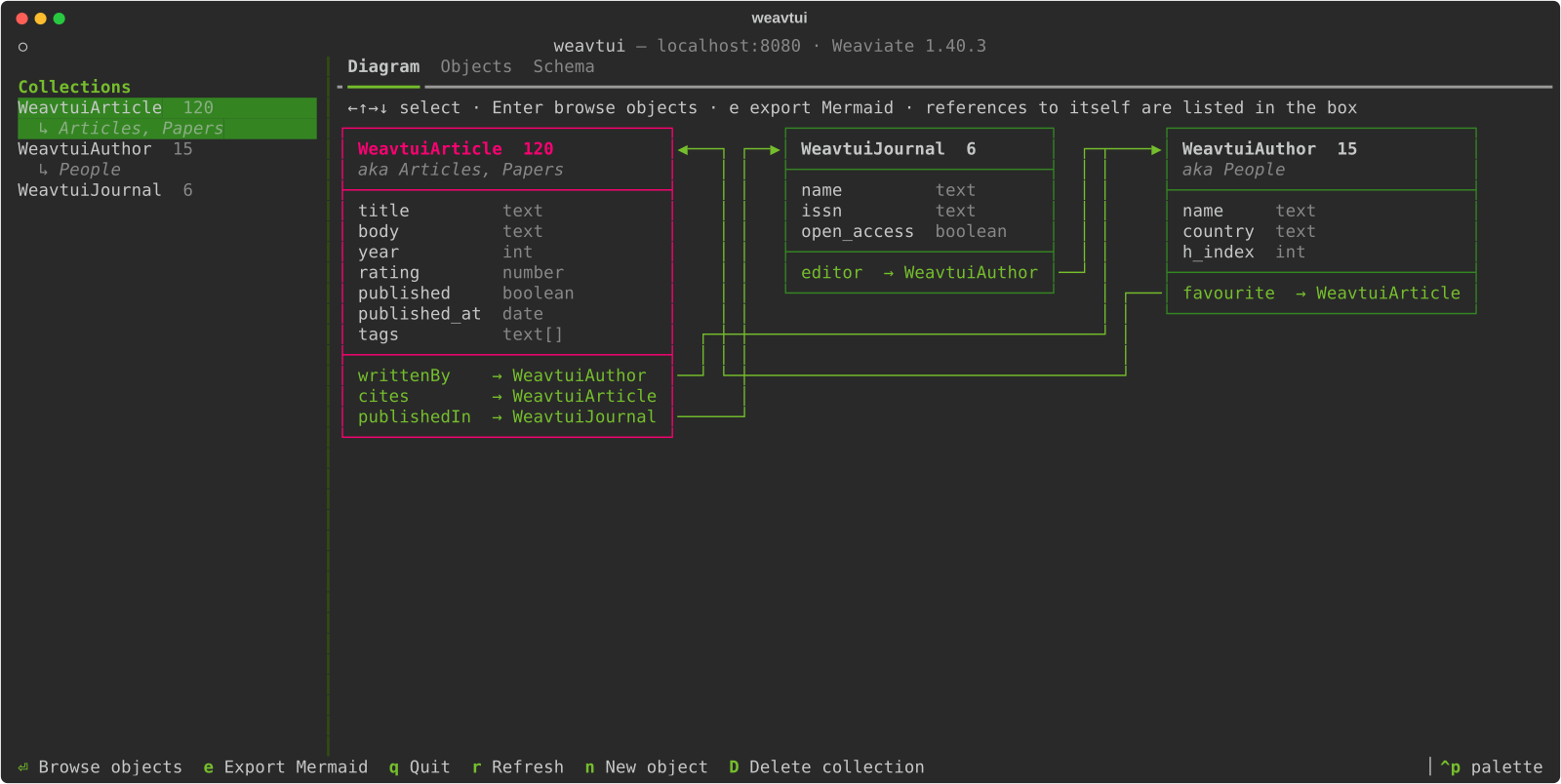
- Schema diagram: every collection as a UML-like box with its properties, types, aliases and object count, with arrows for cross-references. Export it as Mermaid.
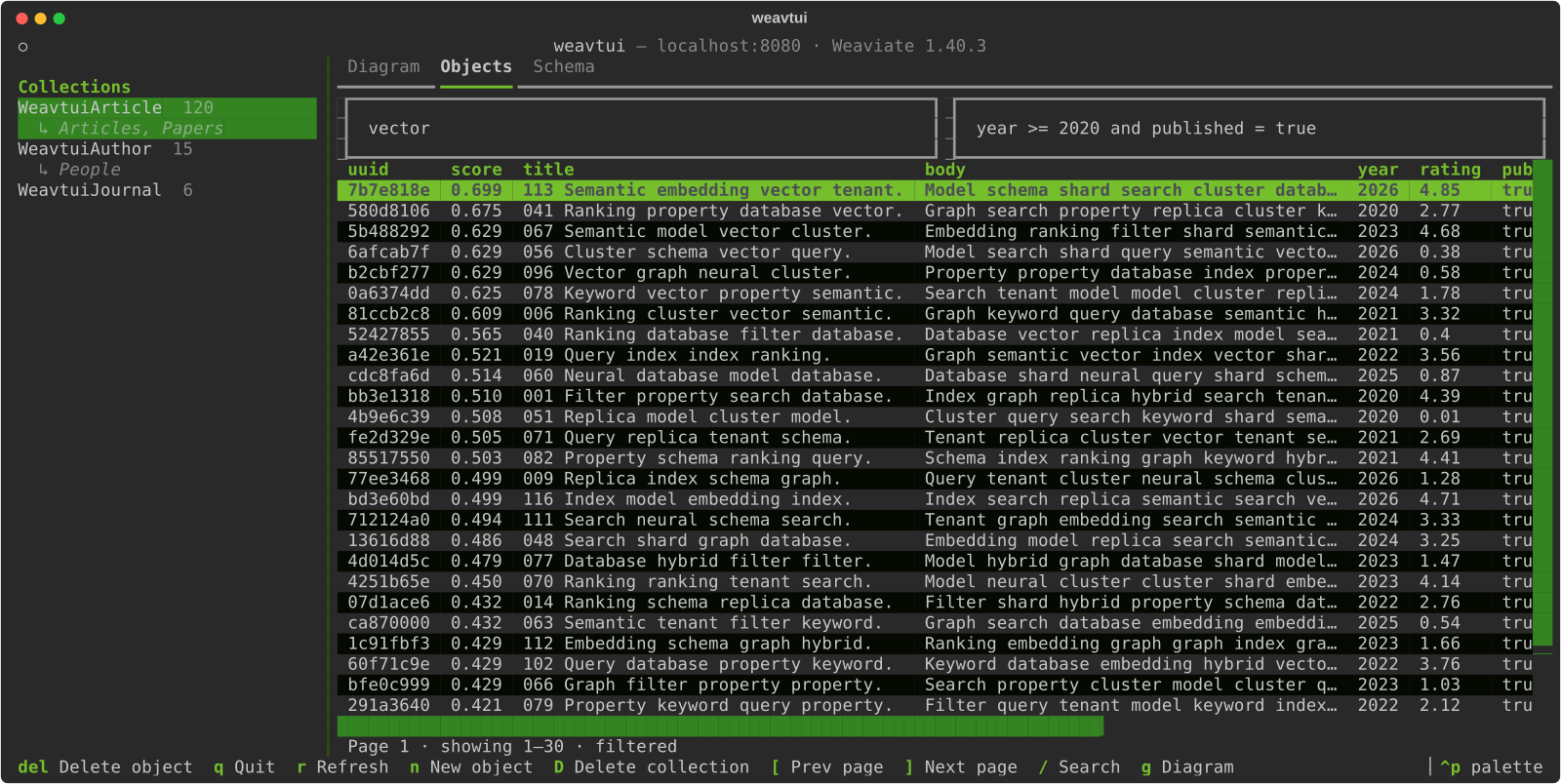
- Object browser: page through any collection; pages size themselves to your window.
- Search and filters: keyword (BM25) search plus simple property filters such as
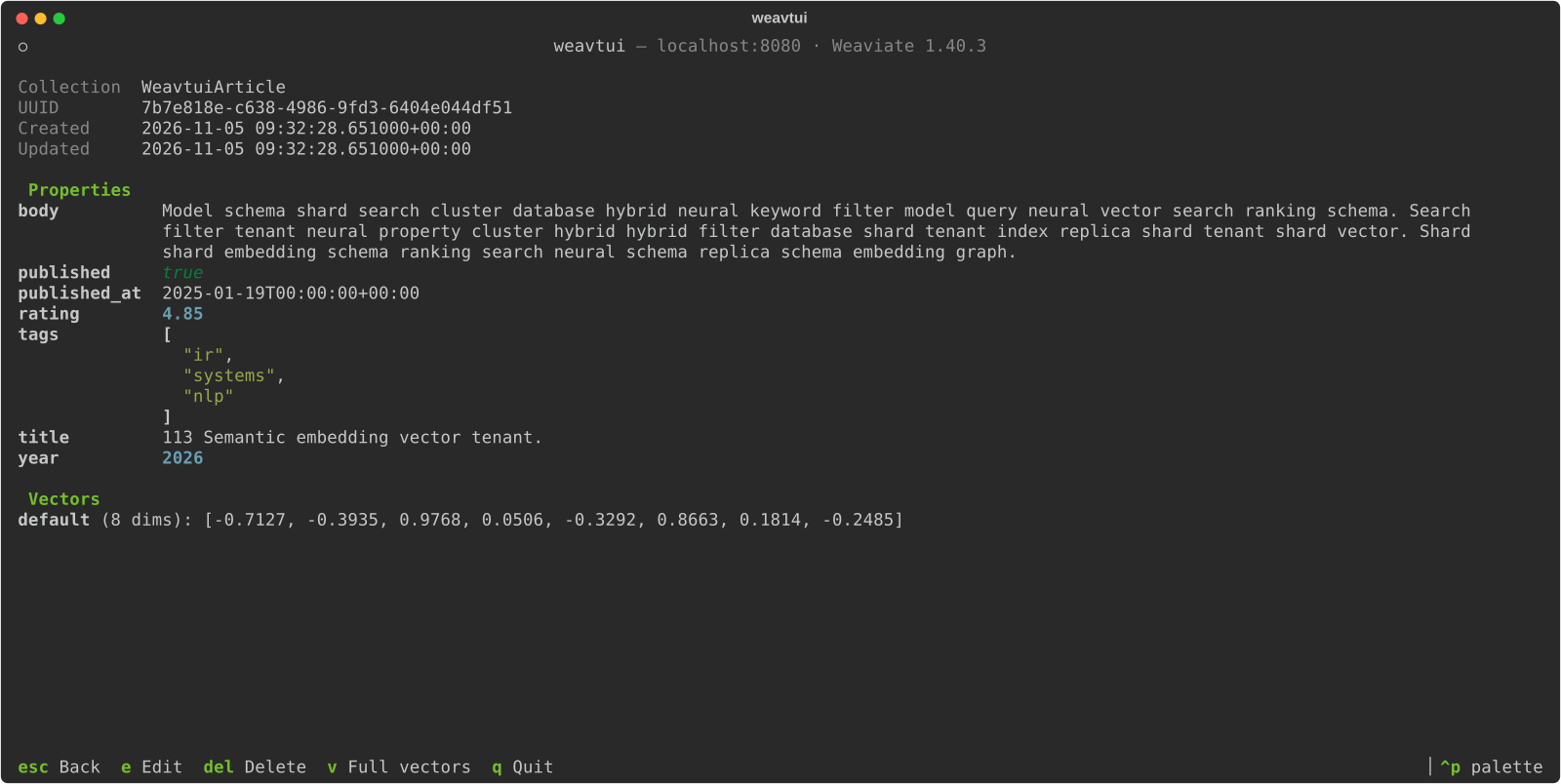
year >= 2020 and published = true. - Object details: all properties, metadata and vectors.
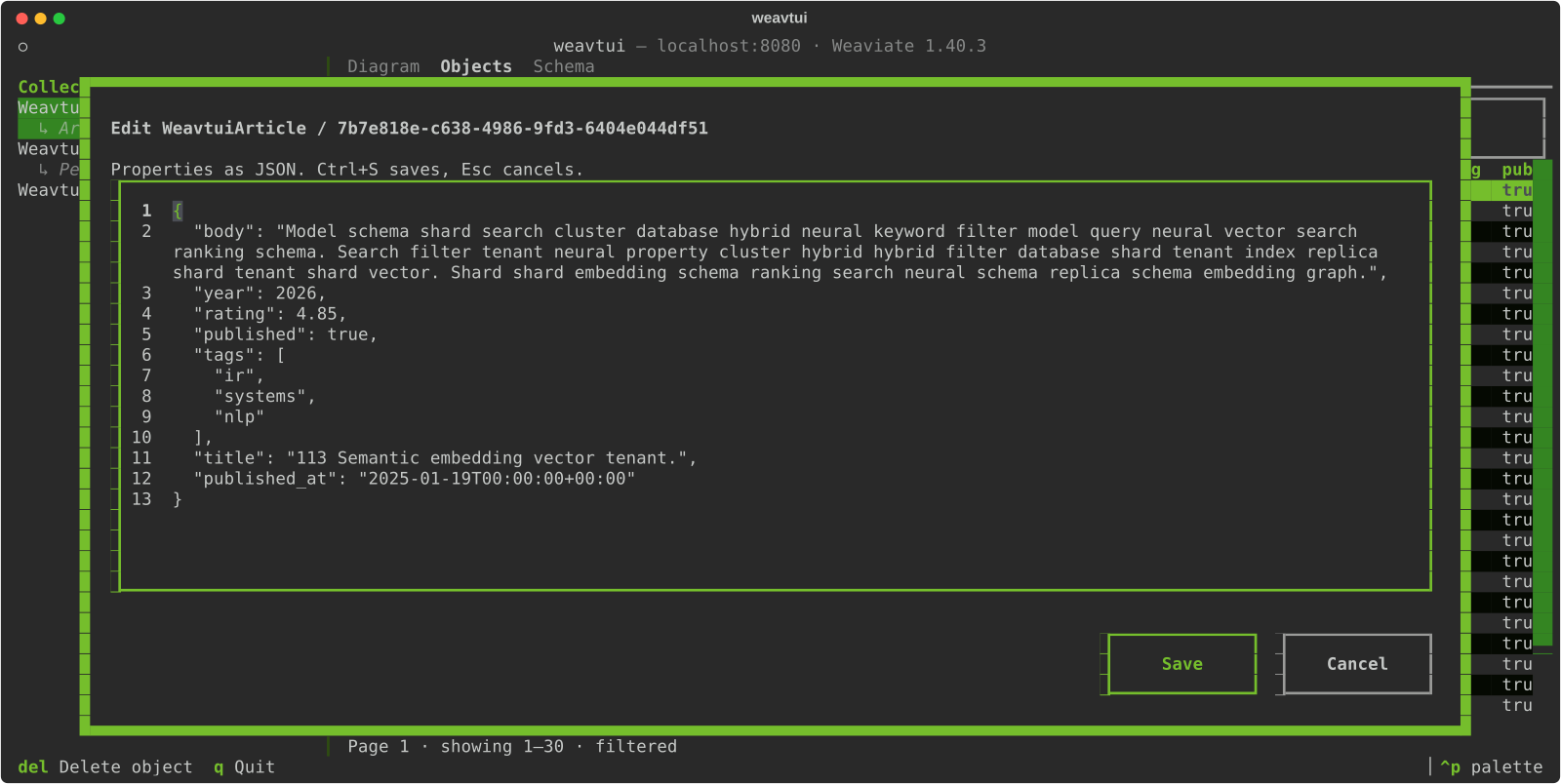
- Editing: create, edit (as JSON) and delete objects; delete whole collections, with confirmation.
- Fits your terminal: no background of its own; uses your terminal's colours plus Weaviate green.
| Browse and search | Inspect an object |
|---|---|
 |
 |
| Edit as JSON | Schema and references |
 |
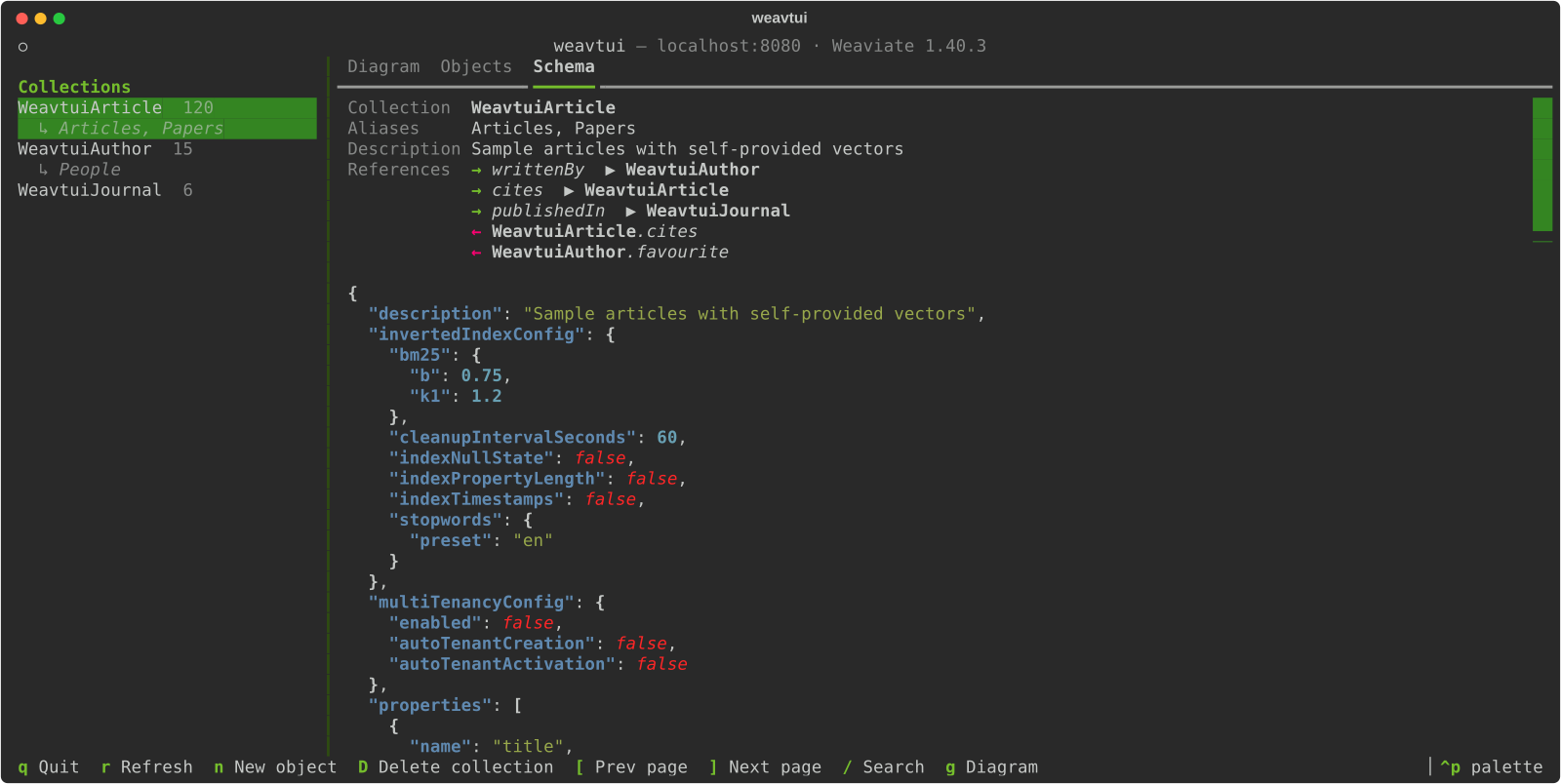 |
Installation
weavtui needs Python 3.13 or newer. The easiest way is to install it as a standalone tool with uv or pipx; uv downloads a suitable Python automatically if you don't have one.
uv tool install weavtui     # or: pipx install weavtui
weavtui
Try it without installing:
uvx weavtui
Or install it into an existing environment:
pip install weavtui
Usage
weavtui                                   # localhost:8080, gRPC 50051, no auth
weavtui --port 8180 --grpc-port 50151     # another local instance
weavtui --host db.example --api-key "$KEY"
weavtui --start browse                    # open the object browser instead of the diagram
| Option | Environment variable | Default |
|---|---|---|
--host |
WEAVTUI_HOST |
localhost |
--port |
WEAVTUI_PORT |
8080 |
--grpc-port |
WEAVTUI_GRPC_PORT |
50051 |
--api-key |
WEAVTUI_API_KEY |
none |
--start (diagram or browse) |
WEAVTUI_START |
diagram |
weavtui works with Weaviate 1.x through the v4 Python client and is tested against Weaviate 1.40. Aliases need Weaviate 1.32 or newer; on older servers they're simply not shown.
The layout
The collection list on the left is always visible. On the right are three tabs:
- Diagram: the schema of the whole database.
- Objects: the selected collection's objects.
- Schema: the selected collection's full configuration, aliases and references.
Keys
| Key | Where | Action |
|---|---|---|
g |
anywhere | Go to the diagram |
← → ↑ ↓ |
diagram | Select a collection (the list on the left follows) |
| Click | diagram | Select a collection; click it again to browse its objects |
Enter |
diagram | Browse the selected collection's objects |
e |
diagram | Export the schema as a Mermaid classDiagram (asks where to save; also copied to the clipboard) |
Enter |
objects | Open the selected object |
[ ] |
objects | Previous / next page |
/ |
objects | Keyword search |
n |
anywhere | New object in the current collection |
Del |
objects | Delete the selected object |
D |
anywhere | Delete the current collection (asks you to type its name) |
r |
anywhere | Refresh |
Ctrl+P |
anywhere | Command palette, e.g. to switch to the weaviate-light theme |
q |
anywhere | Quit |
In the object view: e edit, Del delete, v show full vectors, Esc back.
The editor takes the properties as JSON; Ctrl+S saves, Esc cancels.
Filters
Conditions joined with and. Values are converted using the property's type from the
schema.
year >= 2020 and published = true
title like "*vector*"
tags contains nlp, ml
published_at > 2024-01-01
Operators: = != < <= > >= like contains (matches any of the
comma-separated values).
Limitations
- Multi-tenant collections aren't supported yet (no tenant picker).
- Cross-reference values aren't shown on objects yet; the diagram shows which collections can reference which.
- Vectors can be viewed but not edited, and there is no vector search yet.
Development
git clone https://github.com/mdocekal/weavtui && cd weavtui
uv sync
docker compose up -d                       # Weaviate 1.40.3 on localhost:8080 / 50051
uv run python scripts/seed.py              # sample collections, aliases and references
uv run weavtui
uv run pytest                              # integration tests are skipped without Weaviate
uv run ruff check . && uv run ruff format .
uv run textual run --dev -c weavtuitogether withuv run textual consolegives you Textual's debug console.uv run python scripts/screenshots.pyregenerates the images indocs/images; it needs the seeded database and Inkscape.- To use another server version or other ports:
WEAVIATE_VERSION=1.39.15 WEAVIATE_HTTP_PORT=18080 WEAVIATE_GRPC_PORT=15051 docker compose up -d(setWEAVTUI_TEST_PORT/WEAVTUI_TEST_GRPC_PORTfor the tests).
See AGENTS.md for the code layout and conventions.
Releasing to PyPI
uv version --bump patch        # or minor / major; commit the change
scripts/publish.sh --test      # TestPyPI first (token in UV_PUBLISH_TOKEN)
scripts/publish.sh             # PyPI
The script checks that the working tree is clean and the version isn't tagged yet. It
then runs lint and tests, builds, smoke-tests the wheel in a clean environment, checks
the package metadata, uploads, and tags the release (vX.Y.Z); pushing the tag is left
to you.
License
Released into the public domain under The Unlicense.
1 maintainer

Metadata
1 maintainer
Release files for weavtui 0.1.0
For a detailed explanation of source distributions (sdists) and built distributions (wheels), please see the package formats documentation.
Source distribution (sdist)
| File | Size | Uploaded | Provenance | Actions |
|---|---|---|---|---|
| weavtui-0.1.0.tar.gz | 26.0 kB | Without provenance | Details for weavtui-0.1.0.tar.gz |
Built distribution (wheel)
| File | Interpreter | ABI | Platform | Actions Reset |
|---|---|---|---|---|
| weavtui-0.1.0-py3-none-any.whl | Python 3 | none | any | Details for weavtui-0.1.0-py3-none-any.whl |
Total release size: 55.8 kB
Release files / weavtui-0.1.0.tar.gz
| Download URL | weavtui-0.1.0.tar.gz |
|---|---|
| Size | 26.0 kB |
| Tags | Source |
|
SHA-256 checksum How to use checksums |
f3fe78b455a2e95eabbe6c598689c718394583e6a7bed91fd750e7b4537d06db
|
|
BLAKE2b-256 checksum How to use checksums |
15e01d7abc9232f312ff2fb30a8766fe8c17ec0b535aface3566b60ea47b725c
|
| Upload date | |
|
Uploaded using Trusted Publishing? What is trusted publishing? |
No |
| Uploaded via |
uv/0.12.11 {"installer":{"name":"uv","version":"0.12.11","subcommand":["publish"]},"python":null,"implementation":{"name":null,"version":null},"distro":{"name":"Ubuntu","version":"24.04","id":"noble","libc":null},"system":{"name":null,"release":null},"cpu":null,"openssl_version":null,"setuptools_version":null,"rustc_version":null,"ci":null}
|
Release files / weavtui-0.1.0-py3-none-any.whl
| Download URL | weavtui-0.1.0-py3-none-any.whl |
|---|---|
| Size | 29.8 kB |
| Tags | Python 3 |
|
SHA-256 checksum How to use checksums |
01656b1bee86107ad2d386faeacc11c694dabe026a4b86d53270411c009a1eff
|
|
BLAKE2b-256 checksum How to use checksums |
e9a8dac1c92733fd18db4764f71f2ef1eda298710a23e0a2e5027a61281cc6c3
|
| Upload date | |
|
Uploaded using Trusted Publishing? What is trusted publishing? |
No |
| Uploaded via |
uv/0.12.11 {"installer":{"name":"uv","version":"0.12.11","subcommand":["publish"]},"python":null,"implementation":{"name":null,"version":null},"distro":{"name":"Ubuntu","version":"24.04","id":"noble","libc":null},"system":{"name":null,"release":null},"cpu":null,"openssl_version":null,"setuptools_version":null,"rustc_version":null,"ci":null}
|
Security for weavtui 0.1.0
Provenance
Provenance describes where a file came from. On PyPI, provenance is shared via attestations, which provide a verifiable record of the build or publishing details. View details, limitations and caveats.
No provenance found
None of the files in this release were uploaded with provenance metadata.
A note on package security
PyPI is a repository for distributing packages, not a service for auditing them. While third-party security researchers and our staff do their best to detect and remove malicious packages, PyPI cannot guarantee the quality, security or suitability of any given package.
To learn more about protecting yourself from malicious actors, visit our package security documentation.














