
Extract any website's full design system — logos, colors, fonts, spacing, and more — into ready-to-use CSS tokens in seconds.

Project description
IRIS
One command to extract any website's design system




pip install web-design-tokens •
iris stripe.com
# Install
pip install web-design-tokens
playwright install chromium

# Run — extracts colors, fonts, spacing, logos, components in seconds
iris stripe.com --save-output

# Export as W3C Design Tokens
iris stripe.com --dtcg
What you get
| Category | Extracted |
|---|---|
| Logo | URL, dimensions, favicons |
| Colors | Semantic, CSS variables, palette — with LCH/OKLCH conversion |
| Typography | Font families, sizes, weights, line heights, Google Fonts detection |
| Spacing | Common gap, margin, padding values |
| Border radius | Rounded corners by element |
| Borders | Width + color combinations |
| Shadows | Box-shadow values with confidence scoring |
| Components | Button, input, link, badge styles (default + hover + focus states) |
| Breakpoints | Responsive media query values |
| Frameworks | Detected UI libraries and icon systems |
Usage
| Flag | Effect |
|---|---|
--save-output |
Save JSON to output/{domain}/ |
--dtcg |
Export in W3C DTCG format (auto-saves .tokens.json) |
--dark-mode |
Force dark mode extraction |
--mobile |
Mobile viewport (390×844) |
--browser=firefox |
Use Firefox (better Cloudflare bypass) |
--json-only |
Raw JSON to stdout |
--slow |
3× timeouts for heavy SPAs |
# Firefox for Cloudflare-heavy sites
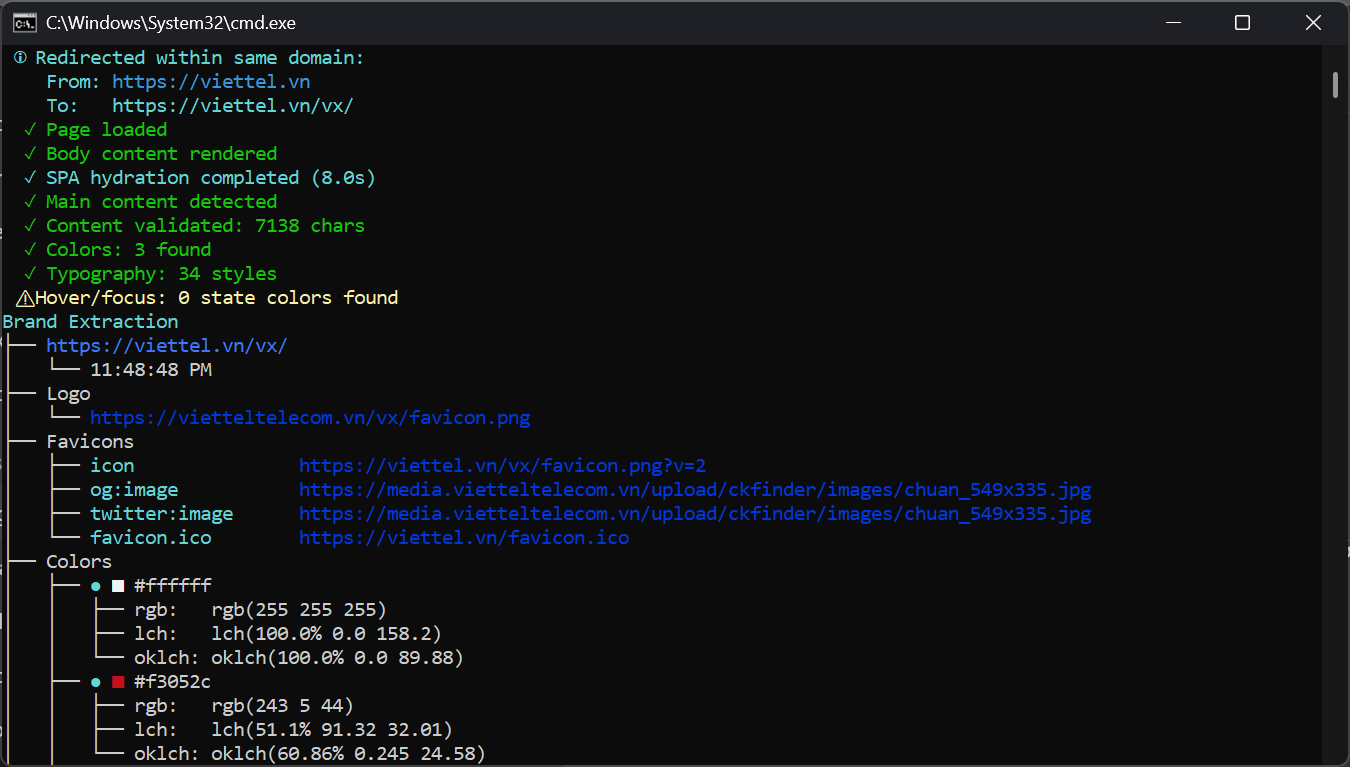
iris viettel.vn --browser=firefox --save-output

# Dark mode on mobile
iris airbnb.com --dark-mode --mobile --dtcg
Output example
Brand Extraction
└── stripe.com
    ├── Logo
    │   ├── https://stripe.com/img/logo.svg
    │   └── 200×60px
    ├── Colors
    │   ├── ● ■ #635bff (primary)
    │   │   ├── rgb: rgb(99 91 255)
    │   │   └── oklch: oklch(58.3% 0.178 261.25)
    │   ├── ● ■ #32325d (text-primary)
    │   │   ├── rgb: rgb(50 50 93)
    │   │   └── oklch: oklch(32.5% 0.032 271.63)
    │   └── ...
    ├── Typography
    │   ├── Inter
    │   │   ├── Body → 16px, line-height: 1.5
    │   │   └── Heading → 32px, weight: 700
    │   └── ...
    ├── Spacing → 16px (1rem)  24px (1.5rem)  32px (2rem)
    ├── Border Radius → 4px  8px  12px
    ├── Shadows → 8 values
    ├── Buttons → 3 variants (primary, secondary, outline)
    ├── Breakpoints → 768px → 1024px → 1280px
    └── Frameworks → React, Tailwind CSS
How it works
IRIS uses Playwright to render pages in a real browser, then runs 14 parallel extractors against the computed DOM:
- Stealth navigation — anti-detection scripts, retry logic, SPA hydration waits
- Parallel extraction — all 14 extractors run concurrently via
asyncio.gather - State simulation — hovers elements to capture hover/focus colors
- Color science — converts every color to sRGB, LCH, and OKLCH
- Confidence scoring — high (brand elements) / medium (interactive) / low (generic)
Extractors cover: logo, colors, typography, spacing, border-radius, borders, shadows, buttons, inputs, links, badges, breakpoints, icon systems, and frameworks.
Dark mode & mobile
# Extract both light and dark mode colors
iris stripe.com --dark-mode

# Mobile-first responsive extraction
iris stripe.com --mobile --save-output
Dark mode colors are deduplicated against light mode. Mobile viewport (390×844 iPhone) captures responsive breakpoints and mobile-specific styles.
W3C DTCG export
The --dtcg flag produces tokens conforming to the W3C Design Tokens Community Group format — compatible with Style Dictionary and design tool plugins.
iris stripe.com --dtcg
# → output/stripe.com/2026-07-17T05-00-00.tokens.json
Limitations
- Canvas / WebGL–rendered sites (Tesla, Apple Vision Pro) can't be analyzed
- Dark mode must be forced with
--dark-mode(not auto-detected) - Heavy SPAs may need
--slowfor full hydration - Hover/focus states are simulated, not read from CSS (some may be missed)
Ethics
Analyzing public CSS is legal under US DMCA § 1201 and EU Software Directive. Use for audits and inspiration — don't clone competitors. Respect robots.txt.
Release history Release notifications | RSS feed


Download files
Download the file for your platform. If you're not sure which to choose, learn more about installing packages.
Source Distribution
Built Distribution
Filter files by name, interpreter, ABI, and platform.
If you're not sure about the file name format, learn more about wheel file names.
Copy a direct link to the current filters
File details
Details for the file web_design_tokens-0.1.1.tar.gz.
File metadata
- Download URL: web_design_tokens-0.1.1.tar.gz
- Upload date:
- Size: 35.5 kB
- Tags: Source
- Uploaded using Trusted Publishing? No
- Uploaded via: twine/6.2.0 CPython/3.12.0
File hashes
| Algorithm | Hash digest | |
|---|---|---|
| SHA256 |
408f8f1543169f082252792467b24b5bb6e05f1d14e67f4ca5b797311ee251fb
|
|
| MD5 |
e6d96d6975797426faf3bc27889902c7
|
|
| BLAKE2b-256 |
ecad1a8c7ea279a9b4b98608cab51ecd1f3892058c9f55e59eed7b7cacb66208
|
File details
Details for the file web_design_tokens-0.1.1-py3-none-any.whl.
File metadata
- Download URL: web_design_tokens-0.1.1-py3-none-any.whl
- Upload date:
- Size: 40.5 kB
- Tags: Python 3
- Uploaded using Trusted Publishing? No
- Uploaded via: twine/6.2.0 CPython/3.12.0
File hashes
| Algorithm | Hash digest | |
|---|---|---|
| SHA256 |
cd922943cd51ba36acad46cd62ef1ff6fd554cbf35a2515e2373bbc5555c81c3
|
|
| MD5 |
4001fd7511d61c85b4cca88b2055a753
|
|
| BLAKE2b-256 |
77f84f15ed447e966761d3ccc68c39275585b4e3564ef46e45e2d6d5e1d6c876
|






