
WebScanner
An async Textual TUI for website reconnaissance — DNS, WHOIS, TLS, security, tech-stack and SEO, with no paid APIs.



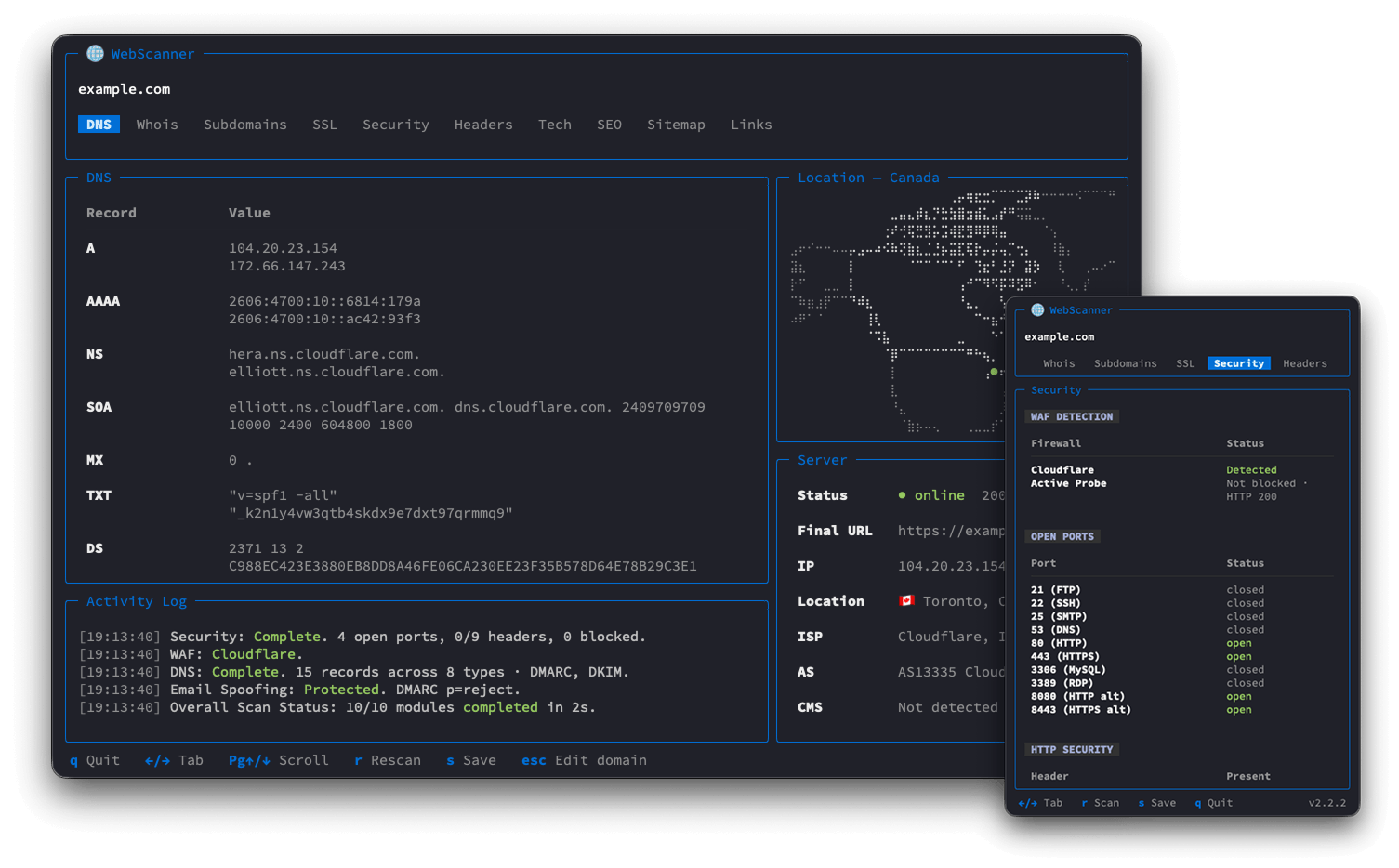
Point it at a domain and it concurrently gathers DNS, WHOIS, TLS, security, tech-stack and SEO intelligence, then lays it out across tabs — with a live activity log, a country map and a server-status panel that stay pinned in place.
No paid APIs. Everything runs off free, public endpoints and the standard library:
ip-api.com for geolocation, Cloudflare/Google DoH and dig against public filtering
resolvers for blocklist checks, the system whois, and stdlib ssl/socket. Country
borders are embedded (Natural Earth), so even the map needs no tile service.
Contents
Features
Ten tabs, scanned concurrently and rendered live as each module finishes:
- DNS — records plus email authentication, folded into one tab.
- A / AAAA / NS / CNAME / SOA / MX / TXT / CAA / DS / DNSKEY records
- DMARC (
_dmarc) and DKIM (probes ~40 selectors, each labelled with its email provider) - SPF
allqualifier, and an Email Spoofing verdict (Protected / Weak / Vulnerable) computed from DMARC enforcement, not SPF alone
- Whois — parsed system
whois, with rich gTLD and ccTLD field support.- Registrar, registration / expiry dates, nameservers
- Per-contact details where published
- Subdomains — discovered natively, no third-party enumeration services.
- TLS certificate SANs
socketprobes of common subdomains
- SSL — the live TLS certificate, parsed from the handshake.
- Issuer, subject, SANs
- Validity window, trust and expiry
- Security — four checks, each a sub-table.
- WAF detection — passive header/cookie fingerprinting plus an active probe that sends obvious attack payloads to see if it gets blocked (names Cloudflare, Sucuri, Akamai, ModSecurity, …)
- Open ports — TCP connect scan of common ports
- HTTP security headers — CSP, HSTS, X-Frame-Options, … present or not
- Blocklists — status across public filtering resolvers (AdGuard, CleanBrowsing, Cloudflare, Google, OpenDNS, Quad9)
- Headers — the full set of HTTP response headers.
- Tech — technology-stack detection via Wappalyzer.
- Each technology with its category, confidence, groups and version
- SEO — everything on-page that search engines read.
- Title / description with length hints, H1–H3, social links
- Top keyword n-grams (1 / 2 / 3-word)
robots.txtand declared sitemaps- JSON-LD structured data
- Sitemap — the site's URLs as a clickable path tree, no crawling.
- Discovered from
sitemap.xml, recursing into nested sitemap indexes - Rebuilt into a folder tree keyed by URL path
- Discovered from
- Links — links found on the page, with their anchor text.
- Internal and external, split into sub-tables
Alongside the tabs, three fixed panels:
- Activity Log — a running narration of the scan: what each module found, what came back empty and what broke, so every headline result is visible without switching tabs.
- Country map — real country outlines auto-framed around the server's location, drawn
with braille characters (
+/-to zoom). - Server — online status and response time, the final URL after redirects, IP, geolocation, ISP, AS, hosting provider and detected CMS (name and version). When many sites share the server's IP, it flags the address as shared and counts how many distinct domains resolve to it (via a free reverse-IP lookup, hackertarget, rate-limited to 50 requests/day).
The layout is responsive: on a narrow terminal it collapses to a single full-width column and the map, Server and Activity panels fold into their own tabs.
Requests to the site being scanned wear a coherent desktop-Chrome identity — a real
User-Agent plus the headers Chrome actually sends beside it — picked once per scan and
reused for every request, and reported in the Activity Log. This is about getting the real
page back rather than a WAF block page, and it only defeats naive User-Agent filtering: the
TLS and HTTP/2 fingerprints are still those of requests, so enterprise bot management sees
straight through it. Third-party lookups (ip-api, DoH) keep an honest scanner User-Agent.
Installation
Requires Python 3.11+.
The easiest way is with pipx (or uv),
which installs webscan into its own isolated environment:
pipx install web-scanner
# or
uv tool install web-scanner
To install the latest unreleased code, point either tool at the repo instead:
pipx install git+https://github.com/iamramizk/web-scanner.
From source (development)
git clone https://github.com/iamramizk/web-scanner.git
cd web-scanner
python3 -m venv .venv
source .venv/bin/activate     # Unix/macOS  (.venv\Scripts\activate on Windows)
pip install -e .
Usage
webscan example.com
You can also run it as a module (python -m webscanner example.com), or from a source
checkout without installing (python app.py example.com).
Once a scan finishes you can stay in the app: press r to rescan the same domain, or esc
to edit the domain and scan a different one — no need to restart.
Press s to save every tab to CSV (plus a server.csv for the fixed Server panel, which
has no tab of its own). Files go into a <domain>_<timestamp>/ folder — under output/
when running from a source checkout, or straight in your current directory when installed.
Updating
The app checks PyPI in the background once a day and, when a newer release is out, marks the version in the footer with an orange dot and adds a line to the Activity Log — so you'll know when it's worth upgrading.
pipx upgrade web-scanner
If you installed from Git, pipx upgrade won't see new commits (the version is unchanged),
so reinstall from source instead:
pipx install --force git+https://github.com/iamramizk/web-scanner
Keys
| Key | Action |
|---|---|
← / → Tab |
Switch tabs |
1–9 0 |
Jump straight to the Nth tab (0 = 10th) |
PgUp / PgDn |
Scroll the main panel up / down |
+ / - |
Zoom the country map in / out |
↑ / ↓ enter |
Navigate the Sitemap tree (space expands/collapses all) |
r |
Rescan |
s |
Save — export every tab to CSV under <domain>_<timestamp>/ |
esc |
Edit the domain and scan a new one |
q |
Quit |
1 maintainer

Download files
Download the file for your platform. If you're not sure which to choose, learn more about installing packages.
Source Distribution
Built Distribution
Filter files by name, interpreter, ABI, and platform.
If you're not sure about the file name format, learn more about wheel file names.
Copy a direct link to the current filters
File details
Details for the file web_scanner-2.2.3.tar.gz.
File metadata
- Download URL: web_scanner-2.2.3.tar.gz
- Upload date:
- Size: 217.3 kB
- Tags: Source
- Uploaded using Trusted Publishing? Yes
- Uploaded via:
twine/6.1.0 CPython/3.13.14
File hashes
| Algorithm | Hash digest | |
|---|---|---|
| SHA256 |
e9fb2b29de87188ee68a96bab3ddb0a7bd0911657adeeb39686171ceca6a242a
|
|
| MD5 |
0b3f638d792e29f50ab27ba4dff20acc
|
|
| BLAKE2b-256 |
290ed77717852202f3d2b7b4cdd6ea0e32d9f91de581bd56b58c151414cc9678
|
Provenance
The following attestation bundles were made for web_scanner-2.2.3.tar.gz:
Publisher:
publish.yml on iamramizk/web-scanner
-
Statement:
-
Statement type:
https://in-toto.io/Statement/v1 -
Predicate type:
https://docs.pypi.org/attestations/publish/v1 -
Subject name:
web_scanner-2.2.3.tar.gz -
Subject digest:
e9fb2b29de87188ee68a96bab3ddb0a7bd0911657adeeb39686171ceca6a242a - Sigstore transparency entry: 2224357724
- Sigstore integration time:
-
Permalink:
iamramizk/web-scanner@9145058b5289c5d2e935c96a446423168ada5861 -
Branch / Tag:
refs/tags/v2.2.3 - Owner: https://github.com/iamramizk
-
Access:
public
-
Token Issuer:
https://token.actions.githubusercontent.com -
Runner Environment:
github-hosted -
Publication workflow:
publish.yml@9145058b5289c5d2e935c96a446423168ada5861 -
Trigger Event:
release
-
Statement type:
File details
Details for the file web_scanner-2.2.3-py3-none-any.whl.
File metadata
- Download URL: web_scanner-2.2.3-py3-none-any.whl
- Upload date:
- Size: 232.9 kB
- Tags: Python 3
- Uploaded using Trusted Publishing? Yes
- Uploaded via:
twine/6.1.0 CPython/3.13.14
File hashes
| Algorithm | Hash digest | |
|---|---|---|
| SHA256 |
5c5b2522bd0852527f3942ca481651ec61b551bacf69da4de6b23949cacd113c
|
|
| MD5 |
71ffd41ff4723bd01ca7c15869a96c3e
|
|
| BLAKE2b-256 |
12d71c819c1e95c1a8ad3aa050c7b609fd8eb080412ba744ac0790f78571ae57
|
Provenance
The following attestation bundles were made for web_scanner-2.2.3-py3-none-any.whl:
Publisher:
publish.yml on iamramizk/web-scanner
-
Statement:
-
Statement type:
https://in-toto.io/Statement/v1 -
Predicate type:
https://docs.pypi.org/attestations/publish/v1 -
Subject name:
web_scanner-2.2.3-py3-none-any.whl -
Subject digest:
5c5b2522bd0852527f3942ca481651ec61b551bacf69da4de6b23949cacd113c - Sigstore transparency entry: 2224358469
- Sigstore integration time:
-
Permalink:
iamramizk/web-scanner@9145058b5289c5d2e935c96a446423168ada5861 -
Branch / Tag:
refs/tags/v2.2.3 - Owner: https://github.com/iamramizk
-
Access:
public
-
Token Issuer:
https://token.actions.githubusercontent.com -
Runner Environment:
github-hosted -
Publication workflow:
publish.yml@9145058b5289c5d2e935c96a446423168ada5861 -
Trigger Event:
release
-
Statement type:














