
A powerful, standalone web scraping toolkit using Playwright and various parsers.
Verified details
These details have been verified by PyPIProject links
GitHub Statistics
Maintainers

Project description
Web Scraper Toolkit






Expertly crafted by Roy Dawson IV
Use Case Synopsis
Web Scraper Toolkit is a production-grade scraping and browser automation platform for:
- Engineers and analysts who need repeatable, scriptable web extraction.
- Red/blue team workflows that need transparent anti-bot diagnostics and safe automation controls.
- Agent builders who need MCP tools for autonomous URL ingestion, crawling, extraction, and post-processing.
You can run it as:
- A CLI tool (
web-scraper) - An MCP server (
web-scraper-server) - A Python library (typed config + async APIs)
What it does (without reading code)
Core scraping and extraction
- Single-page scrape, batch scrape, and domain crawling.
- Sitemap ingestion and tree extraction.
- Markdown, text, HTML, JSON, XML, CSV, screenshot, and PDF outputs.
- Contact extraction (emails, phones, socials).
Browser intelligence and anti-bot handling
- Playwright-first automation with stealth profile controls.
- Native browser fallback routing (
chrome,msedge,chromium) when blocked. - Interactive browser MCP tools for navigate/click/type/wait/key/scroll/hover/evaluate/screenshot.
- Compact interaction-map MCP output for LLM-friendly clickable-element discovery.
- Optional accessibility-tree MCP output for role/name-first autonomous navigation.
- Script-level diagnostics for detection analysis and route optimization.
Dynamic host learning (auto-routing)
- Per-domain host profiles in
host_profiles.json. - Safe-subset auto-learning of routing strategy.
- Promotion only after clean incognito successes (default threshold: 2).
- Deterministic precedence: explicit override > host profile > global config > defaults.
Out-of-the-box behavior ("just works")
Default behavior is tuned for safety + resilience:
- Playwright Chromium is the default primary browser path.
- Incognito-style contexts by default.
- Native fallback policy defaults to
on_blocked. - Host profile learning is enabled by default.
- Host profile read-only mode is available (
host_profiles_read_only=true) to apply-only with no writes. - Host profile store is auto-created when needed.
- If host profile persistence cannot initialize, toolkit continues with clear diagnostic metadata.
- OS-level anti-bot interaction is blocked in headless mode.
- Before OS mouse takeover, toolkit warns the operator and verifies active foreground window.
Quick Start (60 seconds)
pip install web-scraper-toolkit
playwright install
Optional desktop solver support:
pip install web-scraper-toolkit[desktop]
playwright install
Run a first scrape:
web-scraper --url https://example.com --format markdown --export
End-to-End Flow
Simple flow

Advanced flow (dynamic routing)
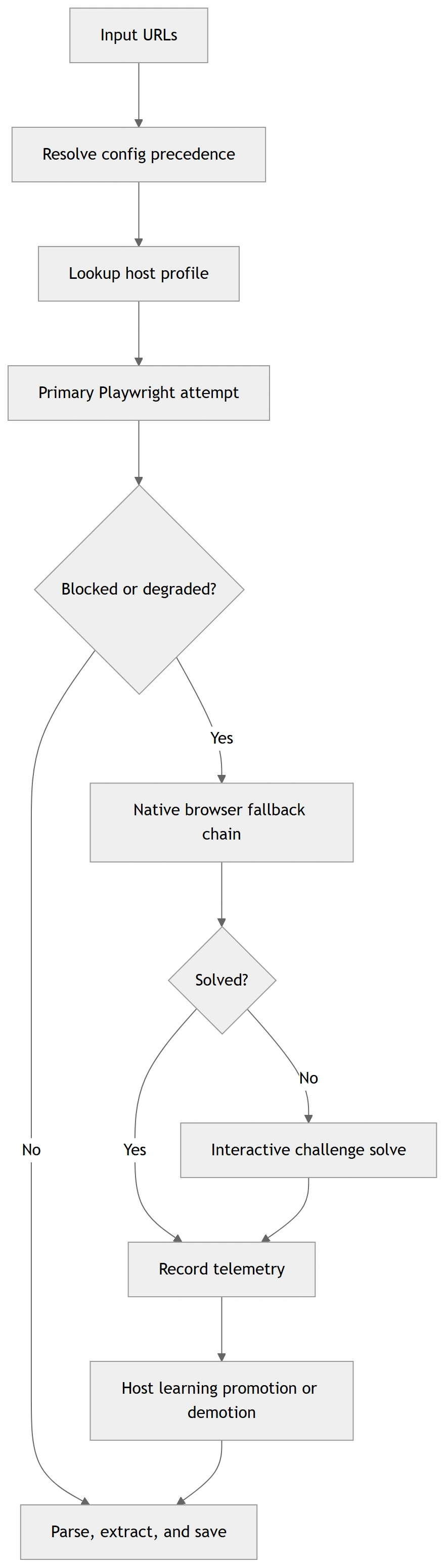
These diagrams are rendered from Mermaid source files for GitHub/PyPI compatibility. Sources:
docs/diagrams/*.mmd
How to Use It
1) CLI (fastest entry)
Minimal:
web-scraper --url https://example.com --format markdown --export
Batch + merge:
web-scraper --input urls.txt --workers auto --format text --merge --output-name merged.txt
Diagnostics wrapper:
web-scraper --run-diagnostic challenge_matrix --diagnostic-url https://target-site.tld/resource --diagnostic-runs-per-variant 2
Optional toolkit auto-commit (off by default):
web-scraper --run-diagnostic toolkit_route --diagnostic-url https://target-site.tld/resource --diagnostic-auto-commit-host-profile
Strict progression gating + artifact capture:
web-scraper \
  --run-diagnostic toolkit_route \
  --diagnostic-url https://target-site.tld/resource \
  --diagnostic-require-2xx \
  --diagnostic-save-artifacts \
  --diagnostic-artifacts-dir ./scripts/out/artifacts
2) MCP (agentic mode)
Local stdio:
web-scraper-server --stdio
Remote transport:
web-scraper-server --transport streamable-http --host 127.0.0.1 --port 8000 --path /mcp
3) Python API
import asyncio
from web_scraper_toolkit.browser.config import BrowserConfig
from web_scraper_toolkit.browser.playwright_handler import PlaywrightManager

async def main() -> None:
    cfg = BrowserConfig.from_dict({
        "headless": True,
        "browser_type": "chromium",
        "native_fallback_policy": "on_blocked",
        "host_profiles_enabled": True,
        "host_profiles_path": "./host_profiles.json",
        "host_profiles_read_only": False,
    })

    async with PlaywrightManager(cfg) as manager:
        content, final_url, status = await manager.smart_fetch("https://example.com")
        print({"status": status, "url": final_url, "has_content": bool(content)})

asyncio.run(main())
Safety Model (OS input + anti-bot interactions)
When toolkit enters OS-level mouse challenge solving:
- It warns the operator before input takeover.
- It validates that the browser is foreground/active.
- It verifies click/hold coordinates are inside active window bounds.
- It refuses OS interaction in headless mode.
pyautoguifailsafe remains active (move cursor to a screen corner to abort).
Optional env override:
WST_OS_INPUT_WARNING_SECONDS(default:3)
Configuration Model
Precedence order:
- Explicit CLI/MCP arguments
- Environment variables (
WST_*) settings.local.cfg/settings.cfgconfig.json- Built-in defaults
Key files:
config.example.jsonsettings.example.cfghost_profiles.example.jsonINSTRUCTIONS.md(full operations runbook)
Full Usage and Operations
For exhaustive setup, deployment, troubleshooting, CLI/MCP option coverage, and diagnostics workflows, read:
INSTRUCTIONS.mddocs/config_schema.md(config + host profile schema contract)docs/api_stability.md(API/deprecation policy)docs/support_matrix.md(platform/browser support matrix)docs/release_checklist.md(ship checklist)
Canonical script diagnostics now use scripts/diag_*.py names.
Verified Outputs
The following output blocks are copied from deterministic command runs in this repository.
Verified Output A — diag_toolkit_zoominfo --help
Command:
python scripts/diag_toolkit_zoominfo.py --help
Expected output:
usage: diag_toolkit_zoominfo.py [-h] [--url URL] [--timeout-ms TIMEOUT_MS]
                                [--skip-interactive]
                                [--include-headless-stage]
                                [--log-level {DEBUG,INFO,WARNING,ERROR}]
                                [--auto-commit-host-profile]
                                [--host-profiles-path HOST_PROFILES_PATH]
                                [--read-only] [--require-2xx]
                                [--save-artifacts]
                                [--artifacts-dir ARTIFACTS_DIR]
Verified Output B — CLI includes strict/artifact diagnostic flags
Command:
python -m web_scraper_toolkit.cli --help
Expected excerpt:
  --diagnostic-require-2xx
                        Require final HTTP 2xx status for toolkit diagnostic
                        stage success.
  --diagnostic-save-artifacts
                        Persist per-stage diagnostic artifacts for toolkit
                        route diagnostics.
  --diagnostic-artifacts-dir DIAGNOSTIC_ARTIFACTS_DIR
                        Optional artifacts directory override for toolkit
                        route diagnostics.
Verified Output C — mocked diagnostic report payload (from deterministic test)
File/fixture expectation used in tests/test_script_diagnostics.py:
{
  "summary": {
    "progressed_stages": 1
  }
}
Production Deployment Checklist
Before release tags, execute and verify:
ruff format --check .
ruff check src
mypy
pytest -q -m "not integration"
python -m build
python -m twine check dist/*
python scripts/clean_workspace.py --dry-run
For full release/security gates, see docs/release_checklist.md.
Support Matrix
- Python: 3.10–3.13
- OS: Windows, Linux, macOS
- Native fallback channels: chrome, msedge, chromium
- Interactive OS-level challenge solving: headed desktop sessions only
Details and limitations: docs/support_matrix.md.
Author & Links
Created by: Roy Dawson IV
GitHub: https://github.com/imyourboyroy
PyPi: https://pypi.org/user/ImYourBoyRoy/
Project details
Verified details
These details have been verified by PyPIProject links
GitHub Statistics
Maintainers
Release history Release notifications | RSS feed


Download files
Download the file for your platform. If you're not sure which to choose, learn more about installing packages.
Source Distribution
Built Distribution
Filter files by name, interpreter, ABI, and platform.
If you're not sure about the file name format, learn more about wheel file names.
Copy a direct link to the current filters
File details
Details for the file web_scraper_toolkit-0.3.1.tar.gz.
File metadata
- Download URL: web_scraper_toolkit-0.3.1.tar.gz
- Upload date:
- Size: 191.9 kB
- Tags: Source
- Uploaded using Trusted Publishing? Yes
- Uploaded via: twine/6.1.0 CPython/3.13.7
File hashes
| Algorithm | Hash digest | |
|---|---|---|
| SHA256 |
8a056f35fd0e5abb67a179f14faa3ebcc6412ee1ffeaf3cacf00826ad028bc87
|
|
| MD5 |
2be4f7180699c0798c93bcb08e5b45d4
|
|
| BLAKE2b-256 |
c0847910d170b95b5961955e37b8df6a92a2cafd22481bf6b0b1fb4c3e4b42f6
|
Provenance
The following attestation bundles were made for web_scraper_toolkit-0.3.1.tar.gz:
Publisher:
publish.yml on ImYourBoyRoy/WebScraperToolkit
-
Statement:
-
Statement type:
https://in-toto.io/Statement/v1 -
Predicate type:
https://docs.pypi.org/attestations/publish/v1 -
Subject name:
web_scraper_toolkit-0.3.1.tar.gz -
Subject digest:
8a056f35fd0e5abb67a179f14faa3ebcc6412ee1ffeaf3cacf00826ad028bc87 - Sigstore transparency entry: 1053167227
- Sigstore integration time:
-
Permalink:
ImYourBoyRoy/WebScraperToolkit@7f09ce6fa5d0578287d47ac309d41b7ced4b1479 -
Branch / Tag:
refs/tags/v0.3.1 - Owner: https://github.com/ImYourBoyRoy
-
Access:
public
-
Token Issuer:
https://token.actions.githubusercontent.com -
Runner Environment:
github-hosted -
Publication workflow:
publish.yml@7f09ce6fa5d0578287d47ac309d41b7ced4b1479 -
Trigger Event:
push
-
Statement type:
File details
Details for the file web_scraper_toolkit-0.3.1-py3-none-any.whl.
File metadata
- Download URL: web_scraper_toolkit-0.3.1-py3-none-any.whl
- Upload date:
- Size: 217.8 kB
- Tags: Python 3
- Uploaded using Trusted Publishing? Yes
- Uploaded via: twine/6.1.0 CPython/3.13.7
File hashes
| Algorithm | Hash digest | |
|---|---|---|
| SHA256 |
93b209942ee682b99f0936e3b5f8b7bd7bf2647f2ec11b9a70a55f401697dc07
|
|
| MD5 |
3d085b22ae9b78719aaa19470bdcdba1
|
|
| BLAKE2b-256 |
285fe54fc37fa26b2179f19331821f92dd3db87c1066a12f7f296c0667abd461
|
Provenance
The following attestation bundles were made for web_scraper_toolkit-0.3.1-py3-none-any.whl:
Publisher:
publish.yml on ImYourBoyRoy/WebScraperToolkit
-
Statement:
-
Statement type:
https://in-toto.io/Statement/v1 -
Predicate type:
https://docs.pypi.org/attestations/publish/v1 -
Subject name:
web_scraper_toolkit-0.3.1-py3-none-any.whl -
Subject digest:
93b209942ee682b99f0936e3b5f8b7bd7bf2647f2ec11b9a70a55f401697dc07 - Sigstore transparency entry: 1053167229
- Sigstore integration time:
-
Permalink:
ImYourBoyRoy/WebScraperToolkit@7f09ce6fa5d0578287d47ac309d41b7ced4b1479 -
Branch / Tag:
refs/tags/v0.3.1 - Owner: https://github.com/ImYourBoyRoy
-
Access:
public
-
Token Issuer:
https://token.actions.githubusercontent.com -
Runner Environment:
github-hosted -
Publication workflow:
publish.yml@7f09ce6fa5d0578287d47ac309d41b7ced4b1479 -
Trigger Event:
push
-
Statement type:






