
 V.E.S.T.


Read Me First
Welcome to the Visual Element-based Saliency Toolkit (V.E.S.T.)
High-level summary: This toolkit allows researchers to seamlessly extract and measure the importance of web page elements. This is accomplished using a formula that takes into account the relative location and size of a web page element as well as the prominence of the web page in which the element is located.
Core Mission: The primary goal is to assess the branding of a webpage and programmatically identify the kinds of topics and narratives that are most prevalent on it.
About the Package
Visual Element-based Saliency Toolkit
This package uses automated web crawling, topological graph generation and multimodal content extraction to generate a spreadsheet detailing the relative location, size, and web page address of a text or image element in an entire website. Additionally, the package comes with a bespoke element ranking formula, EleRank Formula, that utilizes an element's attributes to assign an importance for objective identification and analysis of web page elements in a web site.
Key Features Highlights
- Automated Web Crawling & Archiving: Crawl domains natively from
.txtlists, preserving structures and taking high-quality full-page screenshots. - Topological Graph Generation: Automatically map the structure of crawled domains as directed edge graphs serialized into GraphML format.
- Multimodal Content Extraction: Run a customizable, locally hosted image-to-text pipeline combining MinerU structuring, U2-Net saliency detection, and a choice of modern large vision models (e.g., FLORENCE-2, BLIP-2) to generate structured multimodal CSV datasets.
- Element Importance Scoring: Compute quantitative assessments of visual and textual elements using our bespoke EleRank Formula.
Table of Contents
- Installation
- Architecture & The VoT Formula
- Quick Start Guide
- Implemented Tools & Supported Models
- Usage Notes
Installation
This project leverages deep learning for computer vision and linguistics, requiring a robust environment setup. We recommend downloading the package from PyPI or using Conda to manage your dependencies.
Downloading from PyPI
pip install web-vest
Setting up your Conda Environment
We will walk through setting up a dedicated workspace (vest), modeled after the project's internal environment:
- Create the virtual environment:
conda create -n vest python=3.12 -y
- Activate the environment:
conda activate vest
- Install Required Python Dependencies (aligned with
pyproject.toml; adjusttorchinstall for your hardware):pip install torch torchvision pip install transformers pillow deep-translator lingua-language-detector beautifulsoup4 gdown networkx numpy opencv-python pandas requests mineru playwright
- Optional: Install MinerU Extra Dependencies:
Use this if you want the full MinerU extras stack in your environment.
pip install --upgrade pip
pip install uv
uv pip install -U "mineru[all]"
- Install Chromium for screenshot capture:
python -m playwright install chromium
Testing
The core unit suite uses lightweight dependencies and mocks external model, browser, translation, and subprocess boundaries. From the repository root, run:
python -m pip install --group test
python -m pip install --no-deps --editable .
python -m pytest
Coverage is reported in the terminal, and the suite fails if core-module coverage falls below 80%.
Architecture & The VoT Formula
Pipeline Architecture
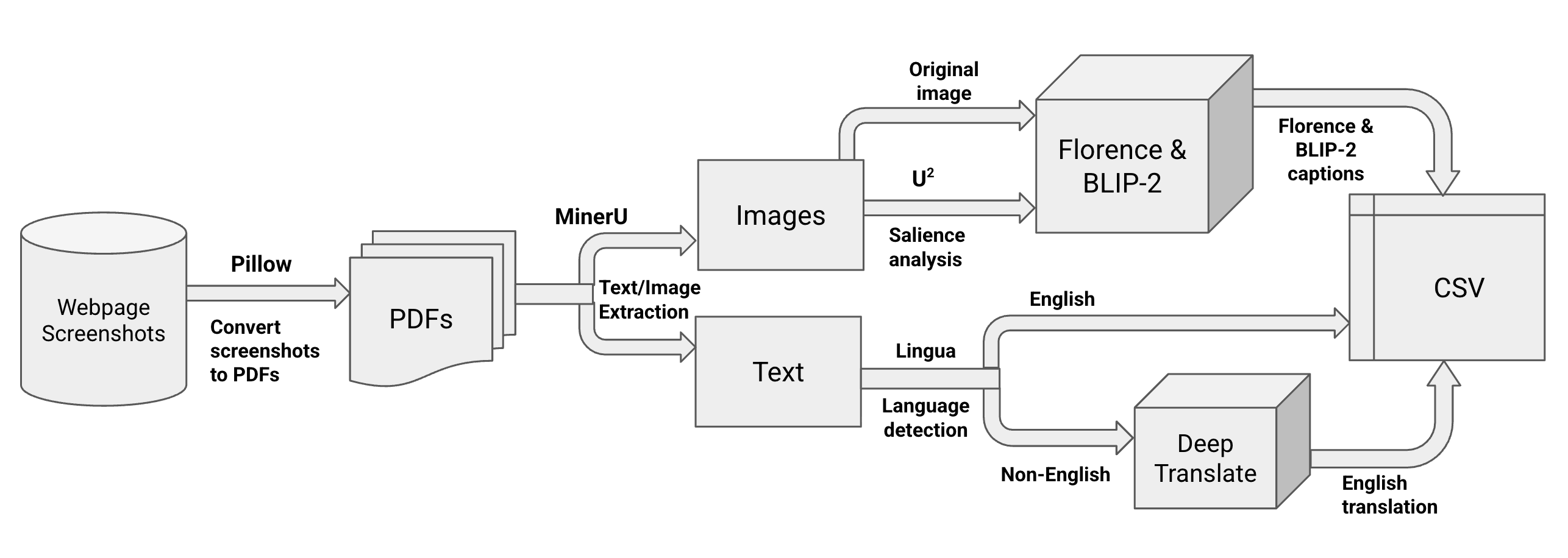
The EleRank Formula
Once elements are extracted, structured, captioned, and translated, they reflect specific themes and visual real estate on the host sites. To establish "what matters most" on any given parsed page, the toolkit uses the VoT Formula:
Importance = weight_1(size_of_content) + weight_2(coordinates_on_page) + weight_3(host_webpage_importance)
- size_of_content: The raw pixel area the text or image occupies on the screen.
- coordinates_on_page: Positional penalty/bonus (e.g., elements at the top coordinate space matter more).
- host_webpage_importance: A multiplier reflecting the domain graph's PageRank or explicitly defined weight of the host domain.
Quick Start Guide
1. Generate Site Graphs and Full-Page Screenshots
seeds.txt accepts either a URL or a group label followed by a tab and a URL:
Kenya	https://example.com
https://another-site.com
Generate graphs without screenshots using the existing command:
generate-site-graphs seeds.txt --output-folder site-graphs
Add --capture-screenshots to archive every crawled page at a desktop viewport:
generate-site-graphs seeds.txt \
  --output-folder site-graphs \
  --capture-screenshots \
  --screenshots-folder data/raw \
  --max-pages 100
Screenshots are written in the structure consumed by preprocess-folder:
data/raw/
└── Kenya/
    └── example.com-about/
        └── 1080p__1920x1080/
            └── screenshot.png
Existing screenshots are skipped so interrupted runs can resume. Use
--overwrite-screenshots to refresh them. Use --screenshot-timeout to change
the default 30-second navigation timeout, and --max-pages 0 for an unlimited
crawl.
Before each new screenshot, the crawler makes a five-second, best-effort attempt to dismiss a recognized cookie banner. It prefers reject or necessary-only, then close, and accepts only as a last resort. Known consent platforms and exact button labels in English, French, Spanish, German, Italian, Portuguese, and Dutch are supported. To capture the page without consent interaction, use:
generate-site-graphs seeds.txt \
  --capture-screenshots \
  --no-dismiss-cookie-banners
Dismissal failures do not stop capture. The crawler never forcibly removes or hides page elements when a safe consent control cannot be found.
2. Run Preprocessing Independently
preprocess-folder data/raw data/interim
3. Run Webpage Element Extraction Independently
extract-webpage-elements data/interim data/interim
4. Run Captioning and Translation Independently
process-webpage-elements \
  data/interim \
  data/processed \
  --model florence \
  --hf-token "$HF_TOKEN" \
  --generate-salient-image no \
  --translate-to-eng yes
5. Rank Webpages (PageRank) Independently
rank-webpages site-graphs/visitqatar_com.graphml data/processed
This creates data/processed/visitqatar_com.csv with columns:
webpage_namerank
6. Score Webpages Independently
score-webpages \
  0.5 0.3 0.2 \
  data/processed/webpage_elements_captions.csv \
  data/processed/visitqatar_com.csv \
  data/processed/webpage_elements_scored.csv
7. Run the Entire Pipeline in One Command
run-pipeline \
  --raw-files-path data/raw \
  --model florence \
  --generate-salient-image no \
  --translate-to-eng yes \
  --output-csv-name webpage_elements_captions.csv
Implemented Tools & Supported Models
| Type | Library / Model | Purpose |
|---|---|---|
| Crawling | Playwright, Requests | Archiving and rendering JavaScript-heavy pages |
| Topology | NetworkX | Parsing links into a directed GraphML object |
| Structuring | MinerU | Bounding box generation and modality classification |
| Saliency | U2-Net | "Soft dimming" background elements prior to captioning |
| Captioning | BLIP-2, Florence-2 | Vision-Language Models to summarize visual context |
| NLP | Lingua, Google Translate | Detecting languages and providing English homogenization |
Usage Notes
- Hugging Face Token: If you plan to use gated models like BLIP-2 (or want faster downloads), you may need to export a Hugging Face API token:
export HF_TOKEN="your_token". - GPU Acceleration: MinerU, Florence-2, and BLIP-2 all highly benefit from CUDA (NVIDIA GPUs) or MPS (Apple Silicon). When available, the pipeline automatically routes tensor processing to these accelerators.
- Data Preprocessing: Place directories containing the webpages into
data/raw. Make sure to structure folders cleanly (e.g.,Country/Webpage/dimensions/image.jpg). - Crawler Scope: The crawler stays on the seed domain, removes query strings and fragments, honors available
robots.txtrules and crawl delays, and defaults to 100 pages per seed. - Screenshot Metadata: GraphML nodes contain canonical URLs plus screenshot status, relative path, and errors. Cookie-banner metadata records whether dismissal succeeded, was not needed, failed, was disabled, or was not attempted, along with the selected action or error when applicable. Capture and dismissal totals are summarized after each seed.
- Public Pages: Screenshot capture does not authenticate or apply site-specific page manipulation. Cookie dismissal is limited to recognized consent controls, open shadow roots, and accessible frames; closed shadow roots and banners without safe controls remain visible.
5 maintainers


Download files
Download the file for your platform. If you're not sure which to choose, learn more about installing packages.
Source Distribution
Built Distribution
Filter files by name, interpreter, ABI, and platform.
If you're not sure about the file name format, learn more about wheel file names.
Copy a direct link to the current filters
File details
Details for the file web_vest-0.3.0.tar.gz.
File metadata
- Download URL: web_vest-0.3.0.tar.gz
- Upload date:
- Size: 1.7 MB
- Tags: Source
- Uploaded using Trusted Publishing? No
- Uploaded via:
twine/7.0.0 CPython/3.14.6
File hashes
| Algorithm | Hash digest | |
|---|---|---|
| SHA256 |
38751ad2e6eb1a7b883145f8dcc14ebb3b49fb68e2dfcaa129c836b4b8269856
|
|
| MD5 |
e3dcb788ba1176eee0fa8aee8f1e9769
|
|
| BLAKE2b-256 |
44244ac400545937bfebe8145aaac7025da8854586318ff5810ebeddc35225bf
|
File details
Details for the file web_vest-0.3.0-py3-none-any.whl.
File metadata
- Download URL: web_vest-0.3.0-py3-none-any.whl
- Upload date:
- Size: 1.6 MB
- Tags: Python 3
- Uploaded using Trusted Publishing? No
- Uploaded via:
twine/7.0.0 CPython/3.14.6
File hashes
| Algorithm | Hash digest | |
|---|---|---|
| SHA256 |
80d0a63279809887fdbb69c3cc7bc81b01bd66ef197a6bafcf02b4ac69ca501a
|
|
| MD5 |
e89de9b5a58b8edba1d9a1f278ee504e
|
|
| BLAKE2b-256 |
089ec01ec9229952da761335f565cf9fdd42134fdb4730cba8e8d3a6102159b5
|














