
WebAgent Protocol





An open MCP extension for the open web. AI agents can discover, verify, and safely use the tools that any website publishes, starting from nothing but its domain name.
MCP connects a model to tools you have installed. WebAgent Protocol (WAP) lets the model find tools on sites it has never seen:
- Discovery. A website publishes a signed manifest at
/.well-known/wap.json. - Native tools. Claude, Cursor, Codex, or any other MCP host gets the site's capabilities as native tools.
- Signed results. Every answer is signed by the business, so a quoted price is provably the business's price.
- Protection for the business. Proof-of-work and rate limits stop bots from draining the business's AI budget.
- Protection for the user. Actions that change something or spend money are confirmed with the user, and built-in loop protection stops two AIs from talking in circles forever.
Free and open source (MIT). Python 3.11+. It's a library: you install it and build on it, and you choose how strict every protection is and where the state lives.
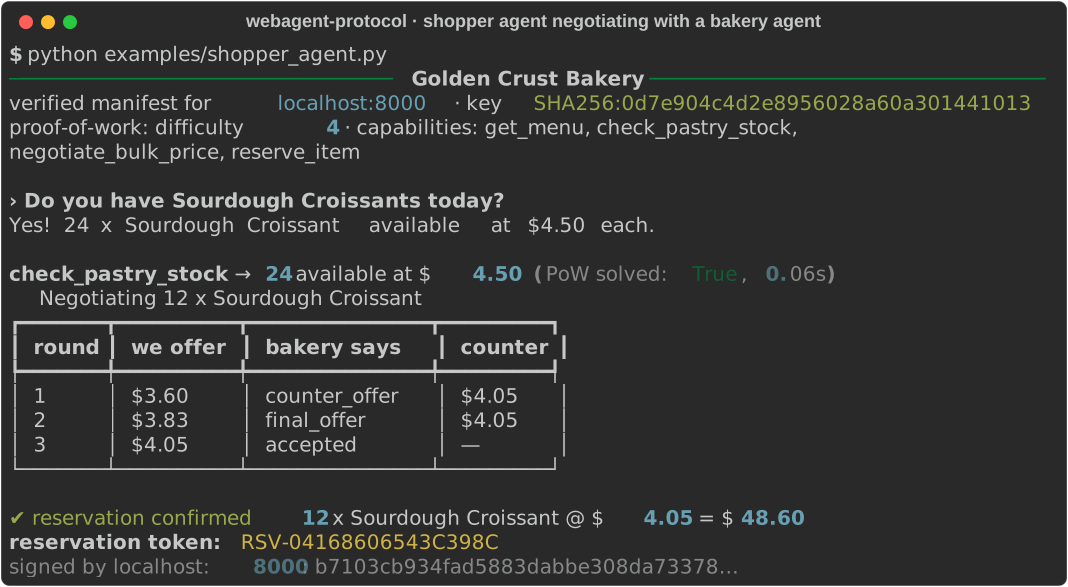
One function, three ways in
from wap.server import WAPServer

wap = WAPServer(name="Golden Crust Bakery", domain="bakery.example", private_key=KEY, require_pow=True)


@wap.action(description="Units of a pastry available right now.", effects="read")
async def check_pastry_stock(item: str) -> StockLevel: ...


wap.mount(app)  # your FastAPI app
That single decorator publishes:
| Endpoint | Who uses it | What they get |
|---|---|---|
/.well-known/wap.json |
any agent, crawler, or registry | a signed manifest: tools, JSON Schemas, public key, policies |
/mcp |
any MCP client, unchanged | standard MCP tools, with signed results and WAP metadata in _meta |
/wap/v1/interact |
WAP clients and the wap-mcp bridge |
signed envelopes, proof-of-work, SSE streaming, multi-turn sessions |
How it relates to MCP and A2A
| MCP | A2A | WebAgent Protocol | |
|---|---|---|---|
| Main job | connect a model host to tools it has been configured with | structured tasks between autonomous agents | let hosts find and safely use tools that websites publish |
| How a server is found | configured by the user | agent card at a well-known URL | signed manifest at /.well-known/wap.json that links to the site's MCP endpoint |
| Relationship to WAP | WAP extends it: WAP tools are MCP tools, and extra guarantees ride in _meta and a declared extension |
complementary | — |
WAP adds what an open-web setting needs and an installed-server setting can assume:
- Replies you can prove. Every reply is Ed25519-signed and bound to the domain.
- Admission control. Anyone can call without registering, but abuse costs the caller more than it costs the business.
- Bounded dialogues. Conversations between agents are guaranteed to end.
The full proposal, written as an MCP Specification Enhancement Proposal, is in
docs/mcp_extension.md.
Built for real deployments
Everything is configurable, and you bring your own infrastructure:
| Concern | What the library gives you |
|---|---|
| Several workers or machines | Pluggable state store: in-memory by default, or RedisStore for shared rate limits, replay protection, sessions and idempotency. It's tested with two server instances sharing one Redis. |
| Your own rate limits | Per-IP and per-agent-key limits, each tunable or disabled, plus an admission hook for tiers (for example, partners with high limits and no puzzles, logged-in customers, blocked keys). |
| Abuse under load | Proof-of-work whose difficulty can rise automatically with load (AdaptivePow). |
| Retries without double-booking | Idempotency keys, which the client adds automatically for anything that isn't read-only. A lost response is retried safely. |
| Humans stay in control | Each action declares effects (read, write, financial). Your agent asks the user before side effects (a confirm hook, or MCP elicitation in the bridge), and free-text requests can't trigger actions without that confirmation. |
| Tool-poisoning defences | Site-written descriptions are sanitised and labelled before a model sees them. Domain allow and block lists; private networks blocked by default in the bridge. |
| Interoperable signatures | RFC 8785 canonical JSON, with test vectors that an independent Node.js verifier checks in CI. |
| Key management | Key rotation that pinned clients follow automatically, optional trust-on-first-use, optional DNS TXT anchoring. |
| Operations | Observer hooks with logging and metrics helpers, a deployment guide, and a real multi-worker load test. |
See docs/configuration.md for every setting.
Quickstart
Install
pip install webagent-protocol               # client + CLI
pip install "webagent-protocol[server]"     # business side: FastAPI + /mcp endpoint
pip install "webagent-protocol[mcp]"        # wap-mcp bridge for Claude, Cursor, Codex
To work from source: git clone https://github.com/varadganjoo/WebAgent-Protocol && pip install -e ".[dev]".
The import name is wap.
Run the demo
python examples/bakery_server.py      # a bakery agent on http://localhost:8000
python examples/shopper_agent.py      # discovers it, negotiates, reserves (screenshot above)
wap inspect localhost:8000            # the verified manifest and tool schemas
wap ask localhost:8000 "hold 2 almond croissants for Ada"
To watch a language model do the shopping instead, run examples/llm_agent.py. It
needs pip install "webagent-protocol[mcp]" openai python-dotenv and OPENAI_API_KEY (optionally OPENAI_LLM)
in a .env file. The model discovers the bakery, gets its capabilities as tools, negotiates, and asks you
before it reserves anything:
python examples/llm_agent.py "Buy 12 sourdough croissants for Ada at the best price you can get"
Use it from Claude, Cursor, or Codex
Option A: the bridge (any WAP site, discovered on demand). Add wap-mcp as an MCP server. When the model
calls wap_discover("bakery.example"), the site's tools appear in its tool list as
bakery_example__check_pastry_stock, bakery_example__reserve_item, and so on. Before a tool that changes
something runs (bakery_example__reserve_item), the host shows the user a confirmation prompt.
{
  "mcpServers": {
    "webagent": { "command": "wap-mcp", "env": { "WAP_CONFIRM": "write" } }
  }
}
That is the config for Claude Desktop (claude_desktop_config.json) and Cursor (.cursor/mcp.json).
For the other hosts:
- Claude Code:
claude mcp add webagent -- wap-mcp - Codex (
~/.codex/config.toml):[mcp_servers.webagent]withcommand = "wap-mcp" - Pre-loading sites: use
wap-mcp bakery.example other.exampleorWAP_DOMAINS=..., which is useful for hosts that don't refresh tool lists.
Option B: connect straight to one site's /mcp. This is plain remote MCP, for example
claude mcp add --transport http bakery https://bakery.example/mcp.
The bridge's safety settings all have safe defaults and can be changed through environment variables:
- which actions need the user's approval (
WAP_CONFIRM), and whether new sites need approval (WAP_APPROVE_SITES); - domain allow and block lists (
WAP_ALLOWED_DOMAINS,WAP_BLOCKED_DOMAINS); - private-network blocking;
- how instruction-like site text is handled;
- key pinning and auth tokens.
The full list is in docs/configuration.md.
Use it from Python
from wap import WAPClient


async def ask_user(request) -> bool:  # your UI: called before any write/financial action
    return input(f"Allow {request.summary()}? [y/N] ").lower() == "y"


async with WAPClient(confirm=ask_user, trust_on_first_use=True) as client:
    manifest = await client.discover("bakery.example")  # verified signature, domain, expiry

    stock = await client.invoke("bakery.example", "check_pastry_stock", {"item": "Sourdough Croissant"})
    print(stock.structured_data, stock.verified)  # {'available': 24, ...} True

    session = client.session("bakery.example")  # multi-turn, state kept server-side
    offer = await session.send(
        capability_id="negotiate_bulk_price",
        payload={"item": "Sourdough Croissant", "quantity": 12, "offered_unit_price": 3.6},
    )

    async for event in client.query("bakery.example", "Any croissants left?"):  # SSE streaming
        print(event.text or "", end="")
Already have an MCP server? Put it on the open web
from mcp.server.mcpserver import MCPServer
from wap.server import WAPServer

tools = MCPServer("inventory")  # your existing MCP server


@tools.tool()
def check_stock(sku: str) -> dict: ...


wap = WAPServer(name="Acme", domain="acme.example", private_key=KEY)
wap.include_mcp(tools)  # its tools become signed, discoverable, abuse-protected
app = wap.create_app()  # serves wap.json, /wap/v1/interact and /mcp
Loop protection: no infinite loops between agents
When your assistant negotiates with a business's assistant, both are language models and neither is sure when to stop. WAP bounds every conversation on both sides:
| Pattern | Example | Default limit |
|---|---|---|
| Same question, same answer | "Any croissants?" → "24 left" → "Any croissants?" … | 3 in a row |
| Ping-pong cycles | offer A → counter B → offer A → counter B … | cycles up to 3 turns, repeated 3 times |
| Stalls | the same offer again and again while only a round counter changes | 5 identical requests |
| Runaway sessions | endless turns | 100 per session (50 on the client, 40 in the bridge) |
How each side enforces it:
- Fingerprints ignore cosmetic changes, so "Any croissants??" and "any croissants" count as the same request. A repeated question that gets a changing answer, such as polling stock, counts as progress.
- The business refuses to continue a loop before running any tool, returning
loop_detected(409) orconversation_limit(429). - The user's side stops itself before sending, and counts error replies as replies.
- In Claude or Cursor, the model receives a tool error telling it to stop, summarize, and report back to the user. In our evaluation, a model told to keep repeating a lowball offer was stopped on its 6th call in 5 of 5 runs, and the business never received more than five of its requests, even when the model ignored the stop instruction and kept trying.
All limits can be tuned with ConversationPolicy. The algorithm is in spec §12.2.
Architecture
sequenceDiagram
    autonumber
    participant H as MCP host<br/>(Claude / Cursor / Codex)
    participant Br as wap-mcp bridge
    participant B as Business agent<br/>(WAPServer)
    participant T as Business tools / LLM

    H->>Br: wap_discover("bakery.example")
    Br->>B: GET /.well-known/wap.json
    B-->>Br: signed manifest
    Note over Br: verify signature, domain & origin binding, expiry, pins
    Br-->>H: tools/list_changed → bakery_example__reserve_item, …
    H->>Br: bakery_example__reserve_item({...})
    Note over Br: loop guard · JSON Schema validation
    opt proof-of-work required
        Br->>B: GET /wap/v1/challenge
        Note over Br: solve SHA-256 puzzle
    end
    Br->>B: POST /wap/v1/interact (signed request)
    Note over B: rate limit → signature → replay → PoW → auth → loop guard
    B->>T: validated call (only now)
    B-->>Br: SSE tokens + signed reply
    Note over Br: verify reply against manifest key
    Br-->>H: structured result + verification metadata
wap/
├── spec/       models · crypto (Ed25519, canonical JSON) · pow (Hashcash) · conversation (loop guard)
├── server/     WAPServer + @action · router (WAP endpoints, SSE) · mcp_endpoint (/mcp) · mcp_import · rate_limiter
├── client/     resolver (discovery + verification) · session (WAPClient, WAPSession) · exceptions
├── mcp/        bridge (wap-mcp: built-in tools + dynamic per-site tools)
└── cli/        wap ask · inspect · verify · keygen · serve
Security at a glance
- Domain authenticity. Manifests are signed and bound to the exact domain they were fetched from. Endpoints must stay on that origin, discovery never follows redirects, and keys can be pinned.
- Reply integrity. Replies are verified against the manifest key and bound to the request. The test suite includes a man-in-the-middle that rewrites prices; the client catches it.
- Replay and session hijacking. Requests are signed and time-bound, with a replay cache. Sessions belong to the key that opened them, and negotiated quotes can only be redeemed in their own session.
- Economic defence. Challenges are stateless and single-use, and their difficulty can't be downgraded. Requests are limited per IP and per agent key. Rejected traffic never reaches your code.
- Side effects need consent. Write and financial actions are confirmed with the user and carry idempotency keys. Free-text requests are read-only unless confirmed.
- Tool poisoning. Site-written text is sanitised, truncated and labelled before any model sees it.
- The
/mcpendpoint enables the MCP SDK's DNS-rebinding protection for the manifest's domain. - Signed means attributable, not safe. Treat reply text as data, never as instructions.
Documentation
docs/configuration.md |
Every setting for servers, clients and the bridge |
docs/deployment.md |
Keys, Redis and workers, proxies, capacity, monitoring |
docs/spec_rfc.md |
WAP/1.0 specification: headers, errors, state machines, security |
docs/test-vectors.json |
Fixed keys, documents, canonical bytes and signatures for other implementations |
docs/mcp_extension.md |
The MCP extension proposal (io.webagent/wap) |
docs/whitepaper.md |
Beyond Scraping: motivation, design, and an evaluation with a real model |
docs/evidence/ |
Every measurement behind the whitepaper, with agent transcripts and how to reproduce them |
CHANGELOG.md · CONTRIBUTING.md · SECURITY.md |
Project docs |
What we measured
We ran a real model (gpt-6-luna) against a live bakery server in Docker, with nothing mocked
(results, method):
| Result | |
|---|---|
| Stock-and-price question | all strategies 10/10 correct; WAP used 4.8× fewer billed input tokens than raw HTML, but 1.7× more than tag-stripped text |
| Negotiate and reserve | 5/5 reserved at the negotiated price, every reply signature-verified |
| User declines | 0 holds in 10/10 runs (client confirm hook and wap-mcp elicitation) |
| Agent told to keep repeating an offer | stopped on the 6th call in 5/5 runs; the business executed at most 5 |
| Throughput, 4 workers + Redis | about 600 signed, proof-of-work-gated requests/s on a laptop, replays accepted exactly once |
Tokens are not WAP's main argument: on a small page a text scraper is cheaper for a read-only question.
The difference is that the WAP agent can act, safely. The whitepaper has
the details and limitations; docker build -f evals/Dockerfile -t wap-eval . reproduces everything.
Development
pip install -e ".[dev]"
pytest -q                                   # full suite; Redis and Node.js tests run when installed
ruff check . && ruff format --check .
The suite covers:
- the official MCP client talking to
/mcpover streamable HTTP; - two server instances sharing a real Redis;
- property-based fuzzing, and canonical JSON cross-checked against Node.js;
- adversarial cases: forged or re-keyed manifests, tampered replies, replays, session hijacking, poisoned tool descriptions, lost responses and double-booking, and looping agents.
python examples/load_test.py --workers 4 --redis-url redis://... runs a real multi-process load test. Contributions are welcome; see
CONTRIBUTING.md.
License
MIT © Varad Ganjoo. Free to use, modify, and ship.
1 maintainer

Metadata
1 maintainer
Release files for webagent-protocol 0.2.0
For a detailed explanation of source distributions (sdists) and built distributions (wheels), please see the package formats documentation.
Source distribution (sdist)
| File | Size | Uploaded | Provenance | Actions |
|---|---|---|---|---|
| webagent_protocol-0.2.0.tar.gz | 212.7 kB | With provenance | Details for webagent_protocol-0.2.0.tar.gz |
Built distribution (wheel)
| File | Interpreter | ABI | Platform | Actions Reset |
|---|---|---|---|---|
| webagent_protocol-0.2.0-py3-none-any.whl | Python 3 | none | any | Details for webagent_protocol-0.2.0-py3-none-any.whl |
Total release size: 316.7 kB
Release files / webagent_protocol-0.2.0.tar.gz
| Download URL | webagent_protocol-0.2.0.tar.gz |
|---|---|
| Size | 212.7 kB |
| Tags | Source |
|
SHA-256 checksum How to use checksums |
ce138963e74da92ae3eff663c4caea317b4ff77570f7c9deca10078361676130
|
|
BLAKE2b-256 checksum How to use checksums |
09a9fdef0de72da5f09f4041f497fd3f8f56a53427521ed6b67ceaf9e118af7f
|
| Upload date | |
|
Uploaded using Trusted Publishing? What is trusted publishing? |
Yes |
| Uploaded via |
twine/7.0.0 CPython/3.13.14
|
Provenance
Provenance describes where a file came from. On PyPI, provenance is shared via attestations, which provide a verifiable record of the build or publishing details. View details, limitations and caveats.


PyPI Publish Attestation
PyPI verified that this artifact, at this checksum, originated from the publisher listed below.
Signed by GitHub Actions, verified by PyPI on Oct 18, 2026.
Transparency logRelease files / webagent_protocol-0.2.0-py3-none-any.whl
| Download URL | webagent_protocol-0.2.0-py3-none-any.whl |
|---|---|
| Size | 104.0 kB |
| Tags | Python 3 |
|
SHA-256 checksum How to use checksums |
a0cc1ce1ac27cbdde9485303880e0f775a5cec645a8dbae4ef646bfac936b943
|
|
BLAKE2b-256 checksum How to use checksums |
e7a4717cab4f40288555ea8c6db428c21385d94482a5e9fbb5c824f838d8717b
|
| Upload date | |
|
Uploaded using Trusted Publishing? What is trusted publishing? |
Yes |
| Uploaded via |
twine/7.0.0 CPython/3.13.14
|
Provenance
Provenance describes where a file came from. On PyPI, provenance is shared via attestations, which provide a verifiable record of the build or publishing details. View details, limitations and caveats.
PyPI Publish Attestation
PyPI verified that this artifact, at this checksum, originated from the publisher listed below.
Signed by GitHub Actions, verified by PyPI on Oct 18, 2026.
Transparency logSecurity for webagent-protocol 0.2.0
Provenance
Provenance describes where a file came from. On PyPI, provenance is shared via attestations, which provide a verifiable record of the build or publishing details. View details, limitations and caveats.
Full provenance
All 2 files in this release have been uploaded with provenance metadata.
Attestation for webagent_protocol-0.2.0.tar.gz
PyPI Publish Attestation
PyPI verified that this artifact, at this checksum, originated from the publisher listed below.
Signed by GitHub Actions, verified by PyPI on Oct 18, 2026.
Transparency logA note on package security
PyPI is a repository for distributing packages, not a service for auditing them. While third-party security researchers and our staff do their best to detect and remove malicious packages, PyPI cannot guarantee the quality, security or suitability of any given package.
To learn more about protecting yourself from malicious actors, visit our package security documentation.













