

WebDuck
A self-hosted DuckDB-as-a-Service server with REST API and Web UI. WebDuck is designed for web hosting providers who want to offer their customers a ready-to-use administration interface for DuckDB databases and data analytics — out of the box, just like the database admin tools that come with any hosting package.


Features
- DuckDB storage engine with file-locking for safe concurrent access
- REST API — admin endpoints (project/DB management) + database endpoints (SQL queries)
- Web UI (NiceGUI) — dark mode with yellow/amber theme
- Dashboard — server status cards, live REST traffic monitor (queries/min, active sessions), storage overview with per-project sizes and trash totals
- Trash — soft-delete projects/databases with restore, permanent delete per entry, empty trash
- JWT authentication for admin API, optional project-key auth for database access
- Per-database write protection — lock a database to read-only, independent of passwords: passwords control who may access, write protection controls what may be done to the data. It protects the data only — compacting, deleting and managing passwords in the web UI keep working at any time
- bcrypt password hashing (never plaintext)
- SQL editor — multi-statement support with sequential execution, query history (Alt+Up/Alt+Down, Alt+Enter)
- SQL upload — execute multi-statement SQL scripts from files
- Database compression — reclaims space DuckDB leaves behind after updates/deletes; a hint highlights databases with high fragmentation
- Browse view — tree-based navigation of databases/tables/views with infinite scroll and cell editing
- Import/Export — CSV, Parquet and JSON import via drag & drop, export with browser download
- Project ordering — drag & drop reordering, persisted in
.projects.json - i18n — English (default), German, extensible via PO/Gettext
- Configurable logging — file rotation + console output, independently configurable
- Configurable upload size — max file size for uploads
- FK dependency hints — DROP errors include referenced tables and constraint info
- Docker support out of the box
- YAML configuration
Web UI
Dashboard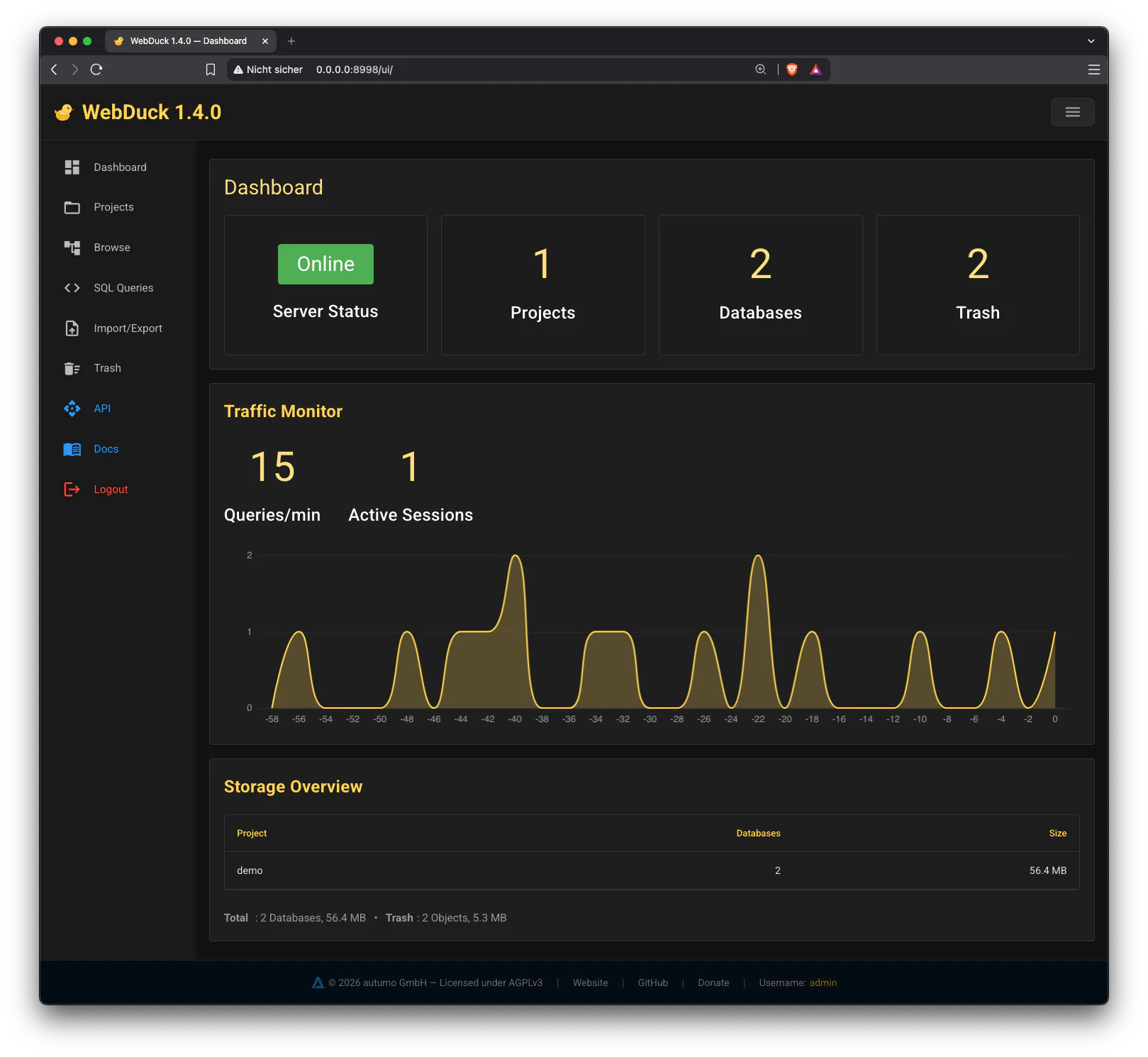 |
|
Projects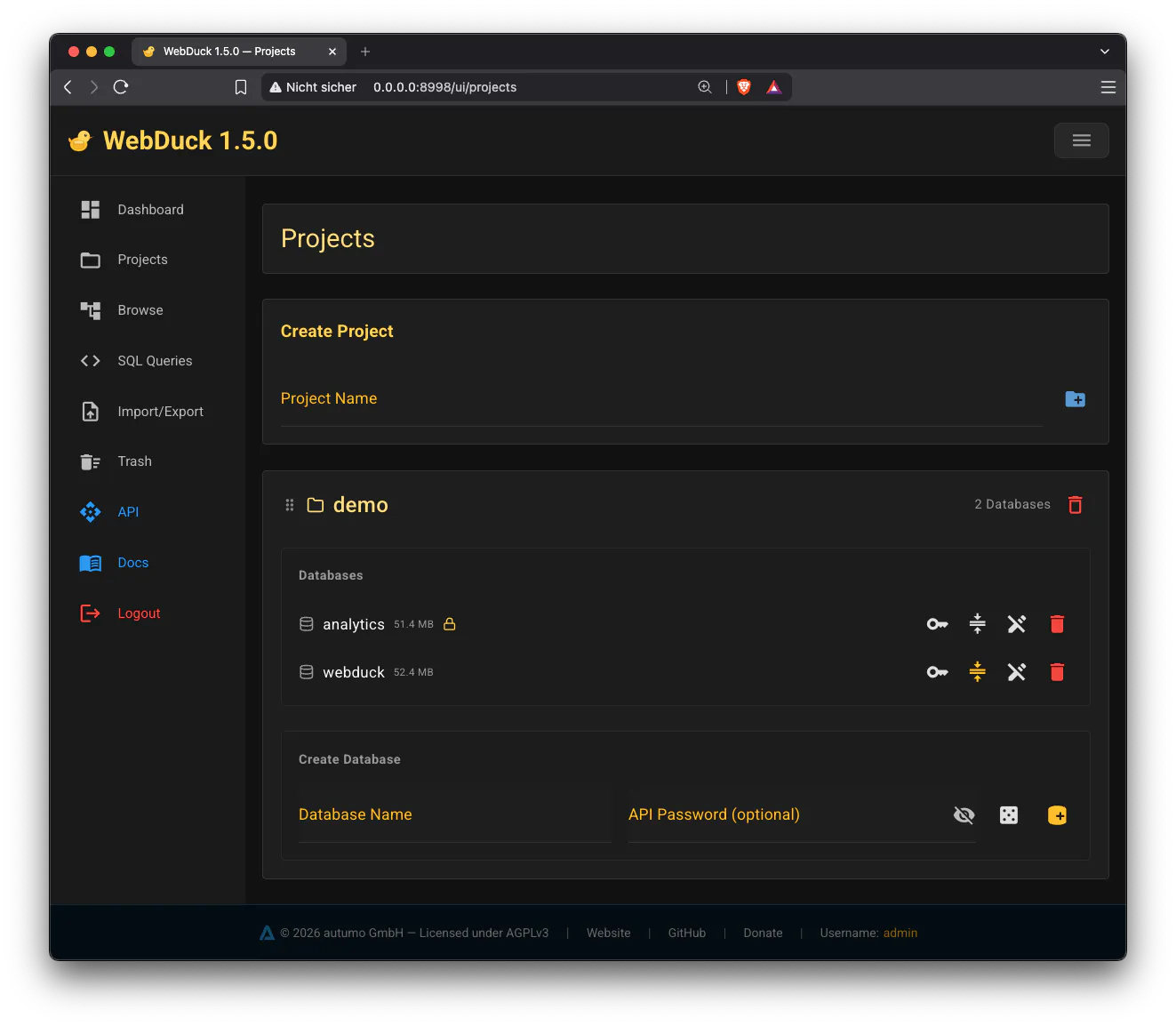 |
Browse View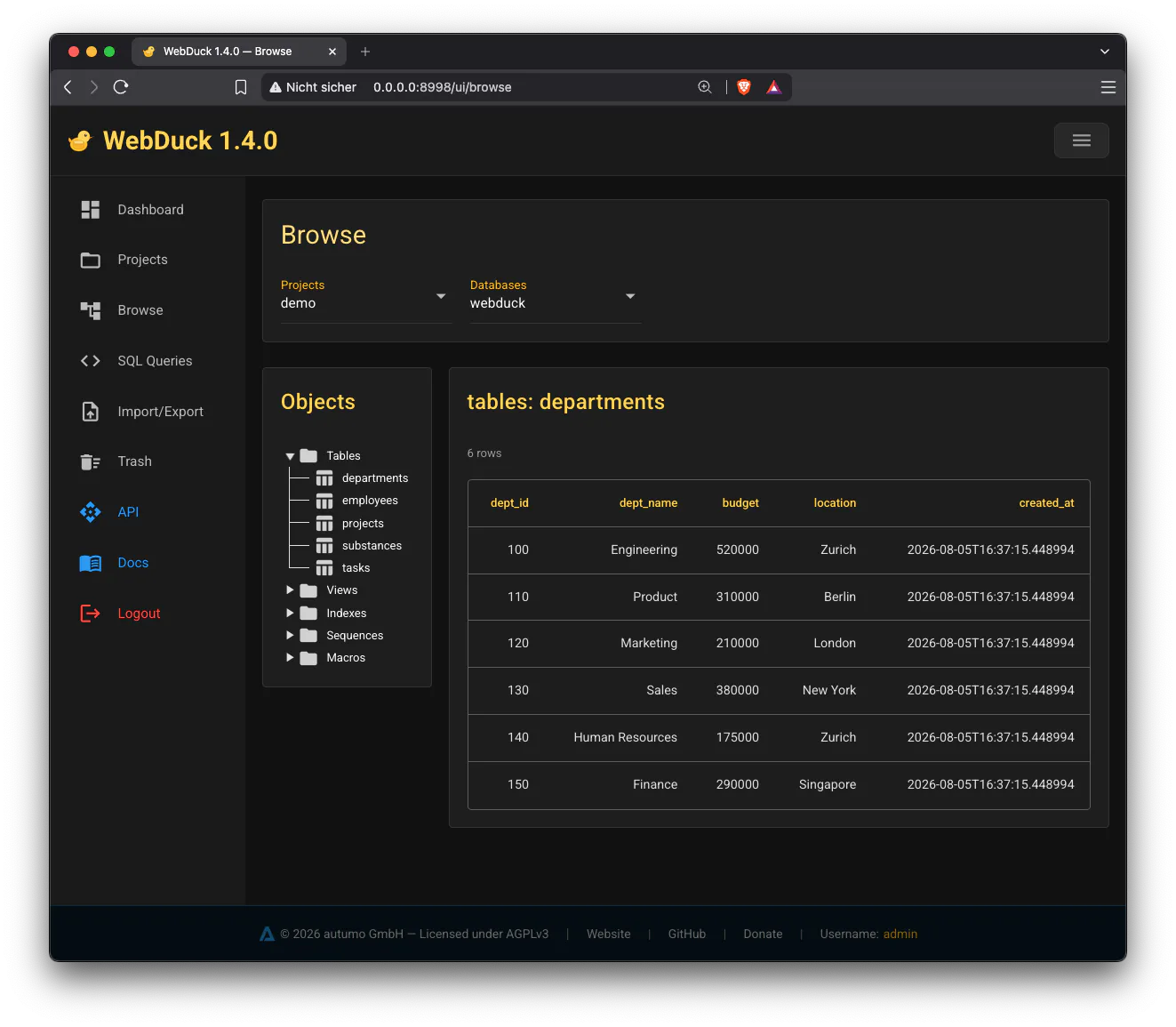 |
Installation
pip (Python)
pip install webduck
Docker
# Download docker-compose.yml
curl -O https://raw.githubusercontent.com/autumoswitzerland/Webduck/master/docker-compose.yml

# Set password
export WEBDUCK_ADMIN_PASS=mypassword

# Start - An admin user is created automatically
docker compose up -d
DuckDB 2.0 compatibility
WebDuck 2.0 requires DuckDB 2.0 LTS (duckdb>=2.0,<2.1).
- Existing databases stay readable. DuckDB 2.0 opens DuckDB 1.x files without conversion and preserves their storage version when writing to them. Those files therefore remain readable by WebDuck 1.5.x.
- New files use storage version 69. Databases created by WebDuck 2.0 use DuckDB 2.0's default storage format. Compacting a database also rebuilds the file, so compacting an older database upgrades it to the 2.0 format; after that it can no longer be opened by WebDuck 1.5.x.
- Linux x86_64 needs AVX2. Official DuckDB 2.0 wheels for Linux x86_64 are built with AVX2 instructions. Docker inherits the host CPU, so an AVX1-only host cannot run WebDuck 2.0. Use the WebDuck 1.5.x line there. macOS x86_64 and arm64 are not affected.
Quick Start
pip
# Initialize - Create an admin user
webduck init

# Create additional admin users (optional)
webduck user add anna secret

# Start server
webduck start
Docker
Docker starts automatically — UI at http://localhost:8998/ui/login.
Log in with admin and the password you set.
CLI Commands
| Command | Description |
|---|---|
webduck init |
Create admin user + default config |
webduck user add <name> <password> |
Create an additional admin user |
webduck user list |
List all admin users |
webduck user delete <name> |
Delete an admin user (removes prefs + query history) |
webduck start |
Start the server |
webduck status |
Show projects and databases |
Options:
webduck start --host 127.0.0.1 --port 8080 --config /path/to/webduck.yaml
webduck user add anna secret
webduck user add anna secret --config /path/to/webduck.yaml
Configuration
webduck.yaml (generated by webduck init):
icon: "icon.svg"
auth:
  jwt_algorithm: HS256
  jwt_expire_minutes: 60
  jwt_secret: CHANGE-ME-TO-A-SECRET-KEY-IN-PRODUCTION
logging:
  file:
    enabled: true
    level: error
    max_files: 5
    max_size_mb: 10
    query_log: false
    log_dir: log
  console:
    enabled: false
    access_log: false
    level: warning
server:
  data_dir: data
  host: 0.0.0.0
  port: 8998
  max_upload_mb: 256
Security note: Before deploying WebDuck in production, replace
jwt_secretinwebduck.yamlwith a long, random secret (e.g. generated withopenssl rand -base64 48). The placeholder valueCHANGE-ME-TO-A-SECRET-KEY-IN-PRODUCTIONmust never be used in production — anyone who knows the secret can forge admin tokens.
Web UI Pages
| Page | URL | Description |
|---|---|---|
| Login | /ui/login |
Admin login with language selection |
| Dashboard | /ui/dashboard |
Server status, live traffic monitor (queries/min, active sessions), storage overview |
| Projects | /ui/projects |
Create/delete projects, manage databases, set passwords, write protection, drag & drop reorder, database sizes + compression hint |
| Queries | /ui/query |
SQL editor (multi-statement) + SQL file upload, query history (Alt+Up/Alt+Down) |
| Browse | /ui/browse |
Tree navigation, table/view browsing with infinite scroll, cell editing |
| Import/Export | /ui/import |
CSV, Parquet and JSON import (drag & drop) and export (browser download) |
| Trash | /ui/trash |
Restore soft-deleted projects/databases, empty the trash |
REST API Reference
Admin API (JWT protected)
All admin endpoints require Authorization: Bearer <jwt_token>. Tokens are
signed with the jwt_secret from webduck.yaml — make sure you replaced the
placeholder before going to production (see the security note above).
| Method | Endpoint | Description |
|---|---|---|
POST |
/admin/login |
Login, returns JWT token |
GET |
/admin/projects |
List all projects (ordered) |
POST |
/admin/projects |
Create project |
DELETE |
/admin/projects/{project} |
Delete project + all databases |
POST |
/admin/reorder-projects |
Reorder projects |
GET |
/admin/projects/{project}/databases |
List databases in project |
POST |
/admin/projects/{project}/databases |
Create database |
DELETE |
/admin/projects/{project}/databases/{db} |
Delete database |
PUT |
/admin/projects/{project}/databases/{db}/password |
Set database password |
PUT |
/admin/projects/{project}/databases/{db}/write-protection |
Enable/disable write protection (read-only) |
GET |
/admin/users |
List admin users |
POST |
/admin/users |
Create admin user |
DELETE |
/admin/users/{username} |
Delete admin user |
Database API (project-key protected)
All database endpoints require X-Project-Key: <project>:<password>.
Databases without a password set are publicly accessible.
| Method | Endpoint | Description |
|---|---|---|
GET |
/db/projects |
List all projects (public) |
GET |
/db/projects/{project}/databases |
List databases (public) |
POST |
/db/projects/{project}/databases/{db}/query |
Execute SQL (read-only) |
POST |
/db/projects/{project}/databases/{db}/write |
Execute SQL (read-write) |
GET |
/db/projects/{project}/databases/{db}/tables |
List tables + columns |
POST |
/db/projects/{project}/databases/{db}/import/{tbl} |
Import CSV/Parquet/JSON |
GET |
/db/projects/{project}/databases/{db}/export/{tbl} |
Export table to CSV/Parquet/JSON |
Example: Login + Query
# Login
TOKEN=$(curl -s -X POST http://localhost:8998/admin/login \
  -H "Content-Type: application/json" \
  -d '{"username":"admin","password":"secret"}' | jq -r '.token')

# Create project + database
curl -X POST http://localhost:8998/admin/projects \
  -H "Authorization: Bearer $TOKEN" \
  -d '{"name":"myapp"}'

curl -X POST http://localhost:8998/admin/projects/myapp/databases \
  -H "Authorization: Bearer $TOKEN" \
  -d '{"name":"main"}'

# Execute a query via the Database API (no password yet = open)
curl -X POST http://localhost:8998/db/projects/myapp/databases/main/write \
  -H "Content-Type: application/json" \
  -d '{"sql":"CREATE TABLE users (id INT, name VARCHAR); INSERT INTO users VALUES (1, '\''Alice'\'');"}'

# Read (without password — no header needed)
curl -X POST http://localhost:8998/db/projects/myapp/databases/main/query \
  -d '{"sql":"SELECT * FROM users"}'

# Set database password (optional — without password, API is open)
curl -X PUT http://localhost:8998/admin/projects/myapp/databases/main/password \
  -H "Authorization: Bearer $TOKEN" \
  -d '{"password":"dbpass","access_level":"write"}'

# Read (with password)
curl -X POST http://localhost:8998/db/projects/myapp/databases/main/query \
  -H "X-Project-Key: myapp:dbpass" \
  -d '{"sql":"SELECT * FROM users"}'
Docker
Run WebDuck with Docker Compose:
docker compose up -d
WebDuck stores its data in /app/data inside the container. The provided Docker Compose configuration persists this data using the webduck_data volume.
Initialize with:
docker compose exec webduck webduck init
Architecture
FastAPI ──┬── /admin/*   (JWT auth)    → Project/DB management
          ├── /db/*      (project key) → SQL queries + CSV/Parquet/JSON import/export
          ├── /ui/*      (cookie)      → NiceGUI Web UI
          ├── /api/*     (session)     → Internal UI endpoints
          └── /health                  → Health check
- Storage: DuckDB files in
data/<project>/<database>.duckdb - Project order: Persisted in
data/.projects.json - Reserved name:
trashis reserved for the soft-delete trash directory — a project directory namedtrashis not listed as a project - Auth: Admin passwords in
data/.users.json(bcrypt), DB passwords indata/<project>/.project.json - Write protection: Per-database read-only flag in
data/<project>/.project.json; a protected database is always opened read-only by the engine - User preferences: Stored in
data/.user_preferences.json - Logging: Rotated log files in
log/(configurable), independent console logging - Concurrency: Per-file reader-writer locks — parallel reads, exclusive writes (DuckDB single-writer model)
Reverse Proxy & HTTPS
WebDuck has no built-in TLS support. For running over HTTPS, put a reverse proxy in front that terminates TLS and forwards requests to WebDuck (default port 8998).
WebDuck will continue to run over HTTP; the proxy handles certificates and HTTPS.
Nginx
server {
    listen 443 ssl http2;
    server_name webduck.example.com;

    ssl_certificate     /etc/letsencrypt/live/webduck.example.com/fullchain.pem;
    ssl_certificate_key /etc/letsencrypt/live/webduck.example.com/privkey.pem;

    location / {
        proxy_pass http://127.0.0.1:8998;
        proxy_set_header Host $host;
        proxy_set_header X-Real-IP $remote_addr;
        proxy_set_header X-Forwarded-For $proxy_add_x_forwarded_for;
        proxy_set_header X-Forwarded-Proto $scheme;
        proxy_http_version 1.1;
        proxy_set_header Upgrade $http_upgrade;
        proxy_set_header Connection "upgrade";
    }
}

server {
    listen 80;
    server_name webduck.example.com;
    return 301 https://$host$request_uri;
}
NiceGUI uses WebSockets, so the
UpgradeandConnectionheaders must be set as shown above.
Caddy (automatic Let's Encrypt)
webduck.example.com {
    reverse_proxy localhost:8998
}
Caddy automatically obtains and renews TLS certificates.
Traefik (Docker)
services:
  webduck:
    image: autumoswitzerland/webduck
    volumes:
      - webduck_data:/app/data
    labels:
      - "traefik.enable=true"
      - "traefik.http.routers.webduck.rule=Host(`webduck.example.com`)"
      - "traefik.http.routers.webduck.entrypoints=websecure"
      - "traefik.http.routers.webduck.tls.certresolver=letsencrypt"
      - "traefik.http.services.webduck.loadbalancer.server.port=8998"
Directly with Uvicorn (optional)
If you want WebDuck to serve TLS directly, you can run Uvicorn manually with certificate files. The webduck start command does not currently pass through SSL options:
uvicorn webduck.main:fastapi_app \
  --host 0.0.0.0 \
  --port 8998 \
  --ssl-keyfile /path/to/key.pem \
  --ssl-certfile /path/to/cert.pem
For production deployments, a reverse proxy is generally simpler and more secure than terminating TLS directly in WebDuck.
Development
git clone https://github.com/autumoswitzerland/Webduck.git
cd webduck
python3.13 -m venv .venv
source .venv/bin/activate
pip install -e ".[dev]"

# Run tests
pytest tests/

# Run linter
ruff check src/ tests/
Donate
WebDuck is free and open-source. If you find it useful, consider supporting the development:

License
WebDuck is licensed under the GNU Affero General Public License v3.0 (AGPLv3) — see LICENSE for details.
Copyright © 2026 autumo GmbH
1 maintainer

Metadata
1 maintainer
Release files for webduck 2.0.0
For a detailed explanation of source distributions (sdists) and built distributions (wheels), please see the package formats documentation.
Source distribution (sdist)
| File | Size | Uploaded | Provenance | Actions |
|---|---|---|---|---|
| webduck-2.0.0.tar.gz | 346.1 kB | With provenance | Details for webduck-2.0.0.tar.gz |
Built distribution (wheel)
| File | Interpreter | ABI | Platform | Actions Reset |
|---|---|---|---|---|
| webduck-2.0.0-py3-none-any.whl | Python 3 | none | any | Details for webduck-2.0.0-py3-none-any.whl |
Total release size: 674.8 kB
Release files / webduck-2.0.0.tar.gz
| Download URL | webduck-2.0.0.tar.gz |
|---|---|
| Size | 346.1 kB |
| Tags | Source |
|
SHA-256 checksum How to use checksums |
a98b0202e74d98a720bcfda247dd72cb5c0962a0470e64e383f2d61a4c8db4dc
|
|
BLAKE2b-256 checksum How to use checksums |
20459d757ea41277bdedf5b107f2ec8bda23a93eff63f41438e4193c292e4b7d
|
| Upload date | |
|
Uploaded using Trusted Publishing? What is trusted publishing? |
Yes |
| Uploaded via |
twine/7.0.0 CPython/3.13.16
|
Provenance
Provenance describes where a file came from. On PyPI, provenance is shared via attestations, which provide a verifiable record of the build or publishing details. View details, limitations and caveats.


PyPI Publish Attestation
PyPI verified that this artifact, at this checksum, originated from the publisher listed below.
Signed by GitHub Actions, verified by PyPI on Nov 27, 2026.
Transparency logRelease files / webduck-2.0.0-py3-none-any.whl
| Download URL | webduck-2.0.0-py3-none-any.whl |
|---|---|
| Size | 328.8 kB |
| Tags | Python 3 |
|
SHA-256 checksum How to use checksums |
0fafe46064c00145152b03443ed70bc70bdbf08214bdc0ad6f1737e1f6cf15e9
|
|
BLAKE2b-256 checksum How to use checksums |
7efd6b8b59126f33eae64b4d33a2cc12cf83c197b77d982bdb1a986f89a12614
|
| Upload date | |
|
Uploaded using Trusted Publishing? What is trusted publishing? |
Yes |
| Uploaded via |
twine/7.0.0 CPython/3.13.16
|
Provenance
Provenance describes where a file came from. On PyPI, provenance is shared via attestations, which provide a verifiable record of the build or publishing details. View details, limitations and caveats.
PyPI Publish Attestation
PyPI verified that this artifact, at this checksum, originated from the publisher listed below.
Signed by GitHub Actions, verified by PyPI on Nov 27, 2026.
Transparency logSecurity for webduck 2.0.0
Provenance
Provenance describes where a file came from. On PyPI, provenance is shared via attestations, which provide a verifiable record of the build or publishing details. View details, limitations and caveats.
Full provenance
Both files in this release have been uploaded with provenance metadata.
Attestation for webduck-2.0.0.tar.gz
PyPI Publish Attestation
PyPI verified that this artifact, at this checksum, originated from the publisher listed below.
Signed by GitHub Actions, verified by PyPI on Nov 27, 2026.
Transparency logA note on package security
PyPI is a repository for distributing packages, not a service for auditing them. While third-party security researchers and our staff do their best to detect and remove malicious packages, PyPI cannot guarantee the quality, security or suitability of any given package.
To learn more about protecting yourself from malicious actors, visit our package security documentation.














