
WebExtrator CLI
A command-line tool for web rendering and extraction via AceDataCloud.
Get your Ace Data Cloud API key
- Open Ace Data Cloud → Applications. Sign in, or register an account first.
- Find General application. If it has not been created, choose Initialize General Application. A general key can use the services available to your account; a dedicated application's key is limited to its service. Check the required service/model access and current pricing.
- Copy the API Key from the application card, or open Keys / Manage Keys → Create to create a separate key for this integration. Give it a recognizable name so you can revoke or rotate it independently.
- When creating a key, review Expiration Time, Set Usage Limitation, and Allowed APIs. Enable only the restrictions you need, allow the operations you will call, then click Create and copy the token from the key list. Task lookup does not grant permission to submit a generation. Confirm the application's balance can cover your first request; any trial allowance is whatever your account currently displays.
- Copy only the token value, without quotation marks, spaces, or
Bearer. An API Key / API Token field expects this raw value; only a manually configured HTTPAuthorizationheader needs theBearerprefix. Aplatform-...account-management token cannot replace a generation API key.
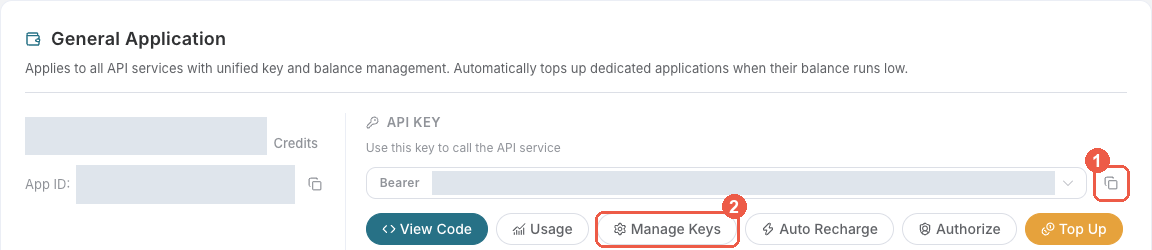
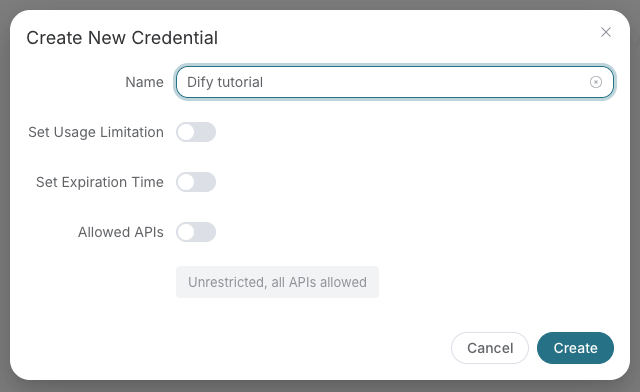
Save the key in the client's credential store or the environment variable shown below. Never put it in a prompt, shared workflow, screenshot, or Git commit. If authentication fails, check the full copied value, application/service access, expiration, usage limit, and balance before creating another key.
Installation
pip install webextrator-cli
Quick Start
export ACEDATACLOUD_API_TOKEN=your_token

webextrator extract https://www.amazon.com/dp/B0C1234567
webextrator render https://example.com
webextrator tasks retrieve --id <task-id>
Commands
| Command | Description |
|---|---|
webextrator extract <url> |
Extract structured content from a web page |
webextrator render <url> |
Render a web page and return the HTML |
webextrator tasks retrieve |
Retrieve a single task by ID or trace ID |
webextrator tasks batch |
Retrieve multiple tasks at once |
webextrator config |
Show current configuration |
Global Options
--token TEXT    API token (or set ACEDATACLOUD_API_TOKEN env var)
--version       Show version
--help          Show help message
Configuration
Set environment variables or use a .env file:
ACEDATACLOUD_API_TOKEN=your_token
ACEDATACLOUD_API_BASE_URL=https://api.acedata.cloud
WEBEXTRATOR_REQUEST_TIMEOUT=60
License
MIT
1 maintainer

Metadata
1 maintainer
Release files for webextrator-cli 2026.10.12.0
For a detailed explanation of source distributions (sdists) and built distributions (wheels), please see the package formats documentation.
Source distribution (sdist)
| File | Size | Uploaded | |
|---|---|---|---|
| webextrator_cli-2026.10.12.0.tar.gz | 10.9 kB | Details |
Built distribution (wheel)
| File | Interpreter | ABI | Platform | Reset |
|---|---|---|---|---|
| webextrator_cli-2026.10.12.0-py3-none-any.whl | Python 3 | none | any | Details |
Total release size: 24.3 kB
Release files / webextrator_cli-2026.10.12.0.tar.gz
| Download URL | webextrator_cli-2026.10.12.0.tar.gz |
|---|---|
| Size | 10.9 kB |
| Tags | Source |
|
SHA-256 checksum How to use checksums |
6209fff25c0af5de4b46a5aeb5b3209511c65612173afd2bb26c97be7988315e
|
|
BLAKE2b-256 checksum How to use checksums |
6abced8a75996962a354fdaa4663a1e08d44231232db9c0e121b4a24e4de7c50
|
| Upload date | |
|
Uploaded using Trusted Publishing? What is trusted publishing? |
No |
| Uploaded via |
twine/7.0.0 CPython/3.12.3
|
Release files / webextrator_cli-2026.10.12.0-py3-none-any.whl
| Download URL | webextrator_cli-2026.10.12.0-py3-none-any.whl |
|---|---|
| Size | 13.5 kB |
| Tags | Python 3 |
|
SHA-256 checksum How to use checksums |
b3f2ea799fdfa867afdc79c0dfaff8259a2041b42503114b98ff8748483b6b0b
|
|
BLAKE2b-256 checksum How to use checksums |
788fbe1cb3dff5d8abea48476edaac8e5b43c8e8563540cdb0ba046e63a57da7
|
| Upload date | |
|
Uploaded using Trusted Publishing? What is trusted publishing? |
No |
| Uploaded via |
twine/7.0.0 CPython/3.12.3
|














