
Webinar Transcriber





Contents
Overview
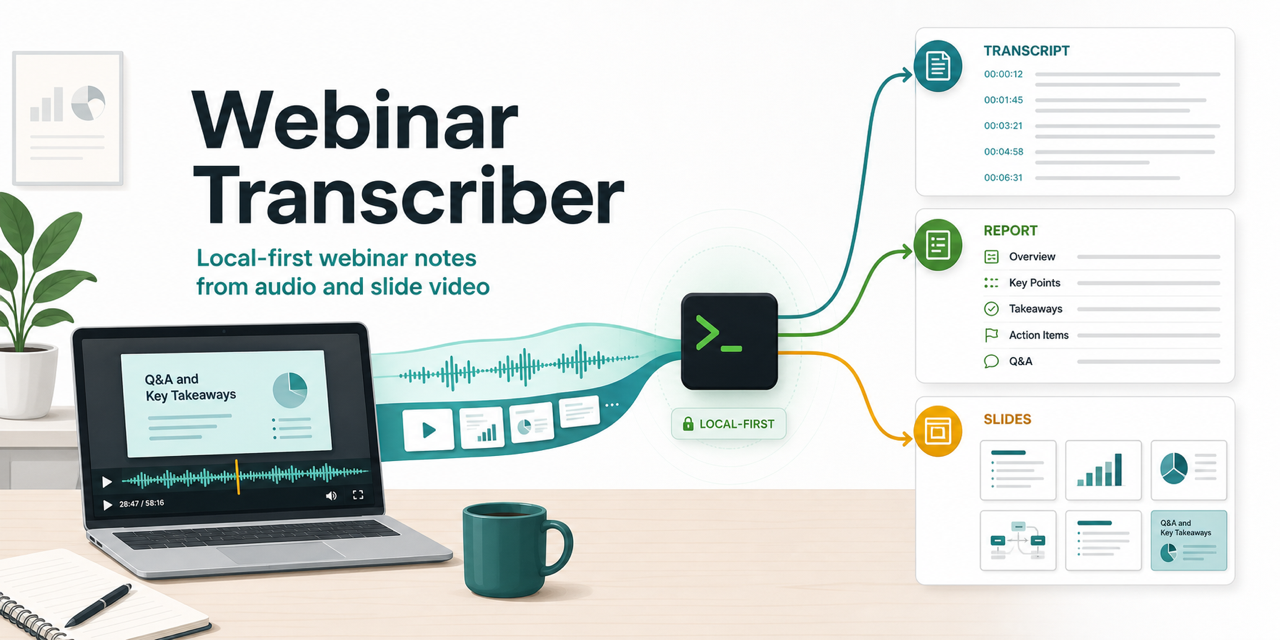
webinar-transcriber turns webinar recordings into transcripts, structured notes, diagnostics, and
machine-readable report artifacts. It accepts audio-only files and slide-based video. Video runs add
scene detection and representative frames; audio-only runs keep the same transcript and report
contract without visual context.
webinar-transcriber is local-first: speech detection, transcription, window reconciliation, and
report sectioning all run on your machine with local models and heuristics. Optional LLM refinement
runs only after that deterministic report exists; it polishes section text and refines titles,
summaries, action items, and section TL;DRs, but never replaces the base pipeline.
For the stage sequence and its intermediate artifacts, see Pipeline.
Install
Choose one base install path. Use PyPI for normal use, a GitHub tag for a fixed release, or the checkout when developing this repository. Add LLM or CUDA support only when needed.
Prerequisites
- Python 3.12+ and uv
Install from PyPI
Install the published package as a standalone CLI:
uv tool install webinar-transcriber
pipx install webinar-transcriber works the same way. pip install webinar-transcriber installs
into the current environment instead of as an isolated tool.
Install from a GitHub release
Pin a tagged release directly from GitHub when you want a fixed version and do not need a checkout:
uv tool install --reinstall git+https://github.com/megabyde/webinar-transcriber.git@v1.3.0
Replace v1.3.0 with the release tag you want. Wheel and source distribution files are also
attached to the GitHub Releases page.
Install the CLI from this checkout
From the repository root, install the local source tree as a uv tool. This registers
webinar-transcriber from the checkout; no virtual environment activation is needed. Re-run the
command after pulling changes when the installed command should track the checkout.
uv tool install --reinstall .
To remove the installed tool:
uv tool uninstall webinar-transcriber
Optional: Cloud LLM extra
Provider-backed report refinement (--llm, see Cloud LLM) needs the OpenAI and
Anthropic SDKs, which the base install omits. Append the llm extra to the package spec in
whichever install command above you used. --reinstall applies the extra whether or not the package
is already installed:
uv tool install --reinstall "webinar-transcriber[llm]"   # from PyPI
uv tool install --reinstall ".[llm]"                     # from a checkout
For a GitHub release, append the extra in the direct-reference form:
"webinar-transcriber[llm] @ git+https://github.com/megabyde/webinar-transcriber.git@v1.3.0".
Optional: NVIDIA CUDA
CUDA is the only supported path that builds pywhispercpp from source. It requires
CMake, a C/C++ compiler, and a working
CUDA toolkit with nvcc on PATH and CUDA_HOME
set.
Install the CLI tool with CUDA support:
GGML_CUDA=1 uv tool install --reinstall . \
    --reinstall-package pywhispercpp \
    --no-binary-package pywhispercpp
If the build fails, see CUDA install fails. For a CUDA-enabled development checkout, see Development.
Verify the installation
Run both commands after completing the selected install path:
$ webinar-transcriber --version
webinar-transcriber, version X.Y.Z
$ webinar-transcriber --help
Usage: webinar-transcriber [OPTIONS] [INPUT_PATHS]...
Installation is complete when both commands exit successfully and --help lists the input argument
and CLI options.
Usage
Quick start
To produce the first report, start with one local media file that contains a decodable audio stream:
webinar-transcriber INPUT
Replace INPUT with the media path. On the first transcription run, pywhispercpp downloads the
default large-v3-turbo model. A successful run prints its output path and writes report.md,
report.docx, report.json, transcript.json, and diagnostics.json in a fresh directory under
runs/.
To process a batch, pass all inputs to one command. Inputs run sequentially:
webinar-transcriber INPUT1 INPUT2 INPUT3
A failing input does not stop the batch: the CLI reports it, moves on to the next file, prints a
N succeeded, M failed tally at the end, and exits 1 if anything failed. Ctrl-C still abandons
the remaining inputs. A provider misconfiguration under --llm is reported before any input runs,
since it would fail every one of them.
The CLI accepts any container PyAV can decode when it contains an audio stream, including .mp4,
.mkv, .mov, .webm, .mp3, .wav, and .m4a. A video stream is optional; when present, it
adds scene detection and representative frames.
Use --keep-audio to retain compressed transcription audio, or --output-dir to name the run
directory for a single input:
webinar-transcriber INPUT --keep-audio
webinar-transcriber INPUT --output-dir runs/custom-demo
Cloud LLM
--llm enables provider-backed report refinement after deterministic sectioning. The LLM step can
polish section transcript text with light cleanup and paragraphing, and refine summary bullets,
action items, section titles, and section TL;DRs. Supported providers are openai and anthropic;
OpenAI is the default.
This step needs provider SDKs that the base install omits. Install them with the llm extra (see
Cloud LLM extra under Install).
Configure the provider with environment variables:
LLM_PROVIDER:openai(default) oranthropic.OPENAI_API_KEY/OPENAI_MODEL: API key and model identifier for the OpenAI provider.ANTHROPIC_API_KEY/ANTHROPIC_MODEL: API key and model identifier for the Anthropic provider.
The CLI does not pin a default model name. For this transcript-polishing workload, start with
gpt-5.6-terra on OpenAI or claude-sonnet-5 on Anthropic. For lower-cost, high-volume runs,
evaluate gpt-5.6-luna or claude-haiku-4-5 against the same report before switching. Set the
model explicitly so each run records the exact choice.
OPENAI_API_KEY=... \
    OPENAI_MODEL="gpt-5.6-terra" \
    webinar-transcriber INPUT --llm
LLM_PROVIDER=anthropic \
    ANTHROPIC_API_KEY=... \
    ANTHROPIC_MODEL="claude-sonnet-5" \
    webinar-transcriber INPUT --llm
The LLM step is complete when report.local.json, report.md, report.docx, and report.json
exist in the run directory. report.local.json preserves the deterministic input to the LLM. A
failed request falls back only for its own part: a section keeps its local text, and a failed
summary keeps the local summary and section titles alongside the polished sections. Each failure is
a warning in diagnostics.json, and llm.report_status is applied when all LLM output was used,
partial when some was, and fallback when none was. Each provider request also records its
completion status under llm.response_metadata: status and incomplete_reason for OpenAI,
stop_reason for Anthropic. An OpenAI response cut off by the output-token limit still parses
rather than falling back, so check for incomplete_reason: max_output_tokens when a polished
section ends early.
For missing environment variables, missing extras, or unsupported provider names, see Troubleshooting.
Rerun only the LLM step
To try a different provider or model without transcribing the media again, point --rerun-llm at a
successfully completed run:
OPENAI_API_KEY=... \
    OPENAI_MODEL="<openai-model>" \
    webinar-transcriber --rerun-llm runs/<timestamp>_<basename>
The command reads report.local.json, runs only LLM refinement and report export, and writes a new
variant under RUN_DIR/llm/<timestamp>/. It never overwrites the source run. Each variant contains
report.md, report.docx, report.json, and diagnostics.json; llm_rerun diagnostics record
the source report hash and version, while llm records the current provider and model when
available.
Earlier runs created without --llm can use their final report.json as the deterministic source.
Older runs already polished by an LLM cannot be rerun safely because they have no
report.local.json; rerun variants are also rejected to avoid polishing LLM output twice.
Speaker diarization
Pass --diarize to label transcript segments with anonymous local speaker IDs:
webinar-transcriber INPUT --diarize
webinar-transcriber INPUT --diarize --diarize-speakers 4
Speakers whose longest single turn stays under two seconds are folded into whoever speaks around them, so momentary boundary artifacts do not surface as an extra speaker. The test is the longest turn rather than total speaking time, so a participant who speaks once but says a whole sentence is kept; a contribution shorter than two seconds, such as a one-word interjection, is merged into the surrounding speaker.
Diarization runs locally through sherpa-onnx and does not use an API key. The first diarized run
downloads the segmentation and speaker-embedding models into
~/.cache/webinar-transcriber/diarization. Set WEBINAR_DIARIZATION_CACHE_DIR to override that
cache directory.
When diarization is enabled, reports label each speaker turn with stable anonymous labels ordered by
first appearance in the timeline: S1, S2, and so on (one label per turn, even when a turn spans
several paragraphs). JSON artifacts include a speaker field on transcript segments and a separate
diarization.json file with raw speaker turns. If labels look wrong, see
Poor diarization labels.
Diarization is complete when the run directory contains diarization.json and transcript segments
in transcript.json include speaker fields.
Advanced Usage
ASR model
webinar-transcriber uses pywhispercpp to resolve whisper.cpp models. By default it uses
large-v3-turbo (downloaded on the first transcription run, not during installation). You can pass
another model identifier or a local GGML model path with --asr-model.
webinar-transcriber INPUT --asr-model large-v3-turbo
webinar-transcriber INPUT --asr-model large-v3
webinar-transcriber INPUT --asr-model models/whisper-cpp/ggml-large-v3-turbo.bin
To manage the model file yourself, download it directly:
mkdir -p models/whisper-cpp
curl -L \
    -o models/whisper-cpp/ggml-large-v3-turbo.bin \
    https://huggingface.co/ggerganov/whisper.cpp/resolve/main/ggml-large-v3-turbo.bin
Use --asr-model large-v3 when transcription accuracy matters more than local runtime.
ASR controls
The default ASR path uses the selected whisper.cpp model, automatic language detection, and an
automatically selected thread count.
--language CODE: force a Whisper language code such asenorru.--threads N: set the CPU worker count passed towhisper.cpp.
GPU-enabled builds can offload supported model work to the GPU, but whisper.cpp still uses CPU
threads for scheduling, language detection, and non-offloaded work. The same --threads value is
also used by local VAD, local diarization, and concurrent LLM section polishing. By default, the CLI
uses the host CPU count capped at 8. Lower it when the machine needs CPU capacity for other work.
Troubleshooting
Common errors and their fixes, indexed by the message the CLI prints, live in Troubleshooting.
Reference
Output layout
Successful runs can write:
runs/<timestamp>_<basename>/
├─ metadata.json             # probed media type, duration, streams
├─ transcript.json           # reconciled transcript with timestamps and optional speakers
├─ report.md
├─ report.docx
├─ report.json               # final report in markdown, docx, and json
├─ report.local.json         # deterministic pre-LLM report; --llm only
├─ diagnostics.json          # tool version, run options, stage timings, counts, warnings,
│                            # ASR and optional LLM info
├─ asr/
│  ├─ speech_regions.json    # VAD ranges
│  └─ decoded_windows.json   # per-window decode output
├─ diarization.json          # anonymous speaker turns; --diarize only
├─ scenes.json               # scene boundaries; video only
├─ frames/                   # representative frames; video only
├─ llm/<timestamp>/          # --rerun-llm variants
│  ├─ report.md
│  ├─ report.docx
│  ├─ report.json
│  └─ diagnostics.json       # llm_rerun source provenance and current provider/model
└─ transcription-audio.mp3   # normalized audio copy; --keep-audio only
Failed runs still write diagnostics.json with the failed stage and any partial intermediate
artifacts already produced, as long as the run directory exists.
Development
Checkout setup, running from source, the make target reference, and the quality gate live in Development. Coding conventions, testing notes, and the Definition of Done live in AGENTS.md.
1 maintainer

Metadata
1 maintainer
Release files for webinar-transcriber 1.6.0
For a detailed explanation of source distributions (sdists) and built distributions (wheels), please see the package formats documentation.
Source distribution (sdist)
| File | Size | Uploaded | |
|---|---|---|---|
| webinar_transcriber-1.6.0.tar.gz | 2.0 MB | Details |
Built distribution (wheel)
| File | Interpreter | ABI | Platform | Reset |
|---|---|---|---|---|
| webinar_transcriber-1.6.0-py3-none-any.whl | Python 3 | none | any | Details |
Total release size: 4.0 MB
Release files / webinar_transcriber-1.6.0.tar.gz
| Download URL | webinar_transcriber-1.6.0.tar.gz |
|---|---|
| Size | 2.0 MB |
| Tags | Source |
|
SHA-256 checksum How to use checksums |
79d9a301d09a1f1b86c994eaba15d6a05b5c8751176451e4b2eee688fc4c6214
|
|
BLAKE2b-256 checksum How to use checksums |
60c8ca0b6a548e21e946d9a24fe84532d8f2dd6254679dde6ac021d40695d789
|
| Upload date | |
|
Uploaded using Trusted Publishing? What is trusted publishing? |
Yes |
| Uploaded via |
twine/7.0.0 CPython/3.13.14
|
Provenance
Provenance describes where a file came from. On PyPI, provenance is shared via attestations, which provide a verifiable record of the build or publishing details. View details, limitations and caveats.


PyPI Publish Attestation
PyPI verified that this artifact, at this checksum, originated from the publisher listed below.
Signed by GitHub Actions, verified by PyPI on Oct 12, 2026.
Transparency logRelease files / webinar_transcriber-1.6.0-py3-none-any.whl
| Download URL | webinar_transcriber-1.6.0-py3-none-any.whl |
|---|---|
| Size | 2.0 MB |
| Tags | Python 3 |
|
SHA-256 checksum How to use checksums |
0ba9b203dd093845ba21b6adbab616ad08013f5709297e2d9a19e17f616e83a3
|
|
BLAKE2b-256 checksum How to use checksums |
afb0dcddd637c220499df85bbd67f20a0ec7e5e0163ee677a1fa1bd6b791cac2
|
| Upload date | |
|
Uploaded using Trusted Publishing? What is trusted publishing? |
Yes |
| Uploaded via |
twine/7.0.0 CPython/3.13.14
|
Provenance
Provenance describes where a file came from. On PyPI, provenance is shared via attestations, which provide a verifiable record of the build or publishing details. View details, limitations and caveats.
PyPI Publish Attestation
PyPI verified that this artifact, at this checksum, originated from the publisher listed below.
Signed by GitHub Actions, verified by PyPI on Oct 12, 2026.
Transparency log













