
A light library to build tiny websites 一个用于搭建轻量级网站的库

Project description
WebNew - v1.1.1 - __init__.py
A light library to build tiny websites 一个用于搭建轻量级网站的库
更新日志:请跳转至 notes.md 查看
对象:
(
WebApp,
Function,
DefaultSite
)
1.WebApp: 网站对应的App,是web.applaction对象。
示例:
from webnew import *
site('Hello')  # 以GET访问 / 时,返回'Hello'
reset()  # 更新WebApp的值
WebApp.run(globals())  # 运行WebApp
输出:
浏览 localhost:8080/ ,显示 Hello。
2.Function:函数类型,即 type(lambda: ...)。
3.DefaultSite:网站的默认站点类,一般用于定义 /index ,建议通过调用 site() 方法设置。
方法:
1.site()
site(
    _get: Union[object, Function] = lambda self: ...,
    _post: Union[object, Function] = lambda self: ...,
    mapping: str = '/'
) -> None
用法 :用于创建默认站点,一般用于定义网站的/index。
参数 :
_get:当以GET访问时,调用的方法,值为一个函数,该函数需带一个 self 参数,若值为object,则在访问时直接返回该值。
_post:当以POST访问时,调用的方法,值为一个函数,该函数需带一个 self 参数,若值为object,则在访问时直接返回该值。
mapping:应为一个正则表达式,默认为'/',代表访问该站点时的接口,正则表达式所匹配的内容将会分组传入 _ge t和 _post 的参数。
示例1:
from webnew import *
site('Hello, GET.', 'Hello, POST.')  # 分别设置GET和POST的返回值
run(globals())  # 运行服务器
输出:
浏览或以GET访问 localhost:8080/ ,显示 Hello, GET. 。 以POSt访问 localhost:8080/ ,显示 Hello, POST. 。
示例2:
from webnew import *
site(lambda self, name: f'Hello, {name}.', mapping='/(.+)')  # 以GET访问/(.+)时,(.+)所匹配的内容会传入name参数再返回
run(globals())  # 运行服务器
输出:
浏览或以GET访问 localhost:8080/Tom ,显示 Hello, Tom. ,可以修改 /Tom 的值再次尝试 。
2.newSite()
newSite(
    class_,
    mapping: str = '/'
) -> None
用法 :用于创建新的站点,原理为调用传入类里的 GET 和 POST 方法。
参数 :
class_:应为一个类,至少包含 GET 和 POST 方法中的一个用于处理GET和POST请求,至少需带一个 self 参数。
mapping:应为一个正则表达式,默认为'/',代表访问该站点时的接口,正则表达式所匹配的内容将会分组传入 class_ 的 GET 和 POST 的参数。
示例1:
from webnew import *
class index:  # 定义index类
    GET = lambda self: 'Hello, GET.'  # 当以GET访问时返回
    POST = lambda self: 'Hello, POST.'  # 当以POST访问时返回
newSite(index)  # 创建站点
run(globals())  # 运行服务器
输出:
浏览或以GET访问 localhost:8080/ ,显示 Hello, GET. 。 以POSt访问 localhost:8080/ ,显示 Hello, POST. 。
示例2:
from webnew import *
site('<!DOCTYPE HTML><meta charset="utf-8" /><h1>请传入文件路径</h1>')  # 站点 / :返回提示HTML
class open_file:  # 站点类
    def GET(self, path):  # GET方法,path为匹配的文件地址
        try: return open(path, encoding='utf-8')  # 返回utf-8打开文件的内容
        except Exception as e: return f'<!DOCTYPE HTML><meta charset="utf-8" /><h1>{e}</h1>'  # 提示打开文件出错
newSite(open_file, '/(.+)')  # 新建站点 /(.+) ,对应open_file类
run(globals())  # 运行服务器
输出:
浏览或以GET访问 localhost:8080/ ,显示 请传入文件路径 ,在路径后写入任意一个电脑文件路径,将会返回该文件的内容。可以尝试访问此链接访问Windows zh-CN 证书文件。
3.debug()
debug(
    mode: bool = True
) -> None
用法:用于设置网站是否调试,不调用debug()时默认为调试。
参数:
mode:应为布尔值,当为True时启用调试模式,为False时关闭,若调试模式启用,Python后端出现任何错误时会在此网页上报错。
示例:
from webnew import *
site(lambda self: error)  # 出现NameError
run(globals())  # 运行服务器
输出:
浏览或以GET访问 localhost:8080/ ,显示如下界面(界面大体一致,不同环境会有所差异):
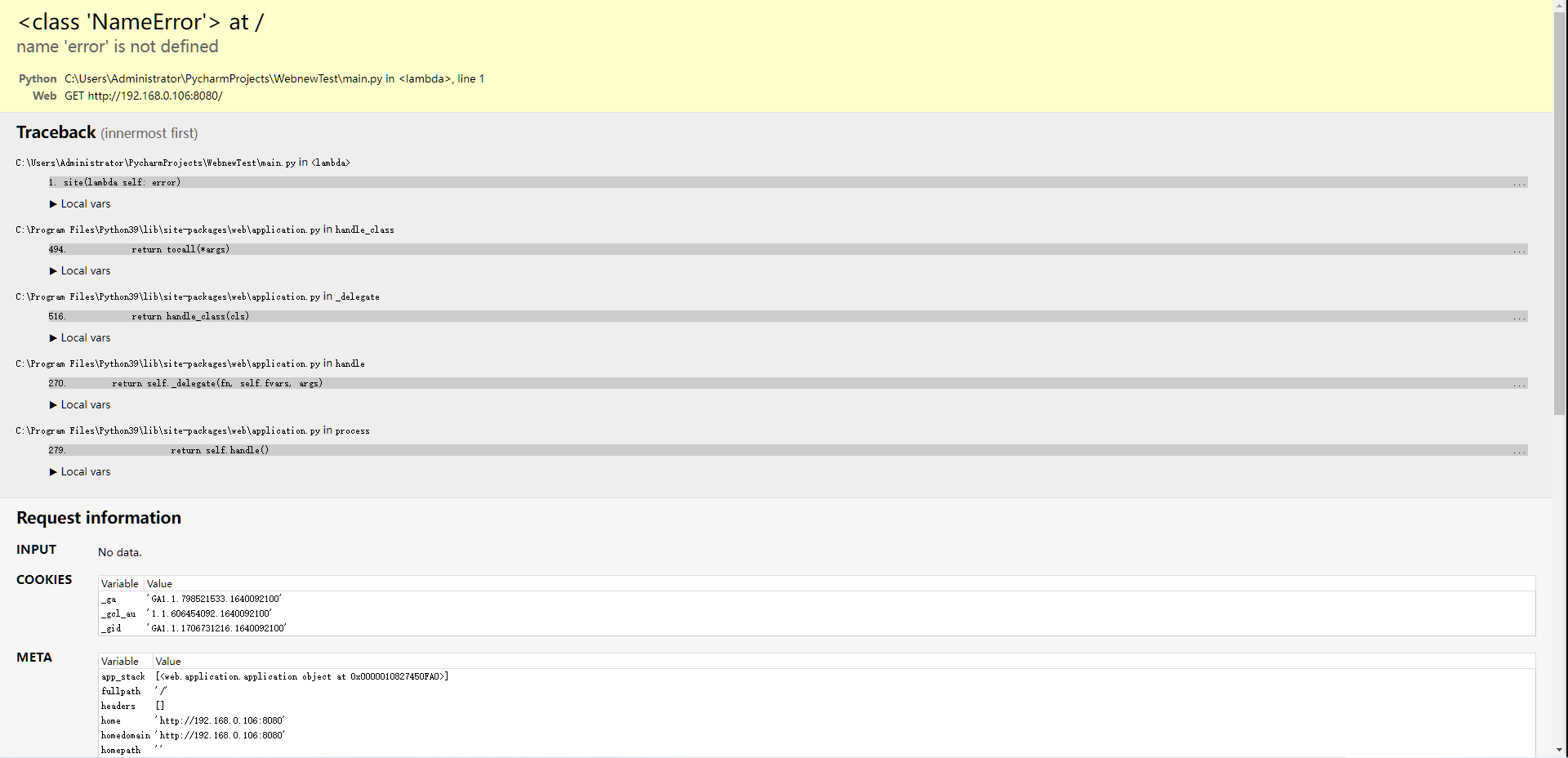
若在第二行后添加代码 debug(False)则显示 internal server error
4.reset()
reset() -> None
用法:用于重新加载 WebApp 对象的值。(WebApp可能会在未来的版本中替换为一个函数,reset()也可能会随之删除)
示例:
from webnew import *
site()
print(WebApp.browser())  # 输出不固定
reset()
print(WebApp.browser())  # 输出不固定
输出:
<web.browser.AppBrowser object at 0x00000136C15E0DC0>
<web.browser.AppBrowser object at 0x00000136C15E0DC0>
由两次输出的数据不一致可知 reset() 改变了 WebApp 对象的值。
5.newSites()
newSites(
    *sites: tuple[Any, str]
) -> None
用法:用于一次新建多个站点。
参数:
sites:形式为 ((class_, mapping), ...),意为循环执行 newSite(class_, mapping)。
示例:
from webnew import *
site('<a href="/page_1">Go to page 1</a>')  # 定义 / 站点
class page_1: GET = lambda self: '<a href="/page_2">Go to page 2</a>'  # 定义page_1类
class page_2: GET = lambda self: '<a href="/">Go to index</a>'  # 定义page_2类
newSites((page_1, '/page_1'), (page_2, '/page_2'))  # 添加page_1和page_2站点
run(globals())  # 运行服务器
输出:
浏览或以GET访问 localhost:8080/ ,显示 Go to page 1 超链接,点击后跳转至 localhost:8080/page_1 ,
显示 Go to page 2 超链接,点击后跳转至 localhost:8080/page_2, 显示 Go to index 超链接,点击后跳转至 localhost:8080/。
6.run()
run(
    globals_ = None
) -> None
用法:用于运行服务器。
参数:globals_:需要传入 globals() 。
说明:凡是调用 run() 都应传入 globals() 。
7.mappings()
mappings() -> tuple
用法: 网站的所有站点储存,返回一个元组, 包含所有站点的定位符及其对应的类。
示例:
from webnew import *
site('Hello')  # 以GET访问 / 时,返回'Hello'
class greet: GET = lambda self: 'Hi, I\'m John.'  # 定义greet类的GET方法
newSite(greet, '/greet')   # 以GET访问 /greet 时,调用greet的GET方法,返回'Hi, I\'m John.'
print(mappings())  # 打印所有站点信息
输出:
('/', 'DefaultSite', '/greet', 'greet')
8.open_web()
open_web() -> None
用法: 网站的所有站点储存,返回一个元组, 包含所有站点的定位符及其对应的类。
WebNew - v1.1.1 - request
# request 用于测试所编写的webnew网站程序
方法:
GET() / POST()
GET(
    ip: str = socket.gethostbyname(socket.gethostname()),
    localhost: int = 8080, mapping: str = '/'
) -> Optional[requests.Response]
POST(
    ip: str = socket.gethostbyname(socket.gethostname()),
    localhost: int = 8080, mapping: str = '/'
) -> Optional[requests.Response]
用法:通过 GET / POST 方法获取一个 requests.Response 对象
Release history Release notifications | RSS feed


Download files
Download the file for your platform. If you're not sure which to choose, learn more about installing packages.
Source Distribution
Built Distribution
Filter files by name, interpreter, ABI, and platform.
If you're not sure about the file name format, learn more about wheel file names.
Copy a direct link to the current filters
File details
Details for the file webnew-1.1.1.tar.gz.
File metadata
- Download URL: webnew-1.1.1.tar.gz
- Upload date:
- Size: 6.4 kB
- Tags: Source
- Uploaded using Trusted Publishing? No
- Uploaded via: twine/3.7.1 importlib_metadata/4.10.0 pkginfo/1.8.2 requests/2.26.0 requests-toolbelt/0.9.1 tqdm/4.62.3 CPython/3.10.1
File hashes
| Algorithm | Hash digest | |
|---|---|---|
| SHA256 |
a76d0fe5600c7cb2e1c8ffe119ea11c3c22e065493bfffbe5dbb7520adae8ddf
|
|
| MD5 |
01d28e51e790e76d88275bd591664f31
|
|
| BLAKE2b-256 |
5caf55344982bb39815ac29c77af543d7034c6c6b83117e6560c35bec5a6603c
|
File details
Details for the file webnew-1.1.1-py3-none-any.whl.
File metadata
- Download URL: webnew-1.1.1-py3-none-any.whl
- Upload date:
- Size: 7.5 kB
- Tags: Python 3
- Uploaded using Trusted Publishing? No
- Uploaded via: twine/3.7.1 importlib_metadata/4.10.0 pkginfo/1.8.2 requests/2.26.0 requests-toolbelt/0.9.1 tqdm/4.62.3 CPython/3.10.1
File hashes
| Algorithm | Hash digest | |
|---|---|---|
| SHA256 |
c07678ff96066fcd546cbacbeece5e39c849a9d4a1714eca321095545fe34ea0
|
|
| MD5 |
98c369fec9f6605df22ec3e008259fda
|
|
| BLAKE2b-256 |
bb6a272c45de9b5c7f89fd8b7e55eb0f0fe503dc016cbd0ed9a362999b263f57
|






