
A web agent framework for researchers to build and study web agents for real-world applications

Project description

Handling "Any site. Any page. Any UI. Any complexity" for your web tasks.




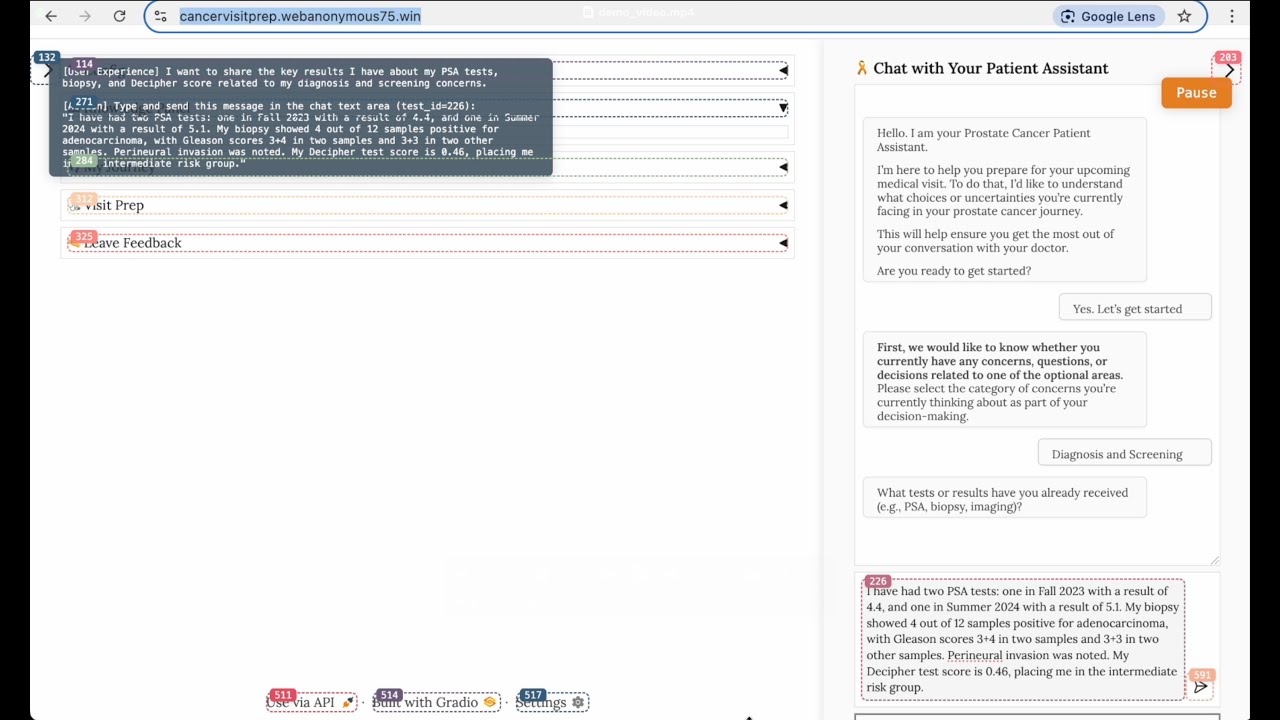
WebOasis is a framework for building AI-driven web agents on real, complex websites.
Features
-
Any site. Any page. Any UI. Any complexity. Robust handling of dynamic, highly interactive pages. You focus on research—no brittle low‑level UI hacking. If you run into a tricky page the agent can't yet handle, please open a request and we'll help.
-
One-parameter engine switch (Playwright ↔ Selenium). Choose your UI engine per experiment without changing operation code or test-suite boilerplate.
-
Dual-agent architecture for clarity and power. Role Agent (human-like intent, high-level reasoning) + Web Agent (browser expert, low-level actions). Clean separation of observation and control.
-
Supports both task automatiton and interactive (tutor‑style) agents (TODO). For tutor-style agents, Human (novice) → Role Agent (proficient user) → Web Agent (operator): guide, involve, and supervise actions in the loop.
Installation
- From source (Recommended):
git clone https://github.com/lsy641/WebOasis.git
cd WebOasis
pip install -e .
- PyPI:
pip install weboasis
Configuration
WebOasis uses prompt-based configuration for its AI agents. You can customize these prompts by setting the WEBOASIS_PROMPTS_PATH environment variable to point to your own prompts.yaml file.
Customizing Prompts
# Set the path to your custom prompts file
export WEBOASIS_PROMPTS_PATH="/path/to/your/custom/prompts.yaml"

# Run your script
python your_script.py
Prompts File Format
Your custom prompts.yaml should follow the same structure as the default:
observe_prompt: |-
  # Interactive Elements
  ${interactive_elements_str}

  # Your custom instructions here
  - Be more cautious when interacting with elements
  - Focus on accessibility-first interactions

  # Response Format
  [Action] (Your custom format)

act_prompt: |-
  # Interactive elements:
  ${interactive_elements_str}

  # Action Space
  ${action_space_desc}

  # Your custom instructions here

  # Goal:
  ${goal}

  # Response Format


example_profile: |-
  # Your custom user profile
  You are a [describe your persona]

  ## Task Description
  [describe what you want to accomplish]

  ## Profile
  [describe your characteristics and preferences]
Available Variables
The following variables can be used in your prompts:
${interactive_elements_str}- List of interactive elements on the page${action_space_desc}- Available actions the agent can perform${accessibility_tree}- Page accessibility information${goal}- Current goal/task to accomplish
Run a demo
The demo simulates a prostate cancer patient using a newly developed visit‑prep web app to surface UI design and system usability issues. At each step, the DualAgent observes page dynamics, articulates the user experience, infers intent, and executes the next UI action.
python WebOasis/scripts/demo.py
Demo core logic (simplified):
import os
from openai import OpenAI
from weboasis.act_book import ActBookController
from weboasis.agents import DualAgent
from weboasis.agents.constants import TEST_ID_ATTRIBUTE

client = OpenAI(api_key=os.getenv("OPENAI_API_KEY"))
act_book = ActBookController(auto_register=False)
act_book.register("browser/interaction")
act_book.register("browser/navigation")
act_book.register("general/flow")

agent = DualAgent(
    client=client, model="gpt-4.1-mini",
    act_book=act_book, web_manager="playwright",
    test_id_attribute=TEST_ID_ATTRIBUTE, log_dir="./logs/demo", verbose=True,
)

for _ in range(20):
    if not agent.web_manager.is_browser_available():
        break
    agent.step()
Project structure
WebOasis/
├── act_book/                      # Operations and registry
│   ├── core/                      # Base classes, registry, automator interface
│   ├── book/
│   │   ├── browser/
│   │   │   ├── interaction.py     # Click/Type/Scroll/... operations
│   │   │   ├── navigation.py      # Navigate/Back/Forward/Tab ops
│   │   │   └── extraction.py      # GetText/Attribute/Screenshot/Title/URL
│   │   ├── dom/selector.py        # Find/Wait/Exists/Visible
│   │   ├── composite/
│   │   │   ├── forms.py           # FillForm/Login/SubmitForm
│   │   │   └── highlighting.py    # Visual highlight helpers
│   │   └── general/flow.py        # NoAction (wait)
│   └── engines/
│       ├── playwright/playwright_automator.py
│       └── selenium/selenium_automator.py
├── ui_manager/                    # Browser managers and parser
│   ├── base_manager.py
│   ├── playwright_manager.py
│   ├── selenium_manager.py
│   ├── parsers/simple_parser.py   # Robust function-call parser
│   ├── js_adapters.py             # Selenium JS adapters (sync/async)
│   └── constants.py               # Loads injected JS utilities
├── agents/                        # Agents and shared types
│   ├── base.py                    # BaseAgent, WebAgent, RoleAgent
│   ├── dual_agent.py              # Orchestrates Role + Web agents
│   ├── constants.py               # Prompts and shared config
│   └── types.py                   # Observation/Message/etc.
├── javascript/                    # Injected browser-side utilities
│   ├── frame_mark_elements.js
│   ├── add_outline_elements.js
│   ├── identify_interactive_elements.js
│   ├── extract_accessbility_tree.js
│   ├── create_developper_panel.js
│   ├── hide_developer_elements.js
│   └── show_developer_elements.js
├── config/prompts.yaml            # Act/observe prompts
└── scripts/demo.py                # Minimal runnable example
Citation
License
Apache License 2.0. See the LICENSE file.


Download files
Download the file for your platform. If you're not sure which to choose, learn more about installing packages.
Source Distribution
Built Distribution
Filter files by name, interpreter, ABI, and platform.
If you're not sure about the file name format, learn more about wheel file names.
Copy a direct link to the current filters
File details
Details for the file weboasis-0.1.4.tar.gz.
File metadata
- Download URL: weboasis-0.1.4.tar.gz
- Upload date:
- Size: 1.4 MB
- Tags: Source
- Uploaded using Trusted Publishing? No
- Uploaded via: twine/6.1.0 CPython/3.13.0
File hashes
| Algorithm | Hash digest | |
|---|---|---|
| SHA256 |
587a90caa3fc9f55633286cdf68ad902b9d291eaa87b5851d6d99c4f8f491cd0
|
|
| MD5 |
82dd0e291bf21f0d688e43942b29e45f
|
|
| BLAKE2b-256 |
475468cf7175d600385d956cc1db17297ca65e2aa42a8f4143861a3ae809e8a6
|
File details
Details for the file weboasis-0.1.4-py3-none-any.whl.
File metadata
- Download URL: weboasis-0.1.4-py3-none-any.whl
- Upload date:
- Size: 1.5 MB
- Tags: Python 3
- Uploaded using Trusted Publishing? No
- Uploaded via: twine/6.1.0 CPython/3.13.0
File hashes
| Algorithm | Hash digest | |
|---|---|---|
| SHA256 |
7e6c82d2b9644badd8b7e31b60b619d41b385b105f1a3abdd45b591e068aed82
|
|
| MD5 |
d82e6cd5b4f452f1dc15a29615b97e81
|
|
| BLAKE2b-256 |
a09bfc66995b7524b517f93710ded245e5601cb0bdfc934dc84138d7ec98840e
|






