
webrecon


A small asynchronous web reconnaissance scanner: DNS enumeration, passive and active subdomain discovery, HTTP fingerprinting, technology detection, TLS certificate inspection and TCP port scanning — with JSON, terminal and HTML reports.
Authorised use only. Run this against systems you own or have written permission to test. Unauthorised scanning is illegal in most jurisdictions.

Features
| Module | What it does |
|---|---|
dns |
Resolves A, AAAA, MX, NS, TXT, CNAME, SOA and CAA records with a per-query status (NXDOMAIN, timeout, SERVFAIL); SPF/DMARC/DKIM hints for mail domains; optional zone-transfer (AXFR) check |
subdomains |
Certificate transparency lookups (crt.sh) plus wordlist brute-force with wildcard-DNS detection, then resolves each candidate |
http |
Reachability, redirect chain, status, page title, headers, security-header and cookie-flag findings, and content discovery (robots.txt, sitemap.xml, security.txt, exposed .git/.env) |
tls |
Issuer, subject, SANs, validity window, days until expiry, chain and hostname verification, protocol and cipher — also for self-signed and expired certificates |
ports |
TCP connect scan over an explicit port list, with optional sanitised banners; open web ports are fed to the HTTP and TLS modules |
Technology detection runs on every HTTP response and identifies ~30 servers, CDNs, frameworks and CMSs from headers, cookies and body markers.
Install
To use the tool, install it from PyPI in its own environment with pipx:
pipx install webrecon-cli
The package is called webrecon-cli (the name webrecon on PyPI belongs to
an unrelated project); the command it installs is webrecon. The latest
development version installs with
pipx install git+https://github.com/Just-Ipavon/web-recon.git.
To work on the code, clone it and install it in a virtual environment. These
commands work in any shell, because they call the environment's own pip
instead of activating it:
git clone https://github.com/Just-Ipavon/web-recon.git
cd web-recon
python3 -m venv .venv
.venv/bin/pip install -e ".[dev]"
.venv/bin/webrecon --version
To have webrecon, pytest and the other tools on your PATH, activate the
environment with the script for your shell:
| Shell | Command |
|---|---|
| bash, zsh | source .venv/bin/activate |
| fish | source .venv/bin/activate.fish |
| csh, tcsh | source .venv/bin/activate.csh |
| PowerShell | .venv\Scripts\Activate.ps1 |
| Windows cmd | .venv\Scripts\activate.bat |
On Windows the paths in the commands above are .venv\Scripts\pip and
.venv\Scripts\webrecon. Do not install with the system pip: distributions
such as Arch, Debian and Fedora refuse it (PEP 668, "externally managed
environment").
A small subdomain wordlist ships inside the package and is used by default;
-w points at your own list and --no-wordlist turns brute-force off.
Usage
# Default scan: DNS, subdomains, HTTP and TLS (asks you to confirm authorization)
webrecon example.com

# Everything, non-interactively, with JSON + HTML reports and a live JSONL log
webrecon example.com -m all --i-have-authorization \
    -o report.json --html report.html --jsonl results.jsonl

# 10 requests per second across all modules, 5 at a time, at most 10 minutes
webrecon example.com -r 10 -c 5 --max-time 600

# A web app on a non-standard port, plus a list of further targets
webrecon https://app.example.com:8443 -iL targets.txt

# Limit the perimeter explicitly and allow an internal range
webrecon example.com --scope example.com,10.0.0.0/24 --allow-private

# Active only — skip certificate transparency lookups
webrecon example.com --no-passive

# Pipe the JSON report to jq
webrecon example.com -m dns --json | jq .dns.records
Targets can be a domain, an IP address (IPv4 or IPv6), host:port or a URL;
internationalised names are converted to punycode. Before any active module
runs, webrecon asks you to confirm that you are authorised to test the
targets (or takes --i-have-authorization), and records the operator, the
time and the scope in the report.
Options
| Flag | Meaning |
|---|---|
target ... |
One or more domains, IPs, host:port or URLs |
-iL FILE |
Read more targets from a file, one per line |
-V, --version |
Print the version |
-m, --modules |
Modules to run: dns, subdomains, http, tls, ports, or all |
-w, --wordlist |
Subdomain wordlist for brute-force (default: the bundled list) |
--no-wordlist |
Skip subdomain brute-force |
-p, --ports |
Ports to scan, e.g. 80,443,8000-8100 |
--max-subdomains |
Cap on candidates resolved (default 200, 0 for no cap) |
--no-passive |
Skip crt.sh lookups (otherwise the target name is sent to crt.sh) |
--banners |
Read a short, sanitised banner from each open port |
--axfr |
Attempt a DNS zone transfer against each name server |
--resolver IP |
Query this DNS server instead of the system resolver |
-c, --concurrency |
Maximum concurrent requests (default 20) |
-r, --rate |
Maximum requests per second across all modules; 0 disables pacing |
-t, --timeout |
Per-request timeout in seconds (default 5) |
--max-time |
Stop each target's scan after this many seconds and report what was found |
--max-requests-per-host |
HTTP request budget per host (default unlimited) |
--scope, --scope-file |
Domains and CIDRs that may be contacted (default: the target and its subdomains) |
--allow-private |
Allow loopback, private and link-local addresses (refused by default) |
--i-have-authorization |
Confirm authorization without the interactive prompt |
--operator |
Name recorded in the report (default: the current user) |
--verify-tls |
Verify certificates on HTTP probes (off by default; the TLS module always reports verification status) |
--proxy URL |
HTTP(S) proxy for HTTP probes and crt.sh; DNS, TLS and port scans still connect directly. HTTP(S)_PROXY variables are ignored |
--user-agent |
User-Agent for HTTP requests |
--no-redact |
Keep Set-Cookie and Authorization values in reports |
-o, --output |
Write a JSON report |
--html |
Write a self-contained HTML report |
--jsonl |
Append each result to a JSONL file as soon as it is found |
--json |
Print the JSON report to stdout |
--force |
Overwrite existing report files |
-q, --quiet |
Suppress terminal output |
--fail-if-unreachable |
Exit with status 3 when no target answered |
Exit codes: 0 success, 1 runtime error, 2 usage error or authorization
not confirmed, 3 nothing reachable (with --fail-if-unreachable), 130
interrupted. An interrupted or crashed scan still writes its reports, marked
as incomplete.
Example output
Every scan produces the same data in three forms. The terminal report is shown in the recording at the top of this page; the other two are written on request.
The JSON report is the full dataset, suitable for piping into jq or feeding
another tool:
{
  "target": "example.com",
  "http": [
    {
      "url": "https://example.com",
      "status": 200,
      "title": "Example Domain",
      "technologies": ["Cloudflare"],
      "interesting_paths": ["/robots.txt"]
    }
  ]
}
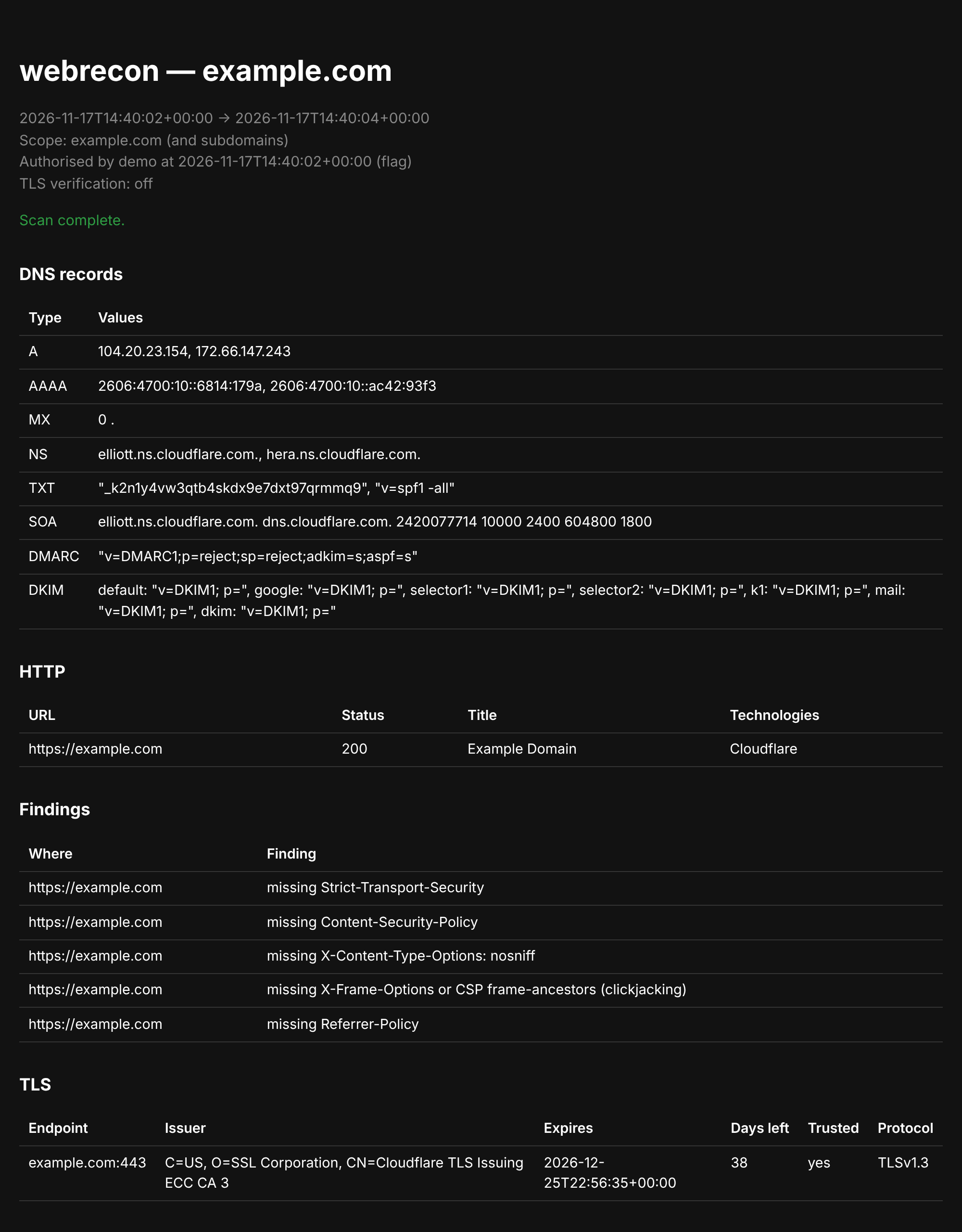
The HTML report is a single self-contained file — no external stylesheets, scripts or fonts — so it can be archived or attached to an engagement report and still render years later:
Design notes
Everything is rate limited. One Throttle
(webrecon/ratelimit.py) is built per scan and shared by
every module: DNS queries, the crt.sh lookup, HTTP requests, TLS handshakes and
port connects each take a slot. It combines a semaphore for in-flight work with
a token bucket for request rate. Unbounded concurrency is what separates a
recon tool from a denial-of-service tool.
Scope is explicit. Every host the tool contacts — subdomains, redirect targets, certificate endpoints — is checked against one scope (by default the target and its subdomains). Out-of-scope hosts and non-public addresses are listed as skipped in the report instead of being probed.
Failures are contained, not fatal. A DNS timeout, an unreachable host or an unparseable certificate is recorded in the result and the scan continues; an unexpected exception in one stage becomes an error entry and the other stages still run. Errors and unreachable hosts appear in every output format. A partial report beats a traceback.
Reports are handled as sensitive. Cookie and authorization values are
redacted, report files are created readable by the owner only (mode 0600) and
are never overwritten without --force, and the HTML report carries a
Content-Security-Policy that forbids scripts.
Modules return dataclasses, not dicts. Every module produces types from webrecon/models.py, so the report layer never guesses at a schema and JSON output stays stable.
Content discovery avoids soft 404s. Servers that answer 200 with an HTML
error page are common, so a path only counts as a hit when its body matches the
shape expected for that file — a .git/HEAD must hold a ref or a commit hash,
an .env must contain KEY=value lines and no HTML, a robots.txt must
contain directives — and differs from what the server sends for a random path.
Candidates are ranked before truncation. --max-subdomains cuts by
confidence (target, then certificate transparency, then wordlist guesses), not
alphabetically, so the hosts most likely to exist survive the cap.
Architecture
webrecon/
├── cli.py              argument parsing, authorization gate, output selection
├── scanner.py          orchestration: runs enabled modules, assembles report
├── context.py          ScanContext: shared throttle, scope and report
├── targets.py          target parsing and scope enforcement
├── config.py           ScanConfig
├── models.py           result dataclasses
├── ratelimit.py        Throttle: concurrency + rate limiting
├── data/               bundled subdomain wordlist
└── modules/
    ├── dns_enum.py         records, crt.sh, wordlist brute-force
    ├── http_probe.py       probing, redirects, content discovery
    ├── security_headers.py security-header and cookie-flag findings
    ├── tech_detect.py      signature-based fingerprinting
    ├── tls_info.py         certificate inspection
    ├── port_scan.py        TCP connect scan
    └── report.py           JSON / JSONL / terminal / HTML rendering
Documentation
Full technical documentation lives in docs/: architecture and design decisions, use case specifications, a function-by-function reference, and the runtime behaviour — with UML diagrams throughout.
| Document | Contents |
|---|---|
| 01 — Architecture | Context, packages, data model, architectural decisions, deployment |
| 02 — Use cases | Actors, use case diagram, eight detailed specifications, operational scenarios |
| 03 — Function reference | Every function: behaviour, edge cases, error handling, covering tests |
| 04 — Runtime behaviour | Sequence diagrams, lifecycle, concurrency model, error propagation |
License
MIT — see LICENSE.
1 maintainer

Metadata
1 maintainer
Release files for webrecon-cli 0.2.1
For a detailed explanation of source distributions (sdists) and built distributions (wheels), please see the package formats documentation.
Source distribution (sdist)
| File | Size | Uploaded | Provenance | Actions |
|---|---|---|---|---|
| webrecon_cli-0.2.1.tar.gz | 64.5 kB | With provenance | Details for webrecon_cli-0.2.1.tar.gz |
Built distribution (wheel)
| File | Interpreter | ABI | Platform | Actions Reset |
|---|---|---|---|---|
| webrecon_cli-0.2.1-py3-none-any.whl | Python 3 | none | any | Details for webrecon_cli-0.2.1-py3-none-any.whl |
Total release size: 114.0 kB
Release files / webrecon_cli-0.2.1.tar.gz
| Download URL | webrecon_cli-0.2.1.tar.gz |
|---|---|
| Size | 64.5 kB |
| Tags | Source |
|
SHA-256 checksum How to use checksums |
930932d1884d95a271b873db390b5158d149804a312155e3f6ed0dfbe68469fa
|
|
BLAKE2b-256 checksum How to use checksums |
a885ea6997f662afa60a1d6822d7ac061834e1dd6d6d197886e86b39a7ebd581
|
| Upload date | |
|
Uploaded using Trusted Publishing? What is trusted publishing? |
Yes |
| Uploaded via |
twine/7.0.0 CPython/3.13.16
|
Provenance
Provenance describes where a file came from. On PyPI, provenance is shared via attestations, which provide a verifiable record of the build or publishing details. View details, limitations and caveats.


PyPI Publish Attestation
PyPI verified that this artifact, at this checksum, originated from the publisher listed below.
Signed by GitHub Actions, verified by PyPI on Nov 17, 2026.
Transparency logRelease files / webrecon_cli-0.2.1-py3-none-any.whl
| Download URL | webrecon_cli-0.2.1-py3-none-any.whl |
|---|---|
| Size | 49.5 kB |
| Tags | Python 3 |
|
SHA-256 checksum How to use checksums |
8135bea20090c6ffff639f7b0faade82a2b4ffe1f5ee0d1c2a09129973524ca3
|
|
BLAKE2b-256 checksum How to use checksums |
8067d2bafc062038be90b7bd014e32146771f72d5f7aa20c2c9ea891aa6f1981
|
| Upload date | |
|
Uploaded using Trusted Publishing? What is trusted publishing? |
Yes |
| Uploaded via |
twine/7.0.0 CPython/3.13.16
|
Provenance
Provenance describes where a file came from. On PyPI, provenance is shared via attestations, which provide a verifiable record of the build or publishing details. View details, limitations and caveats.
PyPI Publish Attestation
PyPI verified that this artifact, at this checksum, originated from the publisher listed below.
Signed by GitHub Actions, verified by PyPI on Nov 17, 2026.
Transparency logSecurity for webrecon-cli 0.2.1
Provenance
Provenance describes where a file came from. On PyPI, provenance is shared via attestations, which provide a verifiable record of the build or publishing details. View details, limitations and caveats.
Full provenance
Both files in this release have been uploaded with provenance metadata.
Attestation for webrecon_cli-0.2.1.tar.gz
PyPI Publish Attestation
PyPI verified that this artifact, at this checksum, originated from the publisher listed below.
Signed by GitHub Actions, verified by PyPI on Nov 17, 2026.
Transparency logA note on package security
PyPI is a repository for distributing packages, not a service for auditing them. While third-party security researchers and our staff do their best to detect and remove malicious packages, PyPI cannot guarantee the quality, security or suitability of any given package.
To learn more about protecting yourself from malicious actors, visit our package security documentation.














