
Api client for WebShotApi.com. Website screenshot api client, extract html from rendered website extract words with coordinates from website, extract styles from HTML selectors(elements)
Verified details
These details have been verified by PyPIProject links
GitHub Statistics
Maintainers

Project description
WebShotApi.com API client for Python
Capture and store website snapshots effortlessly with our SaaS service. Use our AI unique algorithm for remove cookies and popup banner before take screenshot. Save images in popular formats such as JPG, PNG, WEBP and PDF. Additionally, extract selectors for every HTML element, complete with coordinates and CSS styles post-browser rendering.
Full documentation about our api you can find in this website Website screenshot API DOCS
Installation
Use the package manager pip to install our client in Python.
pip install webshotapi
OR
pip3 install webshotapi
Remove cookies popup before take sceenshot
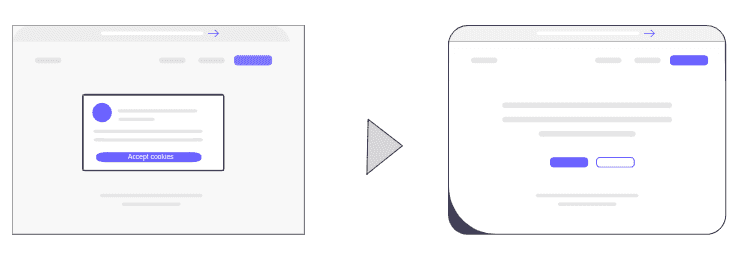
Effortlessly remove annoying cookies pop-ups before capturing stunning screenshots. Let our advanced AI algorithm transform the way you visualize websites, ensuring a cookie-free snapshot every time! Read more
API KEY
Api key you can generate after register. https://dashboard.webshotapi.com/api_keys
Usage
Take screenshot video
Example gif:

Link to example mp4: https://github.com/webshotapi/php-client/raw/c77cb5a3d84b58a2dfd92ba30ed6850f83d7a52e/images/stripe-video.mp4
from webshotapi import Client
import os

if __name__ == "__main__":
    try:
        TOKEN = os.getenv('WEBSHOTAPI_KEY','YOUR TOKEN HERE')
        client = Client(TOKEN)

        result = client.video({
            'url': 'https://www.stripe.com',
            'remove_modals': True,
            'scrolling_enable': True,
            'scrolling_algorithm': "ease_in_quad",
            'scrolling_scroll_delay': 500,
            'scrolling_scroll_distance': 1000,
            'scrolling_scroll_duration': 1500,
        })

        if result.save('/tmp/testa.mp4'):
            print("File saved")
        else:
            print("Error with save file")

    except Exception as e:
        print("Error:")
        print(e)
Take screenshot and save jpg to file
from webshotapi import Client
import os

if __name__ == "__main__":
    try:
        TOKEN = os.getenv('WEBSHOTAPI_KEY','YOUR TOKEN HERE')
        client = Client(TOKEN)

        result = client.screenshot({
             'url': 'https://www.example.com',
             'remove_modals': True
        })

        if result.save('/tmp/testa.jpg'):
            print("File saved")
        else:
            print("Error with save file")

    except Exception as e:
        print("Error:")
        print(e)
Take screenshot and save PDF to file
You can convert your html page to PDF. For example you can prepare html invoice template and convert that website to PDF
from webshotapi import Client
import os

if __name__ == "__main__":
    try:
        TOKEN = os.getenv('WEBSHOTAPI_KEY','YOUR TOKEN HERE')
        client = Client(TOKEN)

        result = client.pdf({
            'url': 'https://www.example.com'
        })

        if result.save('/tmp/test.pdf'):
            print("File saved")
        else:
            print("Error with save file")

    except Exception as e:
        print("Error:")
        print(e)
Extract words map and HTML elements with css styles after rendering
Revolutionize your web development experience with our unparalleled software. Extract all selectors for HTML elements, complete with CSS styles, post-browser rendering. Furthermore, delve into the intricate details by extracting words along with their precise position data (x, y, width, height, offset from the previous word). This invaluable information allows you to construct a comprehensive words map of the entire website. Elevate your understanding and efficiency in website analysis and development like never before!
Sample script:
from webshotapi import Client
import os

if __name__ == "__main__":
    try:
        TOKEN = os.getenv('WEBSHOTAPI_KEY','YOUR TOKEN HERE')
        client = Client(TOKEN)

        #send request
        result = client.extract({
            'url': 'https://www.example.com',
            'extract_elements': True,
            'extract_style': 1,
            'extract_words': True,
            'extract_html': True,
            'extract_text': True
        })

        #print json data from result
        print(result)
        print(result['html'])

    except Exception as e:
        print("Error:")
        print(e)
Results
{
 "elements": [
      {
         "xpath": "/html[1]",
         "css_selector": "html",
         "x": 0,
         "y": 0,
         "width": 1920,
         "height": 413,
         "style": {
            "visibility": "visible",
            "display": "block",
            "fontWeight": "400",
            "backgroundImage": "none",
            "backgroundColor": "rgba(0, 0, 0, 0)",
            "cursor": "auto",
            "fontSize": "16px",
            "color": "rgb(0, 0, 0)",
            "position": "static",
            "textDecoration": "none solid rgb(0, 0, 0)",
            "textDecorationLine": "none",
            "textDecorationColor": "rgb(0, 0, 0)",
            "textDecorationStyle": "solid",
            "textDecorationThickness": "auto",
            "bottom": "auto",
            "top": "auto",
            "left": "auto",
            "right": "auto",
            "zIndex": "auto",
            "opacity": "1",
            "backgroundRepeat": "repeat",
            "borderWidth": "0px",
            "textAlign": "start",
            "marginLeft": "0px",
            "marginRight": "0px",
            "marginTop": "0px",
            "marginBottom": "0px",
            "paddingLeft": "0px",
            "paddingRight": "0px",
            "paddingTop": "0px",
            "paddingBottom": "0px",
            "overflow": "visible",
            "textIndent": "0px",
            "textTransform": "none",
            "letterSpacing": "normal",
            "fontFamily": "\"Times New Roman\""
         },
         "attributes": {}
      }
  ],
  "words": [
     {
         "word": "permission.",
         "position": {
            "x": 660,
            "y": 231,
            "width": 92,
            "height": 19
         },
         "word_index": 26,
         "xpath": "/html[1]/body[1]/div[1]/p[1]",
         "offset": 145
      }
  ],
  "page_properties": {
      "viewport": {
         "width": 1920,
         "height": 1080
      },
      "document": {
         "width": 1920,
         "height": 1080
      }
   },
  "html": "<!doctype html><html lang='en' dir='ltr'><head><base hr...",
  "text": "Welcome in our page\nToday is Monday...",
  "screenshot_url": "https://api.webshotapi.com/v1/screenshot/?token=....&width=1920&height=960",
  "status_code": 200
}
API docs
Full documentation about our api you can find in this website API DOCS
About our service
You can use our service with free plan with 100 free requests
License
Project details
Verified details
These details have been verified by PyPIProject links
GitHub Statistics
Maintainers
Release history Release notifications | RSS feed


Download files
Download the file for your platform. If you're not sure which to choose, learn more about installing packages.
Source Distribution
Built Distribution
Filter files by name, interpreter, ABI, and platform.
If you're not sure about the file name format, learn more about wheel file names.
Copy a direct link to the current filters
File details
Details for the file webshotapi-1.1.16.tar.gz.
File metadata
- Download URL: webshotapi-1.1.16.tar.gz
- Upload date:
- Size: 11.2 kB
- Tags: Source
- Uploaded using Trusted Publishing? Yes
- Uploaded via: twine/6.1.0 CPython/3.13.7
File hashes
| Algorithm | Hash digest | |
|---|---|---|
| SHA256 |
ad8d974b60ce60af583a4ab635a294a1a995ffa835f020615f34df4ed07ab18c
|
|
| MD5 |
dbbba30cd917249a312e69278814c43f
|
|
| BLAKE2b-256 |
aede82973c40dba2b4aa5334126cb97d9e94cbda11d2e3377710df2fd8d59f12
|
Provenance
The following attestation bundles were made for webshotapi-1.1.16.tar.gz:
Publisher:
python-publish.yml on webshotapi/python-client
-
Statement:
-
Statement type:
https://in-toto.io/Statement/v1 -
Predicate type:
https://docs.pypi.org/attestations/publish/v1 -
Subject name:
webshotapi-1.1.16.tar.gz -
Subject digest:
ad8d974b60ce60af583a4ab635a294a1a995ffa835f020615f34df4ed07ab18c - Sigstore transparency entry: 701583211
- Sigstore integration time:
-
Permalink:
webshotapi/python-client@391fb7f1cb93bc7583490caca8ec9eea4b1c9408 -
Branch / Tag:
refs/tags/v1.1.16 - Owner: https://github.com/webshotapi
-
Access:
public
-
Token Issuer:
https://token.actions.githubusercontent.com -
Runner Environment:
github-hosted -
Publication workflow:
python-publish.yml@391fb7f1cb93bc7583490caca8ec9eea4b1c9408 -
Trigger Event:
push
-
Statement type:
File details
Details for the file webshotapi-1.1.16-py3-none-any.whl.
File metadata
- Download URL: webshotapi-1.1.16-py3-none-any.whl
- Upload date:
- Size: 11.3 kB
- Tags: Python 3
- Uploaded using Trusted Publishing? Yes
- Uploaded via: twine/6.1.0 CPython/3.13.7
File hashes
| Algorithm | Hash digest | |
|---|---|---|
| SHA256 |
7ec1c9f951b448c10bf008c206674a358f685a67b04630db8a711612038e8a0d
|
|
| MD5 |
803d57b8797df57ba0501416d36c324a
|
|
| BLAKE2b-256 |
79026f56c2885004e73c96cc5ecba803466e97fd2c88ff2243bfaae911537538
|
Provenance
The following attestation bundles were made for webshotapi-1.1.16-py3-none-any.whl:
Publisher:
python-publish.yml on webshotapi/python-client
-
Statement:
-
Statement type:
https://in-toto.io/Statement/v1 -
Predicate type:
https://docs.pypi.org/attestations/publish/v1 -
Subject name:
webshotapi-1.1.16-py3-none-any.whl -
Subject digest:
7ec1c9f951b448c10bf008c206674a358f685a67b04630db8a711612038e8a0d - Sigstore transparency entry: 701583216
- Sigstore integration time:
-
Permalink:
webshotapi/python-client@391fb7f1cb93bc7583490caca8ec9eea4b1c9408 -
Branch / Tag:
refs/tags/v1.1.16 - Owner: https://github.com/webshotapi
-
Access:
public
-
Token Issuer:
https://token.actions.githubusercontent.com -
Runner Environment:
github-hosted -
Publication workflow:
python-publish.yml@391fb7f1cb93bc7583490caca8ec9eea4b1c9408 -
Trigger Event:
push
-
Statement type:






