
Advanced Web Intelligence & Scraping Toolkit with CLI and Web UI

Project description
WebTools CLI



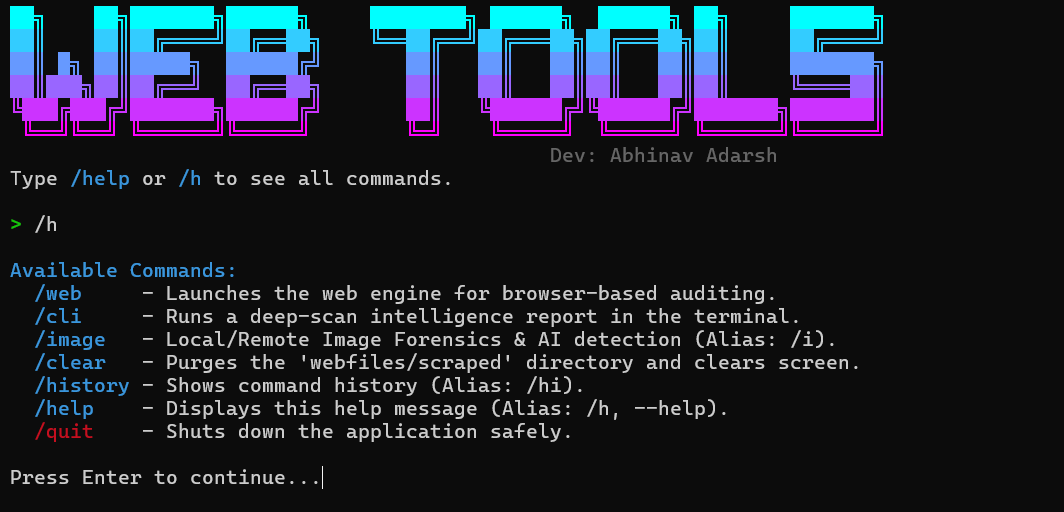
try :

WebTools CLI is an advanced web intelligence suite for researchers, OSINT enthusiasts, and developers. It brings the power of deep web analysis and automated scraping directly into your terminal.
🚀 Why WebTools CLI?
- 🎯 Stealth & Speed: Smart proxy rotation and Turbo-Fetch logic for evasion and performance.
- 🧠 AI-Powered: Automated content summarization, sentiment analysis, and readability scoring.
- ☁️ Cloud-Native: Integrated Mega.nz storage for seamless media backups and file management.
- 🔧 Security-Centric: Built-in honeypot detection, threat leveling, and image forensic analysis.
- 💻 Terminal-First: Designed for power users who live in the command line.
- 🛡️ Cross-Platform: Works seamlessly on Windows, Linux, and macOS (with auto-download for Windows tunnels).
- 🔌 SPA Ready: Automatic Playwright fallback for JavaScript-heavy sites like LinkedIn/Instagram.
📦 Installation
See the installation guide for recommended system specifications.
Quick Install
Install globally via pip:
pip install webtools-cli
To upgrade to the latest version:
pip install webtools-cli --upgrade
📋 Key Features
Advanced Scraping & Stealth
- Smart Proxy Rotation: Automatically rotates User-Agents and Proxies to evade detection.
- Turbo-Fetch: Parallel chunk downloads for large media (Videos/Images).
- Mega Cloud Drive: Native integration with Mega.nz for multi-account storage and file management.
- One-Click Save: Instantly save scraped images and videos directly to your cloud storage.
- Deep Crawl: Recursive link mapping up to 3 levels deep.
- Headless Fallback: Integrated Playwright support for auth-walled or SPA environments.
Intelligence & Security Analysis
- OSINT Toolkit: Auto-extract emails, phones, locations, social media, and tech stacks.
- SEO Auditor: Page score, heading hierarchy, link integrity, and image alt-text auditing.
- Image Forensics: CLI-based Error Level Analysis (ELA) and AI-likelihood detection.
- Honeypot Detector: Identifies hidden traps and anti-bot measures (Cloudflare/CAPTCHAs).
Modern Experience
- Premium Visual Engine: Sleek glassmorphism, fluid gradients, and premium Motion One animations.
- Responsive Preview: Live rendering scaling for desktop and mobile viewpoints.
- History & Stats: Phase-by-phase performance tracking and historical session management.
🚀 Getting Started
Basic Usage
Launch Interactive Menu
webtools
Non-Interactive Script Mode
python -m webtools
Slash Commands Reference
Navigate the suite using quick terminal commands:
| Command | Alias | Description |
|---|---|---|
/web |
/w |
Launch Web UI (Cloudflare Tunnel + QR) |
/cli |
/c |
Launch CLI Intelligence scan |
/image |
/i |
Image Forensics & AI Likelihood |
/history |
/hi |
View and manage scan history |
/help |
/h |
Show full command documentation |
/clear |
- | Purge all locally scraped data |
/quit |
/q |
Exit the application |
☁️ Deployment Options
- Local Development: Run on your machine with a generated QR code for mobile access.
- Cloud Tunnels: Automatic
cloudflaredintegration to expose your UI globally. - Google Colab: Compatible with Colab for cloud-based scraping (see badge above).
🤝 Resources & Support
- GitHub Repository - Source code and updates.
- Issue Tracker - Report bugs or request features.
- License - MIT License.
⚖️ Legal
This tool is for educational and testing purposes only. Always respect robots.txt and the Terms of Service of the websites you scrape. Neither the author nor the contributors are responsible for any misuse of this tool.
Built with ❤️ by Abhinav Adarsh and the open source community
Release history Release notifications | RSS feed


Download files
Download the file for your platform. If you're not sure which to choose, learn more about installing packages.
Source Distribution
Built Distribution
Filter files by name, interpreter, ABI, and platform.
If you're not sure about the file name format, learn more about wheel file names.
Copy a direct link to the current filters
File details
Details for the file webtools_cli-1.2.8.tar.gz.
File metadata
- Download URL: webtools_cli-1.2.8.tar.gz
- Upload date:
- Size: 101.3 kB
- Tags: Source
- Uploaded using Trusted Publishing? No
- Uploaded via: twine/6.2.0 CPython/3.12.10
File hashes
| Algorithm | Hash digest | |
|---|---|---|
| SHA256 |
28d344ecb816ad36ce72a19d5d51263e61dd3d25f593eb9462cc266e262d216e
|
|
| MD5 |
3d09e9cfd314a54e21d35ab6e8e00c04
|
|
| BLAKE2b-256 |
2bf5585eb37d462fadc607d8ba06539079b3084957526fa1db3273f4a6be82d3
|
File details
Details for the file webtools_cli-1.2.8-py3-none-any.whl.
File metadata
- Download URL: webtools_cli-1.2.8-py3-none-any.whl
- Upload date:
- Size: 101.0 kB
- Tags: Python 3
- Uploaded using Trusted Publishing? No
- Uploaded via: twine/6.2.0 CPython/3.12.10
File hashes
| Algorithm | Hash digest | |
|---|---|---|
| SHA256 |
3adb0164e8cd0ec956a8afd31ffbba90a2207c1bafe16798c8a92d3d5160f91f
|
|
| MD5 |
91050162f3c7c125a04757693a3e7210
|
|
| BLAKE2b-256 |
f137c87d3f98667debcfcb4cfe9e9d3d597d8d699f455bc42584a748e1e3b2b9
|






