
WebVigil








WebVigil is an open-source web application vulnerability scanner (DAST) for developers.
A Python engine and CLI that runs passive, production-safe checks by default and, behind an
explicit opt-in, an Active Mode for reflected and stored XSS, SQL injection, SSRF, command
injection, XXE, file upload and more, with every active finding confirmed against a baseline.
It writes JSON, SARIF 2.1.0, HTML and Markdown reports and fails a build with --fail-on,
so it fits CI.
It helps teams find and fix security problems in web apps, both in development (terminal, CI, pre-deploy) and in production (non-intrusive checks that are safe to run against live systems). WebVigil ships as a reusable scan engine, a CLI, and an optional web dashboard built on top of the same engine.
Status: released and maintained: install it. The CLI, the exit codes, the configuration keys, the check ids and the JSON report follow Semantic Versioning; what each release changed is in the changelog. Scope and limitations says what WebVigil deliberately does not do.
WebVigil vs. other scanners
| WebVigil | OWASP ZAP | Nuclei | |
|---|---|---|---|
| Distribution | Library + CLI + optional dashboard | GUI + daemon (Docker/desktop) | CLI + YAML templates |
| Safe by default | Passive-only unless --mode active is explicit |
Active scan is a common default workflow | Mostly read-only, template-dependent |
| Confirmed findings | Every active finding is proven against a per-request baseline | Signature + active-scan rules | Signature/template match |
| Best for | CI-native, in-band checks on your own app | Deep manual pentesting with a GUI/proxy | Fast sweeps against thousands of known CVE/misconfig templates |
| License | Apache-2.0 | Apache-2.0 | MIT |
WebVigil isn't a replacement for either — pair it with Nuclei for known-CVE template matching, or ZAP for manual, proxy-driven testing. See Scope and limitations for the full boundary.
Safe by default
WebVigil runs in Safe Mode by default: it only observes responses, headers, TLS
configuration, cookies, and page content. It never sends attack payloads and is safe to
point at production. The one request it adds beyond plain page fetches is a single GET
with an Origin header, used to detect reflective CORS — still a read-only GET, still
restricted to the target scope.
Active Mode (payload injection: XSS, SQLi, SSRF, etc.) is opt-in, requires an explicit authorization flag, and is intended for development and staging environments only.
Responsible use
A scanner sends requests to a system, so who may point it where matters as much as what it finds.
- Authorized targets only. Scan systems you own or have explicit permission to test. Scanning someone else's system without permission may be illegal where you live, and downloading this tool is not that permission.
- Active Mode has a gate. It needs
--mode activeand--authorized-by "<who / engagement>"; without the name WebVigil refuses (exit code5), and the name is written into the report. - Anything that writes, logs in or phones out is off by default, each behind its own
switch:
--stored-xss,--file-upload,--submit-post-formsand--confirm-csrfwrite to the target;--login-urlcreates a session;--osv-onlinesends library names to OSV.dev. - Always on: a scope guard that keeps every request on the target host, a request budget,
a concurrency cap and a delay, and
robots.txtis honoured unless you turn it off. - What WebVigil will not do: brute-force credentials, evade a WAF or an IDS, keep access, take data out, or exploit beyond one bounded proof. That is not on the roadmap (Scope and limitations).
- Demos stay on safe targets. The screenshots, recordings and posts for this project scan
the bundled test app (
scripts/serve-fixture-app.py) or the maintainer's own systems, never a third party's.
Found a vulnerability in WebVigil? Report it privately, see SECURITY.md. Found one in someone else's system with it? Tell its owner, and follow their disclosure policy.
Coverage
WebVigil was built milestone by milestone against a planned roadmap. Every entry below is
in the code and links to its docs; each was designed as a spec first, under
specs/. The milestones are the history of the build, not published versions:
1.0.0 is the first release and contains all of them.
| Milestone | Focus | Status |
|---|---|---|
v0.1 |
Security headers, technology-disclosure headers, cookie flags, TLS/HTTPS configuration, CORS misconfiguration (all passive) | shipped |
v0.2 |
Web API (FastAPI + SQLite, persistent scans, queued execution) | shipped |
v0.3 |
Web dashboard (Next.js) | shipped |
v0.4 |
Passive dependency fingerprinting: client-side JS libraries + known-vulnerability matching against a vendored Retire.js database (docs) | shipped |
v0.5 |
Information disclosure: stack traces and directory listings (passive), plus opt-in probing for exposed .git/.env/backups/debug endpoints (docs) |
shipped |
v0.6 |
Active Mode: injection testing — reflected XSS, SQL injection (error/boolean/time), path traversal, open redirect (docs) | shipped |
v0.7 |
Authenticated scanning (static cookies), CSRF detection, and form-driven crawling (docs) | shipped |
v0.8 |
Stored / persistent XSS: opt-in two-phase inject-then-recrawl detection (docs) | shipped |
v0.9 |
In-band SSRF: cloud metadata service, loopback / internal resources, file:// — detected from the target's own responses (docs) |
shipped |
v0.10 |
Opt-in OSV.dev online advisory lookup for dependency fingerprinting, augmenting the vendored Retire.js database (docs) | shipped |
v0.11 |
Active Mode: in-band OS command injection (arithmetic echo + time-based) and server-side template injection (docs) | shipped |
v0.12 |
Active Mode: request-envelope injection — CRLF / response splitting, host-header injection, opt-in in-band XXE, and an HTTP-methods (TRACE / verb) check (docs) | shipped |
v0.13 |
Header / bearer authentication (--header), OpenAPI / Swagger import to seed the crawl and the injection pass (--openapi), and four passive checks: missing Subresource Integrity, mixed content, session identifier in a URL, private IP in a body (docs) |
shipped |
v0.14 |
Active Mode: LDAP / XPath / SSI injection (in-band, error signature + differential), and opt-in unrestricted file-upload testing (--file-upload) — a benign marker uploaded with a dangerous name / type, then fetched back to prove execution, inline rendering, or a path-traversal write (docs) |
shipped |
v0.16 |
Active Mode: in-band expression-language injection — Spring SpEL, Struts OGNL, JEXL, MVEL, Unified EL. The dialect is named from the evidence, and a pure static-call probe separates a sandboxed evaluator (HIGH) from a reachable type system (CRITICAL) (docs) | shipped |
v0.17 |
Active Mode: opt-in CSRF confirmation (--confirm-csrf) — each state-changing form is submitted as a control and as cross-site-shaped replays (foreign Origin, token removed or altered), and reported only when the server accepts the replay (docs) |
shipped |
v0.18 |
Active Mode: opt-in POST crawling (--submit-post-forms) — the crawler submits candidate forms (urlencoded, multipart without a file) and --openapi POST operations once with benign values, reads each answer as a page, and follows what it links to (docs) |
shipped |
v0.19 |
Active Mode: automated login (--login-url, --username, --password-env) — WebVigil finds the login form, submits the account once, keeps the session and logs in again when it drops; the password only ever comes from the environment or a prompt (docs) |
shipped |
v0.20 |
Session-security checks: session.id.weak (short, low-entropy, numeric, counter, timestamp or repeated ids, plus opt-in anonymous sampling with --sample-sessions), session.fixation (the session id survives the login, confirmed with one request) and session.logout.not-invalidated (--test-logout, Active Mode). Findings name the cookie and never carry a value (docs) |
shipped |
The ten opt-in switches, all off by default:
--probe(sensitive-path probing),--stored-xss,--file-upload,--confirm-csrfand--submit-post-forms(all write to the target),--xxe(re-types POST bodies as XML),--osv-online(sends library names toapi.osv.dev),--login-url(a real login request with the account you give it; Active Mode only),--sample-sessions(a few cookie-lessGETs of the entry URL) and--test-logout(ends the scan's own session; Active Mode only). Everything else only reads.
Scope and limitations
WebVigil is deliberately bounded. It is an in-band scanner: the engine talks only to the target, sends a small static set of payloads, and confirms every active finding against a per-request baseline. That line keeps it fast, low-noise, and safe to distribute as a open-source tool with no hosted service — at the cost of the classes below. For each, the thing to reach for instead.
-
JavaScript-rendered apps. The crawler parses HTML; it runs no headless browser, so a SPA that builds its DOM in JS exposes almost no surface to the crawl (the scan warns when the entry page looks like one). Instead: point
--openapiat the app's schema to seed the crawl and the injection pass directly, or feed URLs collected by your own browser-based crawler. -
Blind / out-of-band vulnerabilities. Blind SSRF, blind command injection, blind / OOB XXE, blind stored XSS with no reflected marker, and HTTP request smuggling all need either a collaborator server the scanner hosts (public domain, DNS/HTTP listeners) or raw-socket control of request framing. Both cross the "engine talks only to the target" rule. Instead: pair WebVigil with your own collaborator — Burp Collaborator, interactsh. Background: why blind SSRF is the one thing WebVigil won't do.
-
Some active-scan classes.
eval()code injection, NoSQL injection, HTTP parameter pollution, remote file inclusion, DOM XSS, and verb-based auth bypass are out — each is either deferred, has no reliable in-band oracle, or needs a browser. The full table of what is covered and what is not, with the reason for each, is indocs/active-injection.md. -
Authentication. WebVigil authenticates with a static cookie (
--cookie) or header (--header) you supply, or — in Active Mode — logs in to a form itself (--login-url) and re-logs in when the session drops. It does not drive CAPTCHA, MFA, an SSO / OAuth flow or a JSON token login. It checks session security (weak ids, fixation, a logout that does not invalidate) but never guesses an id. Instead: log in with your browser and paste the session cookie. See authenticated scanning. -
Not a template scanner. There is no Nuclei-style CVE-template database, no CMS or plugin enumeration, no exploit matching beyond the vendored Retire.js data and the opt-in OSV.dev lookup. Instead: run Nuclei alongside it.
-
Not a fuzzer. Payloads are a small, documented, in-repository set with no mutation engine and no WAF-evasion tuning; WebVigil tests the parameters a target actually exposes, not guessed ones. Instead: a dedicated fuzzer (ffuf, wfuzz) for parameter mining and brute force.
-
Not an exploitation framework. A confirmed SQLi is proved with one bounded marker, not by dumping the database; a confirmed traversal reads one known file, not the whole disk. WebVigil stops at proof.
-
API-scanning edges.
--openapireads JSON only (convert a YAML document first) and fuzzes query / path / form-urlencoded-body parameters — not individual fields of a JSON request body. These are current limits, not permanent ones. See API scanning.
Install
Python 3.12 or newer. The package has the engine and the CLI; the dashboard and the bundled test app live in this repository only.
pipx install webvigil                  # or: uv tool install webvigil, or: pip install webvigil
webvigil version

# or, without installing Python packages:
docker run --rm ghcr.io/ryanvmorais/webvigil scan https://your-app.example

# keep a report: with --format it goes to stdout, so redirect it on the host
docker run --rm ghcr.io/ryanvmorais/webvigil scan https://your-app.example --format html > report.html

# re-render a saved scan: mount the folder that holds it
docker run --rm -v "$PWD:/work" ghcr.io/ryanvmorais/webvigil report /work/scan.json --format html > report.html
The image is built for linux/amd64 and linux/arm64 and carries signed build provenance and
an SBOM (see releasing). webvigil[web] adds the Web API.
Quick start
The steps below run from a clone of this repository, because the test app ships with it, and need uv.
your-app.examplestands for a system you own or may test: replace it. With the package installed, drop theuv run.
Try it first on a target built to be attacked, on your own machine: a test app that ships with
this repository, or OWASP Juice Shop or
DVWA on localhost.
git clone https://github.com/ryanvmorais/webvigil && cd webvigil
uv sync --all-extras                                 # the test app needs the web extra
uv run python scripts/serve-fixture-app.py &        # an intentionally vulnerable app on 127.0.0.1:9100
uv run webvigil scan http://127.0.0.1:9100 --mode active --authorized-by "trying WebVigil"   # about 2 minutes: it has slow, time-based cases
Then on your own app:
uv run webvigil scan https://your-app.example
uv run webvigil scan https://your-app.example --format html --output report.html
uv run webvigil scan https://your-app.example --probe   # also probe for exposed .git/.env/backups
uv run webvigil scan https://your-app.example --mode active --authorized-by "you / engagement"  # injection + in-band SSRF testing
uv run webvigil scan https://your-app.example --mode active --authorized-by me --stored-xss     # + stored XSS (writes markers)
uv run webvigil scan https://your-app.example --mode active --authorized-by me --file-upload    # + file-upload testing (writes files)
uv run webvigil scan https://your-app.example --mode active --authorized-by me --submit-post-forms  # + the crawler submits POST forms (writes)
uv run webvigil scan https://your-app.example --mode active --authorized-by me --cookie "session=<paste>" --confirm-csrf  # + CSRF confirmation (submits forms)
uv run webvigil scan https://your-app.example --cookie "session=<paste from your browser>"      # authenticated scan
WEBVIGIL_LOGIN_PASSWORD=... uv run webvigil scan https://your-app.example --mode active --authorized-by me \
  --login-url https://your-app.example/signin --username scanner@example.com                    # log in by itself
uv run webvigil scan https://your-app.example --sample-sessions                                 # also judge fresh anonymous session ids (GET-only)
WEBVIGIL_LOGIN_PASSWORD=... uv run webvigil scan https://your-app.example --mode active --authorized-by me \
  --login-url https://your-app.example/signin --username scanner@example.com --test-logout      # + logout test (ends the scan's own session)
uv run webvigil scan https://your-app.example --openapi ./openapi.json                          # seed the scan from an API schema
uv run webvigil scan https://your-app.example --osv-online                                      # also check libraries against OSV.dev
uv run webvigil list-checks
uv run webvigil report report.json --format md      # re-render a saved scan, offline
By default the scan prints a summary to your terminal (stderr): a severity-count table followed by one line per finding.

A real run against the bundled test app, kept to its first screen by | head -40. The command
is typed for the recording and the wait in the middle is cut (the test app has slow, time-based
cases, so the real scan takes about a minute and a half). The source is
assets/cli-scan-demo.cast; play it with asciinema play.
With --format it writes the report to stdout (or --output PATH), so you can pipe it.
Use in CI — fail the build on high-severity findings:
uv run webvigil scan "$TARGET_URL" --format sarif --output results.sarif --fail-on high
Exit codes: 0 clean · 3 findings at or above --fail-on · 4 operational error
(bad target, unreachable host, config) · 5 Active Mode without --authorized-by.
To scan a target on your own machine from the image, add --network host (Linux) or use
host.docker.internal as the host name (Docker Desktop).
Web API
An optional FastAPI service keeps a history of scans in SQLite and runs them through the same engine. It is single-user and local-first.
pip install "webvigil[web]"        # or: uv sync --all-extras
webvigil-web serve                 # http://127.0.0.1:8000  (OpenAPI docs at /docs)
The database is created and migrated on first start; open /docs to create the account.
See docs/web-api.md for configuration, auth, and backup.
Web UI
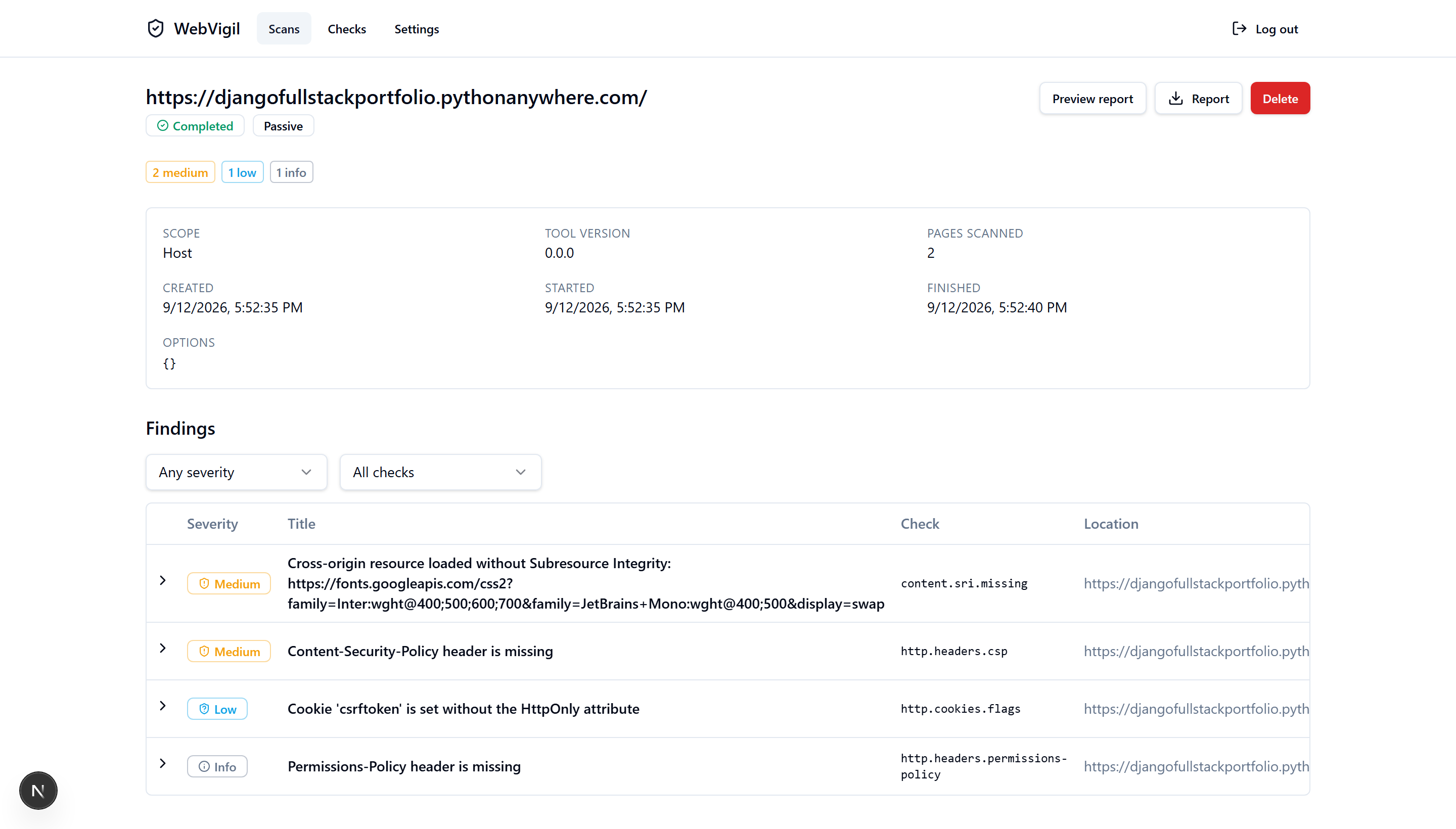
A Next.js dashboard for the Web API: first-run setup, login, scan history, a new-scan form, scan detail with filterable findings, report preview and download, the check catalogue, and a settings screen. It is a thin client of the API — it never talks to the engine.
# API on :8000 in one shell (see above), then:
cd web
pnpm install
pnpm dev                           # http://localhost:3000

# or the whole stack in containers:
docker compose up --build          # dashboard on http://localhost:3000 (published on 127.0.0.1 only)
The dashboard calls same-origin /api/*; Next proxies that to the API, so no CORS is
involved. See docs/web-ui.md.
The dashboard lives in this repository only; it is not in the PyPI package. pip install webvigil gives the engine and the CLI, and webvigil[web] adds the Web API.
Development
uv sync
uv run ruff check .
uv run black --check .
uv run mypy src
uv run lint-imports    # the engine must not import Typer/Rich/FastAPI/SQLModel/Uvicorn
uv run pytest

# Web UI (in web/):
pnpm install && pnpm lint && pnpm typecheck && pnpm test && pnpm build
pnpm test:e2e         # Playwright: setup → scan → report → logout, fully offline
See docs/ for architecture, the stack and why each piece was chosen, and a guide to writing your own checks.
Design notes
Short essays on the reasoning behind specific decisions — the why behind a spec's ADRs, written up on their own. Full index in docs/notes/.
- The OAST problem: why blind SSRF is the one thing WebVigil won't do
- False-positive discipline in an active scanner
- Detecting stored XSS means writing data you can't take back
- Keeping a security engine honest with import-linter
- OSV.dev without an API key
License
1 maintainer

Metadata
1 maintainer
Release files for webvigil 1.0.3
For a detailed explanation of source distributions (sdists) and built distributions (wheels), please see the package formats documentation.
Source distribution (sdist)
| File | Size | Uploaded | |
|---|---|---|---|
| webvigil-1.0.3.tar.gz | 333.8 kB | Details |
Built distribution (wheel)
| File | Interpreter | ABI | Platform | Reset |
|---|---|---|---|---|
| webvigil-1.0.3-py3-none-any.whl | Python 3 | none | any | Details |
Total release size: 731.3 kB
Release files / webvigil-1.0.3.tar.gz
| Download URL | webvigil-1.0.3.tar.gz |
|---|---|
| Size | 333.8 kB |
| Tags | Source |
|
SHA-256 checksum How to use checksums |
369b52f2e6de11e0211fbd8cf2456b06f85a5de184c1134f286bd82914ca1f77
|
|
BLAKE2b-256 checksum How to use checksums |
3856b1b39eb1e0ae0a15164d34a9c10fa53114b931b856cac440465249c1a4c9
|
| Upload date | |
|
Uploaded using Trusted Publishing? What is trusted publishing? |
Yes |
| Uploaded via |
twine/7.0.0 CPython/3.13.14
|
Provenance
Provenance describes where a file came from. On PyPI, provenance is shared via attestations, which provide a verifiable record of the build or publishing details. View details, limitations and caveats.


PyPI Publish Attestation
PyPI verified that this artifact, at this checksum, originated from the publisher listed below.
Signed by GitHub Actions, verified by PyPI on Oct 8, 2026.
Transparency logRelease files / webvigil-1.0.3-py3-none-any.whl
| Download URL | webvigil-1.0.3-py3-none-any.whl |
|---|---|
| Size | 397.5 kB |
| Tags | Python 3 |
|
SHA-256 checksum How to use checksums |
57d69da4fcb1c5d05e699d4c17955687221016595c84e7036b83656fe68e9cd6
|
|
BLAKE2b-256 checksum How to use checksums |
05cf7bf864ff9c4ef6138b05ddbee45e3b72a6b15ce09c02a576a34507e8d760
|
| Upload date | |
|
Uploaded using Trusted Publishing? What is trusted publishing? |
Yes |
| Uploaded via |
twine/7.0.0 CPython/3.13.14
|
Provenance
Provenance describes where a file came from. On PyPI, provenance is shared via attestations, which provide a verifiable record of the build or publishing details. View details, limitations and caveats.
PyPI Publish Attestation
PyPI verified that this artifact, at this checksum, originated from the publisher listed below.
Signed by GitHub Actions, verified by PyPI on Oct 8, 2026.
Transparency log













