






WEDAP : weighted ensemble data analysis and plotting (pronounced we-dap)
wedap is primarily used to plot H5 files produced from running WESTPA.
mdap can be used to plot data files from analysis of standard MD simulations.
wekap can be used to plot flux values as rates from a WESTPA created direct.h5 file.
For a demo and summary of features, see this jupyter notebook.
Or view the same demo notebook on the documentation web page.
What's New in v1.1.0
This release modernizes the tooling and adds several requested features. Most changes are backwards-compatible; the breaking items below are limited to environment/dependency requirements and the removal of the deprecated GUI. See CHANGELOG.md for more info.
Breaking changes
- GUI removed. The
Gooey-based graphical interface (unmaintained upstream since 2021) and all of its mentions have been removed. Use the CLI or Python API instead. If you relied on the GUI, pin towedap<1.1.0. - Python & dependency floors raised. Minimum Python is now 3.9 (numpy 2 floor). The old
numpy<2/matplotlib<=3.7.0upper caps have been dropped —wedapnow supports numpy 2.x and recent matplotlib (tested through numpy 2.5 / matplotlib 3.11 on Python 3.12). If you must stay on an older interpreter, pin towedap<1.1.0.
Requirements
- numpy
- matplotlib
- h5py
- tqdm
- gif
Installation
pip install wedap
Or install the latest development version from source:
git clone https://github.com/darianyang/wedap.git
cd wedap
pip install -e .
Examples
After installation, to run the CLI version and view available options:
wedap --help
Or:
wedap -h
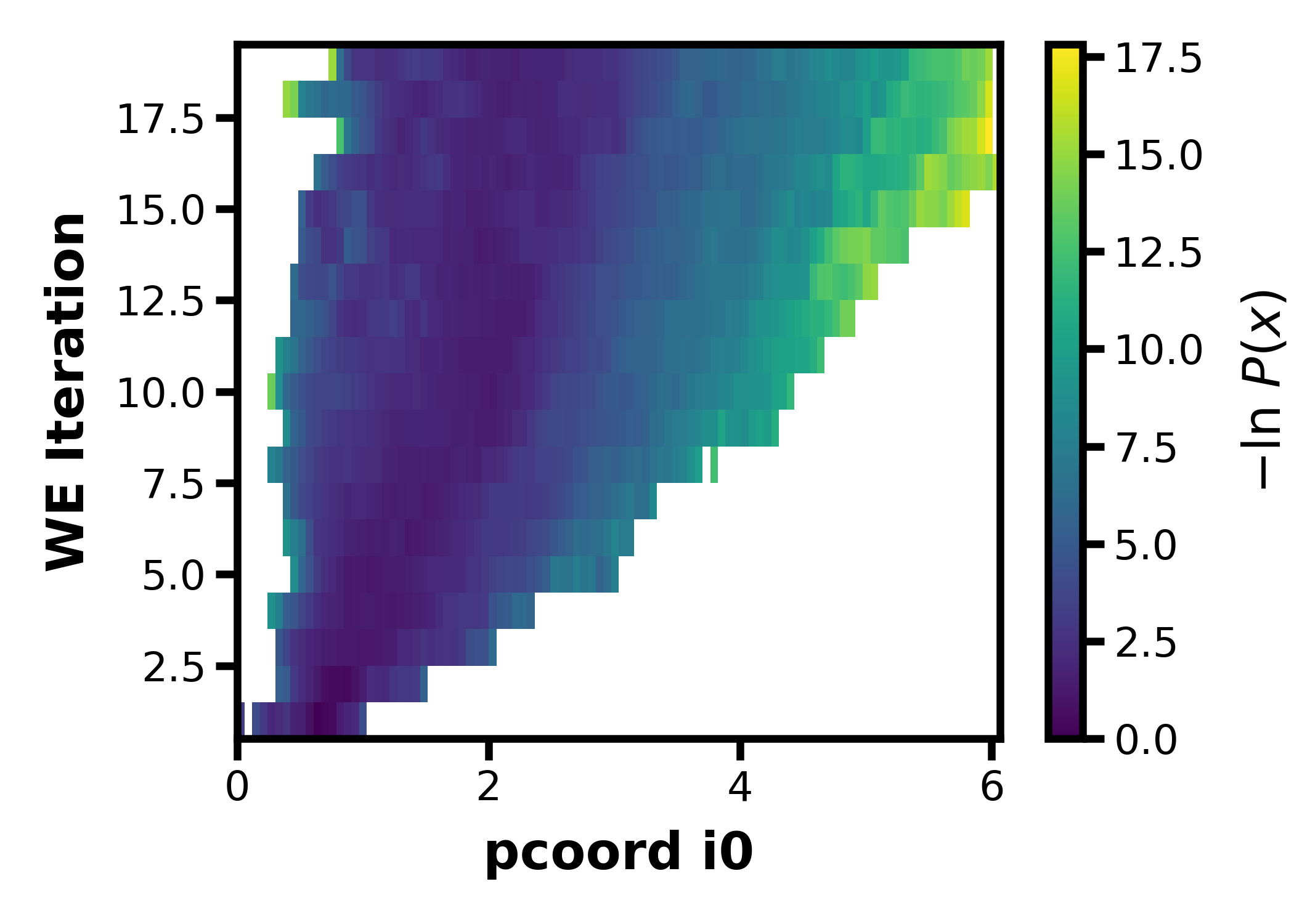
To visualize the evolution of the pcoord for the example p53.h5 file via CLI:
wedap -h5 wedap/data/p53.h5
To do the same with the API:
import wedap
import matplotlib.pyplot as plt

wedap.H5_Plot(h5="wedap/data/p53.h5", data_type="evolution").plot()
plt.show()
The resulting p53.h5 file evolution plot will look like this:
See the examples directory for more realistic applications using the Python API.
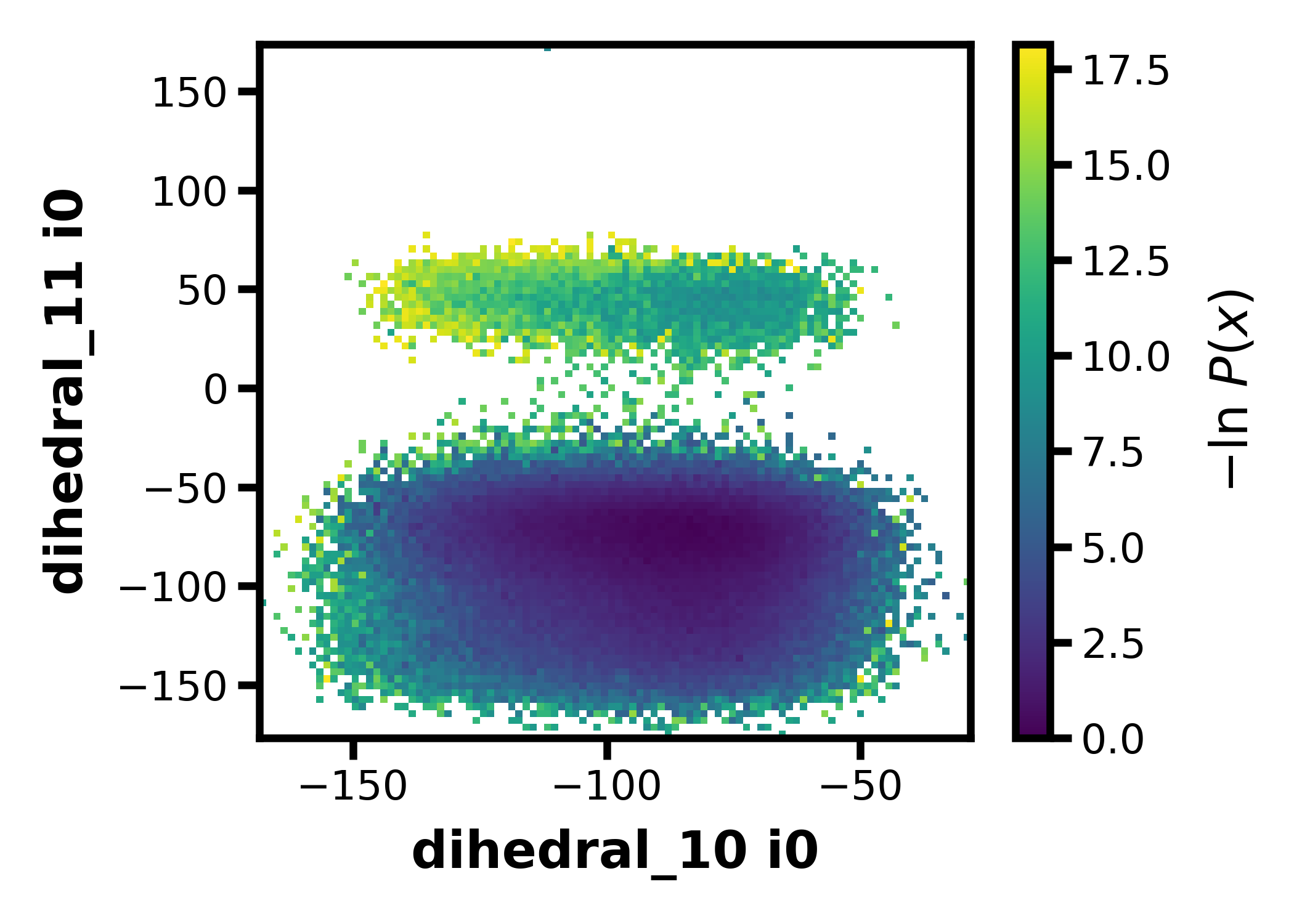
Evolution plots are created by default using the CLI but average and instant probability distribution options are also available. To use one of your auxiliary datasets instead of the progress coordinate, just include the name of the aux dataset from your h5 file in the --Xname or --Yname fields:
wedap -h5 wedap/data/p53.h5 --data_type average --Xname dihedral_10 --Yname dihedral_11
Or:
wedap -h5 wedap/data/p53.h5 -dt average -X dihedral_10 -Y dihedral_11
The resulting p53.h5 file average plot of the dihedral aux datasets will look like this:
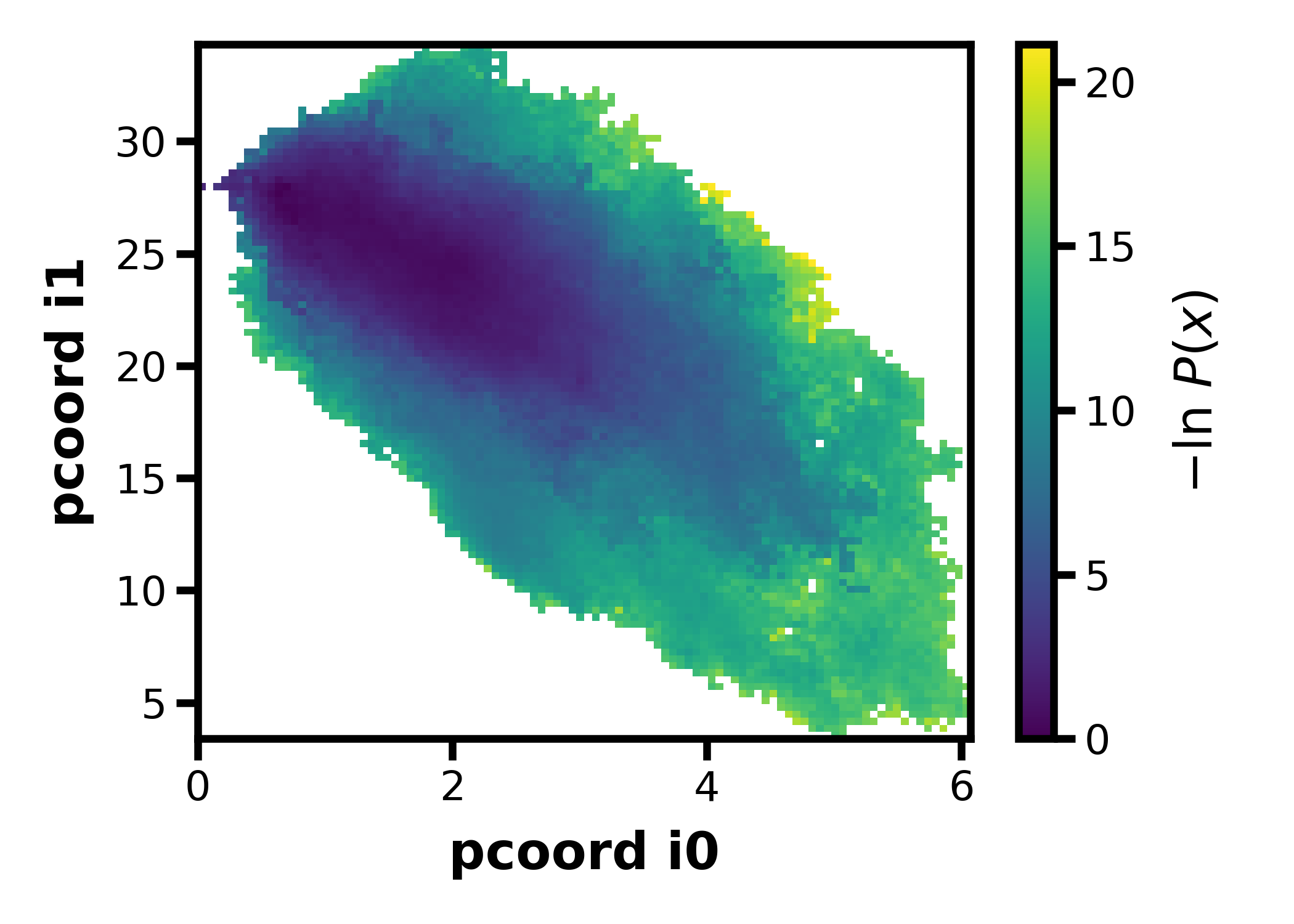
If you used a multi-dimensional progress coordinate and you want to use your pcoord for both the X and Y dimensions in a 2D average or instant plot, just use pcoord with the corresponding index set to the appropriate dimension (this also works with aux datasets which may have an additional dimension):
wedap -h5 wedap/data/p53.h5 --data_type average --Xname pcoord --Xindex 0 --Yname pcoord --Yindex 1
Or:
wedap -h5 wedap/data/p53.h5 -dt average -X pcoord -Xi 0 -Y pcoord -Yi 1
Or (since the default X options are the first pcoord, only the second pcoord needs to be specified):
wedap -h5 wedap/data/p53.h5 -dt average -Y pcoord -Yi 1
The resulting p53.h5 file average plot of the pcoord datasets will look like this:
Motivation
WESTPA already comes with some excellent analysis tools for generating probability distributions, so why is wedap needed?
wedap was originally built as a way to simplify the original WESTPA plotting pipeline:
Native WESTPA CLI-based Analysis Tools:
┌───────┐       w_pdist        ┌────────┐        plothist         ┌────────┐
│west.h5├─────────────────────►│pdist.h5├────────────────────────►│plot.pdf│
└───────┘ --construct-dataset  └────────┘ --postprocess-function  └────────┘
               module.py                      plot_settings.py
Analysis using wedap:
┌───────┐     wedap      ┌────────┐
│west.h5├───────────────►│plot.pdf│
└───────┘  CLI/Python    └────────┘
So wedap can generate plots with more flexibilty and less intermediate files, providing an especially useful way to plot aux datasets and explore your h5 file.
- The Python interface allows for advanced users to quickly generate a plot as a matplotlib axes object which can be further customized all in one Python script.
- For example, the
moviepyorgifpackage can be used with wedap to easily create a gif of your h5 file (see an example of this inwedap/h5_movie.py). - The actual data can also be easily extracted and then analyzed (see
wedap/h5_cluster.pyfor an example of k-means clustering using the data from a WESTPA west.h5 file).
- For example, the
- A CLI is also available if using wedap on a system without access to a display.
Since the original implementation of wedap, many more features have been added that are not available using the WESTPA w_pdist and plothist tools, these include the following:
- Easy WE tracing and plotting by inputing an iteration and segment, or by inputing the X and Y value to then query and trace.
- 3D plots that replace the probability with another pcoord or aux dataset (
plot_mode="scatter3d"). - Selective basis states (if you have multiple basis states, only plot the probability contributions from specific states).
- See the
skip_basisargument (available through the Python API only currently).
- See the
- More to come!
Note that the WESTPA analysis tools have features not available in wedap and may still be of interest to you.
Contributing
Have an idea for a feature to add to wedap? Let me know and I may be able to incorporate it (dty7@pitt.edu).
Or feel free to try developing it yourself! Features should be developed on branches. To create and switch to a branch, use the command:
git checkout -b new_branch_name
To switch to an existing branch, use:
git checkout branch_name
To submit your feature to be incorporated into the main branch, you should submit a Pull Request. The repository maintainers will review your pull request before accepting your changes.
Copyright
Copyright (c) 2021-2026, Darian Yang
1 maintainer

Download files
Download the file for your platform. If you're not sure which to choose, learn more about installing packages.
Source Distribution
Built Distribution
Filter files by name, interpreter, ABI, and platform.
If you're not sure about the file name format, learn more about wheel file names.
Copy a direct link to the current filters
File details
Details for the file wedap-1.1.0.tar.gz.
File metadata
- Download URL: wedap-1.1.0.tar.gz
- Upload date:
- Size: 100.0 kB
- Tags: Source
- Uploaded using Trusted Publishing? Yes
- Uploaded via:
twine/6.1.0 CPython/3.13.12
File hashes
| Algorithm | Hash digest | |
|---|---|---|
| SHA256 |
92e18591bcfa6f4ecb65f1f060603b9b25da03f016acb367fd580927b3f58249
|
|
| MD5 |
590f0a4a06dc52c1c52d566f6e90466e
|
|
| BLAKE2b-256 |
eb909ae9cd19a81da9c83691d9e1e2609a8ebbb2e137c606c0391792cf3bf6b4
|
Provenance
The following attestation bundles were made for wedap-1.1.0.tar.gz:
Publisher:
build.yml on darianyang/wedap
-
Statement:
-
Statement type:
https://in-toto.io/Statement/v1 -
Predicate type:
https://docs.pypi.org/attestations/publish/v1 -
Subject name:
wedap-1.1.0.tar.gz -
Subject digest:
92e18591bcfa6f4ecb65f1f060603b9b25da03f016acb367fd580927b3f58249 - Sigstore transparency entry: 2189228732
- Sigstore integration time:
-
Permalink:
darianyang/wedap@e82316621359069f57cb72df6733762e785afb8a -
Branch / Tag:
refs/tags/v1.1.0 - Owner: https://github.com/darianyang
-
Access:
public
-
Token Issuer:
https://token.actions.githubusercontent.com -
Runner Environment:
github-hosted -
Publication workflow:
build.yml@e82316621359069f57cb72df6733762e785afb8a -
Trigger Event:
release
-
Statement type:
File details
Details for the file wedap-1.1.0-py3-none-any.whl.
File metadata
- Download URL: wedap-1.1.0-py3-none-any.whl
- Upload date:
- Size: 113.6 kB
- Tags: Python 3
- Uploaded using Trusted Publishing? Yes
- Uploaded via:
twine/6.1.0 CPython/3.13.12
File hashes
| Algorithm | Hash digest | |
|---|---|---|
| SHA256 |
9bb65e77e2c4f0a776673c59b4d09f918921ddc5832f43058c0a59d22b716271
|
|
| MD5 |
4908a06bb4771d7ac7ad6a47c5b755ef
|
|
| BLAKE2b-256 |
9fa3c5ae68f2112c78aff87298da6c83c8c9133b9c31c3fecbbd80d24d65d1e1
|
Provenance
The following attestation bundles were made for wedap-1.1.0-py3-none-any.whl:
Publisher:
build.yml on darianyang/wedap
-
Statement:
-
Statement type:
https://in-toto.io/Statement/v1 -
Predicate type:
https://docs.pypi.org/attestations/publish/v1 -
Subject name:
wedap-1.1.0-py3-none-any.whl -
Subject digest:
9bb65e77e2c4f0a776673c59b4d09f918921ddc5832f43058c0a59d22b716271 - Sigstore transparency entry: 2189228740
- Sigstore integration time:
-
Permalink:
darianyang/wedap@e82316621359069f57cb72df6733762e785afb8a -
Branch / Tag:
refs/tags/v1.1.0 - Owner: https://github.com/darianyang
-
Access:
public
-
Token Issuer:
https://token.actions.githubusercontent.com -
Runner Environment:
github-hosted -
Publication workflow:
build.yml@e82316621359069f57cb72df6733762e785afb8a -
Trigger Event:
release
-
Statement type:














