
A local-first knowledge graph for your browsing - Chrome extension + CLI

Project description
Weft
A local-first knowledge graph for your browsing.
Weft turns your browser tabs into a searchable, clustered knowledge graph. Instead of drowning in hundreds of tabs or flat bookmark lists, Weft groups related pages, removes duplicates, and lets you explore your browsing context visually.
Think: Obsidian graph view, but for the web you already opened.
Two Ways to Use Weft
| Chrome Extension | CLI (Python) | |
|---|---|---|
| Best for | Live tracking, visual exploration | Batch processing, scripting |
| Graph View | Interactive sidepanel | Terminal UI |
| Navigation Tracking | Automatic | Manual export |
| Install | Load unpacked extension | pip install weft-graph |
Chrome Extension
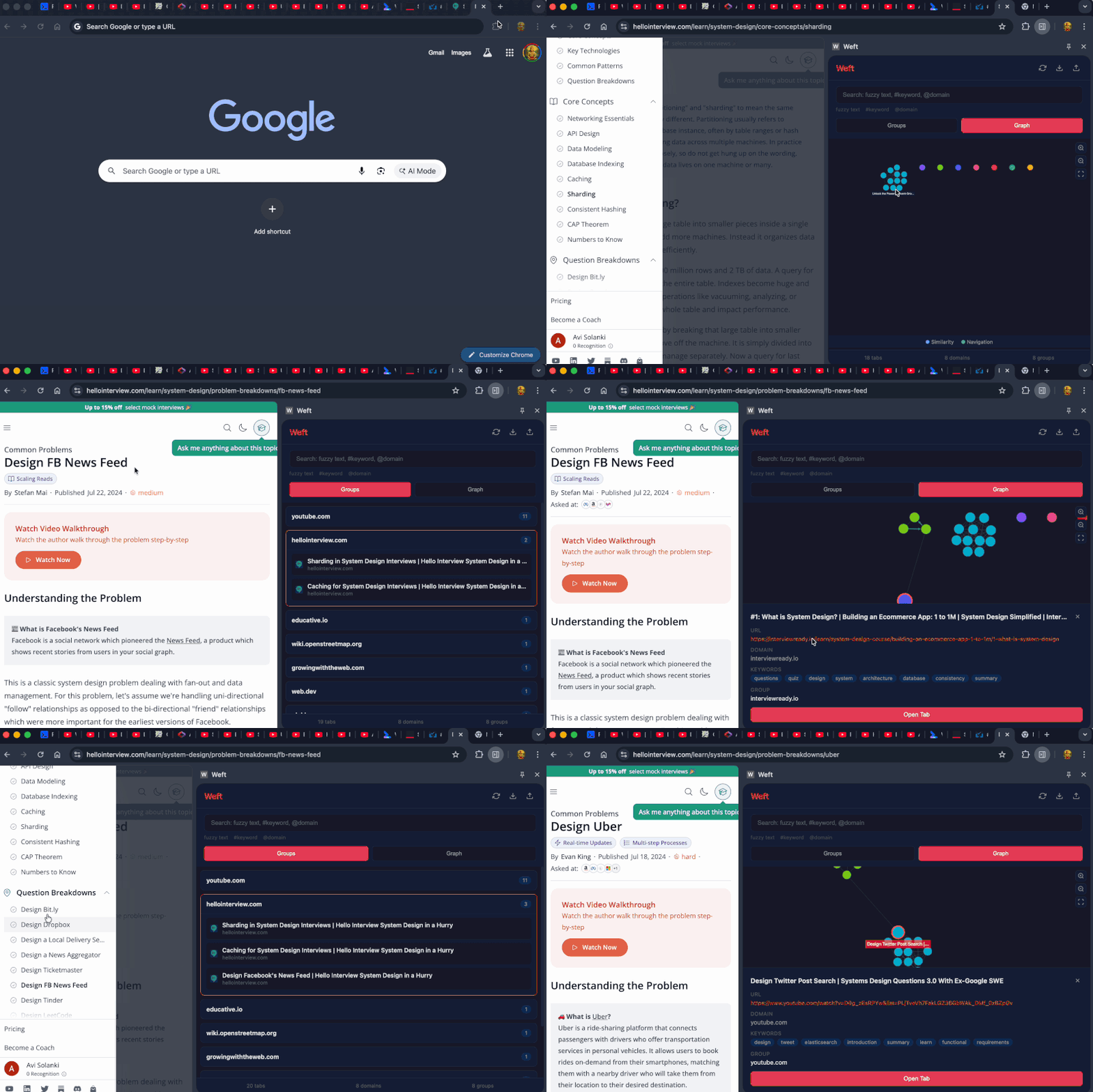
Live knowledge graph that tracks your browsing in real-time.
Features
- Live Tab Tracking - Automatically captures tabs as you browse
- Navigation Edges - Tracks how you move between pages (including SPAs)
- Graph Visualization - Interactive Cytoscape.js graph with zoom/pan
- Smart Grouping - Clusters related pages by content similarity
- Keyword Extraction - Automatic keyword detection from page content
- Search - Fuzzy text,
#keyword, and@domainfilters - Import/Export - Compatible with CLI JSON format
Install Extension
- Clone or download this repo
- Open Chrome →
chrome://extensions - Enable "Developer mode" (top right)
- Click "Load unpacked" → select the
extension/folder - Click the Weft icon or open sidepanel
Extension Usage
Views:
- Groups - Browse tabs organized by topic clusters
- Graph - Visual knowledge graph with similarity and navigation edges
Search Syntax:
- Fuzzy:
distributed systems - Keyword:
#database - Domain:
@github.com
Actions:
- Click any tab to see details (URL, keywords, group)
- Click "Open Tab" to open in browser
- Use refresh button to rebuild graph after browsing
- Export/Import for backup or CLI compatibility
CLI Tool
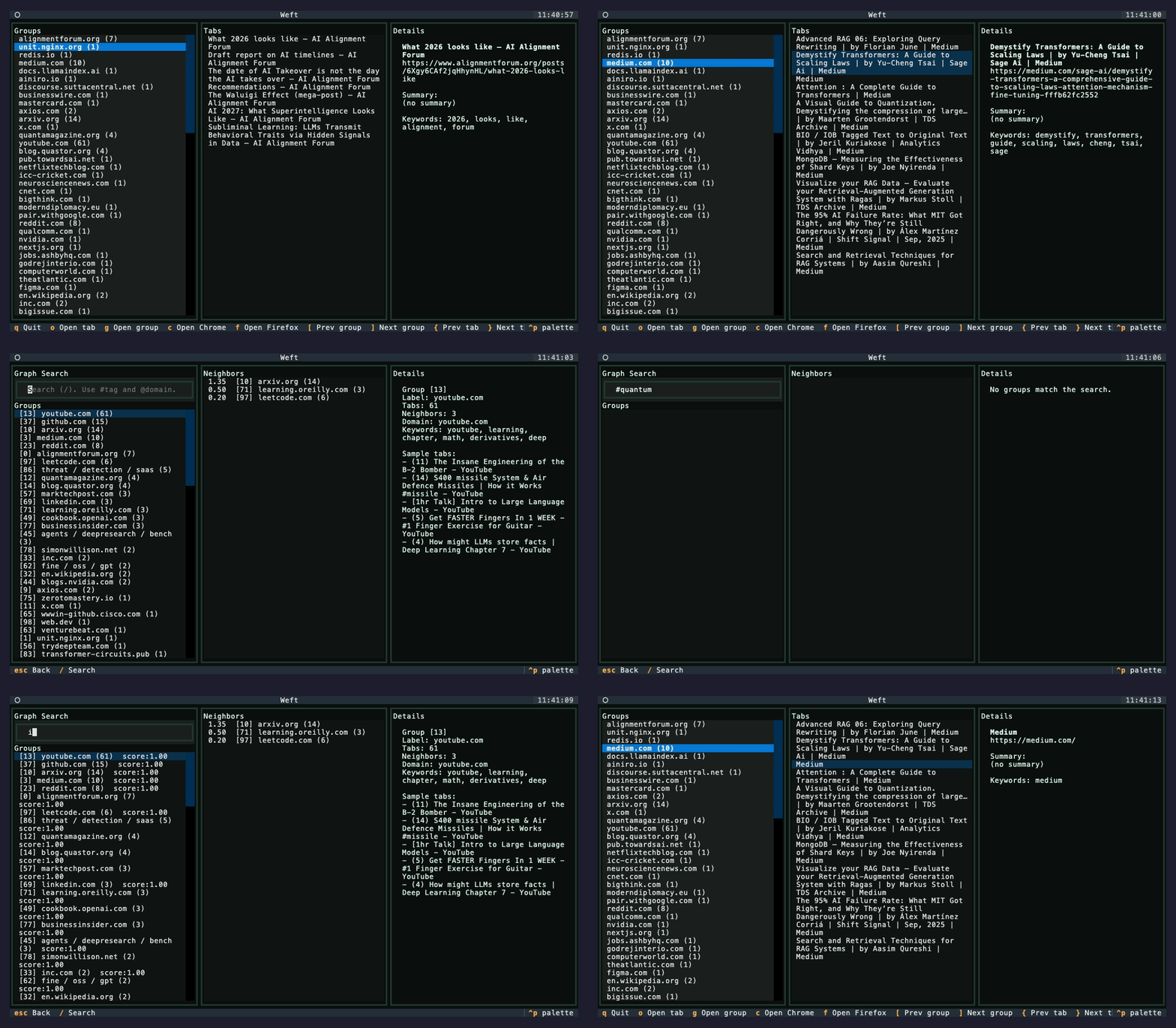
Batch processing and terminal UI for exploring your knowledge graph.
Install CLI
pip install weft-graph
Or from source:
git clone https://github.com/Avi-141/weft.git
cd weft
pip install -e .
Quick Start
# Build knowledge graph from your browser tabs
weft weave

# Explore in terminal UI
weft explore
Commands
weft weave
Extracts tabs from browsers and weaves them into a knowledge graph.
# From all browsers (default)
weft weave

# Chrome only
weft weave --browser chrome

# Firefox only
weft weave --browser firefox

# With LLM summaries (requires Ollama)
weft weave --summarize

# Fast mode (tab titles only, no crawling)
weft weave --no-crawl
weft explore
Interactive TUI for exploring your knowledge graph.
# Default graph
weft explore

# Specific file
weft explore my_graph.json
Keyboard Shortcuts
| Key | Action |
|---|---|
[ / ] |
Navigate groups |
{ / } |
Navigate tabs in group |
o |
Open tab in browser |
g |
Open all tabs in group |
v |
Switch to graph view |
s |
Focus search |
q |
Quit |
How It Works
Tabs → Extract → Analyze → Dedupe → Cluster → Graph → Explore
         │          │         │         │        │
         ▼          ▼         ▼         ▼        ▼
      Browser    Keywords   SimHash   Union   Similarity
       Tabs      Content    Matching   Find    + Navigation
- Extract - Captures tabs from browser (live or batch)
- Analyze - Extracts keywords from page content
- Deduplicate - Canonical URL matching + SimHash for near-duplicates
- Cluster - Groups by similarity using Union-Find algorithm
- Graph - Builds similarity edges + navigation edges between pages
- Explore - Visual graph or terminal UI for discovery
Edge Types
| Type | Description | Visual |
|---|---|---|
| Similarity | Pages with related content | Light edges |
| Navigation | You clicked from A to B | Bold edges |
Similarity Computation
| Mode | Method |
|---|---|
| Default | Jaccard similarity on keywords |
With --summarize |
Cosine similarity on embeddings |
A domain bonus (default: 0.25) is added when tabs share the same domain.
Clustering Algorithm
Uses Union-Find with two strategies:
- Domain Pre-grouping - Tabs from the same domain grouped together
- Mutual KNN - Two tabs cluster only if they mutually consider each other neighbors
Requirements
Extension
- Chrome/Chromium browser
CLI
- Python 3.9+
- macOS (browser export uses AppleScript)
- Chrome and/or Firefox
Optional: LLM Summaries (CLI)
# Install Ollama
brew install ollama

# Pull models
ollama pull llama3.1:8b
ollama pull nomic-embed-text

# Use with summarization
weft weave --summarize
Privacy
Weft is fully local. Your browsing data never leaves your machine:
- Extension uses IndexedDB (browser local storage)
- CLI stores data in local JSON files
- No analytics, no cloud sync, no external requests
License
MIT


Download files
Download the file for your platform. If you're not sure which to choose, learn more about installing packages.
Source Distribution
Built Distribution
Filter files by name, interpreter, ABI, and platform.
If you're not sure about the file name format, learn more about wheel file names.
Copy a direct link to the current filters
File details
Details for the file weft_graph-1.1.0.tar.gz.
File metadata
- Download URL: weft_graph-1.1.0.tar.gz
- Upload date:
- Size: 26.1 kB
- Tags: Source
- Uploaded using Trusted Publishing? No
- Uploaded via: twine/6.2.0 CPython/3.14.2
File hashes
| Algorithm | Hash digest | |
|---|---|---|
| SHA256 |
573de61c45112f709052e1fbce0a11e2b9b97f0968da61d3f987f71d9d22709c
|
|
| MD5 |
51f2402e705dc6dd89ad4b03c5142dbe
|
|
| BLAKE2b-256 |
1ffb448e445e89c7d236cfbece25edce88d2542d29715379c423342542422612
|
File details
Details for the file weft_graph-1.1.0-py3-none-any.whl.
File metadata
- Download URL: weft_graph-1.1.0-py3-none-any.whl
- Upload date:
- Size: 27.4 kB
- Tags: Python 3
- Uploaded using Trusted Publishing? No
- Uploaded via: twine/6.2.0 CPython/3.14.2
File hashes
| Algorithm | Hash digest | |
|---|---|---|
| SHA256 |
77383c069a3a167a93d93c6dc31f1af3c5f5b9990b2cf9ecfadcd44966433fb7
|
|
| MD5 |
9cf67709157ee28008fb9855e819d760
|
|
| BLAKE2b-256 |
e711efb7629e1d433a188bfec3423d4e1230f6a8ea8b3e85f2ce806d894935d9
|






