
Weighslide
Weighslide is a python program to calculate sliding windows across of a list of numerical values. The user sets the window size, and the exact weighting of each value in the window.
What is it used for?
Weighslide was developed for use in bioinformatics. Alpha-helices are common protein secondary structure, and have a periodicity of 3.6 residues per turn. Weighslide allows numerical values to be weighted according to alpha-helical peridicity.
Note that weighslide is not currently optimised for large datasets.
Citation:
Please cite as follows:
"A sliding window analysis was performed using the weighslide package in python (Mark Teese, Technical University of Munich)."
Keywords:
sliding window, rolling window, weighted window, data normalisation, data normalization, 1D array, numerical list
How it works
Weighslide takes as an input a 1D array (list) of numerical data, and applies a user-defined weighting and algorithm in a sliding-window fashion across the data.
For example:
window = [ 2  5  2 ]
statistic = "mean"
dataset = [ 0  0  0  1  1  2  3  5  8  13  21]
The window length is 3. The array will therefore be sliced as follows:
........[ NaN  0  0 ]
.............[ 0  0  1 ]
................[ 0  1  1 ]
...................[ 1  1  2 ] and so on until the final slice [ 13  21  NaN ]
Each array slice will be "weighted" by multiplication with the window, array-style, resulting in:
........[ NaN  0  0 ]
.............[ 0  0  2 ]
................[ 0  5  2 ]
...................[ 2  5  4 ] and so on.
If the "statistic" variable is given as "mean", a mean will be calculated for each array slice.
..........[    0    ]
.............[   0.66  ]
................[   2.33  ]
...................[  3.66  ] and so on.
The "statistic" can be mean, std, or sum.
The value (in this case the mean) will replace the central position in the output 1D array.
output = [ 0.00  0.00  0.66  2.33  3.66  6.00  9.66  15.6  25.3  41.0  65.5  ]
The first and last array slices always contain flanking "not a number" (Nan) values, which are ignored in all calculations. The first and last output values therefore do not represent results from true, full-length windows.
Installation
pip install weighslide
Weighslide requires python 3.9 or later, and installs numpy, pandas, matplotlib and openpyxl.
The dependency lower bounds are the oldest versions the test suite is actually run against, rather than guesses. As of version 0.3.0 the suite passes on both ends of that range:
| oldest tested | newest tested | |
|---|---|---|
| python | 3.9 | 3.13 |
| pandas | 1.2.5 | 3.0.5 |
| numpy | 1.20.3 | 2.5.2 |
| matplotlib | 3.4.3 | 3.11.1 |
If you are on a python older than 3.9, pip install weighslide will simply give you the newest release that supports your version, rather than failing.
To install from a clone of this repository:
pip install .
Usage
From python
import weighslide

infile = r"D:\Path\To\Your\File\infile_name.xlsx"
# for excel files, you will need to input the sheet name containing the data
excel_kwargs = {"sheet_name": "Sheet1"}
# if it's an excel file with multiple columns, define which column contains the data
column = "your data column header"
# define the window and statistic. The following parameters are used
# if you want to calculate mean of the four surrounding values in the sequence
window = [1, 1, "x", 1, 1]
statistic = "mean"
name = "your short sample name"
weighslide.run_weighslide(infile, window, statistic, name=name, column=column, excel_kwargs=excel_kwargs)
To apply the algorithm to a pandas Series without writing any output files, use calculate_weighted_windows directly:
import pandas as pd
from weighslide import calculate_weighted_windows

data = pd.Series([0, 0, 0, 1, 1, 2, 3, 5, 8, 13, 21], dtype=float)
result = calculate_weighted_windows(data, [2, 5, 2], "mean", full_output=False)
From the command line
Installing the package adds a weighslide command.
Analyse a csv or excel file:
weighslide "[1,1,'x',1,1]" mean -i "D:\Path\To\Your\File\infile_name.xlsx" -c "your data column header"
Analyse a list given directly on the command line, which prints the result to the screen:
weighslide "[1,1,'x',1,1]" mean -r "[1,1,2,3,5,8,13,21,34]"
For the full list of command-line options:
weighslide -h
When an input file is given, the output files are created in a weighslide_output subfolder alongside the input file.
Output files
| File | Contents |
|---|---|
<name>_<statistic>.csv |
The result of the sliding window analysis, one value per input position. |
<name>_sliced.csv |
Every slice taken from the original array, for checking the slice algorithm. |
<name>_mult.csv |
Every slice after multiplication by the window. |
<name>.xlsx |
The three datasets above, on separate sheets. |
<name>.png |
A line graph of the original data against the sliding window output. |
Jupyter notebook example
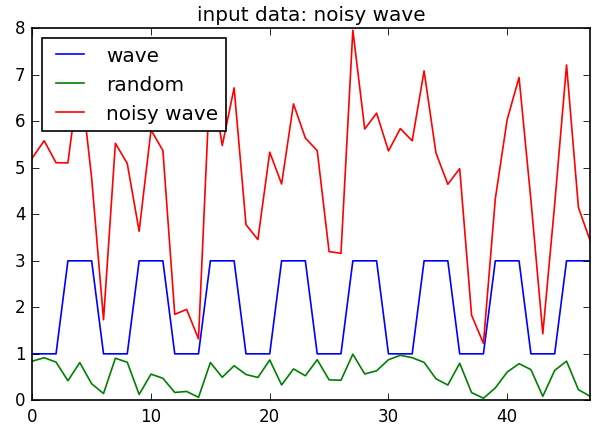
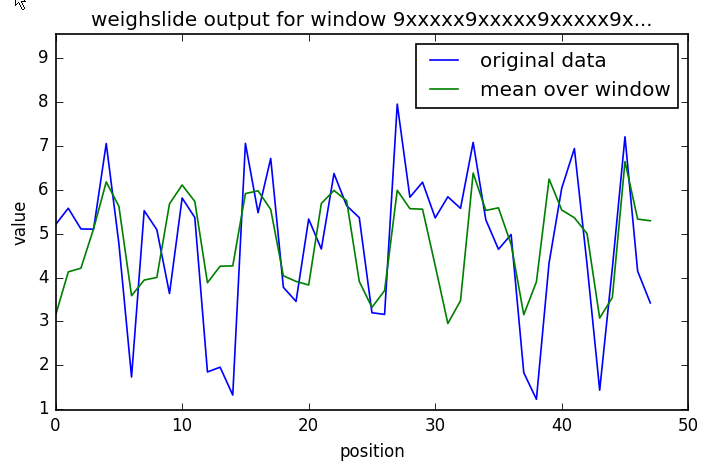
This shows the power of weighslide to smoothen a repeated element in a noisy dataset.
# create a noisy wave that repeats every 6th position. Save to csv.
import weighslide
import numpy as np
import pandas as pd
import matplotlib.pyplot as plt
%matplotlib inline
plt.rcParams["savefig.dpi"] = 120
df = pd.DataFrame()
df["wave"] = [1, 1, 1, 3, 3, 3] * 8
df["random"] = np.random.random_sample(df.shape[0])
df["noisy wave"] = df.wave + df.random * 5
df.plot(title="input data: noisy wave")
df.to_csv("wave.csv")
# run weighslide with a window that averages every 6th position
window = "9xxxxx9xxxxx9xxxxx9xxxxx9xxxxx9xxxxx9"
weighslide.run_weighslide("wave.csv", window, "mean", name="wavetest", column="noisy wave", overwrite=True)
Examples of windows
[1,1,1]
- if "statistic" is set to "mean", this window returns the average of the central position, and the two neighbouring positions
- the window size is 3
[1,1,"x",1,1]
- the central position "x" has no weighting at all
- the window size is 5, it consists of the central position, two upstream, and two downstream positions
- the positions upstream (-1, -2) and downstream (1, 2) of the central position are all equally weighted
- if the statistic is set to "mean", the result for each position will simply be the average of the surrounding 4 positions
[0.5, 1, 0.5, 2, 0.5, 1, 0.5]
- the central position "2" is highly weighted (2*orig value)
- the window size is 7, it consists of the central position, three upstream, and three downstream positions
- the positions upstream (-1, -2, -3) and downstream (1, 2, 3) of the central position are unequally weighted
- if the statistic is set to "mean", the result for each position will simply be the average of the surrounding 4 positions
A window can also be written as a string of digits, where 0 is the lowest weighting (0.1) and 9 the highest (1.0), and x marks a position to ignore. For example "4x4" is equivalent to [0.5, nan, 0.5]. Only odd-length windows are accepted, so that each result centres on a single unambiguous position.
Development
pip install -e ".[dev]"
pre-commit install
pytest
pre-commit run --all-files runs black, ruff and mypy. CI runs the same hooks, plus the test suite on python 3.9, 3.12 and 3.13 on Linux and Windows.
Contribute
If you encounter a bug, or weighslide doesn't work for any reason, please open an issue at https://github.com/teese/weighslide/issues. Pull requests are welcome.
License
Weighslide is free software distributed under the permissive MIT license.
1 maintainer

Metadata
1 maintainer
Release files for weighslide 0.3.0
For a detailed explanation of source distributions (sdists) and built distributions (wheels), please see the package formats documentation.
Source distribution (sdist)
| File | Size | Uploaded | Provenance | Actions |
|---|---|---|---|---|
| weighslide-0.3.0.tar.gz | 407.0 kB | Without provenance | Details for weighslide-0.3.0.tar.gz |
Built distribution (wheel)
| File | Interpreter | ABI | Platform | Actions Reset |
|---|---|---|---|---|
| weighslide-0.3.0-py3-none-any.whl | Python 3 | none | any | Details for weighslide-0.3.0-py3-none-any.whl |
Total release size: 420.2 kB
Release files / weighslide-0.3.0.tar.gz
| Download URL | weighslide-0.3.0.tar.gz |
|---|---|
| Size | 407.0 kB |
| Tags | Source |
|
SHA-256 checksum How to use checksums |
766d8901f6e522ae343bcd0dbbe95222cf7a159aaa1c93adc7cd00643615d212
|
|
BLAKE2b-256 checksum How to use checksums |
391df03d9d645ef45f4a700ad6dde4951349df317a8cbe2e9aaf68ab38d897c9
|
| Upload date | |
|
Uploaded using Trusted Publishing? What is trusted publishing? |
No |
| Uploaded via |
twine/7.0.0 CPython/3.13.13
|
Release files / weighslide-0.3.0-py3-none-any.whl
| Download URL | weighslide-0.3.0-py3-none-any.whl |
|---|---|
| Size | 13.2 kB |
| Tags | Python 3 |
|
SHA-256 checksum How to use checksums |
c8c0a6a0b924b9c5f9132229240525b4406e5eb9f445b810486e431f352f4b5d
|
|
BLAKE2b-256 checksum How to use checksums |
dd0db49e926b6b989d1331e2a651621c029deb42a588db0e21ebaeabe5032391
|
| Upload date | |
|
Uploaded using Trusted Publishing? What is trusted publishing? |
No |
| Uploaded via |
twine/7.0.0 CPython/3.13.13
|
Security for weighslide 0.3.0
Provenance
Provenance describes where a file came from. On PyPI, provenance is shared via attestations, which provide a verifiable record of the build or publishing details. View details, limitations and caveats.
No provenance found
None of the files in this release were uploaded with provenance metadata.
A note on package security
PyPI is a repository for distributing packages, not a service for auditing them. While third-party security researchers and our staff do their best to detect and remove malicious packages, PyPI cannot guarantee the quality, security or suitability of any given package.
To learn more about protecting yourself from malicious actors, visit our package security documentation.














