

wxauto (适用PC微信3.9.11.17版本)
欢迎指出bug,欢迎pull requests
Windows版本微信客户端自动化,可实现简单的发送、接收微信消息、保存聊天图片
3.9.11.17版本微信安装包下载: 点击下载
文档: 使用文档 | 云服务器wxauto部署指南
| 环境 | 版本 |
|---|---|
| OS |  |
| 微信 |  |
| Python |  (不支持3.7.6和3.8.1) (不支持3.7.6和3.8.1) |
获取wxauto
cmd窗口:
pip install wxauto
python窗口:
>>> import wxauto
>>> wxauto.VERSION
'3.9.11.17'
>>> wx = wxauto.WeChat()
初始化成功,获取到已登录窗口:xxx
示例
[!NOTE] 如有问题请先查看使用文档
请先登录PC微信客户端
from wxauto import *


# 获取当前微信客户端
wx = WeChat()


# 获取会话列表
wx.GetSessionList()

# 向某人发送消息(以`文件传输助手`为例)
msg = '你好~'
who = '文件传输助手'
wx.SendMsg(msg, who)  # 向`文件传输助手`发送消息:你好~


# 向某人发送文件(以`文件传输助手`为例,发送三个不同类型文件)
files = [
    'D:/test/wxauto.py',
    'D:/test/pic.png',
    'D:/test/files.rar'
]
who = '文件传输助手'
wx.SendFiles(filepath=files, who=who)  # 向`文件传输助手`发送上述三个文件


# 下载当前聊天窗口的聊天记录及图片
msgs = wx.GetAllMessage(savepic=True)   # 获取聊天记录,及自动下载图片
注意事项
目前还在开发中,测试案例较少,使用过程中可能遇到各种Bug
交流
最后
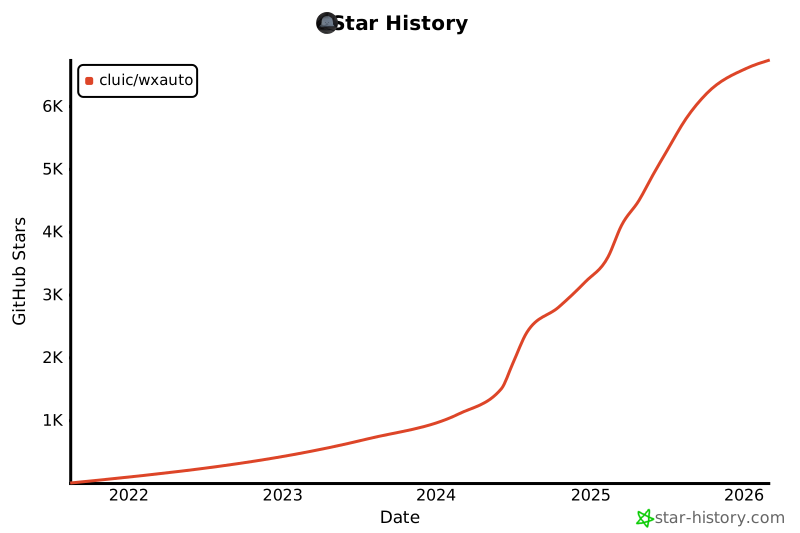
如果对您有帮助,希望可以帮忙点个Star,如果您正在使用这个项目,可以将右上角的 Unwatch 点为 Watching,以便在我更新或修复某些 Bug 后即使收到反馈,感谢您的支持,非常感谢!
免责声明
代码仅用于对UIAutomation技术的交流学习使用,禁止用于实际生产项目,请勿用于非法用途和商业用途!如因此产生任何法律纠纷,均与作者无关!
1 maintainer

Download files
Download the file for your platform. If you're not sure which to choose, learn more about installing packages.
Source Distribution
Built Distribution
Filter files by name, interpreter, ABI, and platform.
If you're not sure about the file name format, learn more about wheel file names.
Copy a direct link to the current filters
File details
Details for the file weixin_auto-3.9.11.17.tar.gz.
File metadata
- Download URL: weixin_auto-3.9.11.17.tar.gz
- Upload date:
- Size: 84.0 kB
- Tags: Source
- Uploaded using Trusted Publishing? No
- Uploaded via:
twine/6.1.0 CPython/3.11.4
File hashes
| Algorithm | Hash digest | |
|---|---|---|
| SHA256 |
a6876b86fde191ffa7eb2335072aef7b6cdfbb13efda75396d7aa8da06efdc99
|
|
| MD5 |
2449b20664894364ba7d535ecbc0e8d2
|
|
| BLAKE2b-256 |
09c6e26da2b359b4af2f0eb4ea4bad443b46e4a0729097e485fa1ba1f159ca68
|
File details
Details for the file weixin_auto-3.9.11.17-py3-none-any.whl.
File metadata
- Download URL: weixin_auto-3.9.11.17-py3-none-any.whl
- Upload date:
- Size: 86.0 kB
- Tags: Python 3
- Uploaded using Trusted Publishing? No
- Uploaded via:
twine/6.1.0 CPython/3.11.4
File hashes
| Algorithm | Hash digest | |
|---|---|---|
| SHA256 |
87a8bf4d595e0b0e8c377c114a0826fb776003b3ae24f08a8e1fc99c3797c97c
|
|
| MD5 |
051497e7ab8585c21d09f66d699ca0c4
|
|
| BLAKE2b-256 |
086670cf5f21f3a86284fc8d37166ab8d2419758c341cf1931ec634032d7f0f1
|













