
A collection of Well Engineering tools
Verified details
These details have been verified by PyPIProject links
GitHub Statistics
Maintainers

Project description
welleng






welleng is a collection of tools for Wells/Drilling Engineers, with a focus on well trajectory design and analysis.
Features
- Survey listings — generate and interpolate well trajectories using minimum curvature or maximum curvature methods
- Well bore uncertainty — ISCWSA MWD Rev 5.11 error model (validated 35/35 sources against all three ISCWSA example workbooks), legacy Rev4 for back-compat, and OWSG gyro tool stacks (north-seeking stationary, mixed continuous, gyro-MWD) driven by the new ISCWSA JSON schema and an Excel-formula interpreter
- Clearance & Separation Factors — the standard ISCWSA separation rule (within 0.5% of ISCWSA test data), the exact combined-ellipsoid Mahalanobis method (
MahalanobisClearance— same collision/clear verdicts as the rule but up to ~1.47× less conservative, analytic and mesh-free), and a mesh-based method using the Flexible Collision Library - Well path creation — the
connectormodule builds trajectories between start/end locations automatically - Vertical section, TVD interpolation, project-ahead — common survey planning tools
- Torque and drag — simple torque/drag model with architecture module
- Visualization — interactive 3D via vedo/VTK or browser-based via plotly (requires
easyinstall) - Data exchange — import/export Landmark .wbp files; read EDM datasets
- World Magnetic Model — auto-calculates magnetic field data when not supplied
Selecting an error model
Survey/SurveyHeader take an error_model name — switch models by changing the
string. The default and recommended model is "ISCWSA MWD Rev5.11": the current
ISCWSA standard, validated 35/35 sources against all three ISCWSA example workbooks.
Omit error_model (leave it None) for no uncertainty calculation.
import welleng as we

we.error.get_error_models()            # -> list every available model name

survey = we.survey.Survey(
    md, inc, azi, header=header,
    error_model="ISCWSA MWD Rev5.11",  # the standard; change this string to switch
)
cov = survey.err.errors.cov_NEVs       # NEV covariance per station
Model families (all selectable by name via error_model=):
- Canonical ISCWSA MWD —
"ISCWSA MWD Rev5.11"(default, validated),"ISCWSA MWD Rev4"(legacy, to reproduce older results). (The older"ISCWSA MWD Rev5"name has been retired — use"ISCWSA MWD Rev5.11".) - OWSG tool stacks (Set A, JSON-driven) — the toolcode library:
"MWD+SRGM","MWD+SRGM+SAG","MWD+SRGM+AX"(axial-interference correction),"MWD+IFR1"/"MWD+IFR1+AX"(in-field referencing), and the gyro stacks"GYRO-NS"(north-seeking stationary),"GYRO-NS-CT"(mixed continuous),"GYRO-MWD". A_Flsuffix is the floating-rig variant.
Revisions. welleng ships Rev5-1 / Rev5.11 as the default. The older OWSG Rev2 (2015) toolcodes can be regenerated from their workbooks with
python -m welleng.errors.tools.owsg_to_json, but are not yet shipped as a selectable revision (tracked indocs/dev/FUTURE_WORK.md). Validate any model only against a matching-revision reference.
Error model update (welleng 0.10.0). The MWD Rev 5 model has been brought into compliance with the ISCWSA Rev 5.11 example workbooks; select it as
"ISCWSA MWD Rev5.11"(the older"ISCWSA MWD Rev5"name has since been retired). Its covariance differs slightly from welleng ≤ 0.9.x (the Rev 5.11 corrections)."ISCWSA MWD Rev4"is unchanged for users who need to reproduce older results. Seewelleng/errors/iscwsa_validate.pyfor the validation harness used to audit against each ISCWSA example workbook.
Gyro support + JSON-driven tool models (welleng 0.11.0). ISCWSA is moving its error-model standard from the legacy Excel workbooks to a machine-readable JSON schema at
iscwsa/error-models. welleng 0.11 ships ahead of that transition: a vendored copy of the schema (pinned to upstream SHAc7af784atwelleng/errors/iscwsa_schema/), a ~95-line Excel-formula interpreter atwelleng/errors/interpreter.py, and the full OWSG Set A library (~100 tool models, including the gyro stacks) generated as ISCWSA JSON atwelleng/errors/iscwsa_json/owsg_a/. Use them viaSurvey(error_model='GYRO-NS' | 'GYRO-NS-CT' | 'GYRO-MWD' | 'MWD+SRGM' | ...). Seeexamples/gyro_survey_example.pyfor a side-by-side MWD/gyro position-uncertainty comparison.The legacy hand-coded MWD path is untouched — the canonical strings (
'ISCWSA MWD Rev4','ISCWSA MWD Rev5','ISCWSA MWD Rev5.11') still route through the production engine, so existing users see no behaviour change unless they opt in to a JSON-driven tool name.
Parallel-paths conformance harness. Every term that exists in both the legacy hand-coded dispatcher and the new JSON+interpreter path is diff-tested at machine precision in CI (
tests/test_iscwsa_json_conformance.py). The harness also catalogues schema gaps it surfaces — terms that don't evaluate against the current draft schema (cross-station references likeMDPrev/AzPrev/IncPrev, per-tool calibration constants likeNoiseReductionFactor). Runpython -m welleng.errors.conformance --summaryfor the agreement matrix. Findings are filed upstream as schema-feedback on the ISCWSA Discussions board.
Absolute validation against SPE 90408. The conformance harness above compares the two welleng paths (and so cancels any shared scale error); on top of that, the gyro weight functions are now checked against the published position covariances in SPE 90408-MS (Torkildsen et al. 2004) Appendix E — the first non-self-referential validation of welleng's gyro output. Example Models #1 (XY stationary), #3 (XY stationary→continuous hybrid), #5 (XYZ stationary→continuous) and #6 (XYZ stationary) reproduce the Appendix E covariances on ISCWSA Well #1 to within the paper's ±1% acceptance (the hybrid to ~0.1%), and Model #3 also on Well #2. See
tests/test_spe90408_appendix_e.py. The propagation engine itself is independently exact — MWDcov_NEVsmatches the ISCWSA reference to 5e-5.
Support welleng
welleng is fuelled by copious amounts of coffee, so if you wish to supercharge development please donate generously:

Cloud API
A hosted API for 3D well path planning is available at welleng.org. Solve CLC (curve-line-curve) paths via simple REST calls — no local install, no GPU required.
- Batch solving (up to 100K pairs)
- GPU-accelerated
- Free tier available
See the interactive docs to try it out.
Documentation
Documentation is available, though the library evolves quickly so the examples directory is often the best reference.
Tech
welleng uses a number of open source projects:
- trimesh — loading and using triangular meshes
- Flexible Collision Library — fast collision detection
- numpy — scientific computing
- scipy — mathematics, science, and engineering
- vedo — 3D visualization based on VTK
- magnetic-field-calculator — BGS magnetic field calculator API
Installation
The default install includes core dependencies (numpy, scipy, pandas, etc.) and covers survey generation, error models, and trajectory design. The easy extras add 3D visualization (vedo/VTK), magnetic field lookup, network analysis, and mesh import. The all extras add mesh-based collision detection, which requires compiled dependencies.
You'll receive an ImportError with a suggested install tag if a required optional dependency is missing.
Default install (core functionality, no visualization)
pip install welleng
Easy install (recommended — adds 3D visualization, magnetic field calculator, trimesh, networkx)
pip install welleng[easy]
Full install (adds mesh collision detection — requires compiled dependencies)
First install the compiled dependencies. On Ubuntu:
sudo apt-get update
sudo apt-get install libeigen3-dev libccd-dev octomap-tools
On macOS, use brew. On Windows, follow the FCL install instructions. Then:
pip install welleng[all]
Developer install
The project uses uv for dependency management:
git clone https://github.com/jonnymaserati/welleng.git
cd welleng
uv sync --all-extras
Or with plain pip:
pip install -e .[all]
Windows
On Windows, pip install welleng should work for the default and easy installs. For the full install with mesh collision detection, follow the FCL install instructions to set up the compiled dependencies first.
Colaboratory
For Google Colab, install dependencies with:
!apt-get install -y libeigen3-dev libccd-dev octomap-tools
!pip install welleng[easy] plotly
The VTK-based 3D viewer doesn't work in Colab, but plotly does. Here's a quick example:
import welleng as we
import plotly.graph_objects as go

# create a survey
s = we.survey.Survey(
    md=[0., 500., 2000., 5000.],
    inc=[0., 0., 30., 90],
    azi=[0., 0., 30., 90.]
)

# interpolate every 30 m
s_interp = s.interpolate_survey(step=30)

fig = go.Figure()
fig.add_trace(go.Scatter3d(
    x=s_interp.e, y=s_interp.n, z=s_interp.tvd,
    mode='lines', name='interpolated'
))
fig.add_trace(go.Scatter3d(
    x=s.e, y=s.n, z=s.tvd,
    mode='markers', marker=dict(color='red'), name='survey stations'
))
fig.update_scenes(zaxis_autorange="reversed")
fig.show()
Quick Start
Build a pair of well trajectories, compute error ellipses and clearance, and visualize (requires pip install welleng[all] for mesh clearance and visualization):
import welleng as we

# construct well paths
connector_reference = we.survey.from_connections(
    we.connector.Connector(
        pos1=[0., 0., 0.], inc1=0., azi1=0.,
        pos2=[-100., 0., 2000.], inc2=90, azi2=60,
    ),
    step=50
)
connector_offset = we.survey.from_connections(
    we.connector.Connector(
        pos1=[0., 0., 0.], inc1=0., azi1=225.,
        pos2=[-280., -600., 2000.], inc2=90., azi2=270.,
    ),
    step=50
)

# create surveys with error models
survey_reference = we.survey.Survey(
    md=connector_reference.md,
    inc=connector_reference.inc_deg,
    azi=connector_reference.azi_grid_deg,
    header=we.survey.SurveyHeader(name="reference", azi_reference="grid"),
    error_model='ISCWSA MWD Rev4'
)
survey_offset = we.survey.Survey(
    md=connector_offset.md,
    inc=connector_offset.inc_deg,
    azi=connector_offset.azi_grid_deg,
    start_nev=[100., 200., 0.],
    header=we.survey.SurveyHeader(name="offset", azi_reference="grid"),
    error_model='ISCWSA MWD Rev4'
)

# build well meshes
mesh_reference = we.mesh.WellMesh(survey_reference)
mesh_offset = we.mesh.WellMesh(survey_offset)

# calculate clearance
clearance_ISCWSA = we.clearance.IscwsaClearance(survey_reference, survey_offset)
clearance_mesh = we.clearance.MeshClearance(survey_reference, survey_offset, sigma=2.445)

# print minimum SF
print(f"Min SF (ISCWSA): {min(clearance_ISCWSA.sf):.2f}")
print(f"Min SF (mesh):   {min(clearance_mesh.sf):.2f}")

# visualize
lines = we.visual.get_lines(clearance_mesh)
plot = we.visual.Plotter()
plot.add(mesh_reference, c='red')
plot.add(mesh_offset, c='blue')
plot.add(lines)
plot.show()
plot.close()
This results in a quick, interactive visualization of the well meshes. What's interesting about these results is that the ISCWSA method does not explicitly detect a collision in this scenario whereas the mesh method does.
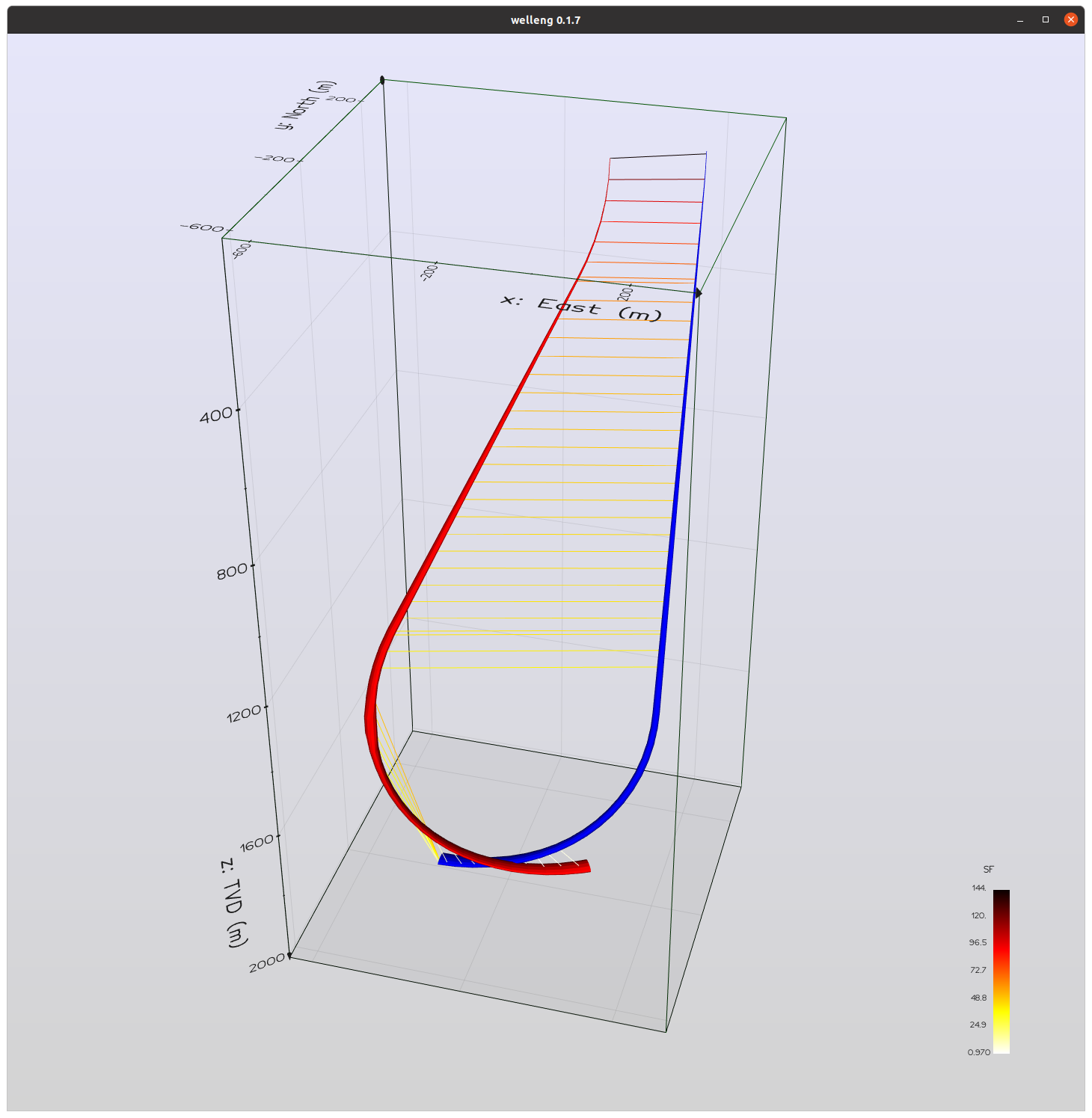
For more examples, including how to build a well trajectory by joining up a series of sections created with the welleng.connector module (see pic below), check out the examples and follow the jonnymaserati blog.
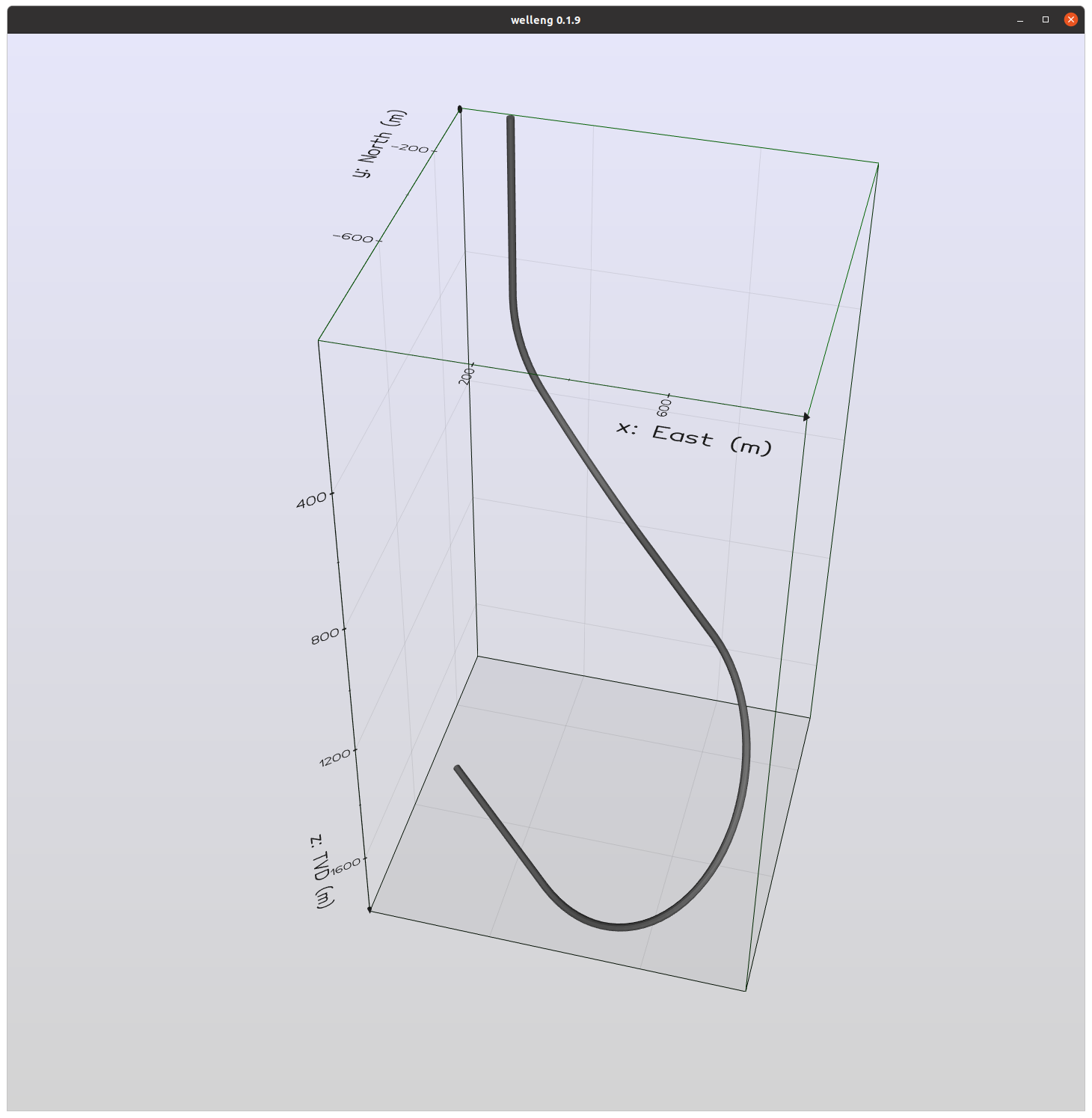
Well trajectory generated by build_a_well_from_sections.py
It's possible to generate data for visualizing well trajectories with welleng, as can be seen with the rendered scenes below.
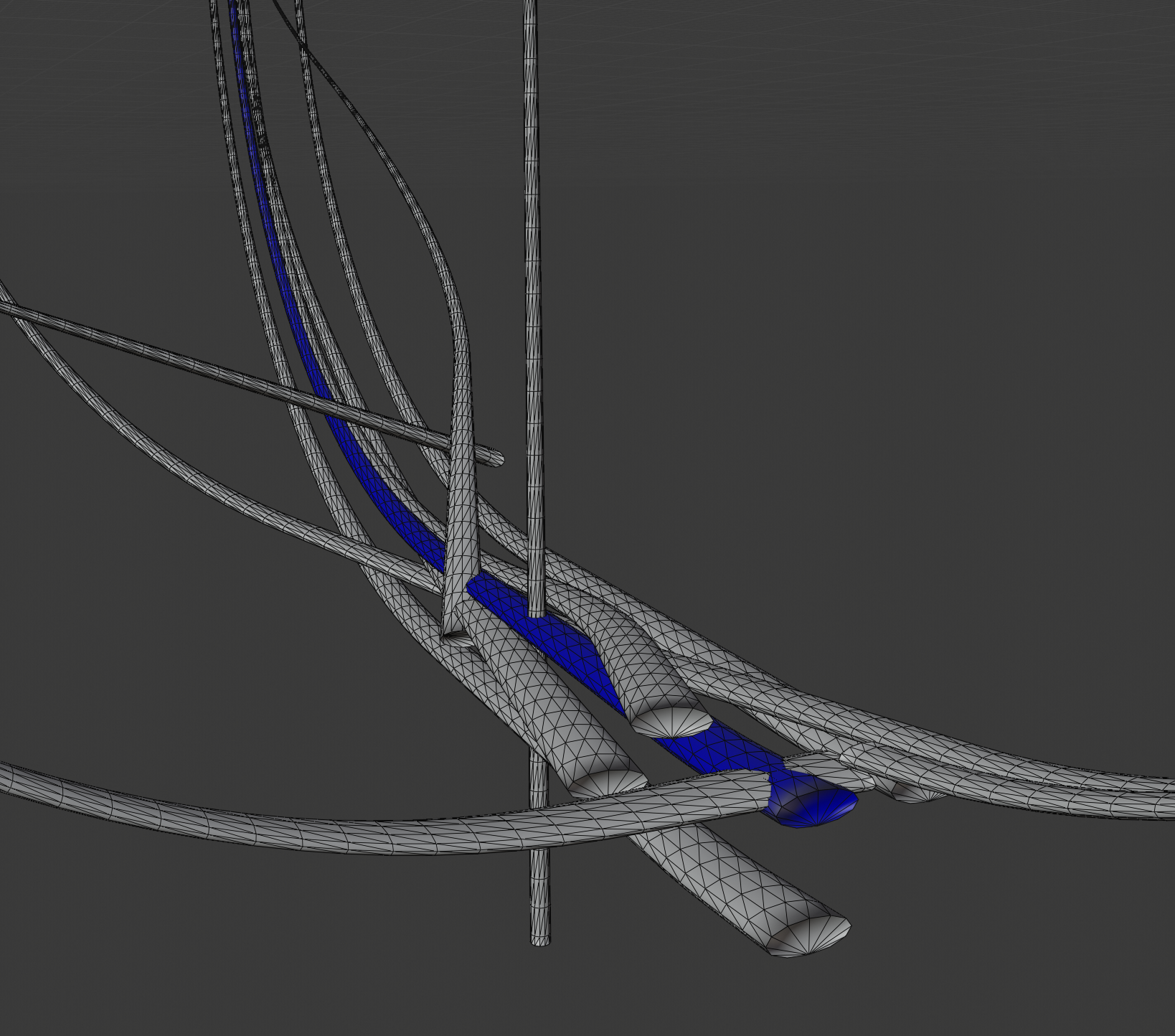
The ISCWSA standard set of well paths for evaluating clearance scenarios have been rendered in blender above. See the examples for the code used to generate a volve scene, extracting the data from the volve EDM.xml file.
Citation
Author: Jonathan Corcutt — Corcutt Beheer B.V., Wassenaar, Netherlands · ORCID 0009-0008-1953-7760.
If welleng supports your work, please cite the software (the concept DOI always resolves to the latest version):
Corcutt, J. welleng: open-source well-engineering tools. Zenodo. https://doi.org/10.5281/zenodo.20968887
@software{corcutt_welleng,
  author    = {Corcutt, Jonathan},
  title     = {welleng: open-source well-engineering tools},
  publisher = {Zenodo},
  doi       = {10.5281/zenodo.20968887},
  url       = {https://doi.org/10.5281/zenodo.20968887}
}
If your work relies on the gyro error-model validation specifically, please also cite:
Corcutt, J. (2026). Reproducing the ISCWSA Gyro Error-Model Test Cases: Implementation Clarifications, Reference-Data Inconsistencies, and an Open-Source Reference Implementation. Zenodo. https://doi.org/10.5281/zenodo.20940515
@misc{corcutt2026gyro,
  author    = {Corcutt, Jonathan},
  title     = {Reproducing the {ISCWSA} Gyro Error-Model Test Cases: Implementation Clarifications, Reference-Data Inconsistencies, and an Open-Source Reference Implementation},
  year      = {2026},
  publisher = {Zenodo},
  doi       = {10.5281/zenodo.20940515},
  url       = {https://doi.org/10.5281/zenodo.20940515}
}
If your work uses the anti-collision (exact Mahalanobis separation factor) method, please also cite:
Corcutt, J. (2026). Making the Exact Wellbore Anti-Collision Boundary Practical: an Efficient, Validated, Open Implementation, and the Cost of the Separation-Rule Approximation. Zenodo. https://doi.org/10.5281/zenodo.20976872
@misc{corcutt2026anticollision,
  author    = {Corcutt, Jonathan},
  title     = {Making the Exact Wellbore Anti-Collision Boundary Practical: an Efficient, Validated, Open Implementation, and the Cost of the Separation-Rule Approximation},
  year      = {2026},
  publisher = {Zenodo},
  doi       = {10.5281/zenodo.20976872},
  url       = {https://doi.org/10.5281/zenodo.20976872}
}
Built on: welleng stands on NumPy, SciPy, pandas, trimesh, FCL and more, and implements published methods (ISCWSA, Brooks, Sawaryn, …) — see CITATIONS.md for the dependency and method references to credit.
License
Please note the terms of the license. Although this software endeavors to be accurate, it should not be used as is for real wells. If you want a production version or wish to develop this software for a particular application, then please get in touch with jonnycorcutt, but the intent of this library is to assist development.
Project details
Verified details
These details have been verified by PyPIProject links
GitHub Statistics
Maintainers
Release history Release notifications | RSS feed


Download files
Download the file for your platform. If you're not sure which to choose, learn more about installing packages.
Source Distribution
Built Distribution
Filter files by name, interpreter, ABI, and platform.
If you're not sure about the file name format, learn more about wheel file names.
Copy a direct link to the current filters
File details
Details for the file welleng-0.14.0.tar.gz.
File metadata
- Download URL: welleng-0.14.0.tar.gz
- Upload date:
- Size: 197.8 kB
- Tags: Source
- Uploaded using Trusted Publishing? Yes
- Uploaded via: twine/6.1.0 CPython/3.13.12
File hashes
| Algorithm | Hash digest | |
|---|---|---|
| SHA256 |
032f4647e4a1799e8f84f9de74d6127a3b91317b6ff611a9059fb326878f3915
|
|
| MD5 |
92d37c6bc72bad3815597062976de781
|
|
| BLAKE2b-256 |
ad25d578adbc7c80fac873305082b379bf9fc61debfe4f70e92e591055e50725
|
Provenance
The following attestation bundles were made for welleng-0.14.0.tar.gz:
Publisher:
publish.yml on jonnymaserati/welleng
-
Statement:
-
Statement type:
https://in-toto.io/Statement/v1 -
Predicate type:
https://docs.pypi.org/attestations/publish/v1 -
Subject name:
welleng-0.14.0.tar.gz -
Subject digest:
032f4647e4a1799e8f84f9de74d6127a3b91317b6ff611a9059fb326878f3915 - Sigstore transparency entry: 2046748115
- Sigstore integration time:
-
Permalink:
jonnymaserati/welleng@b69240cd2c2586fc3ba8c4f5c8c805555c1212f6 -
Branch / Tag:
refs/tags/v0.14.0 - Owner: https://github.com/jonnymaserati
-
Access:
public
-
Token Issuer:
https://token.actions.githubusercontent.com -
Runner Environment:
github-hosted -
Publication workflow:
publish.yml@b69240cd2c2586fc3ba8c4f5c8c805555c1212f6 -
Trigger Event:
release
-
Statement type:
File details
Details for the file welleng-0.14.0-py3-none-any.whl.
File metadata
- Download URL: welleng-0.14.0-py3-none-any.whl
- Upload date:
- Size: 270.7 kB
- Tags: Python 3
- Uploaded using Trusted Publishing? Yes
- Uploaded via: twine/6.1.0 CPython/3.13.12
File hashes
| Algorithm | Hash digest | |
|---|---|---|
| SHA256 |
4552bec97db82f370df67b8827511af04ff0b6d72540f5a34f66b9fb7c72ef11
|
|
| MD5 |
fe26bd6107509fcac8f4b8777c1f2591
|
|
| BLAKE2b-256 |
dbf767fc6ec473c590dbdc151385a8321284ff4c37f07c4bbf7b6ddfe9ab3f2b
|
Provenance
The following attestation bundles were made for welleng-0.14.0-py3-none-any.whl:
Publisher:
publish.yml on jonnymaserati/welleng
-
Statement:
-
Statement type:
https://in-toto.io/Statement/v1 -
Predicate type:
https://docs.pypi.org/attestations/publish/v1 -
Subject name:
welleng-0.14.0-py3-none-any.whl -
Subject digest:
4552bec97db82f370df67b8827511af04ff0b6d72540f5a34f66b9fb7c72ef11 - Sigstore transparency entry: 2046748151
- Sigstore integration time:
-
Permalink:
jonnymaserati/welleng@b69240cd2c2586fc3ba8c4f5c8c805555c1212f6 -
Branch / Tag:
refs/tags/v0.14.0 - Owner: https://github.com/jonnymaserati
-
Access:
public
-
Token Issuer:
https://token.actions.githubusercontent.com -
Runner Environment:
github-hosted -
Publication workflow:
publish.yml@b69240cd2c2586fc3ba8c4f5c8c805555c1212f6 -
Trigger Event:
release
-
Statement type:






