
WEmbed
This project contains the source code of WEmbed for calculating low dimensional weighted vertex embeddings.
The library is written in C++ and includes Python bindings.
Below is an example of a two-dimensional embedding calculated by WEmbed.
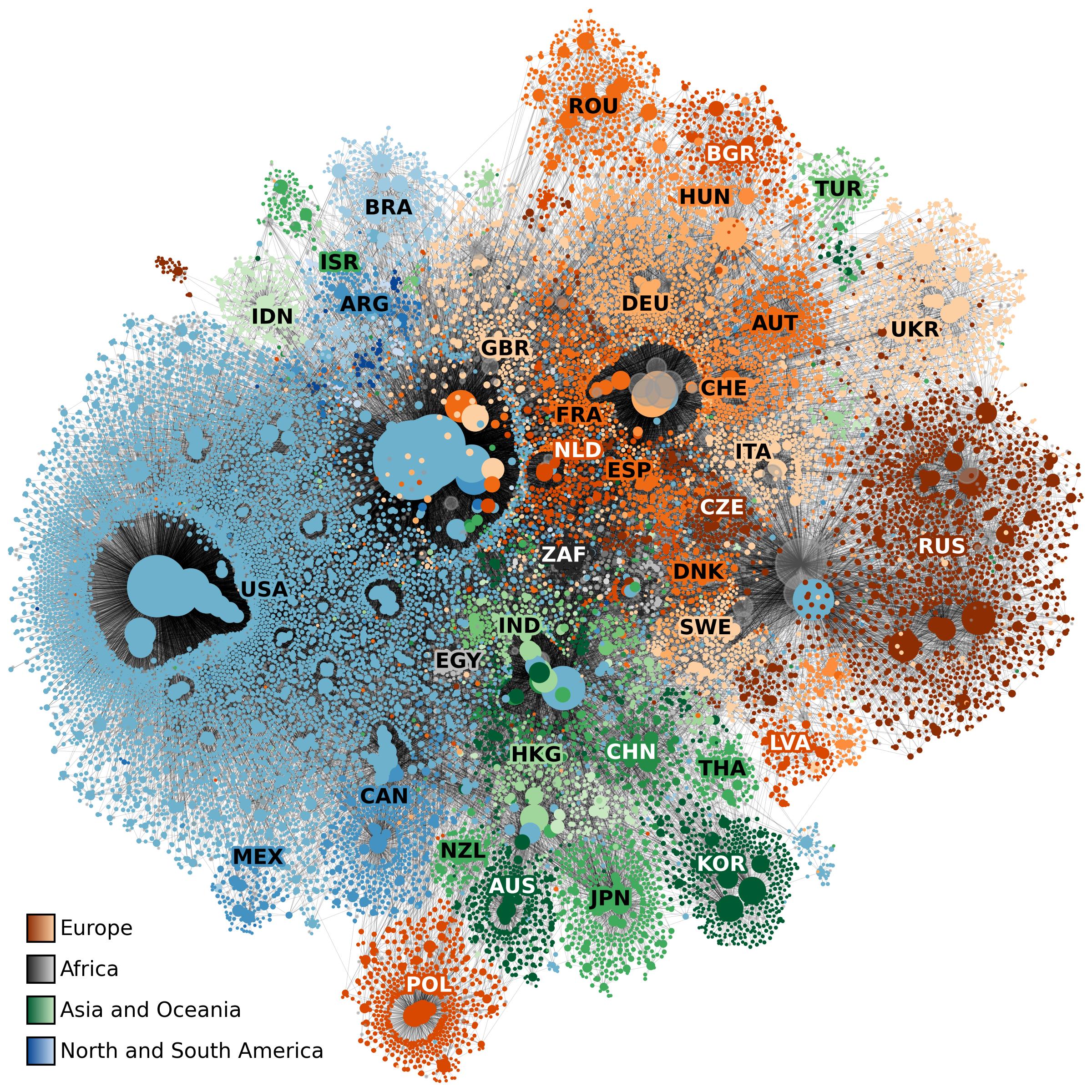
The network represents the connections between internet routers. Vertex size represents a weight, calculated by WEmbed, and colors indicate the country of the respective routers IP-Address. Note that WEmbed had no knowledge of the countries during the embedding process and still managed to assign vertices from the same countries similar spacial coordinates.
Installing the Python module
On most Linux systems we provide prebuild binaries, and you should be able to install WEmbed via pip. We recommend creating a new virtual environment before installing WEmbed.
python -m venv .venv
source .venv/bin/activate
pip install wembed
If your Linux system is not supported, or you are on Windows/Mac, pip will try to build WEmbed from source. In this case you have to make sure, that you install all necessary dependencies (see section further below).
Usage and file formats
Both the C++ example and the Python example show how to use the code. A minimal working example for the python bindings might look like this:
import wembed

graph = wembed.graphFromEdgeListFile("example.edg")
options = wembed.Options()
options.embeddingDimension = 4
embedder = wembed.createEmbedder(graph, options)

embedder.calculateEmbedding()

embedder.writeCoordinates("example.emb")
-
Start by creating a graph object. This can be done with a file (
graphFromEdgeListFile), a list ofwembed.Edgeobjects (graphFromEdges) or offset and neighbor arrays in CSR form (graphFromNeighborhoods). The graph is assumed to be undirected, connected and with consecutive vertex ids starting at zero. The file is expected to contain one line per edge. Each edge should only be given in one direction. The repository contains a small example graph file. -
Create the embedder with
createEmbedderfrom thegraphobject and anoptionsobject. You can modify the behavior of the embedder through this options object (e.g. changing the embedding dimension). You can calculate a single gradient descent step throughcalculateStep()or calculate until convergence withcalculateEmbedding(). -
The final embedding can be written to file. It will contain one line per vertex. The first number of every line is the id of the vertex and the next d entries contain the coordinates for this vertex. The last entry represents the weight of the vertex.
Installing Dependencies
In order to compile WEmbed you need a C++20 compiler with OpenMP support and CMake 3.28 or newer. You can look at the flake.nix for more information. WEmbed also depends on a few smaller libraries, these get downloaded automatically by CMake via Fetchcontent (you do not have to worry about them).
By default, WEmbed uses the sprk tree as its spatial index, which needs a recent Rust toolchain (cargo 1.88 or newer).
If you do not have Rust, configure with -DWEMBED_USE_SPRK=OFF: WEmbed then only contains a bundled KD-tree, which needs nothing but a C++ compiler.
The KD-tree is never chosen silently, you have to select it explicitly (--index-type 0, or indexType = IndexKdTree in the options); it is also the only index for more than 16 embedding dimensions.
Both indices report exactly the same repelling pairs, so the choice only affects the running time: expect the KD-tree to be a bit slower (x2.0) especially for datasets with few vertices or high dimensions.
Compiling with CMake
The project uses CMake as a build tool (see the root CMakeLists.txt for more details).
In order to build the binaries clone this repository,
and call CMake with the release preset.
A release folder will be created, its bin and lib folders contain the executables and libraries.
git clone git@github.com:Vraier/wembed.git
cd wembed
cmake --preset release
cmake --build --preset release
This needs Ninja. Without it, cmake -B release -DCMAKE_BUILD_TYPE=Release followed by cmake --build release -j4 does the same.
The build can be adjusted with the following options (e.g. cmake --preset release -DWEMBED_USE_SPRK=OFF):
| Option | Default | Description |
|---|---|---|
WEMBED_USE_SPRK |
ON |
Use the sprk tree as spatial index (needs Rust). If OFF, only the bundled KD-tree is available. |
WEMBED_BUILD_TOOLS |
ON |
Build the command line tools and unit tests. OFF by default if WEmbed is part of another project. |
WEMBED_BUILD_PYTHON |
OFF |
Build the python module (needs the Python development headers). The presets turn this on. |
Run the unit tests with ctest --preset release.
See DEVELOPMENT.md for the other presets (debug with sanitizers, profiling) and for building wheels.
Using WEmbed in your C++ project
The C++ interface is the single header wembed.h and the CMake target wembed::wembed.
With CMake's FetchContent, only the library is built, not the tools and tests:
include(FetchContent)
FetchContent_Declare(
    wembed
    GIT_REPOSITORY https://github.com/Vraier/wembed.git
    GIT_TAG        v0.3.1
)
FetchContent_MakeAvailable(wembed)

target_link_libraries(my_target PRIVATE wembed::wembed)
Project Structure
All C++ source files can be found in src, this includes the library and small example command line applications for C++. The python folder contains code for the python bindings and an example using these bindings. Unit tests using google test are found in tests.
Work in progress
Note that WEmbed is still quite experimental, expect major changes in the future. See TODOs for pending TODOs.
1 maintainer

Metadata
1 maintainer
Release files for wembed 0.3.1
For a detailed explanation of source distributions (sdists) and built distributions (wheels), please see the package formats documentation.
Source distribution (sdist)
| File | Size | Uploaded | Provenance | Actions |
|---|---|---|---|---|
| wembed-0.3.1.tar.gz | 1.4 MB | Without provenance | Details for wembed-0.3.1.tar.gz |
Built distributions (wheels)
Total release size: 11.6 MB
Release files / wembed-0.3.1.tar.gz
| Download URL | wembed-0.3.1.tar.gz |
|---|---|
| Size | 1.4 MB |
| Tags | Source |
|
SHA-256 checksum How to use checksums |
2035906237c6162ea71b07a645be645c6182625c14cca2cd57be72248fb7b7fd
|
|
BLAKE2b-256 checksum How to use checksums |
29b72e736e25d342767d9be555aa63fa4183b78f49037785caf13da47fdfecd6
|
| Upload date | |
|
Uploaded using Trusted Publishing? What is trusted publishing? |
No |
| Uploaded via |
twine/7.0.0 CPython/3.13.16
|
Release files / wembed-0.3.1-cp314-cp314-manylinux_2_28_x86_64.whl
| Download URL | wembed-0.3.1-cp314-cp314-manylinux_2_28_x86_64.whl |
|---|---|
| Size | 1.7 MB |
| Tags | CPython 3.14 Linux glibc 2.28+ x86-64 |
|
SHA-256 checksum How to use checksums |
fc2405a1dca42f7950772405512a74876f5baa432a97a8c10aed089781a1e5bb
|
|
BLAKE2b-256 checksum How to use checksums |
b21e29f7237a7ebf04ae0090a7e554ef8bc7dfea3438162bf0513a6e44e60038
|
| Upload date | |
|
Uploaded using Trusted Publishing? What is trusted publishing? |
No |
| Uploaded via |
twine/7.0.0 CPython/3.13.16
|
Release files / wembed-0.3.1-cp313-cp313-manylinux_2_28_x86_64.whl
| Download URL | wembed-0.3.1-cp313-cp313-manylinux_2_28_x86_64.whl |
|---|---|
| Size | 1.7 MB |
| Tags | CPython 3.13 Linux glibc 2.28+ x86-64 |
|
SHA-256 checksum How to use checksums |
2b994064a3b2bf286f354c89539e1a57d766df920594c4c8fa703ab4a95362db
|
|
BLAKE2b-256 checksum How to use checksums |
5c2b1ef1325cddf47751a79ee072e7208cda22c6e34baa4643bcdc2d449a4b39
|
| Upload date | |
|
Uploaded using Trusted Publishing? What is trusted publishing? |
No |
| Uploaded via |
twine/7.0.0 CPython/3.13.16
|
Release files / wembed-0.3.1-cp312-cp312-manylinux_2_28_x86_64.whl
| Download URL | wembed-0.3.1-cp312-cp312-manylinux_2_28_x86_64.whl |
|---|---|
| Size | 1.7 MB |
| Tags | CPython 3.12 Linux glibc 2.28+ x86-64 |
|
SHA-256 checksum How to use checksums |
c02cd982eb6e047a6f58f86d5837acfa16a80b355b42ce3072787e0df90d5d82
|
|
BLAKE2b-256 checksum How to use checksums |
64a75d503f3c27c27ee30bb92ed5bbf3abf145ab45b0f5dbd1a39c9d6b8d07c4
|
| Upload date | |
|
Uploaded using Trusted Publishing? What is trusted publishing? |
No |
| Uploaded via |
twine/7.0.0 CPython/3.13.16
|
Release files / wembed-0.3.1-cp311-cp311-manylinux_2_28_x86_64.whl
| Download URL | wembed-0.3.1-cp311-cp311-manylinux_2_28_x86_64.whl |
|---|---|
| Size | 1.7 MB |
| Tags | CPython 3.11 Linux glibc 2.28+ x86-64 |
|
SHA-256 checksum How to use checksums |
7de63acf02ca24abfe61ebf6122b15f1107efda09c6bc89bca31ac923cecb2a5
|
|
BLAKE2b-256 checksum How to use checksums |
639e248a23e5619ee8de28a7babfbe3a96948be6aa332a8f740ffdbde12bc99f
|
| Upload date | |
|
Uploaded using Trusted Publishing? What is trusted publishing? |
No |
| Uploaded via |
twine/7.0.0 CPython/3.13.16
|
Release files / wembed-0.3.1-cp310-cp310-manylinux_2_28_x86_64.whl
| Download URL | wembed-0.3.1-cp310-cp310-manylinux_2_28_x86_64.whl |
|---|---|
| Size | 1.7 MB |
| Tags | CPython 3.10 Linux glibc 2.28+ x86-64 |
|
SHA-256 checksum How to use checksums |
b05d177d630c1297d0f6b9832a7cccaaf16f7bd4cf20990d54fa8e092cf87945
|
|
BLAKE2b-256 checksum How to use checksums |
05153ecf6d9bb5768f193bc7fa7e5e35a8e60b2151848766b3e121ee5a993f79
|
| Upload date | |
|
Uploaded using Trusted Publishing? What is trusted publishing? |
No |
| Uploaded via |
twine/7.0.0 CPython/3.13.16
|
Release files / wembed-0.3.1-cp39-cp39-manylinux_2_28_x86_64.whl
| Download URL | wembed-0.3.1-cp39-cp39-manylinux_2_28_x86_64.whl |
|---|---|
| Size | 1.7 MB |
| Tags | CPython 3.9 Linux glibc 2.28+ x86-64 |
|
SHA-256 checksum How to use checksums |
f5f8c98ae3c185671216d1d77e55d650946ff9671919463209bf602f736320ba
|
|
BLAKE2b-256 checksum How to use checksums |
23eba2bc27cfd08ec35ed509881074ef22ddad3fb4b8fd5ed5494a0c543a4e16
|
| Upload date | |
|
Uploaded using Trusted Publishing? What is trusted publishing? |
No |
| Uploaded via |
twine/7.0.0 CPython/3.13.16
|
Security for wembed 0.3.1
Provenance
Provenance describes where a file came from. On PyPI, provenance is shared via attestations, which provide a verifiable record of the build or publishing details. View details, limitations and caveats.
No provenance found
None of the files in this release were uploaded with provenance metadata.
A note on package security
PyPI is a repository for distributing packages, not a service for auditing them. While third-party security researchers and our staff do their best to detect and remove malicious packages, PyPI cannot guarantee the quality, security or suitability of any given package.
To learn more about protecting yourself from malicious actors, visit our package security documentation.














