





Wendao (问道, wèn dào, "asking the way") is an AI learning companion. It turns your course materials into two things for students:
- an interactive knowledge graph of the course's chapters and concepts, and
- an AI learning agent that answers questions using only the course materials, with a link to the page each answer came from.
It was built for the NUS course MLE4217/5219 Materials Informatics, and this repository uses that course as its example. Nothing in the code is tied to that course, so you can run it on any course written as Markdown pages and Jupyter notebooks.
More docs: developer notes · student guide · product plan
How it works
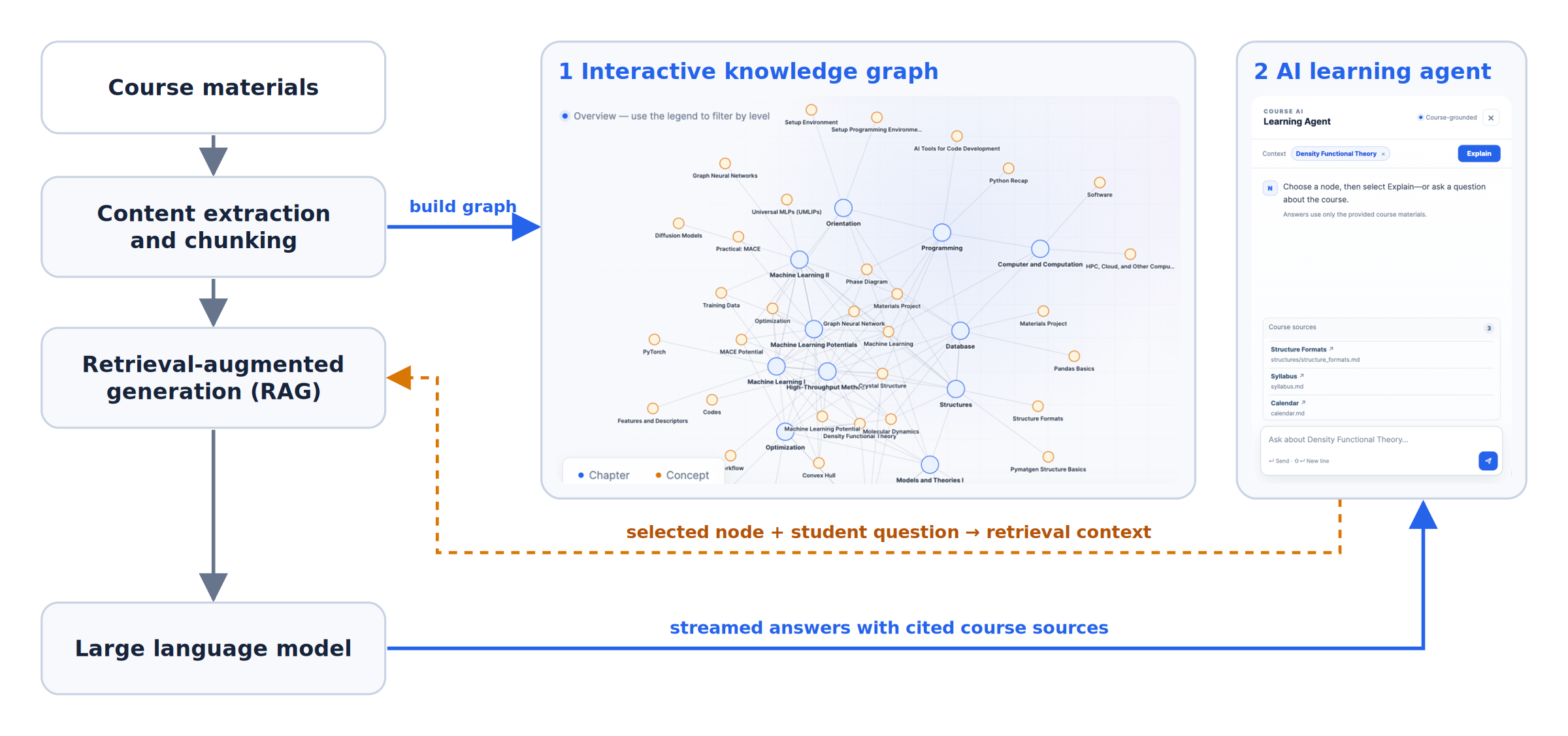
- Extract. Wendao reads your course pages and notebooks and splits them into small pieces called chunks.
- Knowledge graph. Chapters and concepts become nodes. Two nodes are linked only when they appear together in the course.
- Search. When a student asks a question, Wendao finds the most relevant chunks. It combines keyword search with meaning-based search. If the chunks don't really answer the question, Wendao says so instead of guessing.
- Answer. The chunks it found are sent to a language model (Claude, GPT, Gemini, or a local model), which writes the answer. No model training or GPU is needed.
Demo
Knowledge graph
Blue nodes are chapters and orange nodes are concepts. Click a chapter to see its concepts, or click a concept to see every chapter that uses it. You can also filter with the legend or search.
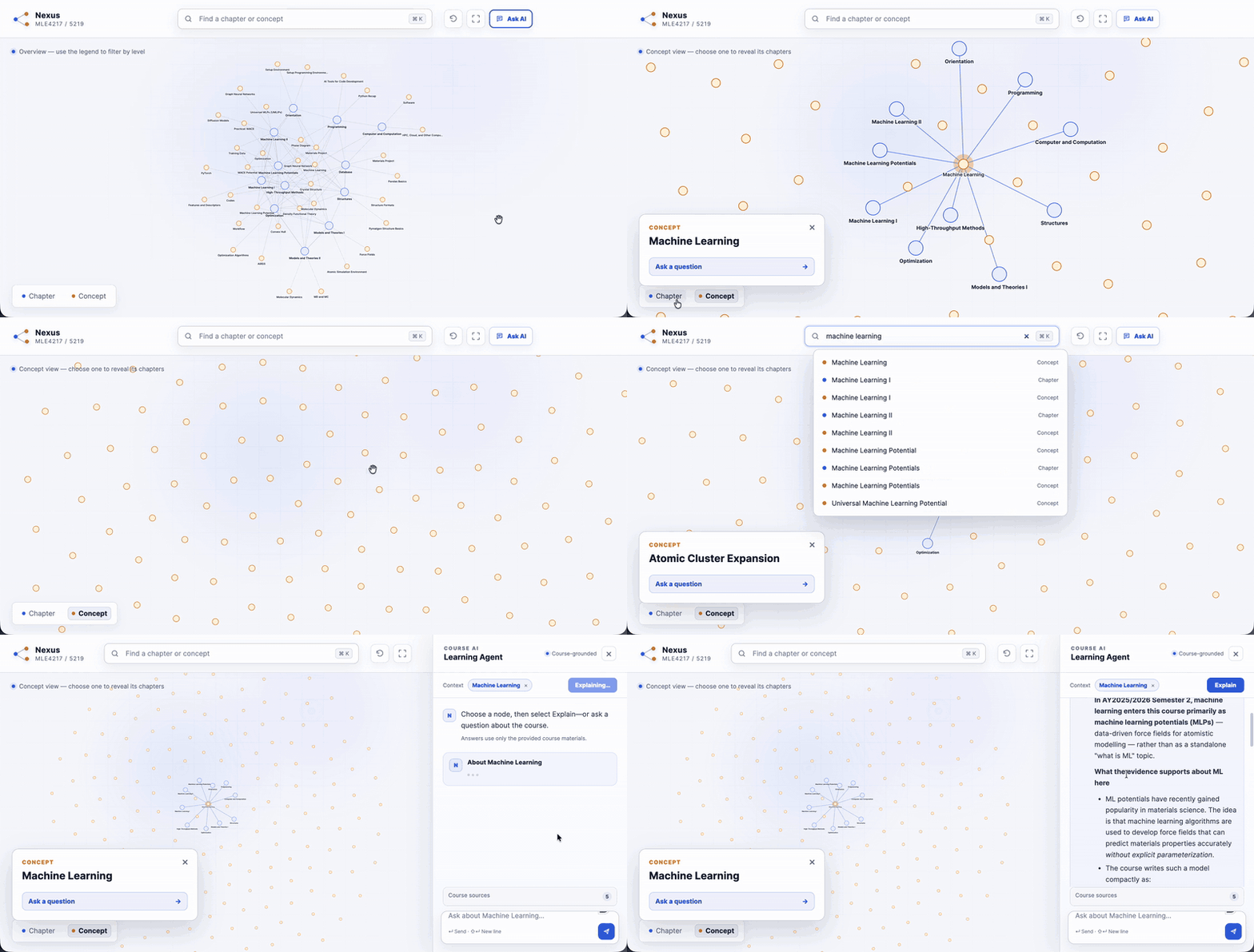
Full-resolution video: knowledge_graph_demo.mp4
AI learning agent
Select a node and press Explain, or pick one of the suggested questions. You can ask follow-up questions and open the cited course page from the answer. If the course doesn't cover a question, the agent tells you.
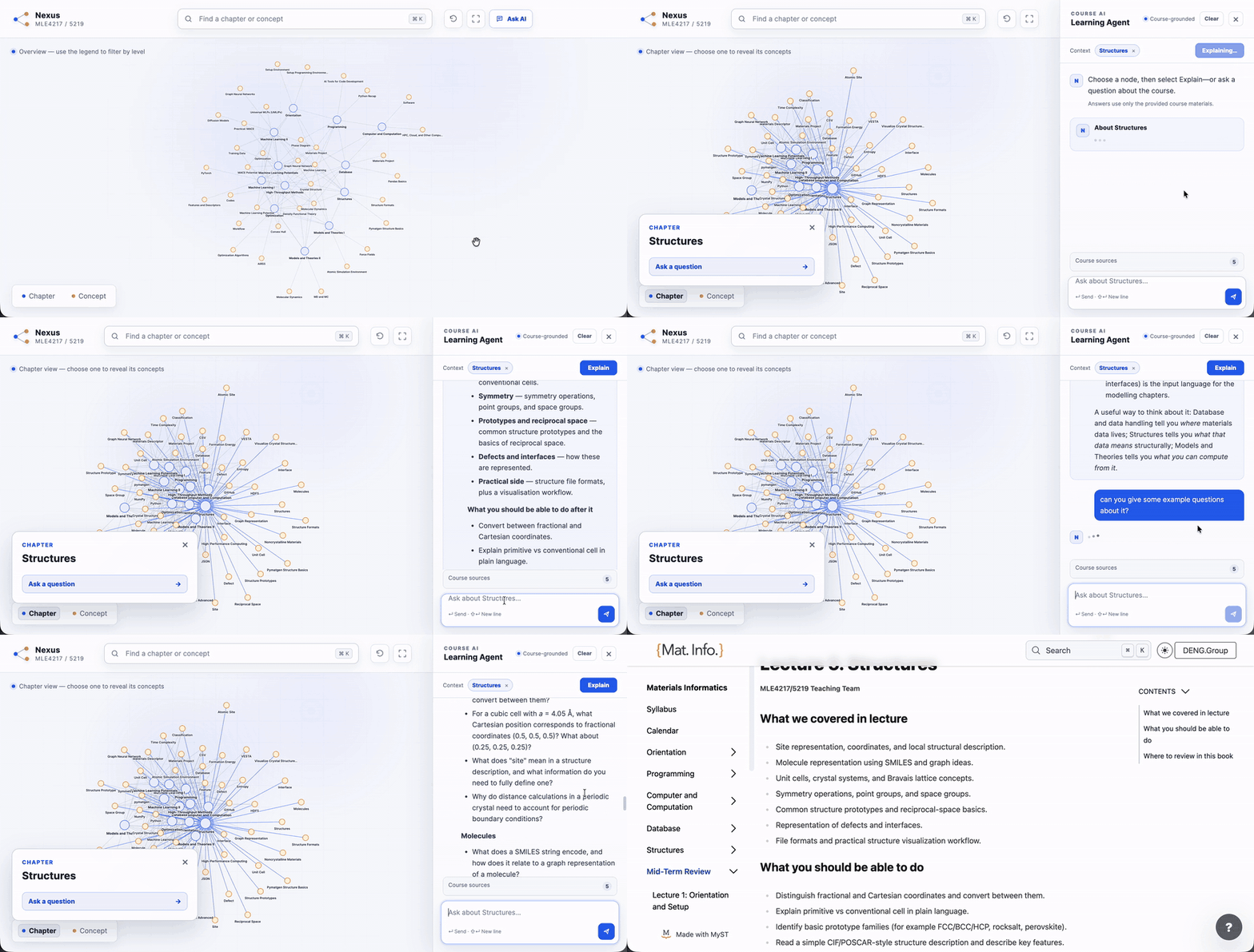
Full-resolution video: ai_learning_agent_demo.mp4
Why use it
Students can explore the course in any order, see how topics connect, and check their understanding. The agent only answers from the course, and it says clearly when it can't.
Instructors can reuse Wendao for their own course. You only need your course content and a list of concepts. Only the chunks relevant to each question are sent to the model, and any major model provider works. Test questions let you check what the agent will and won't answer before students use it.
Install
You need Python 3.11 or newer. Wendao has two installs:
| You are | Install | Size | You can |
|---|---|---|---|
| A student | pip install wendao |
about 160 MB | open course apps from your teacher |
| A teacher | pip install "wendao[teacher]" |
about 200 MB | build courses from your notes, test them, and share them |
You can also use uv: uv tool install wendao (or "wendao[teacher]"). Check it works with
wendao --help.
Students who use your course website don't need to install anything.
Wendao runs its search model on the CPU, so no graphics card is needed. For a very large course, a teacher can build on a
GPU instead with pip install "wendao[teacher,gpu]". Both give the same search results, so a course built on a GPU works
everywhere.
How you work with Wendao
Teachers build a course from their notes, then share it. Your course lives in its own folder, called a workspace, next to your lecture notes:
my-course/
  notes/            your lecture notes (or point to a folder elsewhere)
  wendao.toml       course name, website, chapters, which model to use, and how students use AI
  concepts.json     the concepts to show in the knowledge graph
  questions.json    test questions
  .env              your API key (never committed)
  build/            files Wendao creates: chunks, graph, search index, reports, course app
Run wendao commands anywhere inside the workspace. Wendao finds wendao.toml by itself.
Students get the course from their teacher in one of two ways:
- A website link. Nothing to install; it works on any device.
- A course file (
my-course.wendao). Students open it on their own laptop withwendao open my-course.wendao. The graph and search work offline.
| Command | Who | What it does |
|---|---|---|
wendao init my-course |
teacher | Create a new workspace with starter files |
wendao build |
teacher | Read your notes, build the knowledge graph, and build the search index |
wendao ask "question" |
teacher | Ask a question. Add --search-only to see what search finds, without a model |
wendao eval |
teacher | Test Wendao with the questions in questions.json |
wendao check |
teacher | Check your settings and the connection to the model |
wendao serve |
teacher | Run the course website (the knowledge graph with the AI agent) |
wendao serve --widget |
teacher | Run the API for the chat widget on your existing course website |
wendao pack |
teacher | Put the built course into one file to share with students |
wendao students |
teacher | See your class list and how many questions each student asked |
wendao open my-course.wendao |
student | Open a course file from your teacher |
Run any command with --help to see its options.
Quick start: try the example course
The repository includes a ready-built workspace for MLE4217/5219:
git clone https://github.com/deng-group/wendao.git
cd wendao/examples/mle4217_5219
wendao ask --search-only "What is a convex hull?"    # works without a model
To get real answers, set [model] in wendao.toml to your own provider and put its key in .env
(see Connect a model). Then run wendao serve. It checks the model connection, starts Wendao at
http://127.0.0.1:5057/, and opens it in your browser. Press Ctrl+C to stop.
Use Wendao for your own course
1. Create a workspace
wendao init my-course                              # creates my-course/ with a notes/ folder
wendao init my-course --source ~/teaching/notes    # or use notes you already have
cd my-course
Wendao reads these kinds of files:
| Type | Files | Answers point to |
|---|---|---|
| Markdown / MyST pages | .md |
the page |
| Jupyter notebooks | .ipynb |
the notebook |
| PDF (lecture notes, papers) | .pdf |
the page number |
| PowerPoint slides | .pptx (including speaker notes and tables) |
the slide number |
| Word documents | .docx |
the document |
| LaTeX | .tex |
the document |
| Web pages and plain text | .html, .txt |
the file |
Each top-level folder becomes a chapter. Scanned PDFs (pictures of pages) have no text to read, so run them through OCR first.
To read only some types, set file_types under [source], for example file_types = ["pdf", "pptx"].
2. Describe your course
Open wendao.toml and fill in the course name and website. The website lets answers link to the right page. The file explains
each setting. The most useful ones are:
[[chapters]]: names, order, and visibility for your chapter folders. Folders you don't list still appear, named after the folder.[search] aliases: spellings students might type, such as{ "convexhull" = "convex hull" }.[graph] bridge_stop_concepts: very common concepts, such aspython, that shouldn't link chapters on their own.
Then list the concepts for the knowledge graph in concepts.json. For each concept, give the words to look for in your notes:
{"id": "convex-hull", "label": "Convex Hull", "category": "thermodynamics", "aliases": ["convex hull", "convex hulls"]}
See examples/mle4217_5219/ for a complete example.
3. Build
wendao build
This reads your notes, builds the knowledge graph, and builds the search index. The first run downloads the search model. Run it again whenever you change your notes or settings.
Check the search results before you connect a model:
wendao ask --search-only "What is a convex hull?"
This shows the pages search found and whether Wendao thinks it can answer.
4. Connect a model
Wendao works with three kinds of API. Choose one in wendao.toml and put its key in .env:
provider |
Works with | Key in .env |
|---|---|---|
anthropic |
Anthropic (Claude), or any server that uses the same API | ANTHROPIC_AUTH_TOKEN |
openai |
OpenAI, or any OpenAI-compatible server: DeepSeek, OpenRouter, vLLM, Ollama, LM Studio | OPENAI_API_KEY |
gemini |
Google Gemini | GEMINI_API_KEY |
For example, for a local model with Ollama, which needs no key:
[model]
provider = "openai"
model = "llama3.1"
base_url = "http://localhost:11434/v1"
Then test it:
wendao check
wendao ask "How is Materials Project data used to train MACE potentials?"
A small, cheap model is usually enough, because Wendao gives it the relevant course text. Answers use a temperature of 0.2. Some
models, such as OpenAI's reasoning models, don't accept one; set temperature = "none" under [model] for those.
5. Try it yourself
wendao serve
This opens the course website on your computer at http://127.0.0.1:5057/.
6. Share it with your students
First decide how students use AI, under [student] in wendao.toml:
[student]
ai = "teacher"                    # "teacher", "student", or "either"
server = "https://course.example.edu"   # your Wendao website (needed for course files with ai = "teacher")
questions_per_day = 50            # per student, on your key (0 = no limit)
ai |
Students ask with | Who pays |
|---|---|---|
"teacher" |
your model and key. The key stays on your server; students never see it. | you, with a daily limit per student |
"student" |
their own API key (or a free local model with Ollama), entered in the app's AI settings | each student |
"either" |
your model by default; students may add their own key instead | you, unless a student adds a key |
A student's own key is saved only in their browser and sent with each question. It's never stored on any server.
Students can also point to their own model server (for example DeepSeek, OpenRouter, or a university server). On your
course website this must be a public https:// address, so nobody can use your server to reach private machines. A local
model on the student's own laptop, such as Ollama, works in the course file (wendao open).
Sign-in and daily limits per student. To limit questions per student (not per network), give Wendao your class list.
Save it as students.csv with an email column (export it from your learning platform; optional columns: name, and
limit for a personal daily limit), then add it under [student]:
roster = "students.csv"
questions_per_day = 30
Students then sign in with their email before using your course AI; emails not on the list can still browse the graph,
but can't use your AI. See who asked how much with wendao students (today) or wendao students --all. Wendao keeps
only emails and daily question counts (in usage.db, next to wendao.toml), not the questions. The class list and
usage.db are personal data, so keep them out of git (new workspaces already ignore them).
Signing in uses the email alone, so someone who knows a classmate's email could use that classmate's questions for the day, but never more than that.
Then share the course in one or both ways:
-
Website: put it on a server with
deploy/DEPLOYMENT.mdand send your students the link. This is also theserverthat course files use for the course AI. -
Course file: run
wendao pack. It writesbuild/<course-name>.wendao, which contains the graph, the search index, and the search model (about 90 MB for a typical course; add--no-modelfor a few MB, and students download the model once). Share it however you like, for example on your learning platform. Students open it with:pip install wendao wendao open my-course.wendao
To add the agent to an existing course website as a chat widget, run wendao serve --widget and see
README_DEVELOPERS.md.
Testing your agent
Add real questions from your course to questions.json. For each one you can say what Wendao should do:
{
  "id": "convex_hull",
  "query": "What is a convex hull?",
  "expected_status": "answerable",
  "expected_files": ["high_throughput/thermodynamics.md"]
}
expected_status is one of answerable, needs_time_context (schedule questions), needs_clarification (too broad),
weak_evidence (not enough in the notes), or out_of_scope. Then run:
wendao eval             # search and answer decisions, no model needed
wendao eval --answers   # prompts and citations, no model needed
wendao eval --real      # ask the real model every question, so you can read the answers (uses API credits)
Reports are saved in build/reports/.
Developing Wendao
git clone https://github.com/deng-group/wendao.git
cd wendao
uv sync --all-extras                       # creates .venv with the locked versions, `wendao` included
uv run python -m unittest discover -s tests
| Folder | What's in it |
|---|---|
src/wendao/ |
The tool: command line (cli.py), workspaces, extraction, knowledge graph, evaluation |
src/wendao/rag/ |
Search, answer checks, prompts, and model providers |
src/wendao/web/ |
The knowledge graph website and the chat widget API |
examples/mle4217_5219/ |
The example workspace, ready built |
tests/ |
Unit tests |
deploy/ |
Server setup files |
docs/ |
Figures, demo videos, project plan, and older design notes |
Citation
Wendao is developed by the Deng group in the Department of Materials Science and Engineering at the National University of Singapore, for MLE4217/5219 Materials Informatics. If you use Wendao or adapt it for your own course, please cite this repository:
@software{wendao2026,
  author = {Deng, Yanhao and Deng, Zeyu},
  title  = {Wendao: an AI learning companion with an interactive course knowledge graph},
  year   = {2026},
  url    = {https://github.com/deng-group/wendao}
}
License
Wendao is free software under the GNU General Public License v3.0 or later. You can use, study, change, and share it. If you share a changed version, you must share its source code under the same license.
1 maintainer

Metadata
1 maintainer
Release files for wendao 0.2.1
For a detailed explanation of source distributions (sdists) and built distributions (wheels), please see the package formats documentation.
Source distribution (sdist)
| File | Size | Uploaded | |
|---|---|---|---|
| wendao-0.2.1.tar.gz | 122.8 kB | Details |
Built distribution (wheel)
| File | Interpreter | ABI | Platform | Reset |
|---|---|---|---|---|
| wendao-0.2.1-py3-none-any.whl | Python 3 | none | any | Details |
Total release size: 238.9 kB
Release files / wendao-0.2.1.tar.gz
| Download URL | wendao-0.2.1.tar.gz |
|---|---|
| Size | 122.8 kB |
| Tags | Source |
|
SHA-256 checksum How to use checksums |
e90a7c8b79006f7c86d5bcf7a7270a18fa25134879dca0e3d89c4670a4a281c3
|
|
BLAKE2b-256 checksum How to use checksums |
c9683f5f48b7200374236fede68d6ba0461ccc532b66d238228f99ee2b46ee61
|
| Upload date | |
|
Uploaded using Trusted Publishing? What is trusted publishing? |
Yes |
| Uploaded via |
twine/7.0.0 CPython/3.13.14
|
Provenance
Provenance describes where a file came from. On PyPI, provenance is shared via attestations, which provide a verifiable record of the build or publishing details. View details, limitations and caveats.


PyPI Publish Attestation
PyPI verified that this artifact, at this checksum, originated from the publisher listed below.
Signed by GitHub Actions, verified by PyPI on Oct 2, 2026.
Transparency logRelease files / wendao-0.2.1-py3-none-any.whl
| Download URL | wendao-0.2.1-py3-none-any.whl |
|---|---|
| Size | 116.0 kB |
| Tags | Python 3 |
|
SHA-256 checksum How to use checksums |
1abeb542b98d17c9611276f16fcada554f27c4f677f8fcb0786c684ec78ebf29
|
|
BLAKE2b-256 checksum How to use checksums |
eea0381fc7565561c7eb620a3cdf50e71a691c94ebed788af2c4b934109b6eb9
|
| Upload date | |
|
Uploaded using Trusted Publishing? What is trusted publishing? |
Yes |
| Uploaded via |
twine/7.0.0 CPython/3.13.14
|
Provenance
Provenance describes where a file came from. On PyPI, provenance is shared via attestations, which provide a verifiable record of the build or publishing details. View details, limitations and caveats.
PyPI Publish Attestation
PyPI verified that this artifact, at this checksum, originated from the publisher listed below.
Signed by GitHub Actions, verified by PyPI on Oct 2, 2026.
Transparency log













