
Whacker Hero
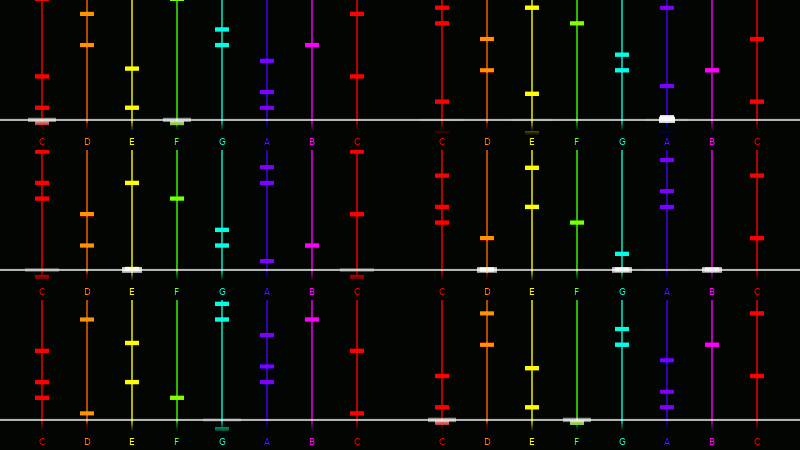
Create play-along videos for Boomwhackers.
Installation
pip install "whackerhero[gui]"
[gui] is optional. It installs gooey which may take a while on Linux.
You have to do a pip-install in order to use the gui, it cannot be launched directly from python or the shell.
Other dependencies are mido for midi reading, numpy for graphics, and moviepy for video rendering.
Usage
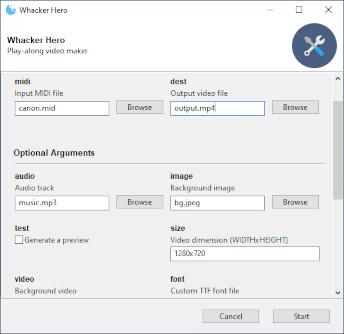
If you've installed the gui, it's pretty straightforward. The most work goes into writing a music arrangement suitable for playing along to (see the example below). There are many midi files on the internet, but they can be big and messy. You should trim it down to only one or two octaves.
The midi file will only be used for visuals. If you want it for audio too, you have to convert it manually.
There is also a command line variant:
whackercmd -a music.mp3 -i background.jpg midifile.mid output.mp4
You can even create gif images for some reason.
whackercmd -s 400x300 --fps 15 midifile.mid output.gif
Due to the single-core design of moviepy, rendering takes forever.
Use the test option to generate a 10 sec long video before you do your final rendering.
Adding play-along to a music video
- Download the music video and extract the music.
- Import the music into your DAW of choice. Don't add any silence at the beginning.
- Write notes in sync with the music. What you hear is what you'll see. If you make all notes the same short length, things will look less cluttered in the final video.
- Export to a midi file.
- Run
whackerhero - Select the midi file and the music video.
- Check the
testbox and press start. - If everything looks good, uncheck
testand run again.
1 maintainer

Metadata
1 maintainer
Release files for whackerhero 0.1.1
For a detailed explanation of source distributions (sdists) and built distributions (wheels), please see the package formats documentation.
Source distribution (sdist)
| File | Size | Uploaded | |
|---|---|---|---|
| whackerhero-0.1.1.tar.gz | 21.3 kB | Details |
Built distribution (wheel)
| File | Interpreter | ABI | Platform | Reset |
|---|---|---|---|---|
| whackerhero-0.1.1-py3-none-any.whl | Python 3 | none | any | Details |
Total release size: 42.9 kB
Release files / whackerhero-0.1.1.tar.gz
| Download URL | whackerhero-0.1.1.tar.gz |
|---|---|
| Size | 21.3 kB |
| Tags | Source |
|
SHA-256 checksum How to use checksums |
7fe9d37e9e40a694bf5d440d5e4e2f297be70c18e6df53aa7985fdac32b1c992
|
|
BLAKE2b-256 checksum How to use checksums |
7aaa7eb4529ee6268d389c15cccb7fbfc1bf650988f17f11362f9659f1ae9e84
|
| Upload date | |
|
Uploaded using Trusted Publishing? What is trusted publishing? |
No |
| Uploaded via |
twine/4.0.1 CPython/3.11.3
|
Release files / whackerhero-0.1.1-py3-none-any.whl
| Download URL | whackerhero-0.1.1-py3-none-any.whl |
|---|---|
| Size | 21.6 kB |
| Tags | Python 3 |
|
SHA-256 checksum How to use checksums |
2bdb35864fc9a09fffcf2c3d51d8f2bcedffdca6471033f87a250d6c0d4277d4
|
|
BLAKE2b-256 checksum How to use checksums |
8e1209d77153c25e101c72345e6af5a14839b5f26463430c92552bbf67a5ddf0
|
| Upload date | |
|
Uploaded using Trusted Publishing? What is trusted publishing? |
No |
| Uploaded via |
twine/4.0.1 CPython/3.11.3
|














