
What's CC Doing

A passive status page + watchdog for Claude Code sessions. Nothing self-reports, so nothing can lie about being alive.
ccdoing regenerates a status page (HTML for you, JSON for agents) from
observed side effects - git commits, the process table, file mtimes,
Claude Code's own on-disk session artifacts - and renders one verdict:
| Verdict | Meaning |
|---|---|
ACTIVE |
a primary signal moved inside the window |
QUIET |
nothing has moved - possibly stalled (with per-signal ages) |
DOWN |
a health check is failing |
STUCK |
a session appears parked on dead work - with the evidence attached |
When QUIET persists, an escalation ladder takes over: log, then notify, then - if you opt in - a nudge: one informational message into a session provably parked on dead work, ending with "ignore this if you're fine." The watchdog never restarts or resumes anything - only the session knows whether it still has work, so the session decides. A finished session sitting open overnight is healthy and is left alone.
Why this exists
A long-running Claude Code subagent was off doing testing, and the TUI
gave no visual feedback about whether it was working or hung. It was
working - but the only way to see that was activity signals the TUI
doesn't show: fresh task output files, transcript growth, processes in
the table. This page began as visual proof of background work; the
watchdog came later, after a session-level watchdog lapsed at handoff
and a human manually checking git log caught an agent waiting forever
on a notification that could never arrive.
Two lessons became design decisions: any arming step someone must remember will eventually be skipped (so the loop is OS-level systemd/cron, re-checked at session start), and self-reported liveness is worthless for stuck agents (so nothing here is instrumented or subscribed - side effects don't lie). Full origin story: BUILD-LOG.md.
The harness adapter (the interesting part)
The claude_session signal classifies every Claude Code session of a
project semantically, from artifacts Claude Code already writes:
WORKING- transcript actively growingWAITING_ON- parked on background task(s) still producing output, or whose output file a process still holds open (legitimate; not flagged)DEAD_WAIT- parked on task(s) whose output stopped moving past threshold, with no sign of a live producer -> verdictSTUCK, with the evidence attachedABANDONED- would be DEAD_WAIT, but the session has been inactive paststuck_max_age_minutes(default 120) - informational only; a long-dead session is never called STUCK or nudgedIDLE- nothing pending
DEAD_WAIT is evidence-based inference, not proof - the "waiting on a
notification that can never arrive" case heartbeat monitors structurally
cannot see. Sessions are matched by where they work (their recorded
working directory), not just where they started, and the page shows
session names, process liveness, and active subagent labels when
available - never transcript content. Mechanics and tradeoffs:
DESIGN.md;
honest limits (activity is not progress):
ANALYSIS.md.
Install & use (Claude Code)
Claude Code is the supported way to use this tool:
/plugin marketplace add nickjrotundo/whats-cc-doing
/plugin install ccdoing@whats-cc-doing
Then run the setup skill (/ccdoing:setup) in your project: Claude
inventories it, proposes signals, asks four questions, writes
ccdoing.yaml, installs the watchdog loop, fires a test notification
so you see the alert channel work now rather than at 3am, and - if
you enable tier 3 - shows you the complete nudge message for approval
first. Day to day: /ccdoing:status, /ccdoing:serve, /ccdoing:live,
/ccdoing:help.
The CLI underneath - install from PyPI (uv tool install whats-cc-doing), from the repo (uv tool install git+https://github.com/nickjrotundo/whats-cc-doing), or from a local
checkout (uv pip install /path/to/whats-cc-doing in a venv):
ccdoing init              # inventory this project, write ccdoing.yaml
ccdoing tick              # one cycle: collect, render, escalate (cron-safe)
ccdoing run               # the same, in a loop
ccdoing status [--fresh]  # print the verdict JSON to stdout
ccdoing view [--fresh]    # live terminal viewer (ssh/headless friendly)
ccdoing serve --all --daemon  # background web server for the dashboard (prints link)
ccdoing serve stop|status # stop the web server / is it running + where
ccdoing projects          # every registered project + last verdict
ccdoing doctor            # env/config checks; --drift for config rot
ccdoing test-escalation --tier log|notify|nudge   # prove the ladder works
ccdoing install [--mode cron]                      # print install units
The CLI runs without Claude Code (generic signals work on any repo or long-running job), but that path is untested and unsupported - you're on your own, but feel free to try.
The escalation ladder
watchdog:
  escalation:
    - { after_quiet_minutes: 15, action: log }
    - { after_quiet_minutes: 30, action: notify }        # apprise -> anywhere
    - { after_quiet_minutes: 45, action: nudge,
        cooldown_minutes: 60, max_per_day: 3 }
Notify targets persist in .ccdoing/notify.urls - one
apprise URL per line, read on
every tick, so a cron/systemd watchdog needs no environment plumbing
($CCDOING_NOTIFY_URLS overrides it for one-off tests; keep the file
gitignored - topics and webhooks are effectively secrets). Prefer no
external service? The status page and dashboard carry an "enable
browser notifications" toggle - viewer-side, fires on verdict
transitions, works over ccdoing serve while a page is open.
Tier 3 is a nudge, never a resume: only for a DEAD_WAIT session
whose process is verifiably alive and which a zero-cost idle
probe did not
report idle (idle means finished - the probe stands the watchdog down).
One courier delivers your pre-approved message into the running
session, which decides for itself. No --resume, no fresh sessions;
cooldown, daily cap, and refuse-while-running are enforced in code.
Who watches the watchdog? The page itself: it shows a red "generator
appears down" banner when it misses its own refresh, and systemd
Restart=/cron re-entry are the loop's recovery.
Outputs
reports/status/status.html- dark, dependency-free, auto-refreshing. Default view is the at-a-glance activity table (green ACTIVE / grey inactive per primary signal, drift-marked when misconfigured); full detail sits behind an "All signals" expander.reports/status/status.json- the interface. Agents and scripts read this; nothing should ever scrape the HTML.
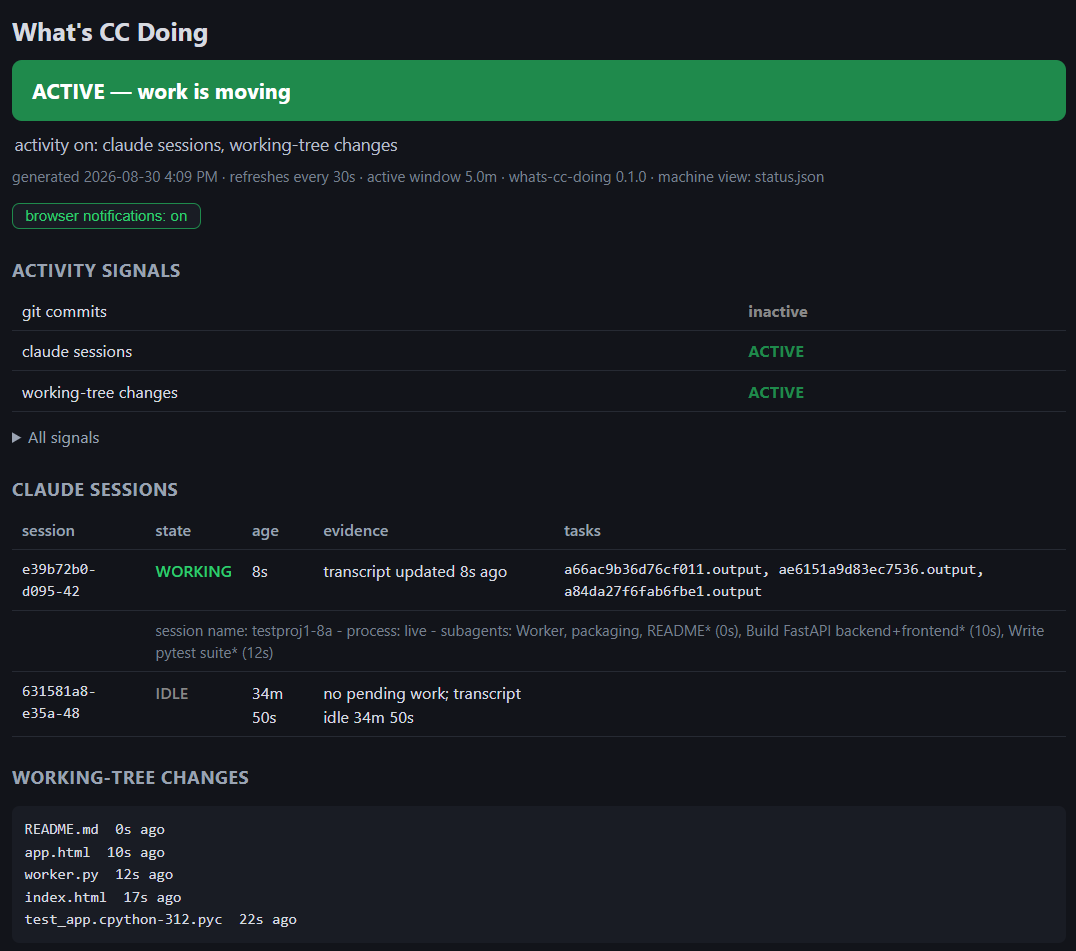
Real files in examples/ - this repository monitoring itself.
Viewing the page (headless / remote / WSL2)
ccdoing serve --all --daemon- background server for the all-projects dashboard; prints the localhost URL.serve stop/serve statusmanage it; starting again restarts. WSL2: localhost forwarding to the Windows browser usually works, but not always - if it doesn't, open the URL in a Linux browser (e.g. WSLg-launched Chrome).ccdoing view- live terminal viewer over ssh (--freshto generate as it views,--oncefor scripts).- Open the file -
file://works fully in Chromium-family browsers - or servereports/status/from your app's own static mount with caching disabled (a cached status page is a lying one).
Many projects on one machine? init registers each; ccdoing projects
lists them with last verdicts (--unregister NAME to remove); each runs
its own independent loop - one registry, one viewer, no per-project
ports. And there is an all-projects dashboard, terminal and web:
-
TUI:
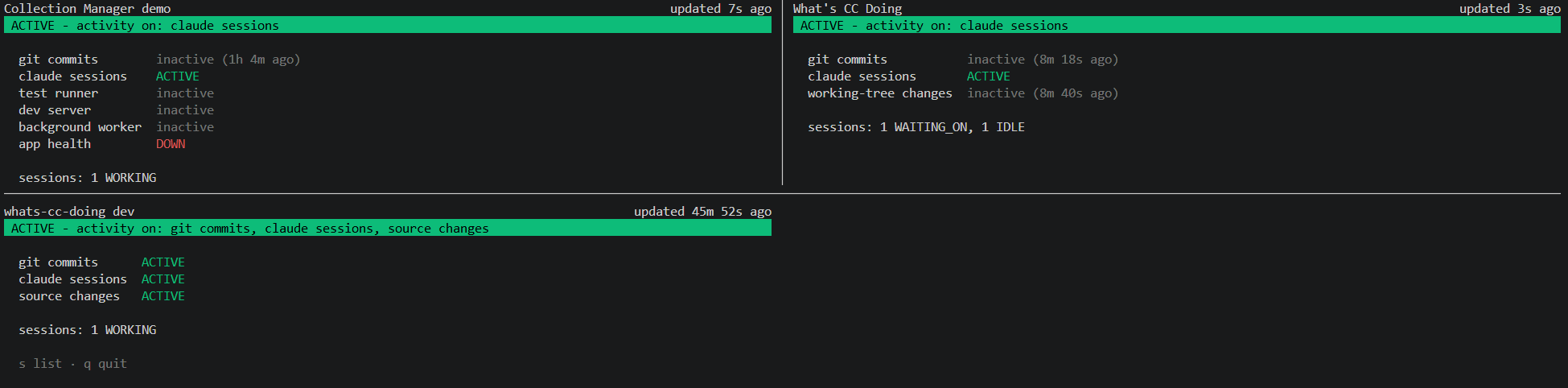
ccdoing view --dash(the default outside any configured project) - title, colored verdict, "Last signal: 12m ago" per project; arrows + Enter open one,bcomes back,dsets the activity window,ssplits side-by-side on wide terminals,[stale]marks dead generators.The
ssplit mode, three projects at once: -
Web:
ccdoing serve --all- card-per-project dashboard with a live "active within N days" filter, click-through to each live status page, and a Multi-view grid of 2-4 pages at/multi. Localhost-only by default; every response isCache-Control: no-store.

Privacy note before publishing a page anywhere public: process
signals render command lines, redacted by default (PID basename (+N args)); the command signal's stdout renders too - treat
ccdoing.yaml as config-as-code.
Keeping the page honest as the project changes
The original internal status page hardcoded two /tmp eval-JSON paths
and went stale the day after shipping. ccdoing is built to notice that
class of rot: json_headline signals use glob patterns + a min_items
shape filter (newest matching file wins); every path-shaped signal
reports no-match/stale drift states on the page and in status.json;
ccdoing doctor --drift re-diffs the setup-time inventory (the plugin
surfaces a one-line notice at session start); and /ccdoing:tune
turns findings into config deltas for approval - never rewriting
values you tuned.
Supported platforms
| Platform | Status |
|---|---|
| Linux | supported (developed and tested here) |
| WSL2 | supported (systemctl --user varies - setup verifies, cron fallback) |
| macOS | best-effort: generic signals work; Claude task outputs may live under $TMPDIR rather than /tmp/claude-* - set task_root_glob on the claude_session signal; use cron (no launchd template yet) |
| Windows (native) | unsupported (pgrep, POSIX paths, systemd/cron assumptions) |
Docs & support
- DESIGN.md - architecture, harness mechanics, decision log
- ANALYSIS.md - known gaps, limits, v0.2 roadmap
- BUILD-LOG.md - origin story + how this was built (an AI-driven build, documented honestly)
- CHANGELOG.md - release history
- Questions/bugs: GitHub Issues
1 maintainer

Metadata
1 maintainer
Release files for whats-cc-doing 0.2.0
For a detailed explanation of source distributions (sdists) and built distributions (wheels), please see the package formats documentation.
Source distribution (sdist)
| File | Size | Uploaded | |
|---|---|---|---|
| whats_cc_doing-0.2.0.tar.gz | 102.0 kB | Details |
Built distribution (wheel)
| File | Interpreter | ABI | Platform | Reset |
|---|---|---|---|---|
| whats_cc_doing-0.2.0-py3-none-any.whl | Python 3 | none | any | Details |
Total release size: 176.1 kB
Release files / whats_cc_doing-0.2.0.tar.gz
| Download URL | whats_cc_doing-0.2.0.tar.gz |
|---|---|
| Size | 102.0 kB |
| Tags | Source |
|
SHA-256 checksum How to use checksums |
f8652113db3dd28afe03bc4e553cd51862cfc5449942e57b334f1b352eee19f1
|
|
BLAKE2b-256 checksum How to use checksums |
44a46eb6152846397cd17e9b635b395a641d1babc2ea43fbd3f1967faa97fe39
|
| Upload date | |
|
Uploaded using Trusted Publishing? What is trusted publishing? |
No |
| Uploaded via |
uv/0.12.7 {"installer":{"name":"uv","version":"0.12.7","subcommand":["publish"]},"python":null,"implementation":{"name":null,"version":null},"distro":{"name":"Ubuntu","version":"24.04","id":"noble","libc":null},"system":{"name":null,"release":null},"cpu":null,"openssl_version":null,"setuptools_version":null,"rustc_version":null,"ci":null}
|
Release files / whats_cc_doing-0.2.0-py3-none-any.whl
| Download URL | whats_cc_doing-0.2.0-py3-none-any.whl |
|---|---|
| Size | 74.2 kB |
| Tags | Python 3 |
|
SHA-256 checksum How to use checksums |
14a9a5a17c3082bcbaf353e85e599ad44c63024b391d7d85512e9a650c111b9c
|
|
BLAKE2b-256 checksum How to use checksums |
81446a3394365d0752273f75ae154ac9e750d582b28d6f352c72b1ba7be5afdd
|
| Upload date | |
|
Uploaded using Trusted Publishing? What is trusted publishing? |
No |
| Uploaded via |
uv/0.12.7 {"installer":{"name":"uv","version":"0.12.7","subcommand":["publish"]},"python":null,"implementation":{"name":null,"version":null},"distro":{"name":"Ubuntu","version":"24.04","id":"noble","libc":null},"system":{"name":null,"release":null},"cpu":null,"openssl_version":null,"setuptools_version":null,"rustc_version":null,"ci":null}
|













