
whatsapp-chat-analyze
Command line tool to analyze WhatsApp exported chat data (accepts .txt and .zip) and plot pretty interactive charts.
Demo
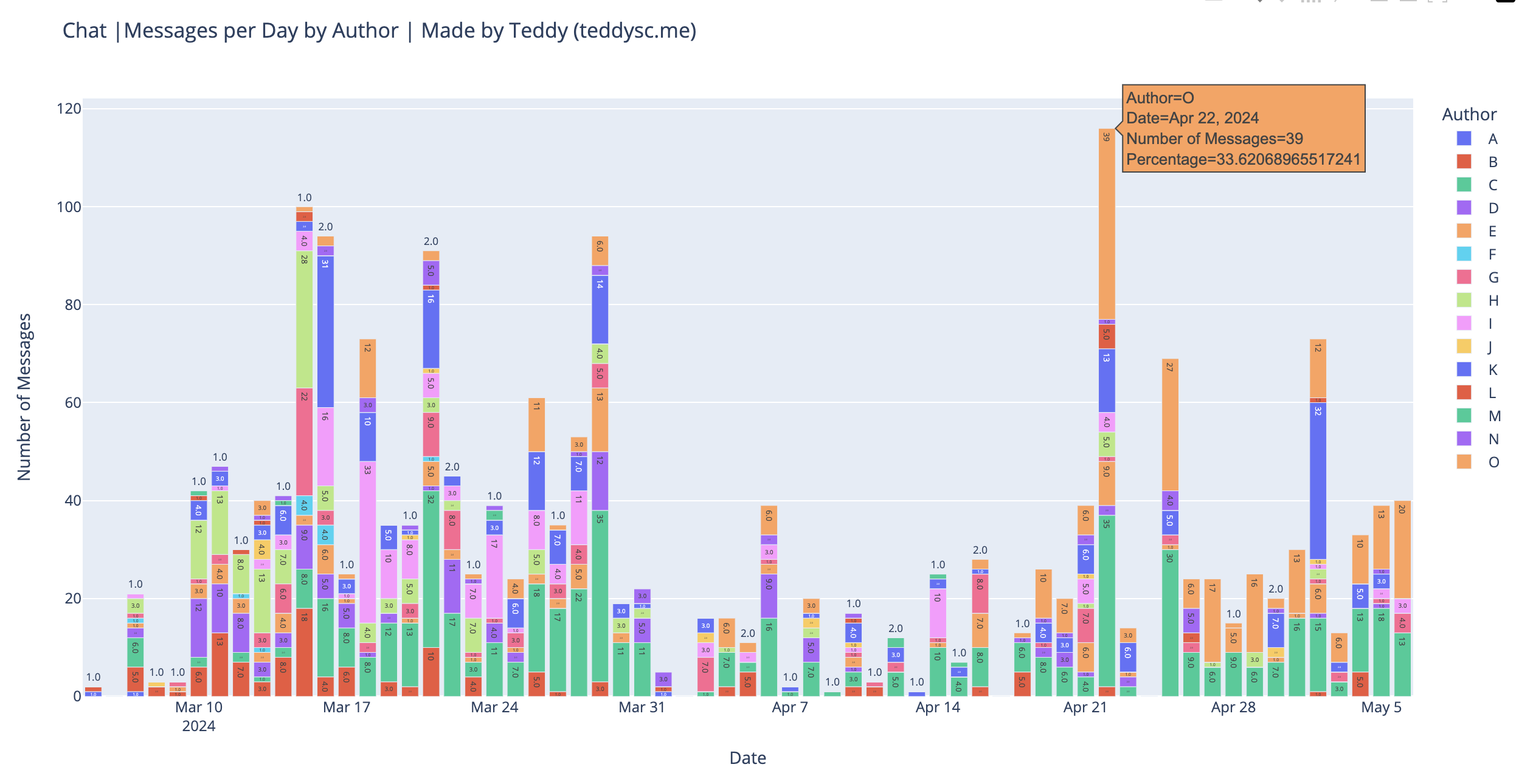
For more plots and interactity, check out the blog post: https://teddysc.me/blog/whatsapp-chat-analyze .
Features
- Simple to install and use, no cloning involved, supports modern Python versions
- Extracts chat data from .txt or .zip files
- Export to csv (
-c) - Pretty interactive charts with plotly and save them to HTML files
- 6 different plots, see demo
- Anonymize sender names to
A,B,C, etc. (-a)
Installation
Python>=3.10 required.
pipx
This is the recommended installation method.
$ pipx install whatsapp-chat-analyze
pip
$ pip install whatsapp-chat-analyze
Usage
$ whatsapp-chat-analyze --help

usage: whatsapp-chat-analyze [-h] [-n name] [-o base] [-d] [-E] [-c] [-a] file

Analyze Whatsapp Exported .txt or .zip (will be automatically extracted) chat file

positional arguments:
  file                  Chat file (_chat.txt or *.zip) to analyze

options:
  -h, --help            show this help message and exit
  -n name, --chat-name name
                        Name of the chat (default: Chat)
  -o base, --output-base-name base
                        Output base name for the plots (default: whatsapp-chat)
  -d, --by-day-only     Plot messages per day only (default: False)
  -E, --extract-only    Extract the chat and exit (default: False)
  -c, --to-csv-only     Convert chat to csv and exit (default: False)
  -a, --anonymize       Anonymize the chat by replacing author names with generic names (default: False)
Develop
$ git clone https://github.com/tddschn/whatsapp-chat-analyze.git
$ cd whatsapp-chat-analyze
$ poetry install
Limitations
- Parsing of chat data uses simple regex, and author names in non-latin languages may not be parsed correctly
1 maintainer

Metadata
1 maintainer
Release files for whatsapp-chat-analyze 0.1.7
For a detailed explanation of source distributions (sdists) and built distributions (wheels), please see the package formats documentation.
Source distribution (sdist)
| File | Size | Uploaded | Provenance | Actions |
|---|---|---|---|---|
| whatsapp_chat_analyze-0.1.7.tar.gz | 5.5 kB | Without provenance | Details for whatsapp_chat_analyze-0.1.7.tar.gz |
Built distribution (wheel)
| File | Interpreter | ABI | Platform | Actions Reset |
|---|---|---|---|---|
| whatsapp_chat_analyze-0.1.7-py3-none-any.whl | Python 3 | none | any | Details for whatsapp_chat_analyze-0.1.7-py3-none-any.whl |
Total release size: 11.9 kB
Release files / whatsapp_chat_analyze-0.1.7.tar.gz
| Download URL | whatsapp_chat_analyze-0.1.7.tar.gz |
|---|---|
| Size | 5.5 kB |
| Tags | Source |
|
SHA-256 checksum How to use checksums |
ec3d5a2292a4af1bd0752de5d45dc60c57c5c163306c8a966ed59b2759f4a3f0
|
|
BLAKE2b-256 checksum How to use checksums |
306d9e7a98ccdc488144b6c80d4547aa2319971b7d09c59075055b988c221c26
|
| Upload date | |
|
Uploaded using Trusted Publishing? What is trusted publishing? |
No |
| Uploaded via |
poetry/1.7.1 CPython/3.12.3 Darwin/23.4.0
|
Release files / whatsapp_chat_analyze-0.1.7-py3-none-any.whl
| Download URL | whatsapp_chat_analyze-0.1.7-py3-none-any.whl |
|---|---|
| Size | 6.4 kB |
| Tags | Python 3 |
|
SHA-256 checksum How to use checksums |
7eb51ad9efcd50b1a894c66d9d7c8c0a80cdfe8d3b034e593329c0abc2b36831
|
|
BLAKE2b-256 checksum How to use checksums |
5152c636e6c95884c2a5832dd1eb29869467778067e36bae676001ead287e23b
|
| Upload date | |
|
Uploaded using Trusted Publishing? What is trusted publishing? |
No |
| Uploaded via |
poetry/1.7.1 CPython/3.12.3 Darwin/23.4.0
|
Security for whatsapp-chat-analyze 0.1.7
Provenance
Provenance describes where a file came from. On PyPI, provenance is shared via attestations, which provide a verifiable record of the build or publishing details. View details, limitations and caveats.
No provenance found
None of the files in this release were uploaded with provenance metadata.
A note on package security
PyPI is a repository for distributing packages, not a service for auditing them. While third-party security researchers and our staff do their best to detect and remove malicious packages, PyPI cannot guarantee the quality, security or suitability of any given package.
To learn more about protecting yourself from malicious actors, visit our package security documentation.














