
This package continously view a specific WhatsApp contact status as soon as it is uploaded OR get notified every 30mins, 1hour, 3hours or 6hours.

Project description
WhatsApp Status Checker
A high-performance, automated tool to continuously monitor and interact with WhatsApp statuses.




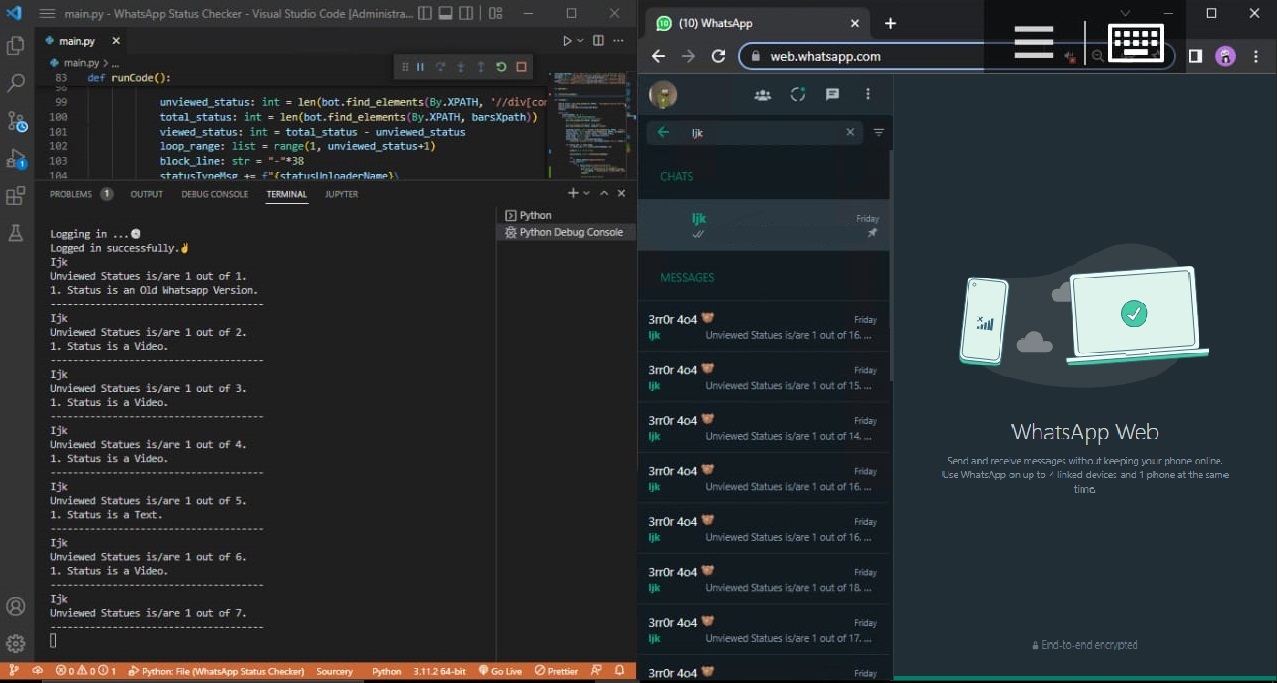
WhatsApp Status Checker is a high-performance tool designed to continuously monitor and interact with WhatsApp statuses. It can automatically view a specific contact's status (Images, Videos, Text, or Audio) as soon as they are uploaded, ensuring every update is registered as "viewed" even on slow internet connections. Alternatively, it can function in a notification-only mode, alerting you via WhatsApp at your preferred intervals (30m, 1h, 3h, 6h).
NOTE: WhatsApp does not allow bots or unofficial clients on their platform, so this shouldn't be considered totally safe.
Demo Video
View HD Demo Video here
AI Auto-Healing (Deprecation)
While we explored implementing an AI-powered "Auto-Healing" mechanism to dynamically resolve broken XPaths, it has been intentionally deprecated. WhatsApp Web is a "heavy" application with highly dynamic DOM structures, making automated path resolution unreliable and performance-heavy.
To ensure the bot remains stable and reliable, we manually maintain and update the XPaths using an accessibility-first approach (targeting ARIA labels and attributes). This makes the locators significantly more resilient to UI updates and provides the consistency required for heavy applications like WhatsApp.
WhatsApp Messenger
CallMeBot was used for WhatsApp message, PLEASE READ!
How to use
Make sure your installed Google Chrome Browser is the latest.
- Create a
.envfile.- Set
MY_NUMBERto your phone number. (Your WhatsApp Number e.g: 234xxxxxxxxxx) - Set
CALLMEBOT_APIKEYto your API Key. (API Key provided by CallMeBot)See CallMeBot for detailed information.
- Set
STATUS_UPLOADER_NAMEcontact you want to view their status.NOTE: As it is saved on your phone(Case Sensitive).
- Optionally, set
TIMEZONEto your preferred timezone. Time will be displayed in this timezone.If not set, it resolves to IP timezone.
- Set
Installation
-
Using UV
- Install UV if you haven't already using
pip install uv - Initialize and create virtual environment using
uv init . && uv venv - Install package using
uv add whatsapp-status-checker
- Install UV if you haven't already using
-
Using PIP
- Create a Virtual Environment using
py -m venv .venv - Activate your virtual environment using
.venv\Scripts\activate - Install dependencies using
pip install whatsapp-status-checker
- Create a Virtual Environment using
Usage
CLI (Recommended)
You can run the application directly from the terminal using the wsc alias:
-
Using UV
uv run wsc
-
Using Python
python -m whatsapp_status_checker
Or if the package is already installed in your path:
wsc
Python Script
Alternatively, you can import and run it in your own Python script:
from whatsapp_status_checker import WhatsAppStatusChecker

def main():
    # Create and run application
    app = WhatsAppStatusChecker()
    app.run()

if __name__ == "__main__":
    main()
Screenshots
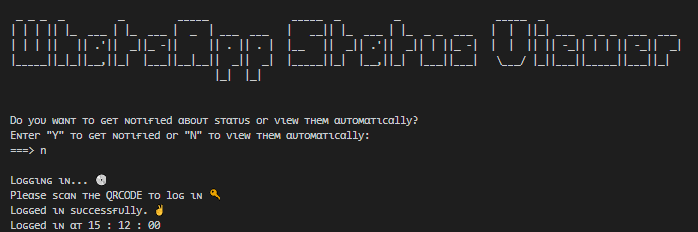
Terminal | First Time Logging In
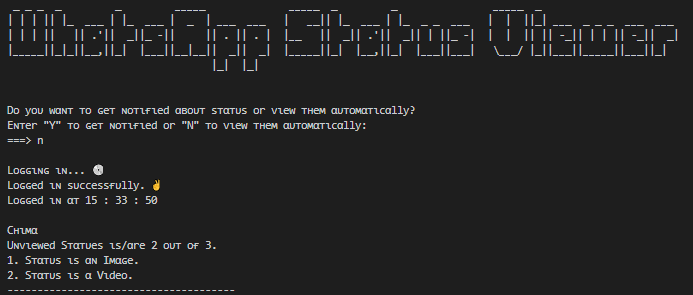
Terminal | Viewed Contact Status
WhatsApp Message | Status Notification
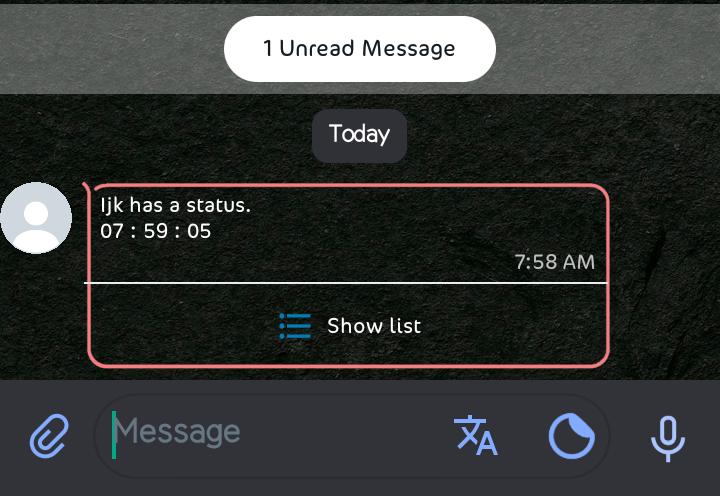
See other Screenshots, Click here
Errors and Fixes
- Timeout When Logging in: The application now uses an efficient 3-minute (180s) polling loop that handles QR code scanning and transient loading screens automatically.
If you consistently timeout, ensure your internet connection is stable.
- Not Receiving WhatsApp Message: Make sure you follow CallMeBot instructions carefully.
Also confirm your
.envvalues are correct.
Support and Contribute
- Please
to encourage developer(s).
- Fork, do your thing and create a PR.
Issues and Bug Reports
Found a bug or have a feature request? Please:
- Check existing issues: Browse issues to see if it’s already reported.
- Open a new issue: Create one here with:
- A clear title
- Description (and steps to reproduce, if a bug)
- Expected vs actual behavior
- Screenshots or error logs, if relevant
- Environment (OS, Python, Chrome version)
- Use the template: Please use the provided bug report template.
- Feature requests: Explain what you want, why it’s useful, and any suggestions.
Discussion
Have feedback or suggestions? Open an issue or join dicussions on new features, improvements, and use cases. Your input helps shape the project!
TODO
- PyPi Package.
- Convert to a package.
- pip install package.
- publish to PyPi.
- Automatically
- Use specified timezone othwerwise automatically get it.
- Check first time activity.
- Make sure it is completely synced with phone (Loading messages).
- Handle Chromedriver
- Check if Chrome browser is updated (same version as latest chromedriver release)
- Download latest chromedriver.
- Extract and move to
driverdirectory.
- Handle dedicated Chrome profile
- Create a new chrome profile(if not previously done).
- Use the newly chrome profile(if just created for the first time).
- Use existing chrome profile(if already created).
Release history Release notifications | RSS feed

Download files
Download the file for your platform. If you're not sure which to choose, learn more about installing packages.
Source Distribution
Built Distribution
Filter files by name, interpreter, ABI, and platform.
If you're not sure about the file name format, learn more about wheel file names.
Copy a direct link to the current filters
File details
Details for the file whatsapp_status_checker-0.1.0.tar.gz.
File metadata
- Download URL: whatsapp_status_checker-0.1.0.tar.gz
- Upload date:
- Size: 35.0 kB
- Tags: Source
- Uploaded using Trusted Publishing? No
- Uploaded via: uv/0.11.7 {"installer":{"name":"uv","version":"0.11.7","subcommand":["publish"]},"python":null,"implementation":{"name":null,"version":null},"distro":{"name":"macOS","version":null,"id":null,"libc":null},"system":{"name":null,"release":null},"cpu":null,"openssl_version":null,"setuptools_version":null,"rustc_version":null,"ci":null}
File hashes
| Algorithm | Hash digest | |
|---|---|---|
| SHA256 |
a789e1a40a945e184b2b216c31ebfbb96c84ee2771429013776c13e4d7d5c208
|
|
| MD5 |
c8cfb094d7a781e0da13fe0c66885c0a
|
|
| BLAKE2b-256 |
291879311576288948a74409c4c9108bce8f88f47ed8fe4f90ca08b7da7f6cfd
|
File details
Details for the file whatsapp_status_checker-0.1.0-py3-none-any.whl.
File metadata
- Download URL: whatsapp_status_checker-0.1.0-py3-none-any.whl
- Upload date:
- Size: 36.2 kB
- Tags: Python 3
- Uploaded using Trusted Publishing? No
- Uploaded via: uv/0.11.7 {"installer":{"name":"uv","version":"0.11.7","subcommand":["publish"]},"python":null,"implementation":{"name":null,"version":null},"distro":{"name":"macOS","version":null,"id":null,"libc":null},"system":{"name":null,"release":null},"cpu":null,"openssl_version":null,"setuptools_version":null,"rustc_version":null,"ci":null}
File hashes
| Algorithm | Hash digest | |
|---|---|---|
| SHA256 |
2214f0d53efdd1383333f9d08ed2bb16744f8de8ec4b3a7ff516fde9930a7e04
|
|
| MD5 |
d80c582c2c527effc3db6ff33efbf199
|
|
| BLAKE2b-256 |
27a6556a5cabc4894351362bbd4e59e008b9d2e5e41d73560f0bf36dde26e5e9
|






