
Various analyses of tweet content

Project description
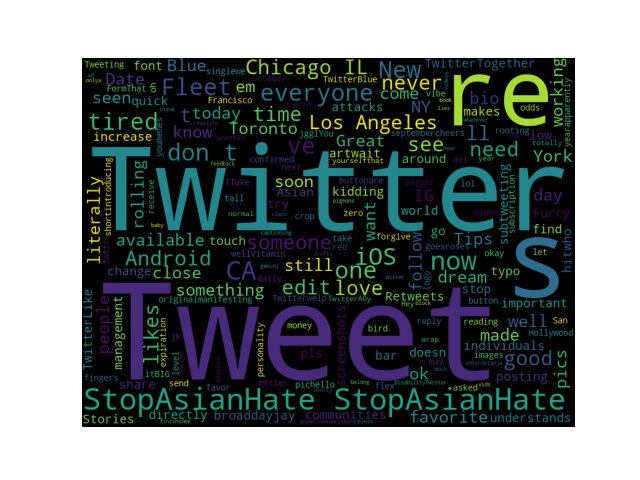
Visualization of tweet content
Just enter the username of the target account and you will be able to see the characteristics of the tweets of that account.
We will use wordcloud to visualize the tweet contents. This is a simple yet powerful visual representation object for text processing, which shows the most frequent word with bigger and bolder letters, and with different colors. The smaller the the size of the word the lesser it’s important.
How to install whatweet
whattweew is available in public and can be installed by the following PyPI packaging command:
pip install whatweet
If you are using virtual environment, please use the package manager of the virtual environment (e.g., pipenv install, poetry add).
How to run whatweet
whatweet needs at three parameters (username, days, language).
Username
Enter the correct username for an account that has a certain number of tweets. However, you cannot use a private account.
days
Enter the number of days to be counted backward from the current date ( 1 <= days <= 500 ).
For users with a relatively large number of tweets, it is recommended to enter a small number of days. The accuracy of the visualization will be better and the process will not be as heavy.
language
Two languages, Japanese and English, are supported for this visualization. Each one is processed differently, so make sure you enter the user's language.
Enter Japanese for Japanese or English for English.
Example
whatweet twitter 100 English
Release history Release notifications | RSS feed

Download files
Download the file for your platform. If you're not sure which to choose, learn more about installing packages.
Source Distribution
Built Distributions
Filter files by name, interpreter, ABI, and platform.
If you're not sure about the file name format, learn more about wheel file names.
Copy a direct link to the current filters
File details
Details for the file whatweet-0.0.1.tar.gz.
File metadata
- Download URL: whatweet-0.0.1.tar.gz
- Upload date:
- Size: 4.0 kB
- Tags: Source
- Uploaded using Trusted Publishing? No
- Uploaded via: twine/3.7.1 importlib_metadata/4.10.1 pkginfo/1.8.2 requests/2.25.0 requests-toolbelt/0.9.1 tqdm/4.54.1 CPython/3.9.4
File hashes
| Algorithm | Hash digest | |
|---|---|---|
| SHA256 |
9b7e8e850dd8c191497dbc1cf068e1184494eef8057ad496caf97f688831aaf3
|
|
| MD5 |
1c727b2409f6a346b06ce0544e4ac3d5
|
|
| BLAKE2b-256 |
23b32528f6152e40ecbdd8d1d862ad73fb2c1eb4edd0084f11e5d0e735e35663
|
File details
Details for the file whatweet-0.0.1-py3.9.egg.
File metadata
- Download URL: whatweet-0.0.1-py3.9.egg
- Upload date:
- Size: 6.2 kB
- Tags: Egg
- Uploaded using Trusted Publishing? No
- Uploaded via: twine/3.7.1 importlib_metadata/4.10.1 pkginfo/1.8.2 requests/2.25.0 requests-toolbelt/0.9.1 tqdm/4.54.1 CPython/3.9.4
File hashes
| Algorithm | Hash digest | |
|---|---|---|
| SHA256 |
7ee9b69433a36c125f40feb7279da6c2e8c8b0e7e726a6128254151210d377b5
|
|
| MD5 |
8410df889d9a34c5e4459bd6008f1ecc
|
|
| BLAKE2b-256 |
5d36278a89907db5bd73ec26f1fa373319ffc1a8f33cb1b0902f56430dd2c511
|
File details
Details for the file whatweet-0.0.1-py3-none-any.whl.
File metadata
- Download URL: whatweet-0.0.1-py3-none-any.whl
- Upload date:
- Size: 4.1 kB
- Tags: Python 3
- Uploaded using Trusted Publishing? No
- Uploaded via: twine/3.7.1 importlib_metadata/4.10.1 pkginfo/1.8.2 requests/2.25.0 requests-toolbelt/0.9.1 tqdm/4.54.1 CPython/3.9.4
File hashes
| Algorithm | Hash digest | |
|---|---|---|
| SHA256 |
d59179a67df9f119e4c15a8289518c62bb7bc7473bdcc808682e35e986e19100
|
|
| MD5 |
0437f6fb8df8182c40f0acd056b39a68
|
|
| BLAKE2b-256 |
c048753f1d07c09ae91a0fd4ec092e540f9fdd4b78cebe38b0c0fc183120ddeb
|






