



Find the Python dependencies that have no prebuilt wheel for your target platform, before your Docker build does.
Point it at your lockfile and the platforms you ship to (ARM servers, Alpine images, Windows on ARM, free-threaded Python 3.14t). It tells you which packages pip or uv will have to compile from source, and which can't be installed at all.
📊 New: wheel coverage for the top 5,000 PyPI packages, by platform and Python version, updated nightly.
📖 Documentation: wheelgap.github.io/wheelgap, with a reference for every flag, input format, config key and output format.
Install and run (under 30 seconds)
With uv:
uvx wheelgap
Or with pipx:
pipx run wheelgap
Or install it: pip install wheelgap.
Run either one in a project directory. It finds uv.lock, pylock.toml, poetry.lock, pdm.lock, Pipfile.lock, requirements.txt, requirements.lock or pixi.lock on its own. Getting started walks through a first run.
Usage
# Will my Alpine ARM image compile anything?
wheelgap -p 3.13 -t alpine-arm64

# Is my stack ready for free-threaded Python 3.14?
wheelgap -p 3.14t -t all

# Several Pythons at once, Linux on both architectures
wheelgap uv.lock -p 3.12,3.13,3.14 -t linux-x86_64,linux-aarch64

# Resolve a version range separately for each Python
wheelgap "numpy>=1.26,<3" -p 3.9,3.13 -t linux

# Check the PyPI packages of a pixi project's `test` environment
wheelgap pixi.lock --environment test -p 3.13 -t linux-x86_64,macos-arm64

# No lockfile? Check packages directly (latest version, or pin one)
wheelgap psycopg2 uvloop numpy==2.3.4 -t windows,win-arm64

# Take the Python and platform from the final stage of a Dockerfile
# (a global `ARG PYTHON_VERSION=3.13` before the first FROM works too)
wheelgap --dockerfile Dockerfile

# Machine-readable, for scripts and CI
wheelgap --json > wheelgap.json

# Why is it a gap? List each rejected wheel and the reason
wheelgap -t alpine-arm64 --explain
Write your defaults down once in pyproject.toml (every key); command-line flags still win:
[tool.wheelgap]
python = ["3.13", "3.14t"]
targets = ["linux-x86_64", "linux-aarch64", "musl-aarch64"]
Not sure what to put there? wheelgap --suggest-targets reads the platforms your CI and Dockerfiles already name and suggests these lines (how).
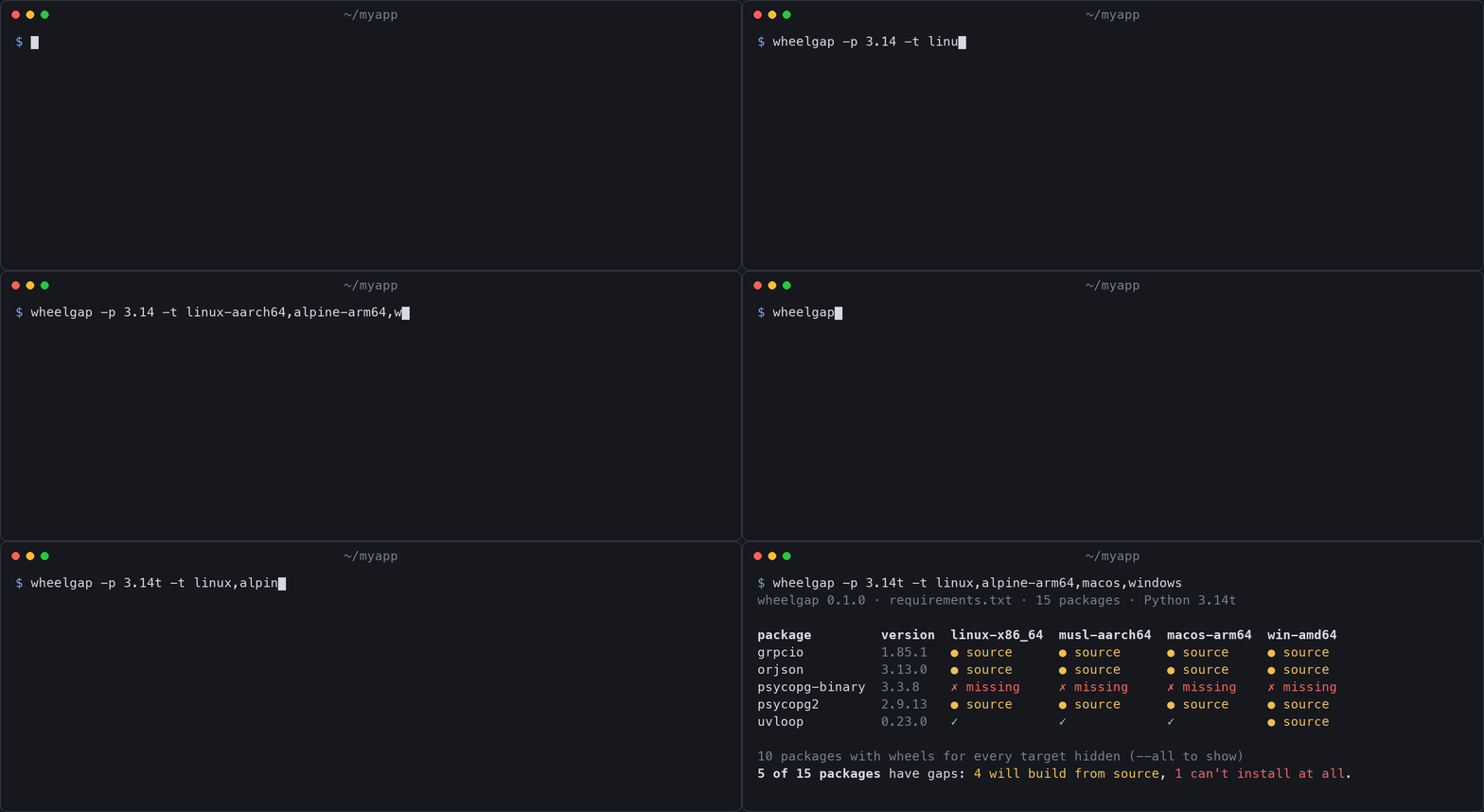
Each cell in the table is one of:
| cell | meaning |
|---|---|
✓ |
a compatible wheel exists, so the install is fast |
● source |
no wheel, only an sdist, so it compiles at install time (needs a compiler, headers, time) |
✗ missing |
no wheel and no sdist, so the install fails |
– |
not installed on this target (environment markers exclude it, or the target selects another resolution) |
✓ bundled |
no wheel on PyPI, but Pyodide ships its own build (with --pyodide-lock) |
Exit codes: 0 no gaps, 1 gaps found, 2 bad input. --fail-on missing accepts source builds, --ignore NAME accepts a known gap, and --exit-zero never fails on gaps.
In --json output, results (and rejected and via with --explain) are keyed by target label: just the platform ("linux-x86_64") when one Python is checked, or Python and platform ("3.13 linux-x86_64") with several. The top-level targets list gives each target's label, python and platform, so a script can look the key up instead of building it:
import json

data = json.load(open("wheelgap.json"))
key = next(t["label"] for t in data["targets"] if t["python"] == "3.13" and t["platform"] == "linux-x86_64")
Version ranges select the newest matching release whose Requires-Python permits each target Python. Different
resolutions appear in separate rows, including in JSON, with n/a for targets using another resolution. See
version ranges for details.
--explain can also show the coverage tracker's notes (--notes), what a source build needs (--build-info), conda-forge builds that fit (--conda-forge) and the nearest newer release with wheels for a gap (--suggest). These are opt-in, since they send package names elsewhere (which names).
The docs cover inputs and dependency selection, --explain, the --json schema, every flag and the recipes for multi-arch images, monorepos and free-threading readiness.
Targets
-t all checks the eight common native platforms (linux-x86_64, linux-aarch64, musl-x86_64, musl-aarch64, macos-arm64, macos-x86_64, win-amd64, win-arm64), and -t everything adds the armv7l, ppc64le, s390x, riscv64 and i686 Linux targets (glibc and musl) and win32. Pyodide (-t pyodide), iOS and Android (-t mobile) are checked when you name them. Aliases (alpine, windows) and Docker names (linux/arm64) work too, and wheelgap --list-targets lists them all.
Python versions take a trailing t for free-threaded builds (3.14t). --glibc, --musl and --macos set the oldest system you deploy to, or --distro ubuntu-22.04 takes it from a distro. The targets page has the wheel tags each target accepts, the floors, and new-Python readiness.
In CI (GitHub Action)
- uses: actions/checkout@v7
- uses: wheelgap/wheelgap@v0.10.0
  with:
    args: uv.lock -p 3.13 -t linux-x86_64,linux-aarch64
The job fails when a dependency would build from source on a target you ship, for example when a dependency bump drops ARM wheels. The gap table also goes to the run's summary page (set summary: false to turn that off). compare-to: base fails only when a pull request makes the lockfile worse, and comment: true posts the result on the pull request (details and permissions). CI covers the Action, --markdown, --junit and GitLab.
With pre-commit
repos:
  - repo: https://github.com/wheelgap/wheelgap
    rev: v0.10.0
    hooks:
      - id: wheelgap
The hook runs when a lockfile or requirements file changes. Put your targets in [tool.wheelgap] in pyproject.toml so the hook checks the right platforms.
From Python
import wheelgap

targets = wheelgap.make_targets(python="3.13", platforms=["linux-aarch64", "musl-aarch64"])

result = wheelgap.check_package("numpy", "2.3.4", targets)  # looks the files up on PyPI
result.ok  # True if every target has a wheel
result.gaps  # the targets that don't

for r in wheelgap.check_lockfile("uv.lock", targets):  # markers and the uv graph respected
    print(r.name, r.version, [t.platform for t in r.gaps])
The Python API page has every function and result attribute.
With an AI coding agent
wheelgap ships a check-wheels skill that teaches coding agents to run it, read its JSON and suggest fixes. It follows the open Agent Skills format.
Claude Code (install from this repository as a plugin):
/plugin marketplace add wheelgap/wheelgap
/plugin install wheelgap@wheelgap
Codex, Cursor, GitHub Copilot and others: copy integrations/claude-code/skills/check-wheels/ into your project's .agents/skills/ folder. For a Cursor project rule instead, copy integrations/cursor/wheelgap.mdc to .cursor/rules/.
As an MCP server: wheelgap-mcp lets any agent that speaks the Model Context Protocol call wheelgap as a tool, with read-only check_package, check_lockfile, check_dockerfile, diff_lockfiles and list_targets tools. For Claude Code:
claude mcp add wheelgap -- uvx --from wheelgap wheelgap-mcp
The MCP setup guide has the tools and a copy-paste snippet for Claude Code, Cursor, VS Code, Codex and Claude Desktop.
Contributing to wheelgap with an agent? See AGENTS.md.
Comparing two lockfiles
wheelgap diff old/uv.lock uv.lock -p 3.13 -t linux-aarch64,musl-aarch64
wheelgap diff origin/main:uv.lock uv.lock -p 3.13 -t linux-aarch64   # the base branch's lockfile, no checkout needed
This checks both lockfiles and lists the packages that got worse on a target (a wheel that became a source build, say) and the new packages with gaps, so a dependency bump that drops a platform fails CI. It exits 1 if there are any, 0 if not, and 2 on bad input. See wheelgap diff.
How it works
- Lockfiles are read offline.
uv.lock,pylock.toml,poetry.lockandpdm.lockalready record every file published for each pinned version. wheelgap parses the wheel filenames' tags withpackagingand checks them against the exact tag set each target accepts. That is the same logic pip and uv use to pick a wheel. requirements.txt,Pipfile.lock,pixi.lock,pyproject.tomland bare package names are looked up on the PyPI JSON API (or your--index-url). wheelgap checks the requirements you give it and doesn't resolve dependencies.- Environment markers are respected. A
pywin32 ; sys_platform == 'win32'dependency won't show up as a Linux gap. Foruv.lockthe dependency graph is walked per target, so transitive platform-specific packages are handled too. - No guessing. Where wheelgap can't be sure, it says
unknown, which counts as a gap, rather than guess.
How it works covers version ranges, --online and --offline, the lookup cache and private indexes, and the FAQ answers "why does it say source when pip installs a wheel?".
Why this exists
Missing wheels show up late, in the most expensive place:
- Your
python:3.13-alpineimage on an ARM runner takes 25 minutes because two transitive dependencies don't publishmusllinux_aarch64wheels, and QEMU is compiling them. - A build fails with
error: Microsoft Visual C++ 14.0 or greater is requiredon a teammate's Snapdragon laptop. - You try free-threaded Python 3.14t and half your stack quietly falls back to source builds, because
abi3wheels don't apply there.
Sites like pyreadiness.org and free-threaded wheels track the top few hundred packages. wheelgap checks your packages, at your pinned versions, for your targets, in about a second, and it can run in CI.
Roadmap
wheelgap is growing into caniuse for Python wheels: an open map of which packages have wheels for which platforms. The CLI stays focused, and around it come a nightly tracker of the most-used PyPI packages, a community knowledge base of workarounds, and campaigns to help upstream projects ship missing wheels. Read the roadmap and join the discussion →
Next up for the CLI, each with a first step written up and no PR yet:
- "nearest version with a wheel" hints (#20)
The roadmap and help wanted labels have more.
Contributing
Contributions are welcome, and pull requests usually get a review within hours.
- New here? Issues labelled good first issue say which files to change and what to test.
- Done one or two? help wanted issues are bigger, and a good next step.
CONTRIBUTING.md has the 3-command dev setup, or you can start in the browser with no setup:

Questions are welcome in Discussions.
Thanks
wheelgap is created and maintained by @patrickballard, with a lot of help from these people. Thank you, all of you!

License
1 maintainer

Metadata
1 maintainer
Release files for wheelgap 0.10.0
For a detailed explanation of source distributions (sdists) and built distributions (wheels), please see the package formats documentation.
Source distribution (sdist)
| File | Size | Uploaded | Provenance | Actions |
|---|---|---|---|---|
| wheelgap-0.10.0.tar.gz | 1.1 MB | With provenance | Details for wheelgap-0.10.0.tar.gz |
Built distribution (wheel)
| File | Interpreter | ABI | Platform | Actions Reset |
|---|---|---|---|---|
| wheelgap-0.10.0-py3-none-any.whl | Python 3 | none | any | Details for wheelgap-0.10.0-py3-none-any.whl |
Total release size: 1.3 MB
Release files / wheelgap-0.10.0.tar.gz
| Download URL | wheelgap-0.10.0.tar.gz |
|---|---|
| Size | 1.1 MB |
| Tags | Source |
|
SHA-256 checksum How to use checksums |
aa6095f09cf18b5907187e98f911f4b28aab5d23bf581efd8662a62a874a60bf
|
|
BLAKE2b-256 checksum How to use checksums |
93863dbbd87924f56f82f6e1b6f47d379a19ea38d89a6678d3d1472e45820fad
|
| Upload date | |
|
Uploaded using Trusted Publishing? What is trusted publishing? |
Yes |
| Uploaded via |
twine/7.0.0 CPython/3.13.16
|
Provenance
Provenance describes where a file came from. On PyPI, provenance is shared via attestations, which provide a verifiable record of the build or publishing details. View details, limitations and caveats.


PyPI Publish Attestation
PyPI verified that this artifact, at this checksum, originated from the publisher listed below.
Signed by GitHub Actions, verified by PyPI on Nov 15, 2026.
Transparency logRelease files / wheelgap-0.10.0-py3-none-any.whl
| Download URL | wheelgap-0.10.0-py3-none-any.whl |
|---|---|
| Size | 196.8 kB |
| Tags | Python 3 |
|
SHA-256 checksum How to use checksums |
1bc505e5bfab4a28b03048f2f20acb10f74063f168936b6eee50fb3514711fcd
|
|
BLAKE2b-256 checksum How to use checksums |
8df4a459a6b4b0fc98ca8feb9b77788707dc9ce30a55468b73189b77ca463195
|
| Upload date | |
|
Uploaded using Trusted Publishing? What is trusted publishing? |
Yes |
| Uploaded via |
twine/7.0.0 CPython/3.13.16
|
Provenance
Provenance describes where a file came from. On PyPI, provenance is shared via attestations, which provide a verifiable record of the build or publishing details. View details, limitations and caveats.
PyPI Publish Attestation
PyPI verified that this artifact, at this checksum, originated from the publisher listed below.
Signed by GitHub Actions, verified by PyPI on Nov 15, 2026.
Transparency logSecurity for wheelgap 0.10.0
Provenance
Provenance describes where a file came from. On PyPI, provenance is shared via attestations, which provide a verifiable record of the build or publishing details. View details, limitations and caveats.
Full provenance
Both files in this release have been uploaded with provenance metadata.
Attestation for wheelgap-0.10.0.tar.gz
PyPI Publish Attestation
PyPI verified that this artifact, at this checksum, originated from the publisher listed below.
Signed by GitHub Actions, verified by PyPI on Nov 15, 2026.
Transparency logA note on package security
PyPI is a repository for distributing packages, not a service for auditing them. While third-party security researchers and our staff do their best to detect and remove malicious packages, PyPI cannot guarantee the quality, security or suitability of any given package.
To learn more about protecting yourself from malicious actors, visit our package security documentation.














